Get started in your own agent
Paste one line into ChatGPT, Claude or another AI agent, and it can make docs, sheets, slides and videos, each opening in an editor beside your chat. You need no AllyHub account to start.
You need: an AI agent app that can run commands on your computer, such as ChatGPT or Claude on a Mac. Your agent checks the rest itself and tells you if something is missing.
1. Paste one line
Section titled “1. Paste one line”Open a new chat in your agent and send this:
Install allyhub.com/for-agentsYour agent reads that page and sets itself up. In ChatGPT this took 52 seconds when we ran it. It asks you for no account and no payment.
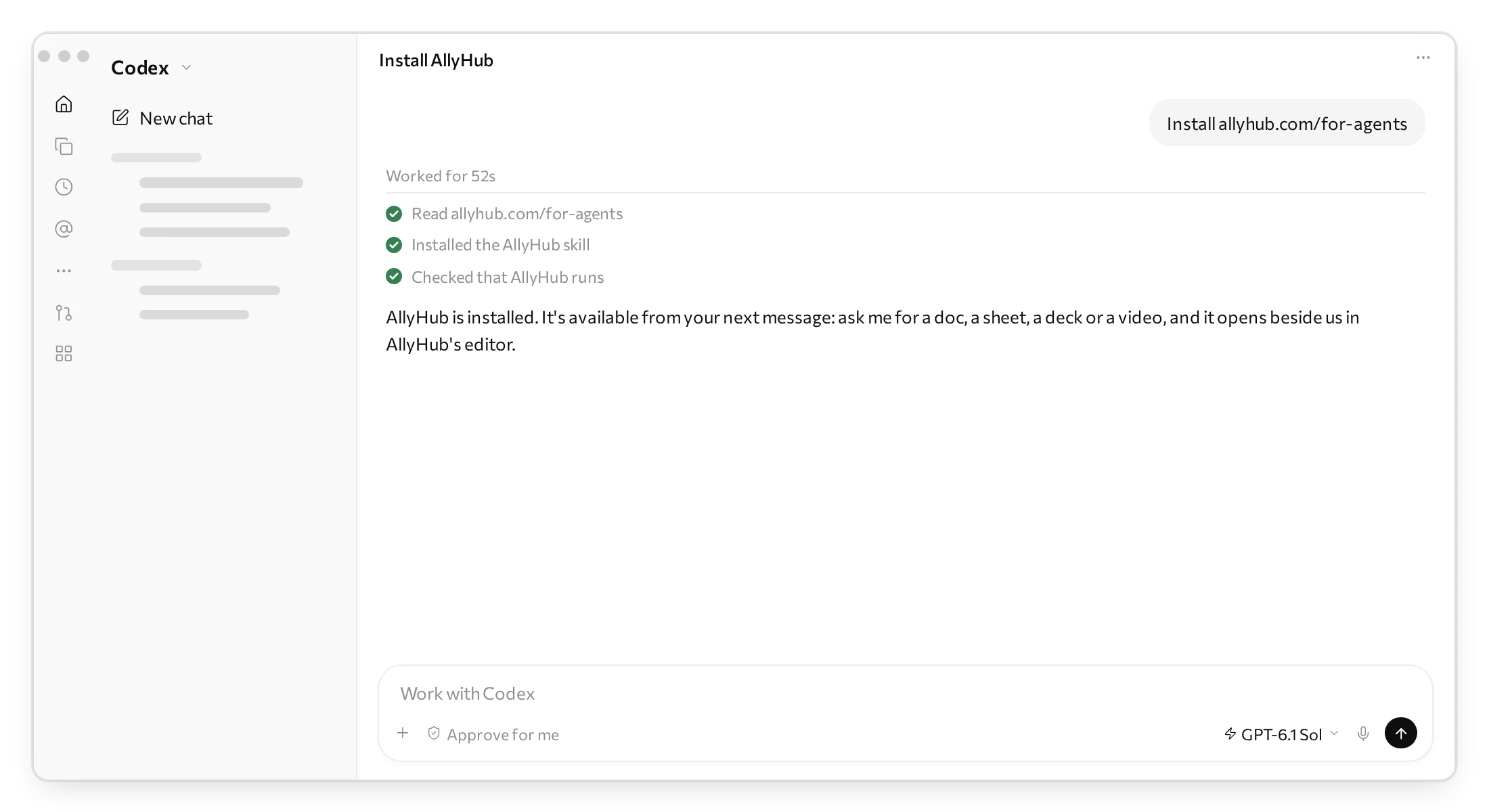
- If your agent asks whether it may run AllyHub’s commands, allow it. AllyHub draws your work with a browser it runs in the background and shows it on your own computer, and an agent that keeps commands in a sandbox has to be told that is fine.
- When it is done, it says AllyHub is installed. ChatGPT adds that AllyHub is available from your next message, so send one.
2. Ask for something
Section titled “2. Ask for something”Say what you want in your own words, and start with Use AllyHub. Your agent may have its own way to make a spreadsheet or a deck, and those two words tell it which one you mean. None of these needs an account:
Use AllyHub to build a sheet of our monthly revenue for 2026: month, revenue, cost, profit, growth month on month, and a chart.Use AllyHub to write a launch brief for our product from these notes.Use AllyHub to make a 10-slide deck from this doc.Use AllyHub to make a 30-second explainer video of how our product works.Your agent makes the piece and checks it before it shows you. When we asked ChatGPT for the sheet above, it took three and a half minutes. The first piece takes the longest, because AllyHub downloads what it draws with, once.
3. See it beside your chat
Section titled “3. See it beside your chat”The piece opens in AllyHub’s editor, in your agent’s own browser pane, beside the conversation. In ChatGPT the pane opens on the right and the chat moves to a narrow column on the left.
Your agent also leaves a link in its answer that opens the piece again, such as “Open the editable sheet in AllyHub”. It sends you no file yet: you look the piece over and change it in the editor, and take the file at the end.
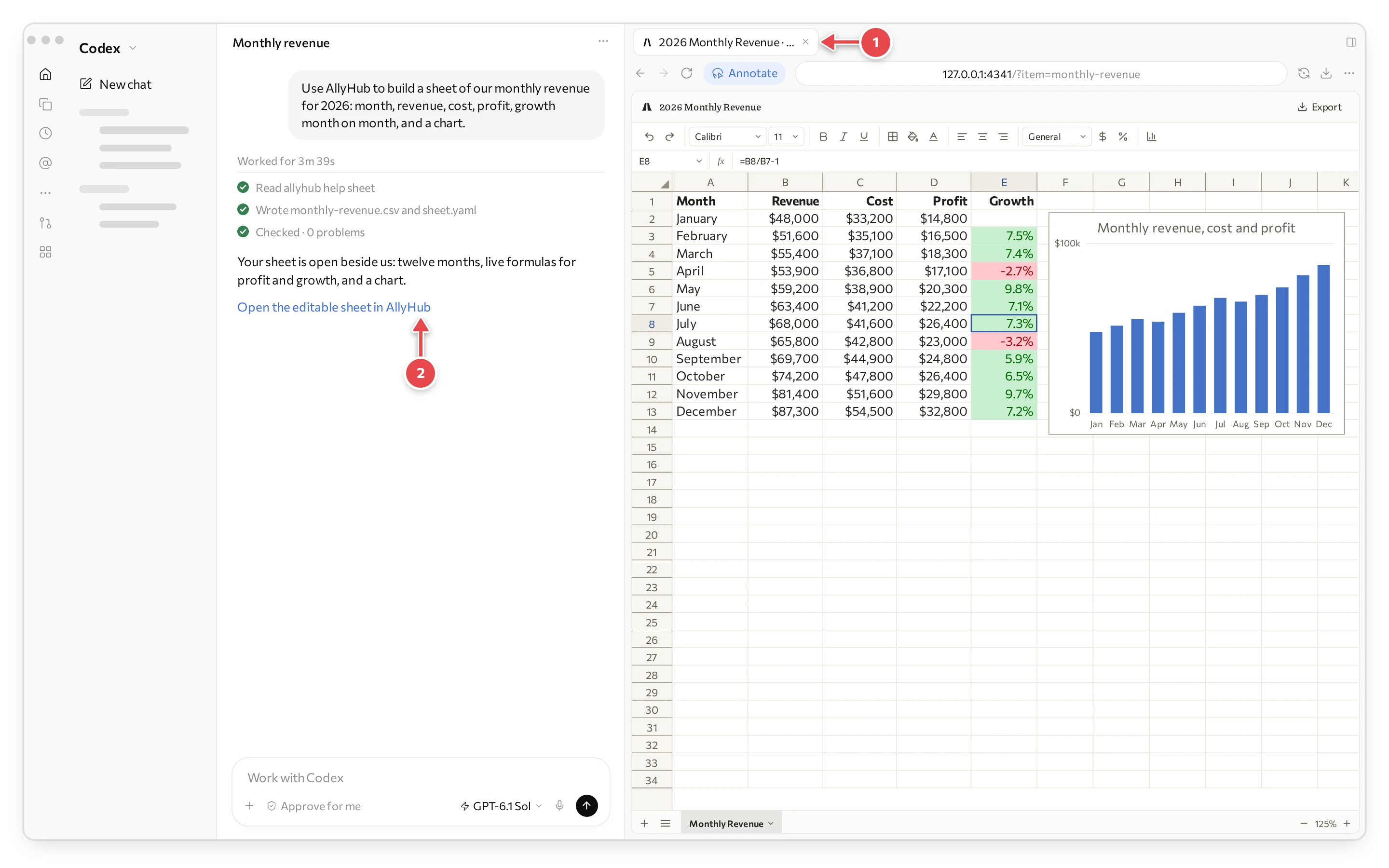
1 The piece in AllyHub’s editor, in the browser pane. 2 The link that opens it again.
The editor follows your computer’s appearance: light when your computer is in light mode, dark when it is in dark mode.
4. Change it
Section titled “4. Change it”There are three ways, and you can mix them:
- Ask in the chat. “Make the title shorter.” “Add a column for margin.”
- Mark it up. In ChatGPT, press Annotate at the top of the browser pane, then click what you mean or drag a box round it. Write what you want there in the note that opens, such as “Show profit margin % here too” on a chart, and press the tick. Press Send in the bar at the foot of the pane: your agent gets a picture of the piece with your notes on it. In Claude, press the pointer button at the right end of the browser pane’s address bar: its tools come up at the foot of the pane, a pen, a box and text, with a colour. Mark what you mean, then press Add to chat.
- Change it yourself. A doc, a sheet and a deck can be edited by hand in the editor, the way you would in Word, Excel or PowerPoint.
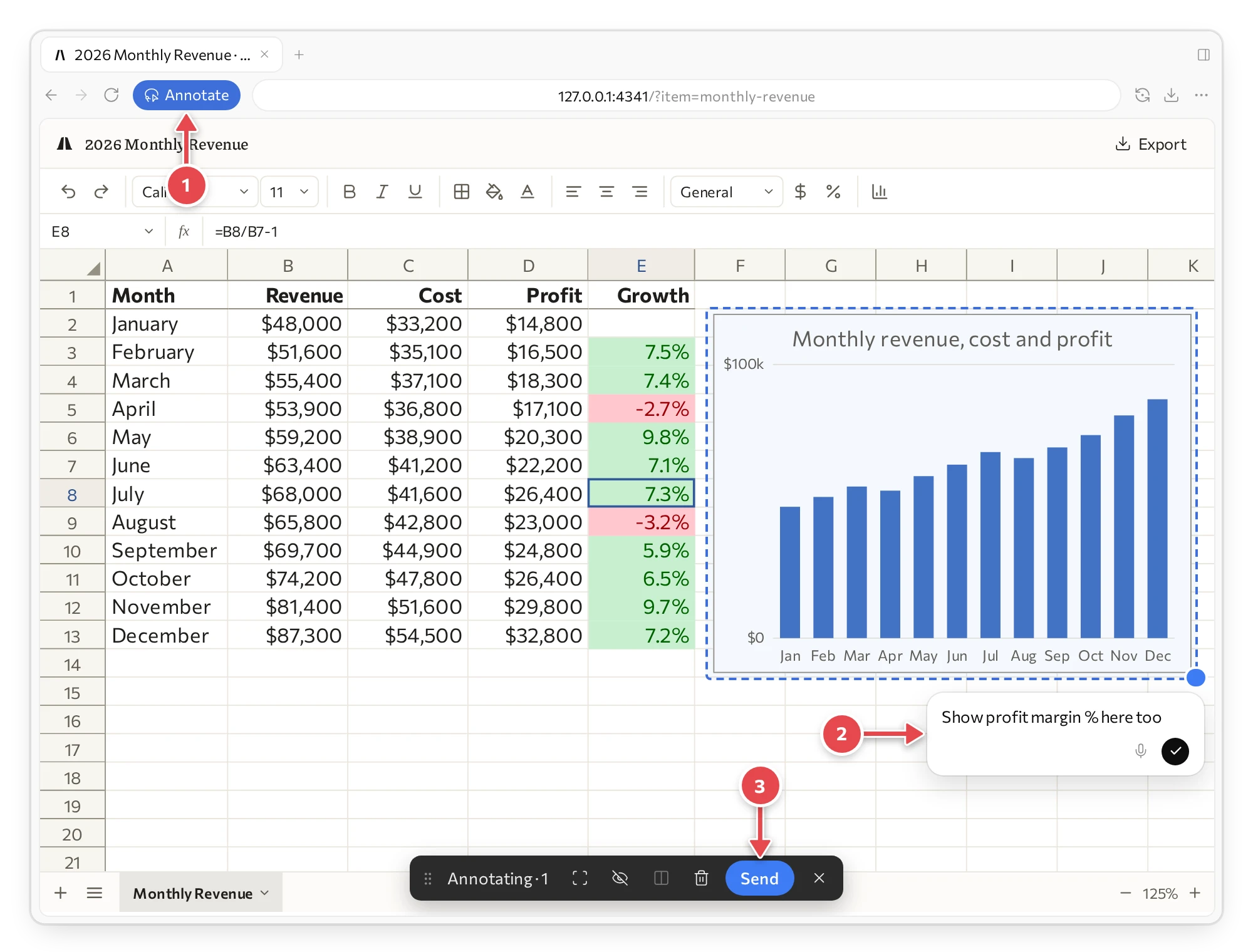
1 Annotate. 2 A box round the chart, and the note. 3 Send.
While your agent works on the piece, you see it there. The editor’s bar says AllyHub is editing or AllyHub is looking, what it changed is outlined in magenta, and in a sheet a magenta dot sits on the sheet’s tab. When it is done, the marks go. When we sent a note like that on the sheet’s chart, the margin showed in the editor in about a minute and a quarter.
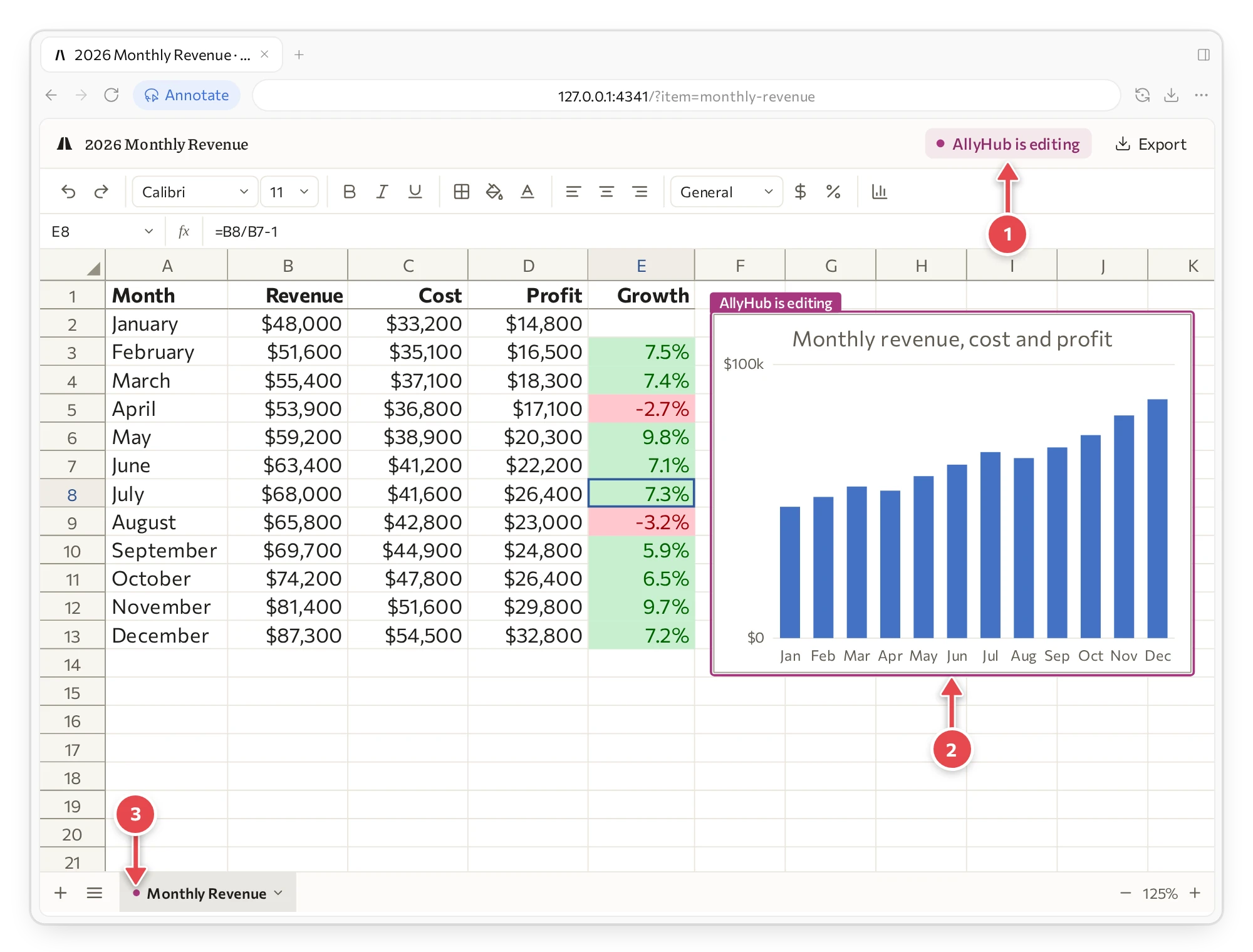
1 AllyHub is editing, in the editor’s bar. 2 What it is changing, outlined, with its name. 3 Its dot on the sheet’s tab.
5. Get the files
Section titled “5. Get the files”When it looks right, press Export at the top right of the editor, choose the Format, and press Export again. Or ask your agent for the files: it exports them from the same piece, so a file holds what the editor shows.
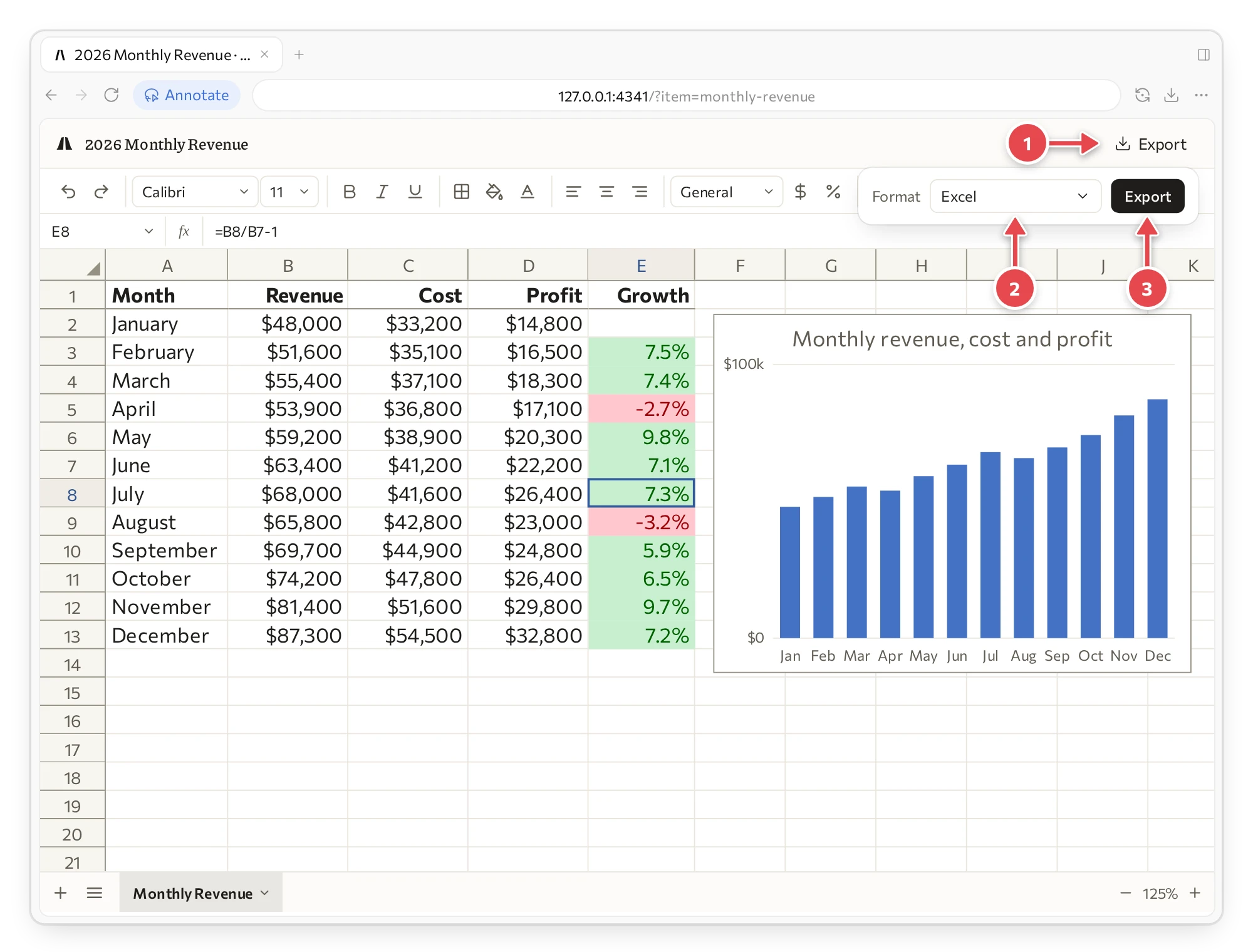
1 Export. 2 The format. 3 Export again.
| What you made | Files you can get |
|---|---|
| Doc | Word, PDF |
| Sheet | Excel, PDF |
| Slides | PowerPoint, PDF |
| Video | MP4, GIF |
What is free
Section titled “What is free”Everything on this page is free and needs no account: docs, sheets, slides, motion-graphics videos, images and 3D scenes, with their editors.
AllyHub’s AI tools are paid per use, in credits, with no subscription:
- AI research on real data: what people post, buy, search and advertise.
- AI video, images, voice and music.
The first time you ask for one of these, your agent asks you to sign in to AllyHub in your browser. A new account has no credits, so you buy some then. Pricing lists what each one costs.