Finding the right YouTube keywords is the difference between a video that acts as a 24/7 lead generator and one that disappears into the algorithm void.
Most marketers understand the value of ranking on YouTube, but the execution is where things break down. Unlike traditional Google SEO where search volume is relatively transparent, YouTube search data is notoriously fragmented and hidden. Without a clear framework, marketing teams end up guessing what their target accounts are actually typing into the search bar, risking thousands of dollars in production budget on zero-volume topics.
However, when you lock in the right keywords, you intercept high-intent buyers exactly when they are actively searching for software comparisons, industry tutorials, and product reviews. This guide cuts through the guesswork. We will walk through 7 actionable methods to find high-value YouTube keywords, validate real search demand, and uncover the exact terms your competitors are quietly using to drive traffic.
Key Takeaways
- YouTube autocomplete is your fastest free signal: The suggestions in YouTube's search bar are based on real user queries. It is the most accessible starting point for initial YouTube keyword research.
- Use YouTube-specific tools when accuracy matters: Google keyword data does not always match YouTube search behavior, so validate important topics with YouTube Studio, TubeBuddy, vidIQ, or Semrush’s YouTube tools.
- Competitor keyword analysis reduces guesswork: Reviewing competitor titles, descriptions, tags, and ranking videos can show which topics already have demand in your niche.
- Long-tail keywords win for new brand channels: High-volume keywords are dominated by massive media channels. Targeting specific, lower-competition phrases gives your brand a realistic path to page-one placement.
- Marketer's starting point: Begin with YouTube autocomplete + YouTube Studio's Research tab (free), then layer in paid tools once you need to report keyword volume and difficulty metrics to clients or stakeholders.
Why YouTube Keyword Research Is Different from Google SEO
Before diving into methods, one important caveat for content teams: YouTube keyword research is not the same as Google keyword research.
Feature / Metric | Google SEO | YouTube SEO |
Primary Intent | Information, navigation, transaction | Entertainment, education, visual tutorials |
Top Ranking Factors | Backlinks, text relevance, technical SEO |
Note: Google keyword data is not the same as YouTube search demand. Use it for context, but validate important video topics with YouTube-specific data.
YouTube's algorithm ranks videos based on:
- Relevance (how well your title, description, and tags match the query)
- Engagement (watch time, click-through rate, retention)
- Authority (channel history, upload consistency)
For marketers, this means finding the best keywords for YouTube isn't just about chasing search volume — it's about finding terms where you can realistically capture market share and drive users to the next step in your funnel.
How to Find the Best Keywords for YouTube for Marketers
Method 1: Use YouTube Autocomplete (Free, No Tools Required)
YouTube's search bar is the most underused YouTube keyword research tool available — and it's completely free.
How it works: As you type a query, YouTube surfaces autocomplete suggestions based on actual user searches. These are direct signals of what your target audience is actively looking for.
Step-by-step:
- Open YouTube in an incognito/private window (to prevent your own watch history from skewing results).
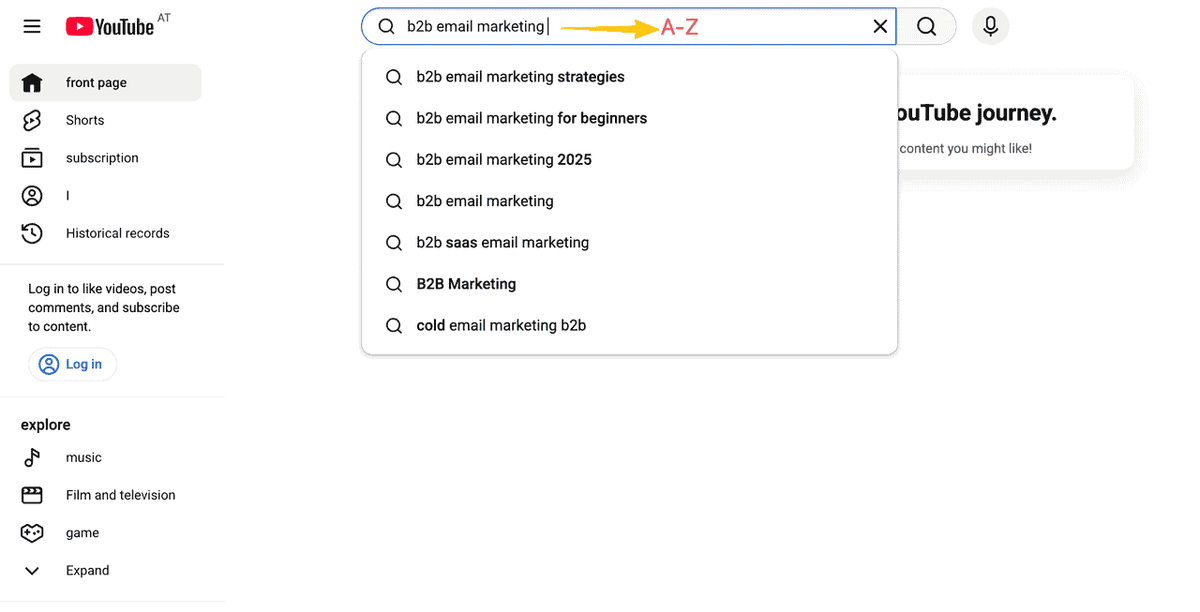
- Type your core topic — for example, b2b email marketing — but don't press Enter.
- Record all autocomplete suggestions that appear.
- Add a space after your topic and type each letter of the alphabet (A through Z) one at a time. This is called the alphabet trick.
- Repeat with question-form queries: how to [topic], best [topic], [topic] tutorial.
- Group suggestions by theme to build out your content pillars.
Marketer's Tip: Run the same research on YouTube's mobile app. Mobile suggestions sometimes differ from desktop, revealing localized or conversational long-tail variants.
Best for:
- Marketing teams starting a channel with zero budget for paid tools
- Identifying the exact phrasing your buyers use (not internal company jargon)
- Building an initial 30-day content calendar
Method 2: Mine YouTube Studio's Research Tab (Free, Channel-Specific)
If you already manage a brand's YouTube channel, YouTube Studio's built-in Research tab is a goldmine for data-driven keyword research.
Step-by-step:
- Log into YouTube Studio and navigate to Analytics → Research.
- Review the "Your viewers search for" section — these are queries your existing leads and subscribers are already using.
- Check the "Content gap" indicator. YouTube flags topics where search demand exists but few quality videos are available.
- Cross-reference these gaps with your channel's existing top-performing videos to see which keyword clusters are already driving impressions.
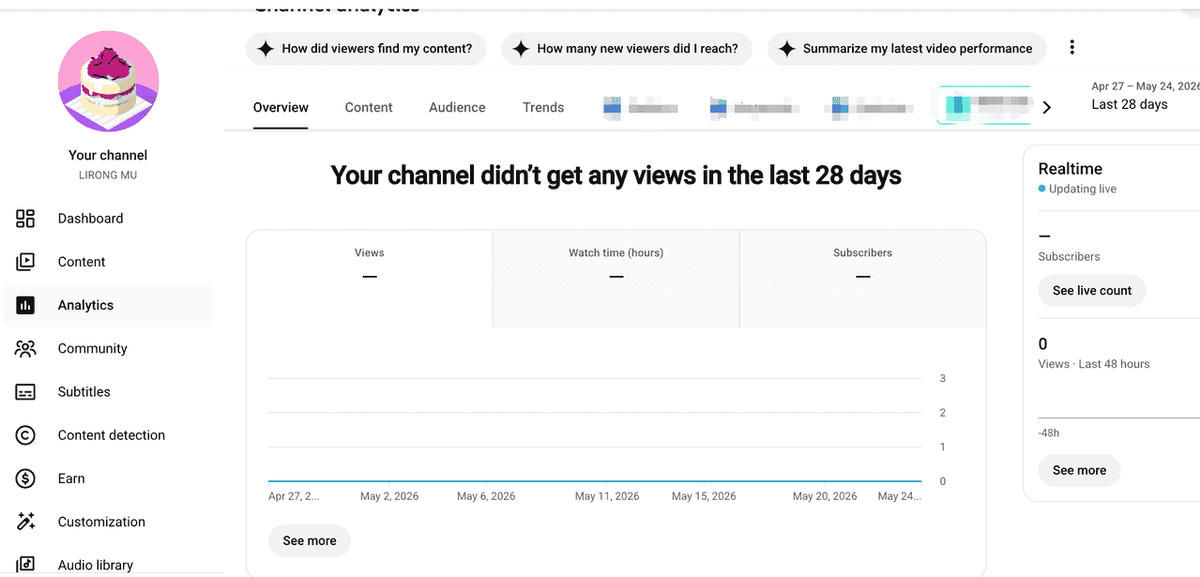
Recommended: The "Content gap" feature is highly valuable for B2B marketers. It identifies keywords where audience demand outpaces supply, allowing your brand to rank faster.
Best for:
- Brand channels with at least 3–6 months of history
- Finding high-converting content gaps before your competitors do
Method 3: Use TubeBuddy or vidIQ for YouTube Keyword Research
For marketers who need hard search volume data, competition scores, and trend analysis to justify content spend, tools like TubeBuddy and vidIQ are common choices for YouTube-specific keyword research.
Using TubeBuddy
- Install the TubeBuddy extension.
- Search for your target keyword on YouTube.
- TubeBuddy displays a Keyword Score panel showing: search volume, competition level, and an overall opportunity score tailored to your specific channel size.
- Save high-opportunity keywords to a Keyword List for your campaign planning.
Using vidIQ
- Install the vidIQ extension.
- Search for a query to view the Keyword Inspector panel.
- Use the Keyword Generator to expand a seed keyword into a full list of related terms with individual difficulty scores.
- Check vidIQ’s trend or related keyword views to identify topics gaining momentum.
Feature | TubeBuddy | vidIQ | Best For... |
Keyword Score | Weighted to your specific channel size | General opportunity and volume score | TubeBuddy for small/new channels |
Competitor Tracking |
Best for:
- Marketers managing multiple YouTube channels or client accounts
- Comparing keyword difficulty before committing production resources
Method 4: Use Semrush's Keyword Analytics for YouTube
Use Semrush when YouTube keyword research also needs to support Google SEO, blog planning, or client reporting. It is less about replacing vidIQ or TubeBuddy and more about connecting YouTube topics with broader search demand.
Step-by-step:
- Navigate to Keyword Analytics → Keyword Overview in Semrush and select YouTube as the search engine.
- Enter your seed keyword to review monthly search volume and the Competitive Rate (0–1 scale).
- Export your keyword list and sort by Competitive Rate — prioritize keywords with moderate volume (1,000–10,000) and a score below 0.5.
- Use the SERP Analysis view to see if you are competing against massive influencers or other corporate brands.
Best for:
- Agencies that need to pull integrated SEO reports for clients
- Identifying topics that can rank on both Google SERPs and YouTube natively
Method 5: How to Find Out What Keywords Competitors Are Using on YouTube
Competitor research helps you see which keywords, titles, tags, and video topics already appear in your niche. It does not prove a keyword will work for your channel, but it can show where demand already exists.
Manual Competitor Keyword Analysis
- Identify 3–5 direct competitor channels in your niche.
- Sort their channel by "Most Popular" videos.
- For each top video, analyze the Title and Description (what terms appear in the first 2 sentences?).
- Find the hidden tags: Right-click the YouTube page → click View Page Source (Ctrl+U) → search (Ctrl+F) for "keywords". You will see the exact tag list the competitor used.
- Build a competitor keyword matrix in Excel to spot overlapping terms.
Automated Competitor Analysis with Tools
- With vidIQ installed, navigate to a competitor's video. The panel displays all tags directly on the screen without needing to inspect the page source.
- Use vidIQ's "Channel Audit" feature to see the competitor channel's top-performing keyword clusters overall.
- Alternatively, use TubeBuddy's "Channelytics" to analyze their strategy and study their highest-traffic topics.
Warning: A keyword that works for a competitor with 500K subscribers might be impossible for your 5K-subscriber brand channel to rank for. Always run competitor tags through a difficulty checker before adopting them.
Best for:
- Marketing teams entering a new niche needing to validate demand quickly
- Reverse-engineering the SEO strategy behind a competitor's viral launch
Method 6: Use Google Trends for YouTube Keyword Validation
Google Trends includes a YouTube-specific filter that most marketers overlook when forecasting quarterly content.
Step-by-step:
- Go to Google Trends and enter your keyword.
- Change the search source from "Web Search" to "YouTube Search".
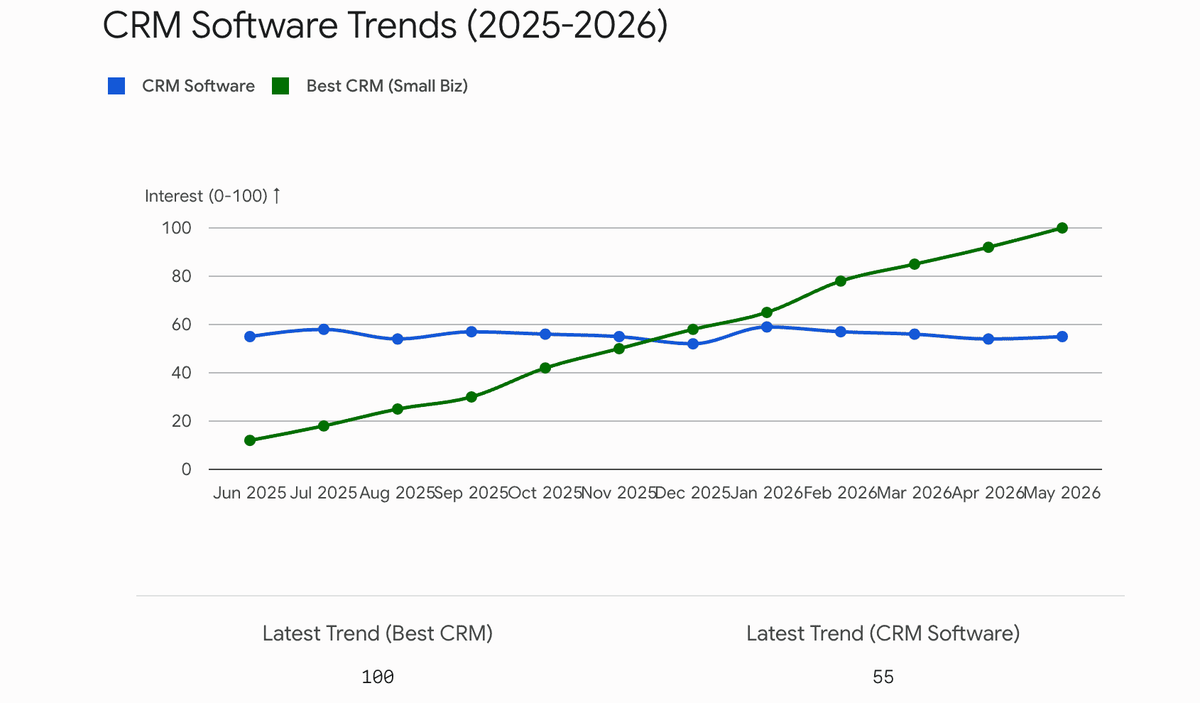
- Compare 2–3 variants (e.g., crm software vs. best crm for small business) to see which is gaining momentum.
- Scroll to "Related queries" and filter by "Rising" to catch breakout trends before competitors do.
Best for:
- Validating whether a topic is growing or declining before approving a video budget
- Planning seasonal marketing campaigns
Method 7: Mine Reddit and B2B Forums for Long-Tail Keywords
Autocomplete shows what people search. Reddit and B2B forums show how they describe the problem before they know the keyword.
Step-by-step
- Identify 2–3 subreddits relevant to your product (e.g., r/marketing, r/SaaS).
- Sort results by "Top" (Past Year).
- Record the exact phrases users use to describe their problems. For example, instead of searching "social media analytics tool," they might ask "how to prove social media ROI to clients."
- Turn these highly specific, problem-oriented phrases into H2s or video titles.
Best for:
- Finding high-converting, low-competition keywords
- Understanding the exact Voice of Customer (VoC) for better copywriting
After You Find YouTube Keywords, Turn Them Into a Repeatable Workflow
Finding keywords is only the first step. The harder part is keeping the research organized after you check autocomplete, YouTube Studio, TubeBuddy, vidIQ, Semrush, competitor videos, and forum threads.
For marketers managing multiple channels or client accounts, the work often becomes messy: keyword ideas in one sheet, competitor notes in another, trend screenshots in Slack, and old video update ideas sitting in someone’s task list.
AllyHub is not a YouTube keyword database, and it should not replace TubeBuddy, vidIQ, Semrush, Google Trends, or YouTube Studio. Use those tools to find and validate keywords first. Then use AllyHub to help organize the research, compare competitor notes, summarize public pages, find influencers, and turn the findings into repeatable briefs or reports.
A practical AllyHub workflow for keyword strategy:
- Add your keyword shortlist, competitor video URLs, and research notes.
- Ask AllyHub to organize the data by keyword, intent, competitor angle, video format, and CTA.
- Review the output before turning it into a script brief, content calendar, or client report.
- Reuse the workflow next month when you refresh competitor research or update old videos.
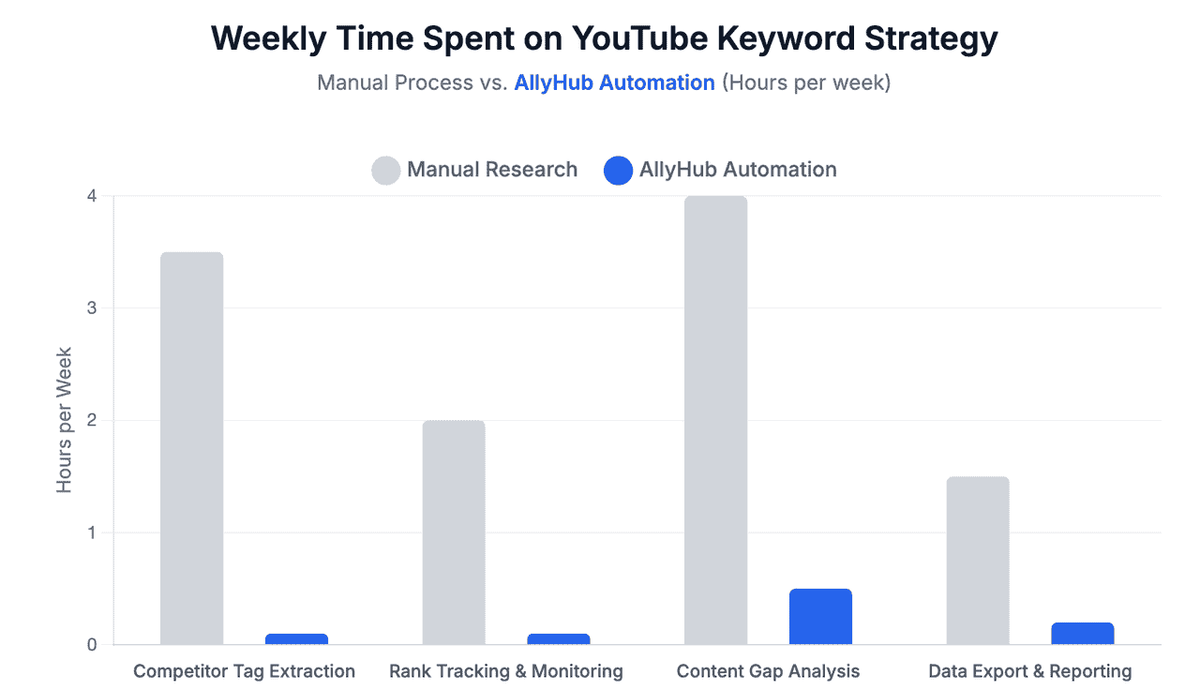
Agency Tip: Keep the keyword tools for discovery, and use AllyHub only when the research becomes repetitive enough to need a reusable workflow.
Frequently Asked Questions
How do I find out what keywords competitors are using on YouTube for free?
You can check competitor titles, descriptions, tags, chapters, and repeated topics. Page source may show keyword metadata, but availability can vary. Tools like vidIQ or TubeBuddy make this faster by showing tag and keyword signals on the video page.
What is the best tool for YouTube keyword research for marketers?
For most marketers, start with YouTube autocomplete and YouTube Studio, then use TubeBuddy or vidIQ for YouTube-specific validation. Use Semrush when your YouTube plan also needs to support Google SEO or client reporting.
Does YouTube keyword research work the same as Google SEO?
No. Google and YouTube searches often have different intent. Use Google SEO data for context, but validate video topics with YouTube-specific tools or YouTube search behavior.
How many keywords should I target per video?
Focus on one primary keyword per video, then add a few related long-tail phrases naturally in the description, chapters, and tags. Do not force keywords where they do not fit.