A YouTube description extractor lets you paste a public video URL and copy its full description without manually selecting text under the video. Usually, you can extract video descriptions with below steps:
- Copy the YouTube video URL.
- Paste it into an extractor.
- Extract and copy the description.
- For multiple videos, use a bulk tool that supports URL lists, playlists, channels, or search results.
Depending on the tool, it can also preserve links, hashtags, timestamps, line breaks, and formatting. After extraction, marketers can find how they place keywords, order CTAs, structure timestamps, promote affiliate or product links, and guide viewers toward the next action.
This guide compares 7 of the best YouTube description extractors in 2026, covering quick free tools, bulk extraction, API workflows, and AI-assisted analysis with AllyHub.
Key Takeaways
- What to extract: YouTube description extractors pull full text from public videos—including links, hashtags, timestamps, and formatting—saving hours of manual data entry.
- Best free tools: SearchVector and NextGrowth Labs are the best starting points for fast, no-login checks when reviewing single competitor videos.
- Best bulk options: Apify and the YouTube Data API v3 are built for large-scale SEO audits across multiple videos, playlists, or entire channels.
- Best bulk extraction & analysis workflow: AllyHub is useful after extraction, when marketers need to compare keyword patterns, CTAs, links, timestamps, and description structure across multiple videos.
- Strategic value: Never copy competitor descriptions verbatim. Extract them to analyze keyword placement, link hierarchy, hashtag clusters, and content structure.
What is a YouTube Description Extractor?
A YouTube description is more than a text box under a video. For competitive research, it reveals how a creator or brand connects YouTube visibility with SEO, affiliate revenue, lead generation, and audience retention.
The most useful elements to analyze are:
- The first 150 characters (crucial for click-through rates)
- Keyword placement and density
- CTA order and positioning
- Link strategy (affiliate, product, or lead magnet)
- Hashtags and timestamp structure
At scale, a YouTube description extractor helps marketers compare competitor SEO patterns, repurpose content ideas, and evaluate influencer promotion strategies before a campaign.
Warning: YouTube descriptions are publicly visible, but automated collection at scale may be restricted by YouTube’s Terms of Service. For recurring or commercial workflows, use the official YouTube Data API where possible.
Method 1: SearchVector YouTube Description Extractor
SearchVector is a simple free YouTube description extractor for marketers who need fast results without creating an account. Paste a YouTube video URL, click extract, and the tool returns the full description in a clean, copyable format.
It is best suited for quick competitive checks when you want to review how a top-ranking video uses keywords, links, hashtags, timestamps, and CTAs.
How to Extract a Description with SearchVector
- Go to SearchVector’s YouTube Description Extractor.
- Paste the full YouTube video URL into the input field.
- Click Extract Description.
- Review the extracted description, including links, hashtags, timestamps, and line breaks.
- Copy the output into your content brief, SEO spreadsheet, or competitor research document.
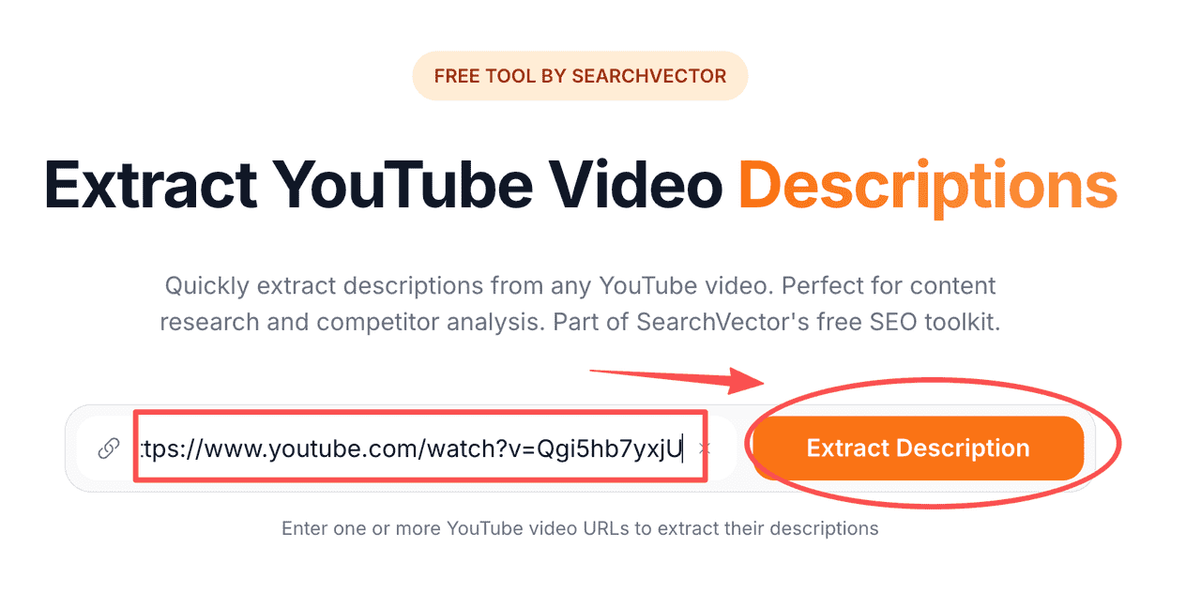
Pro tip: Do not use extracted descriptions as copy templates. Use them for pattern analysis: identify where they place their keywords, how they structure their CTAs, and what topics they cover.
Best for: Marketers who need a fast, free way to check a few competitor videos without API setup.
Limitations: Limited to single-video extraction. It does not provide full metadata like tags, publish dates, or view counts.
Method 2: NextGrowth Labs YouTube Description Extractor
NextGrowth Labs is a lightweight YouTube description extractor for marketers who care about clean output. Instead of giving you a messy block of copied text, it helps preserve the structure of the original description, including line breaks, links, hashtags, and timestamp formatting.
This makes it useful when you want to analyze how a competitor organizes their description, places CTAs, promotes links, or structures timestamps for viewer navigation and YouTube SEO.
Using NextGrowth Labs for Quick Description Checks
- Go to the NextGrowth Labs YouTube Description Extractor.
- Paste the YouTube video URL into the input box.
- Click Extract.
- Review the extracted description, including links, hashtags, timestamps, and formatting.
- Copy the full description or pull out specific sections for your SEO brief, content calendar, or competitor analysis sheet.
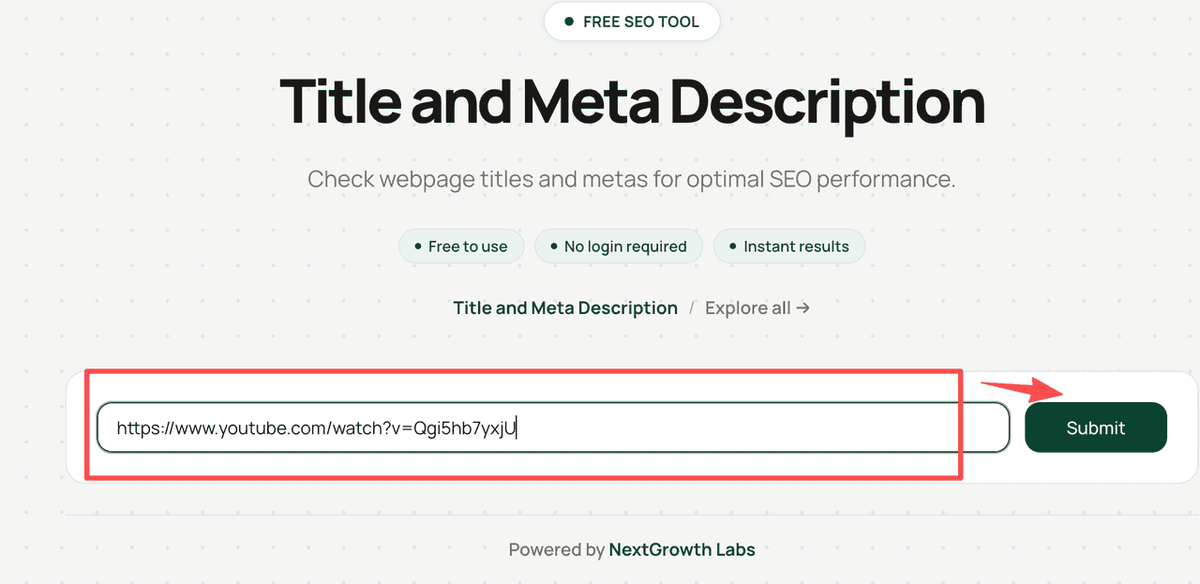
Pro tip: When analyzing competitor descriptions, pay attention to link order. If a creator consistently places a newsletter, free trial, or product link before social links, that usually signals the main conversion goal of the video.
Best for: Marketers who need clean, readable description output with links, hashtags, timestamps, and formatting preserved for quick manual review.
Limitations: It is mainly designed for single-video extraction and does not support large-scale channel, playlist, or spreadsheet-based workflows.
Method 3: AllyHub YouTube Intelligence Workflow
AllyHub is different from a basic YouTube description extractor. Most extractors help you pull the raw description text from one video or a list of URLs. AllyHub is better suited for marketers who want to turn that raw data into a repeatable research workflow.
First, AllyHub helps marketers extract video description individually or at scale, including:
- Video-level data like title, description, tags, keywords, duration, view count, thumbnail URL, etc.
- Channel-level data like subscriber count, channel description, channel keywords, email address, and more.
You just need to copy-and-paste a video URL, or playlist, and ask "Please extract the video descriptions from it", you will get the results:
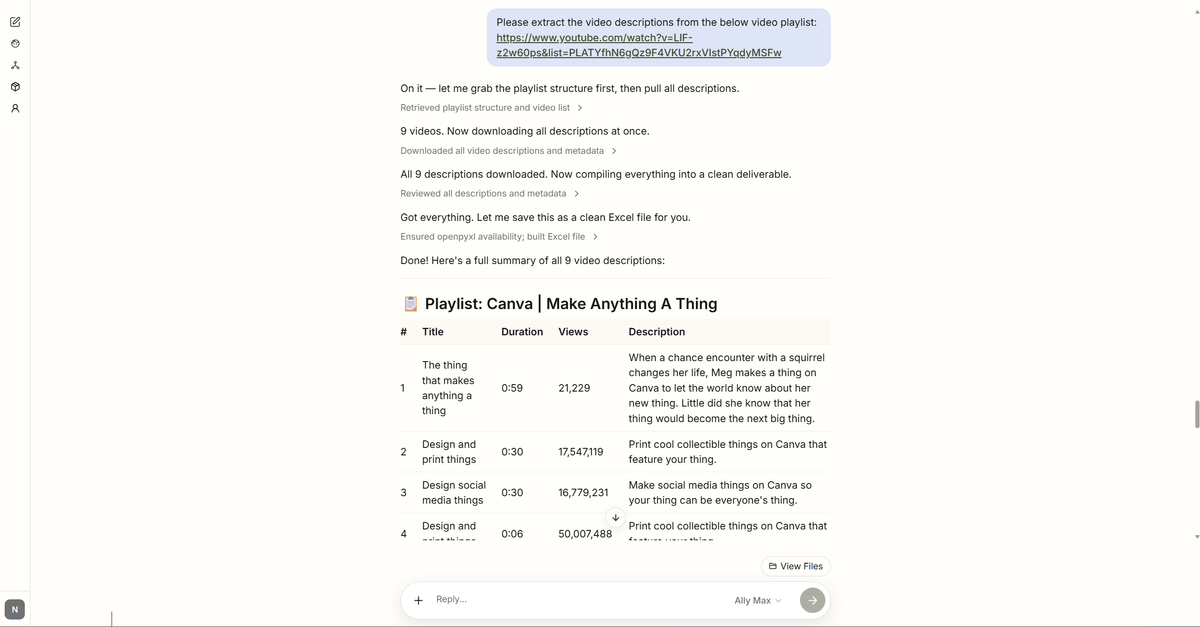
Furtherly, it analyzes YouTube descriptions for keyword patterns, CTA placement, link strategy, hashtags, timestamps, and generate competitor analysis report. This makes it especially useful for teams that run YouTube SEO audits, campaign research, influencer vetting, or recurring competitor monitoring.
How to Use AllyHub After Description Extraction
- Add competitor YouTube URLs or extracted description data into an AllyHub workflow.
- Define the fields you want to review: first 150 characters, CTA, link type, hashtags, timestamps, keyword usage, and notes.
- Ask AllyHub to group repeated patterns across multiple videos.
- Review the output before using it in an SEO brief, influencer review, or campaign report.
- Reuse the workflow for future keywords, competitors, or campaign launches.
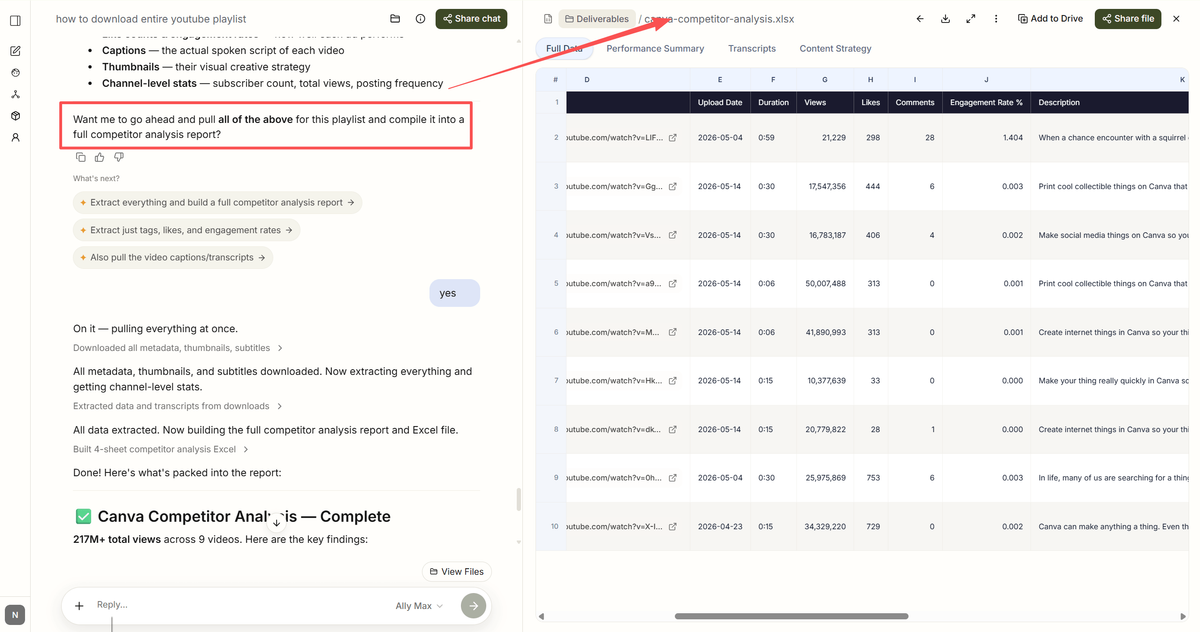
Recommended: AllyHub works best when you give it a clear analysis framework. For example, ask it to classify link destinations, summarize CTA patterns, or compare how competitors structure descriptions across a keyword cluster.
Best for: Marketers who already have YouTube description data and want to turn it into SEO insights, competitor briefs, and repeatable campaign research.
Limitations: Not the best choice if you only need to copy one video description quickly.
Method 4: Comment Picker YouTube Description Extractor
Comment Picker is useful when marketers need both the video title and description. This matters because titles and descriptions should be analyzed together: the title often targets the primary keyword, while the description supports it with secondary keywords, timestamps, CTAs, hashtags, and links.
How to Export YouTube Titles and Descriptions with Comment Picker
- Prepare a list of competitor YouTube URLs.
- Use Comment Picker’s bulk extraction option (available on paid plans).
- Paste the URLs into the bulk input field, one URL per line.
- Run the extraction process.
- Export the results into a spreadsheet for comparison.
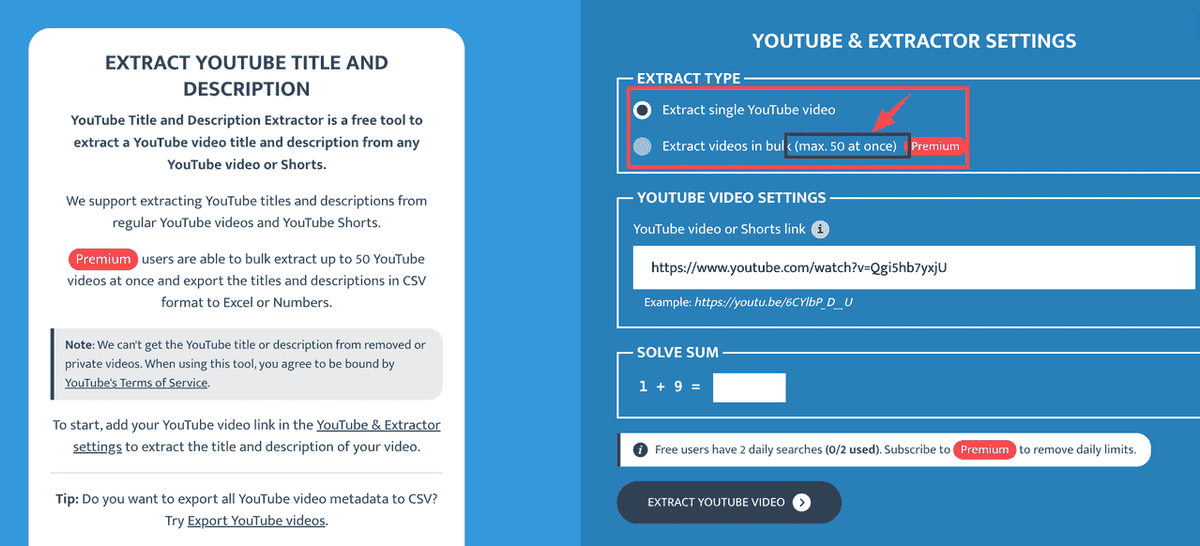
Pro tip: After exporting descriptions to a spreadsheet, create custom columns for "First 150 characters," "Primary CTA," and "Timestamps." This turns raw text into a usable SEO dataset.
Best for: SEO teams that want to compare YouTube titles and descriptions across multiple videos.
Limitations: Bulk extraction usually requires a paid plan. You still need to analyze the keyword patterns manually.
Method 5: ToolsRiver YouTube Description Extractor
ToolsRiver goes slightly further than raw text extraction by adding lightweight analysis such as character count, word count, link detection, and hashtag identification.
For SEO and content teams, these quick metrics can reveal whether a competitor is using a short CTA-focused description or a longer, SEO-rich description designed for search visibility.
What to Check First in ToolsRiver
- Go to the ToolsRiver YouTube Description Extractor.
- Paste the YouTube video URL into the input field.
- Click Extract Description.
- Review the full description and any available metrics, such as character count, word count, detected links, and hashtags.
- Copy the description or key data points into your SEO brief, competitor analysis sheet, or video optimization checklist.
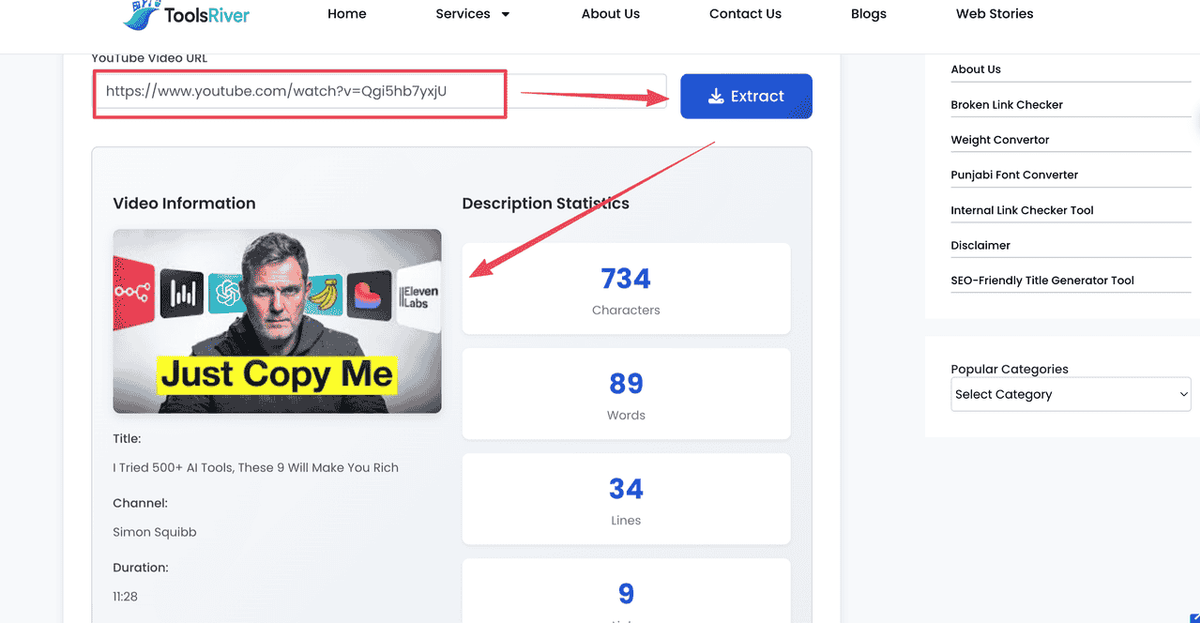
Warning: Do not judge a YouTube description by length alone. A concise description with a strong first 150 characters, clear CTA, and clean timestamps will easily outperform a long description filled with generic keyword stuffing.
Best for: Marketers who want a quick description quality check alongside basic length and link metrics.
Limitations: Analytics are descriptive, not comparative. You must manually compare multiple videos to gain deep insights.
Method 6: Apify YouTube Scraper
Apify is a better fit when marketers need to move beyond single-video extraction and build a larger YouTube research dataset. Apify’s YouTube Scraper can collect structured data from video URLs, playlists, channels, or search results, then export that data for deeper analysis.
This is highly useful when you need to audit an entire competitor channel or collect metadata from the top 50 ranking videos for a target keyword.
Using Apify for Large YouTube Description Datasets
- Create an Apify account.
- Open the YouTube Scraper Actor.
- Choose your input source: video URLs, channel URLs, playlist URLs, or search keywords.
- Set the maximum number of videos.
- Run the scraper and export the results as CSV, JSON, Excel, or another available format.
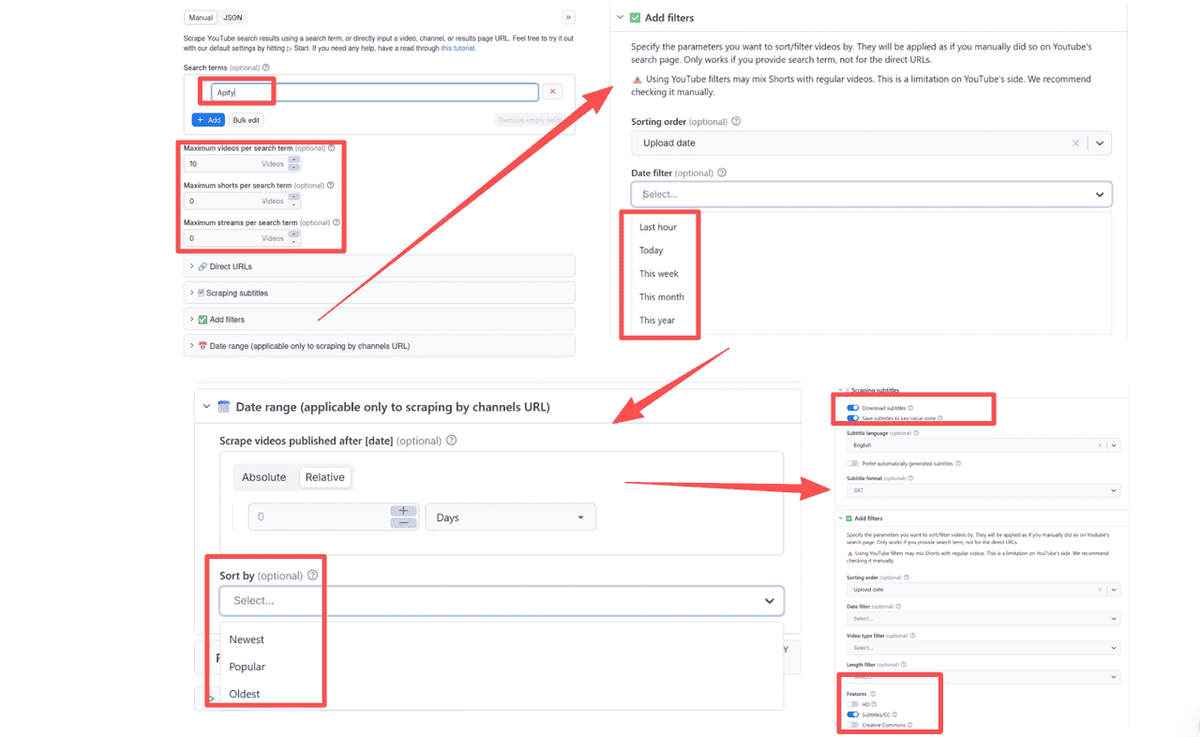
Recommended: Before running a large scrape, define your analysis columns first (e.g., CTA type, affiliate links, timestamps). This prevents you from collecting a massive dataset that your team doesn't know how to action.
Best for: Data-driven marketing teams extracting YouTube descriptions at scale.
Limitations: Requires more technical setup. Recurring scraping workflows may consume platform credits and require compliance review.
Method 7: YouTube Data API v3
The YouTube Data API v3 is the official way to access structured YouTube video metadata, including full video descriptions. It is not a point-and-click extractor, but it is the best option for teams that want reliable, repeatable, and compliant access to YouTube data without relying on scraping tools.
For marketers, this usually means working with a developer, using a no-code API client, or connecting the API to an internal spreadsheet, dashboard, CRM, or content intelligence system.
How to Pull Descriptions with the YouTube Data API
- Go to Google Cloud Console and create a project.
- Enable the YouTube Data API v3 for that project.
- Create an API key under Credentials.
- Use the Videos endpoint to request video metadata.
- Pull the full video description from the snippet.description field in the response.
- Store or export the data into your spreadsheet, dashboard, or reporting workflow.
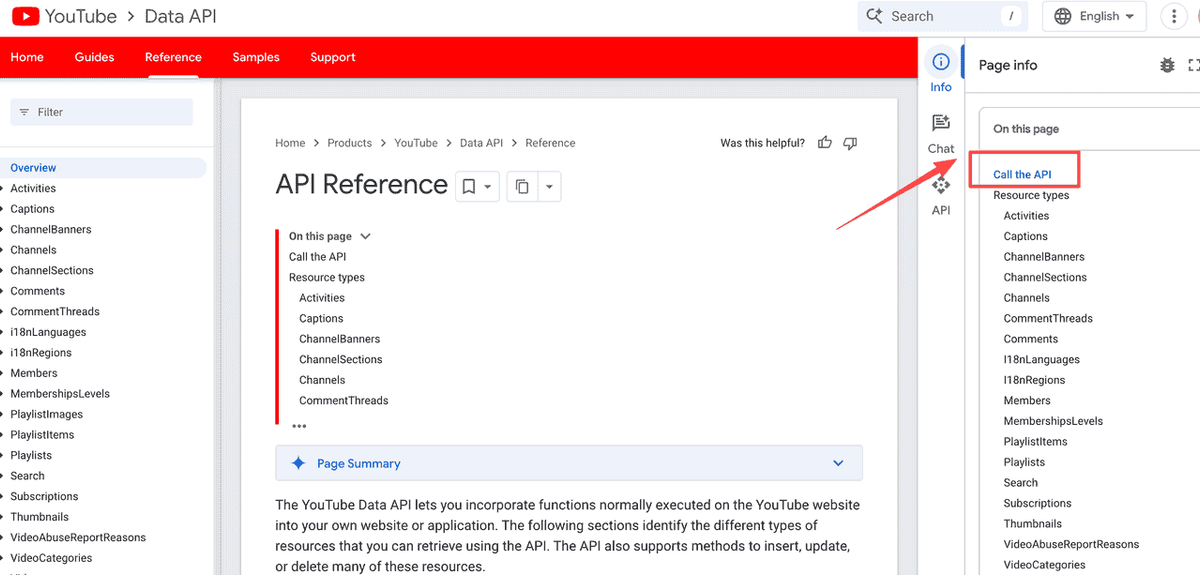
Pro tip: If you are not a developer, use a no-code API client like Postman to test the API first. This helps you understand the data structure before asking your technical team to build a custom dashboard.
Best for: Marketing teams with developer support needing official, structured data for internal reporting.
Limitations: Requires API quota management and developer resources. It provides raw data, not marketing analysis.
YouTube Description Extractor Comparison Table
Tool | Best For | Free Option | Bulk Extraction | Best Marketing Use Case |
SearchVector | Quick single-video checks | Yes | Limited |
Frequently Asked Questions
What is a YouTube description extractor?
A YouTube description extractor is a tool that pulls the full description text from a public YouTube video URL. Some tools also preserve links, hashtags, timestamps, line breaks, titles, channel names, or other metadata.
How do I extract a YouTube video description?
Copy the YouTube video URL, paste it into a YouTube description extractor, and start. You can then copy the full description or export it if the tool supports downloads or bulk processing.
Can I copy links from a YouTube description?
Yes. Many YouTube description extractors preserve clickable URLs along with hashtags, timestamps, line breaks, and other formatting. Some basic tools may return plain text, so check whether links are kept before choosing a tool.
Are YouTube description extractors free?
Yes. Many tools are free for single-video checks. SearchVector, NextGrowth Labs, and ToolsRiver are useful for quick manual reviews, while bulk extraction, exports, APIs, or AI-assisted reporting usually require a paid tool or a more advanced workflow.
Is it legal to extract YouTube video descriptions?
YouTube descriptions are publicly visible, but automated collection at scale may be restricted by YouTube’s Terms of Service. For small manual checks, the risk is usually lower. For recurring business workflows, the official YouTube Data API is often the safer option.
Can I extract descriptions from an entire YouTube channel?
Yes, but basic extractors are usually designed for single video URLs. For channel-level, playlist-level, or search-result-level extraction, use Apify or the YouTube Data API. These tools are better suited for structured bulk data.
Can AllyHub help analyze extracted YouTube descriptions?
Yes. AllyHub can help marketers organize extracted YouTube description data into SEO briefs, CTA reviews, link analysis, hashtag patterns, timestamp checks, and competitor reports. It is most useful after you collect video URLs or raw description data.
Should I copy competitor YouTube descriptions?
No. Use competitor descriptions for pattern analysis, not copying. Look at keyword placement, CTA order, link hierarchy, hashtags, timestamps, and content gaps, then build a better description for your own video.