A video can generate thousands of views and still fail to drive results. For marketers, the real challenge isn't getting people to watch—it's attracting the right people. If your viewers aren't potential customers, subscribers, or decision-makers, even strong view counts can become vanity metrics. That's why learning how to identify target audience on YouTube is one of the most important skills for building a channel that supports business growth rather than just generating traffic.
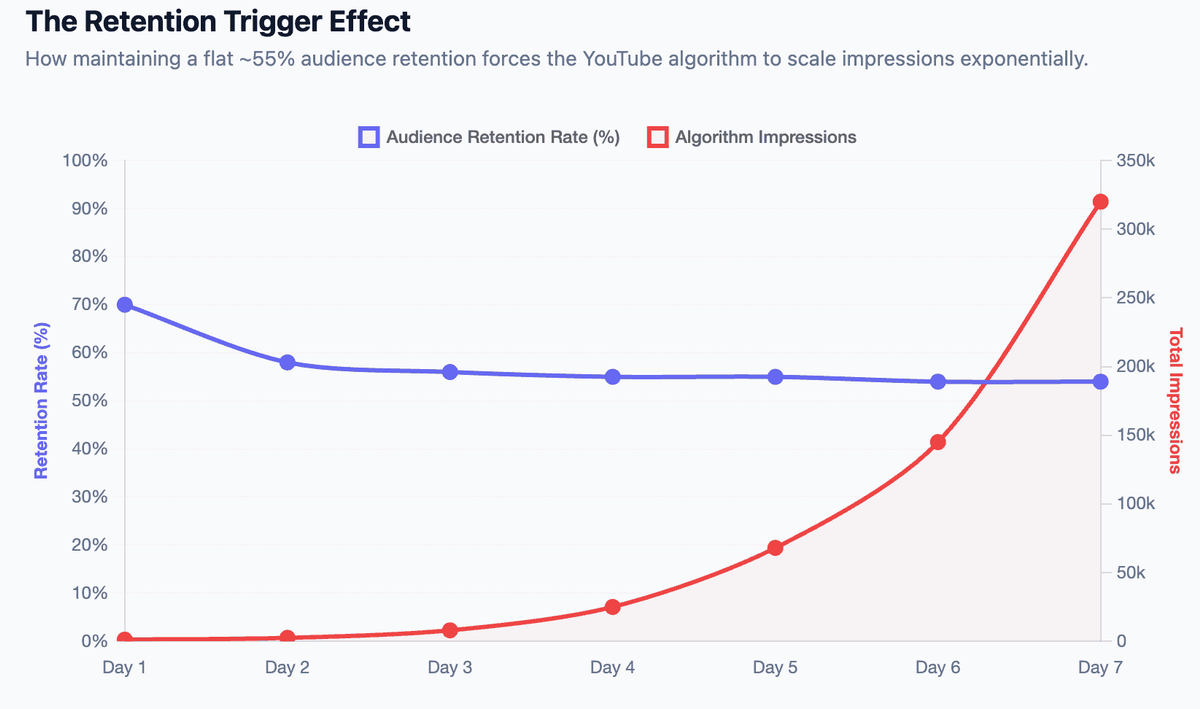
For marketers, every video produced without a verified viewer profile is a sunk cost. YouTube’s algorithm distributes content based on historical engagement signals. If your channel attracts an irrelevant crowd that clicks but bounces early, the algorithm stops pushing your videos.
This guide cuts through the guesswork. We'll walk through five concrete workflows to identify exactly who is watching, what they need, and how to align your content strategy with real data.
Key Takeaways
- Start with native data: YouTube Studio's Audience tab provides your demographic baseline, showing exactly who currently watches and what other channels they consume.
- Competitors hold your shared viewers: Analyzing top-performing peer channels reveals the exact segments and pain points your ideal viewers care about.
- Search behavior equals intent: By mining YouTube's autocomplete and Research tab, you uncover the specific problems your audience is actively trying to solve.
- Qualitative signals validate data: Polls, surveys, and recurring comment themes explain why people watch, adding necessary context to raw metrics.
- Audience profiling is continuous: Viewer composition shifts as a channel grows; building a quarterly review habit prevents content misalignment.
Defining Your YouTube Target Audience: Why It Impacts ROI
Most platform advice focuses on surface-level tactics like tag optimization. But on a platform with over 2 billion logged-in monthly users, tactics without audience clarity simply generate noise.
When you know your exact viewer profile, downstream decisions—topic selection, pacing, call-to-action (CTA) placement—become obvious. Furthermore, according to Think with Google's video consumption research, viewers increasingly expect content tailored to their specific life stages and professional roles.
Note: For marketers, "audience" on YouTube usually means two things: the organic viewers you earn, and the segments you buy via ads. This guide focuses on organic intelligence, though the insights directly translate to paid targeting.
Method 1: Use YouTube Insights to Identify Your Current Audience
If your channel has an existing content library and at least a few hundred views, YouTube Insights (found in YouTube Analytics) is your most reliable starting point. It replaces assumptions with hard behavioral metrics.
Step 1: Extract Demographic Baselines
- Sign in to YouTube Studio.
- Navigate to Analytics > Audience.
- Record your dominant age brackets, gender split, and top geographical regions.
Step 2: Audit "Other Channels Your Audience Watches"
This specific module is a marketer's best competitive research tool. It lists the exact channels your subscribers consume when they leave your page. Look for pattern overlaps: are they watching highly technical tutorials, or broader entertainment-style business vlogs?
Step 3: Analyze Retention and Traffic Sources
Switch to the Content tab. As outlined in YouTube's official Creator Support docs, retention curves show you exactly where viewers drop off.
- A flat retention curve means the audience got exactly what they expected.
- A sharp drop in the first 30 seconds means your title/thumbnail attracted the wrong audience segment for the video's actual content.
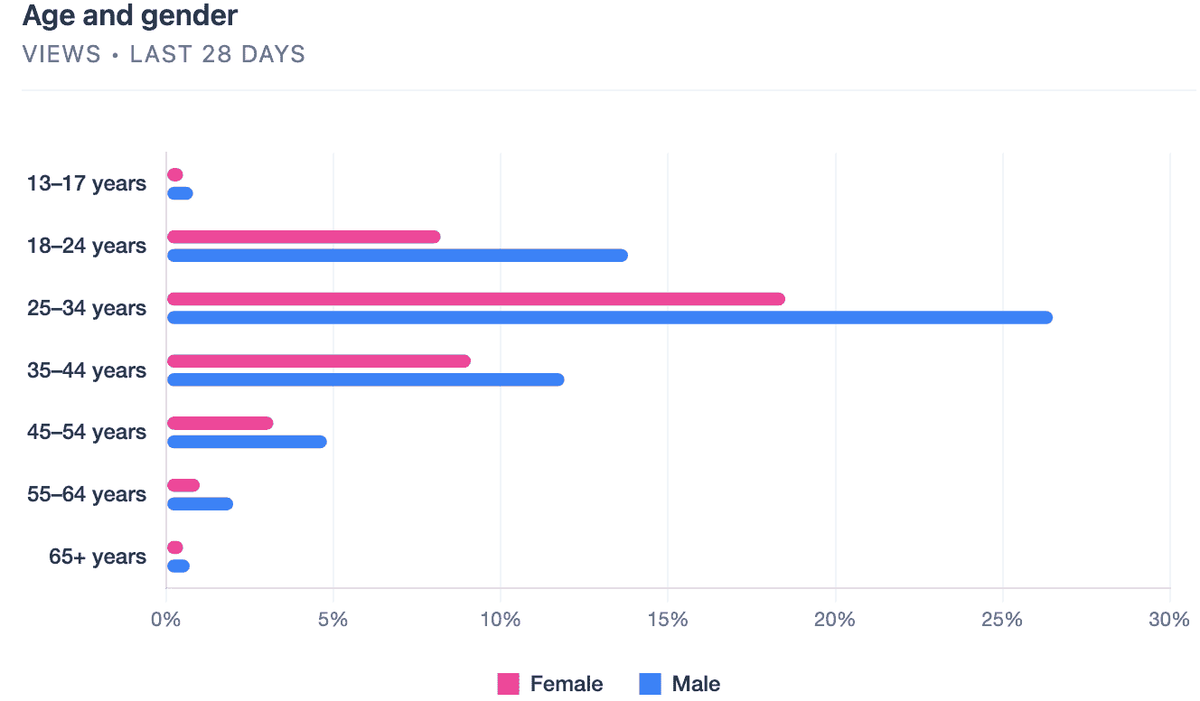
Best for: Channels with historical data (1,000+ views) needing a concrete baseline before expanding content categories.
Method 2: How to Find Target Audience on YouTube via Competitors
New channels lack internal data. To bypass the "cold start" problem, you must reverse-engineer established peers who already hold the attention of your ideal demographic.
Step 1: Identify 3–5 Peer Channels
Search for your core industry topics. Select channels with high engagement (likes and comments relative to subscriber count) rather than just massive vanity metrics. You are looking for channels serving a similar buyer persona, even if they aren't direct business competitors.
Step 2: Extract Qualitative Pain Points from Comments
The comment section is unfiltered market research. Read the top 20 comments on a competitor's 5 best-performing videos. Look specifically for:
- Missing information: "I wish you showed how to integrate this with a CRM." (This is your next video topic).
- Self-identification: "As an agency owner..." or "Running a small Shopify store..." (This verifies who is watching).
- Vocabulary: The exact jargon or phrasing they use to describe their problems.
Pro tip: Always sort competitor comments by "Newest" as well as "Top." Top comments show historical consensus, while Newest comments reveal current shifts in viewer needs.
Best for: New accounts, or marketing teams entering a completely new niche and needing to validate topic demand.
Method 3: Identify YouTube Target Audience Through Search Intent
Demographics tell you who is watching; search behavior tells you what state of mind they are in. Intent mapping helps you capture viewers precisely when they are ready to make a decision.
Step 1: Mine Search Autocomplete
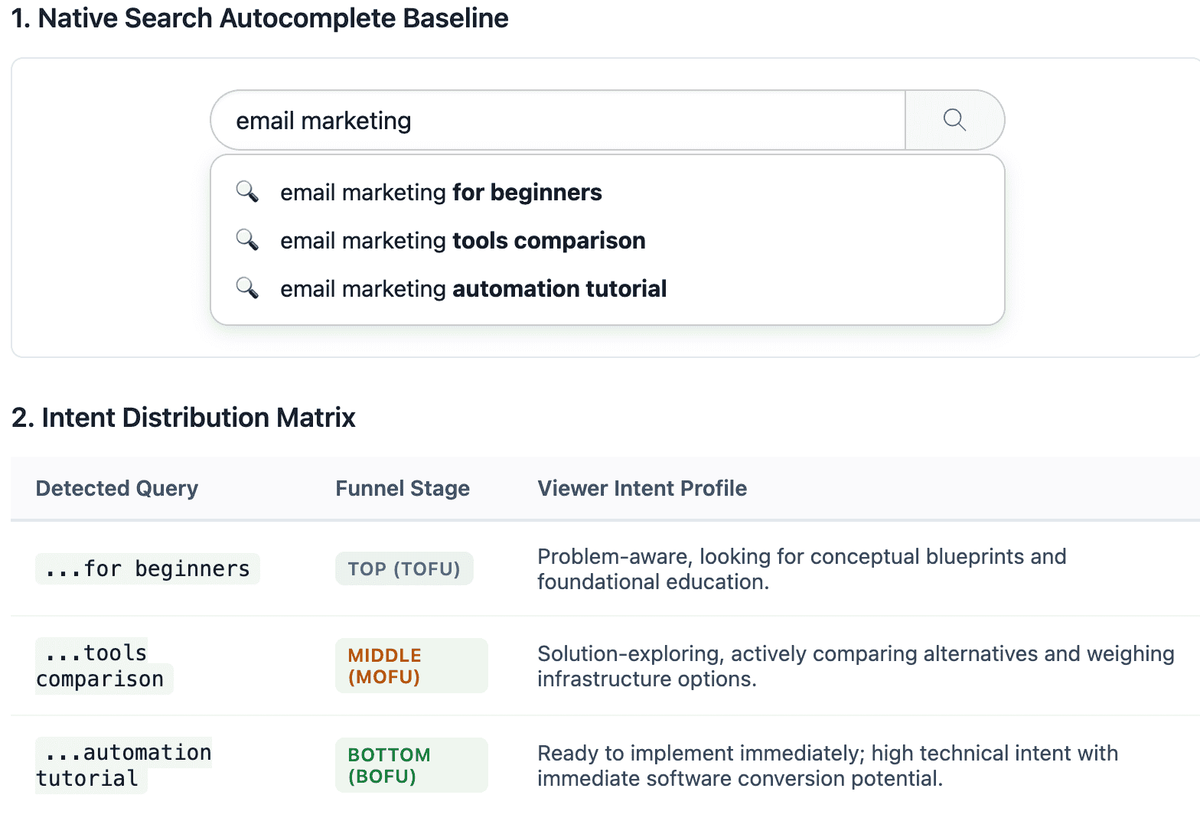
Type a broad industry term into the YouTube search bar. The dropdown suggestions are driven by actual search volume.
Search Query Example | Funnel Stage | Viewer Intent |
"email marketing for beginners" | Top-of-funnel | Problem-aware, seeking basic education |
"email marketing tools comparison" | Middle-of-funnel | Solution-exploring, evaluating options |
For example, if you sell marketing software, searching "email marketing" might yield:
- "...for beginners" (Top-of-funnel, problem-aware)
- "...tools comparison" (Middle-of-funnel, solution-exploring)
- "...automation tutorial" (Bottom-of-funnel, ready to implement)
Step 2: Leverage the YouTube Research Tab
Inside YouTube Studio > Analytics > Research, you can see the exact terms your existing viewers are searching for across the platform. Look closely for "Content Gaps"—queries with high search volume but low-quality video results.
Recommended: Cross-reference these queries using a third-party SEO tool like Ahrefs' Free YouTube Keyword Tool to gauge relative monthly search volumes and prioritize production.
Best for: Content strategists building out a calendar designed specifically to capture organic search traffic.
Method 4: Run Direct Surveys and Mine Community Posts
Quantitative metrics only go so far. To build a robust buyer persona, you need psychographic details that only come from asking direct questions.
Step 1: Deploy Community Polls
If you have access to the Community tab (500+ subscribers), post a poll once a month. Ask single-variable questions:
- "What is your biggest hurdle with [Industry Topic]?"
- "Which of these job titles best describes you?"
Step 2: Embed Micro-Surveys in Videos
Create a 3-question Typeform or Google Form. Mention it in your video intro (e.g., "Help me make better videos for you by answering 3 quick questions in the description"). Ask about their primary business goal and what tools they currently use. Keep it under 60 seconds to complete.
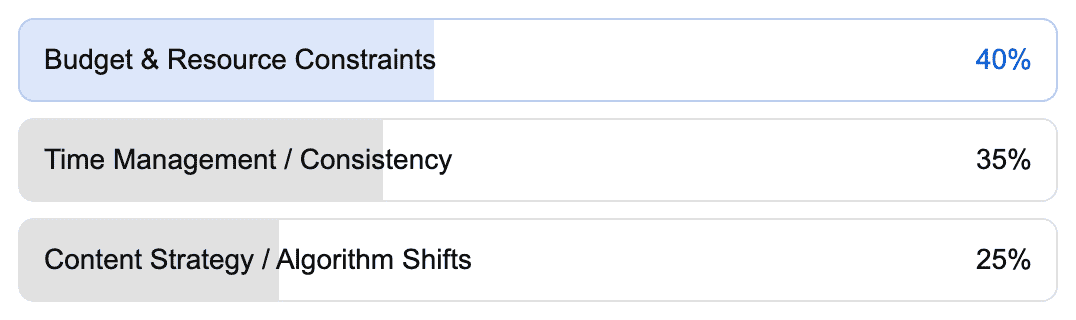
Best for: Highly engaged channels looking to segment their audience for specific product launches or lead generation campaigns.
Method 5: Leverage Google Ads Data for Organic Growth
You don't need a massive paid media budget to utilize enterprise-grade audience profiling. Google Ads shares backend data that can sharply refine your organic video strategy.
Step 1: Link Channels and Check Overlap
Link your YouTube channel to your Google Ads account. Navigate to Audience Manager. If you run even a $50 awareness campaign, Google will populate data showing which "In-Market" and "Affinity" segments over-index among your viewers.
Step 2: Apply Psychographic Segments
If Google Ads reveals your viewers heavily index for "Enterprise Software Deals" and "B2B Tech Startups," you immediately know you are hitting a high-level B2B audience. You can then adjust your video pacing, tone, and visual branding to match professional expectations rather than casual consumer tastes.
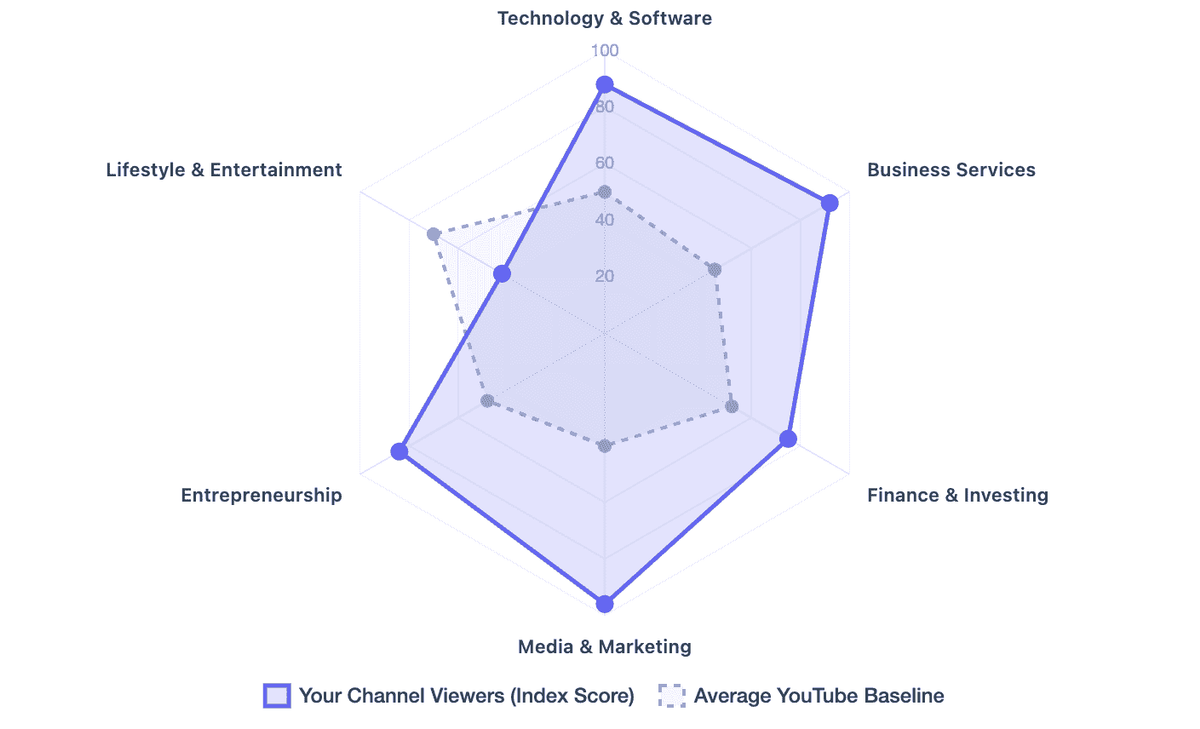
Best for: Brands running omnichannel campaigns who need to unify their YouTube organic profile with their broader paid media targeting.
Comparison: Which Audience Research Method is Best?
Method | Primary Data Type | Time Investment | Best Use Case |
YouTube Insights | Quantitative | Low (1 hr) | Profiling an existing viewer base |
The Reality of Scaling Audience Analysis
Gathering audience intelligence from comments, subtitles, search behavior, and competitor videos is valuable, but it quickly becomes time-consuming when done manually. That's where AllyHub becomes useful.
It takes the raw, messy reality of YouTube comments and hands you a clear, ready-to-shoot content angle. You stop acting like a data-entry clerk, and you go back to doing what you are actually paid to do: market.
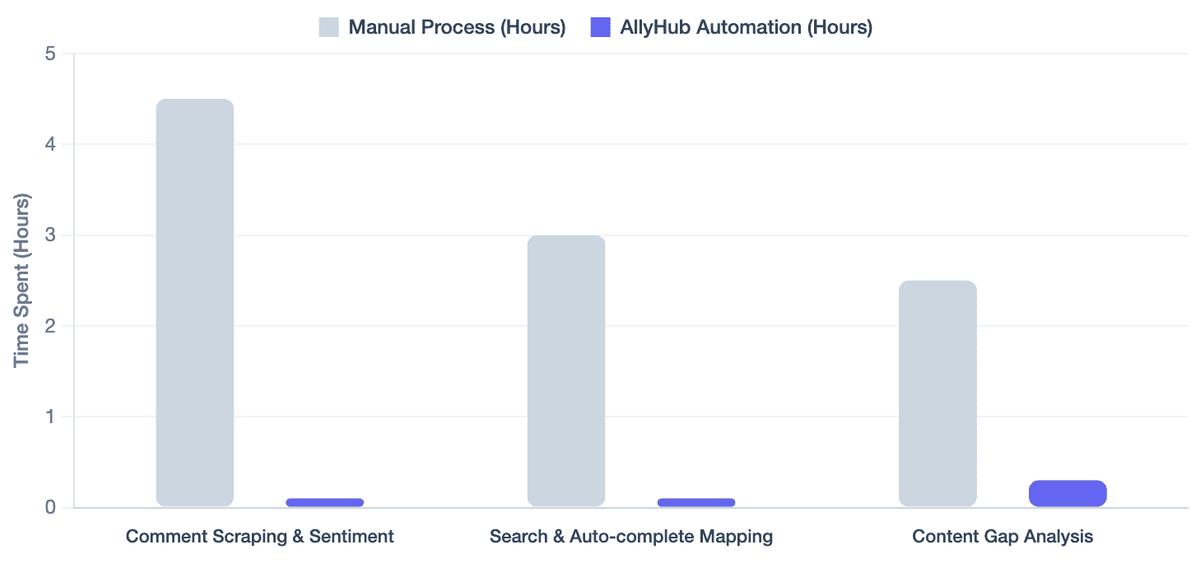
Pro tip: If you manage multiple client channels or a large brand account, rely on automation. Explore AllyHub to see how automating comment analysis and competitor reporting can replace hours of weekly manual research.
Frequently Asked Questions
How do I define my ideal viewer if my channel is brand new?
You cannot rely on YouTube Studio if you have no views. Instead, rely entirely on competitor analysis and search intent. Find 3–5 channels targeting the demographic you want, extract their comment data, and let their historical success guide your first 10 videos.
Why does my YouTube Insights data look different from my buyer persona?
This is a common misalignment. It usually means your video topics or thumbnail packaging are attracting a broader, more casual crowd than your core product serves. Use this as a signal to niche down your content topics and use more specific, professional terminology in your titles.
Does YouTube show you exactly who is watching?
No, YouTube protects user privacy. It provides aggregated demographic and behavioral data (age ranges, gender, watch times, other channels watched). You will not see individual user profiles, which is why combining YouTube data with direct surveys is essential for B2B marketers.
How can AllyHub help identify a YouTube target audience?
AllyHub helps marketers bypass manual research by automating the extraction of YouTube comments, subtitles, and competitor channel data. By analyzing this scraped data at scale, marketers can quickly uncover recurring pain points, audience vocabulary, and content gaps that manual scrolling would miss.
What to Do Next
Identifying your audience is a compounding process. Start with these three steps this week:
- Audit your native data: Spend 20 minutes in YouTube Studio's Audience tab. Document your top demographics and the top 3 channels your viewers also watch.
- Spy on one competitor: Pick the biggest peer channel in your space. Read the comments on their most popular video from the last 90 days and note three recurring questions.
- Map one content gap: Use the Research tab to find one high-volume search term your audience uses that you haven't covered yet, and script your next video around it.