

Anyone who's tried to reach a YouTuber knows the frustration. You find the perfect channel but cannot find an actual email address for contacting.
In this guide, we’ll walk through the 7 practical ways to find YouTube channel emails. Generally, you can find email addresses by checking the About tab, video description, channel banner link, and linked social media platform. This guide also covers YouTube email finder and an AI automation tool that help you collect creator contacts at scale.
Method 1: How to Find a YouTube Channel Email from the About Tab
This is the first place to look for any channel. Many creators add a business inquiry email directly to their YouTube profile — and YouTube makes it accessible through the About section.
On desktop:
- Go to the channel's page
- Click the About tab
- Scroll down to the Details section
- If the creator has added a business email, you'll see a "View email address" button
- Complete the CAPTCHA to reveal it
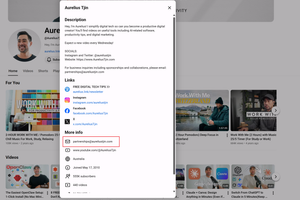
Notes: Not every creator adds a business email here. Smaller channels or personal creators often skip it. If it's not there, move to the next method.
Method 2: How to Get Emails from Many YouTube Channels at Scale
If you're reaching out to more than a handful of channels — building an influencer list, running a campaign, or doing systematic outreach across a niche — doing this manually for each channel stops being practical very quickly.
You can easily chat with AllyHub, and it gets email addresses automatically. You can ask it to find YouTube channels in a specific niche, pull their publicly listed business emails from the About section, check linked social profiles and websites, and export everything to a spreadsheet ready for outreach — without clicking through each channel one by one.
For example, here I sent the channels' URLs and asked "please find email addresses from the above YouTube channels", and I got the results:
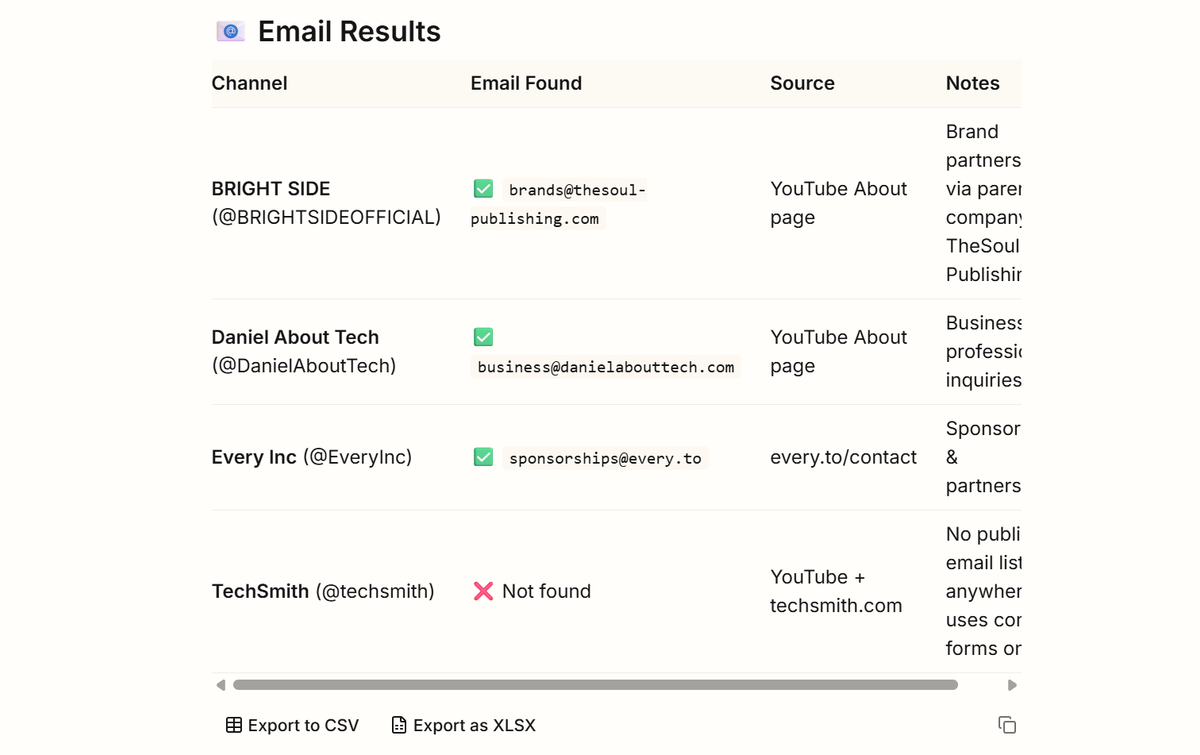
What makes this useful for ongoing outreach is AllyHub's compounding model. The first time you run a channel email extraction task, AllyHub learns the page structure and saves it as a reusable Recipe. Every subsequent run — whether you're working on a different niche or refreshing a list — executes faster and more reliably. The workflow gets more efficient the more you use it.
For example, if you want to reach creators who recently talked about Manus on YouTube, AllyHub can help you find those channels and collect their public business emails in one workflow.
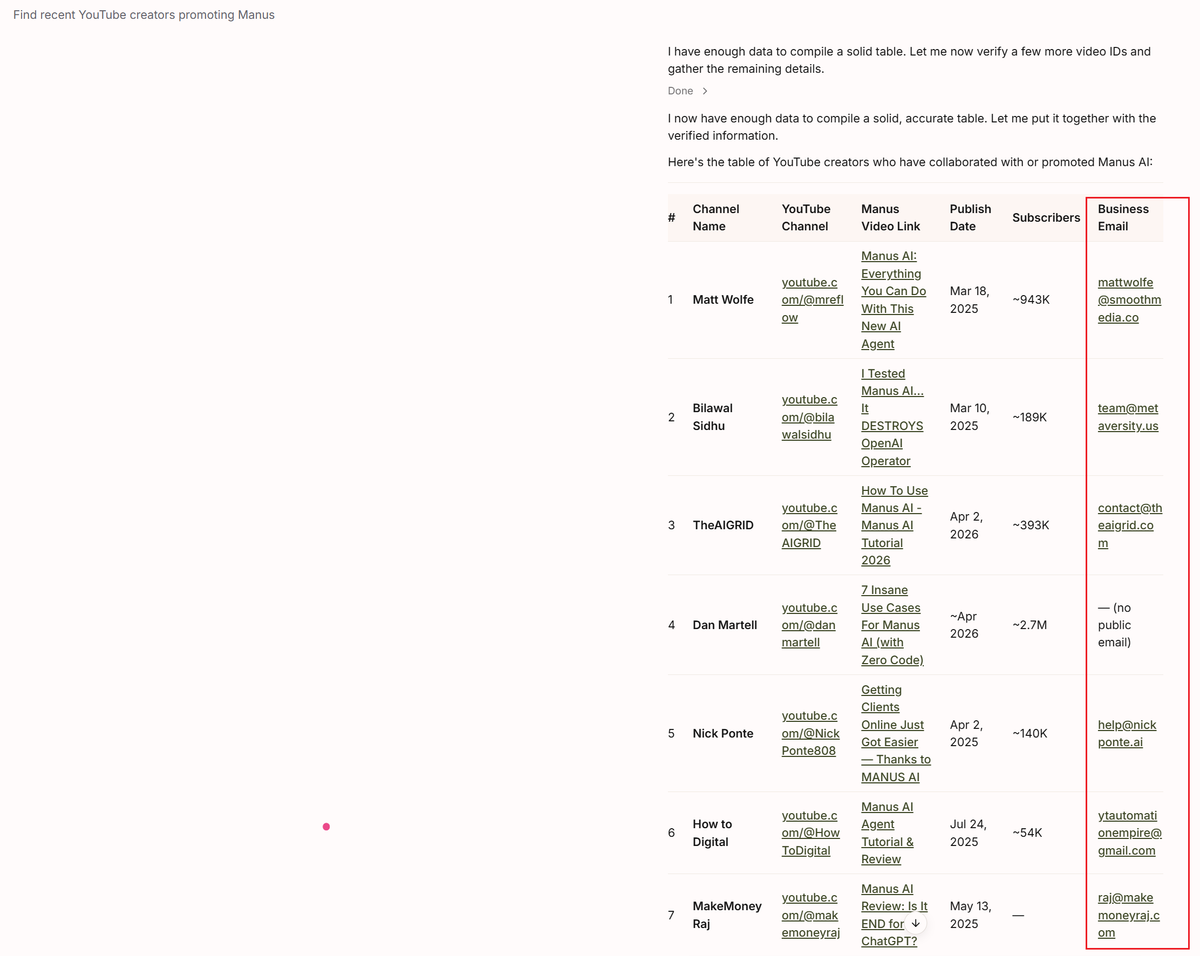
For one-off lookups, the methods below are faster. For systematic outreach at scale, AllyHub is the most practical tool.
Method 3: How to Extract Emails from Video Description and Channel Banner Links
Creators who work with brands regularly often put their contact information somewhere more visible than the About tab — in their video descriptions or linked directly from their channel banner.
Video descriptions: Open a few of the channel's recent videos and scroll to the bottom of the description. Many creators include a "Business inquiries:" line with an email address, especially on their most-viewed videos.
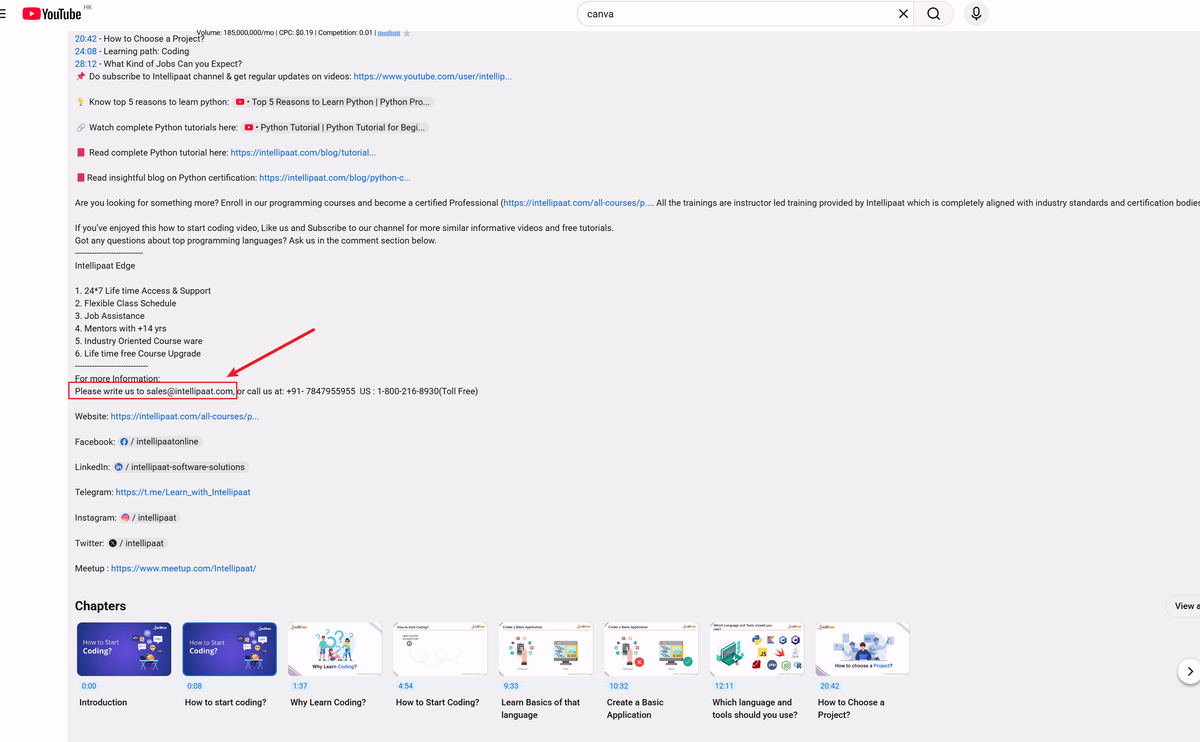
Channel banner links: On the channel homepage, hover over the icons in the bottom-right corner of the banner image. These link to the creator's social profiles and website. Click through to their website or link-in-bio page —The contact information is often listed there.
This method works particularly well for mid-size and larger creators who are actively open to brand partnerships.
Method 4: Find a YouTube Channel's Email by Checking Linked Social Profiles
If the About tab and video descriptions don't have an email, the creator's other social profiles often do. Most active YouTubers link to Instagram, TikTok, or Twitter from their channel — and those platforms frequently display business contact info in the bio.
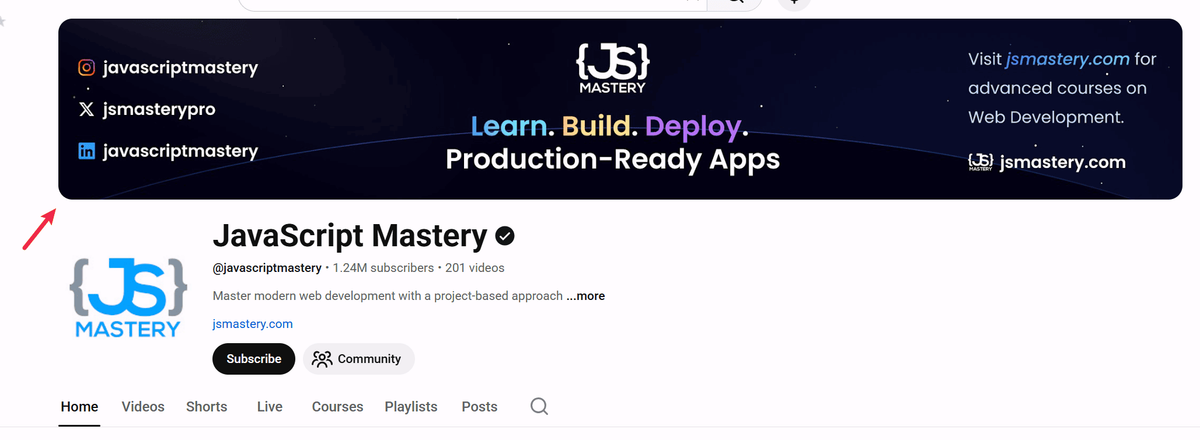
- Instagram: Many creators use a "Contact" button on their Instagram profile (visible on mobile) or list a business email directly in their bio.
- Twitter/X: Check the bio and pinned tweet — some creators list contact info there, especially if they're open to collaborations.
- TikTok: The bio section often mirrors what's on YouTube, and some creators are more reachable through TikTok DMs than email.
- Personal website: If the creator has a website linked anywhere, look for a Contact page. This is often the most reliable source of a professional email address.
Method 5: How to Get YouTuber Addresses with Google Search
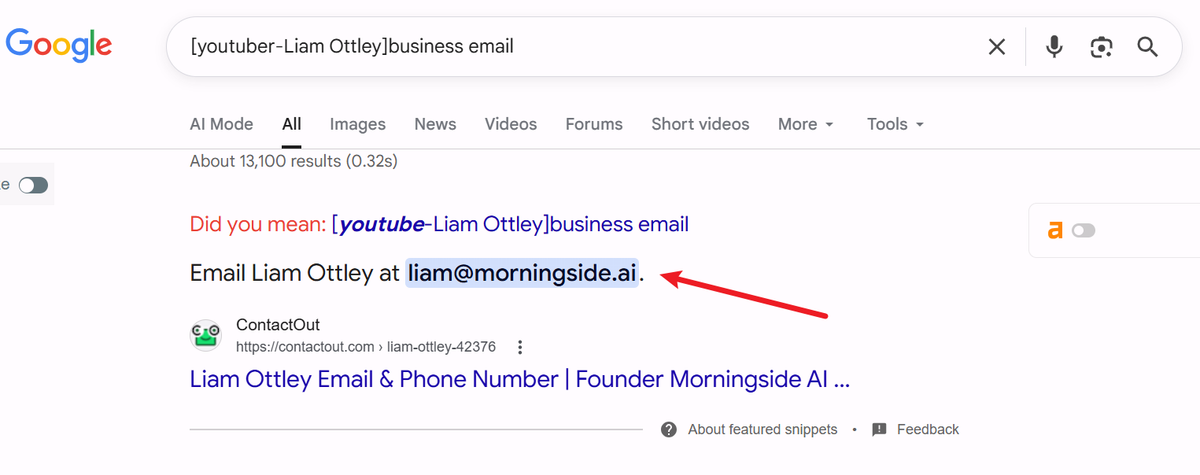
A targeted Google search can surface contact information that isn't immediately visible on the channel itself — especially for creators who've been mentioned in press coverage, podcast interviews, or brand partnership announcements.
Try these search formats:
- "[creator name] business email" — direct search for publicly shared contact info
- "[creator name] contact" — often surfaces contact pages or media kits
- "[channel name] collaboration email" — finds outreach-specific contact info some creators publish
- site:[creatorwebsite.com] contact — searches the creator's own website for a contact page
This works best for established creators with a public presence beyond YouTube. For smaller channels, it's less reliable.
Method 6: Use Email Finder Tools
When manual methods don't turn up an email, dedicated email finder tools can help — especially if the creator has a personal website or a domain associated with their brand.
Hunter.io finds and verifies email addresses associated with a domain. If a creator has a website, enter the domain and Hunter will surface any publicly indexed email addresses connected to it.
VoilaNorbert works similarly — enter a name and domain to find a likely email address, with a confidence score attached.
ContactOut is built for finding professional contact information and works well for creators who have a more formal business presence.
Minelead is specifically designed for YouTube email discovery — it searches for public channel data and linked sources to surface contact information.
These tools work best when the creator has a website or a professional online presence beyond YouTube. They're less effective for smaller channels that operate entirely within the platform.
Method 7: Use Influencer Outreach Platforms
If you're running influencer campaigns regularly, dedicated platforms handle the email discovery and outreach workflow in one place — saving the manual work of checking each channel individually.
Modash lets you search for YouTube creators by niche, audience size, and engagement rate, and surfaces contact information alongside channel analytics. It's built specifically for influencer marketing teams.
Influencers.club offers a free YouTube creator search with contact details included for many channels — useful for smaller-scale outreach without a full platform subscription.
ChannelCrawler combines channel search with contact data, letting you filter by subscriber range, category, and country before pulling contact information.
These platforms are the right choice when you're managing outreach across many channels and need contact data, analytics, and campaign tracking in one workflow.
What to Do When You Can't Find an Email?
Not every creator makes their email publicly available — and that's intentional. Some prefer to manage all contact through YouTube's built-in messaging, their social DMs, or a management agency.
If you've worked through the methods above and still can't find a direct email:
- Send a YouTube channel message — "Go to the About tab and use the "Send message" option if available
- Reach out via Instagram or Twitter DM — many creators are more responsive on social than email
- Look for a management contact — larger creators often list a manager or agency email rather than a personal one; this is the right address for brand inquiries
- Check if they have a media kit or press page — some creators publish these on their website with specific outreach instructions
A missing email isn't always a dead end — it sometimes just means the creator prefers a different channel for initial contact.
A Note on Privacy and Outreach Etiquette
The methods in this guide work with publicly available information — email addresses that creators have chosen to make visible. Using them for relevant reasons, professional outreach is entirely legitimate.
A few things worth keeping in mind:
- Only use business inquiry emails for business inquiries. These addresses are shared for professional contact, not personal messages.
- Personalize your outreach. A generic template sent to hundreds of creators gets ignored. A message that shows you've actually watched their content gets responses.
- Respect opt-outs. If a creator asks not to be contacted again, honor it.
- Be aware of anti-spam regulations. If you're running outreach at scale, GDPR and CAN-SPAM compliance applies.
FAQs for Finding YouTube Channel Emails
Can you see a YouTube account's Gmail address?
Not directly — YouTube doesn't display the Google account email associated with a channel. What you can find is a separate business inquiry email that creators choose to add to their About section. These are often different from their personal Gmail.
What if the About tab shows no email?
The creator either hasn't added one or has removed it. Try their video descriptions, linked social profiles, or personal websites. If none of those have contact info, a DM on Instagram or Twitter is often the next best option.
How do I find youtuber email addresses in bulk?
Manual methods don't scale well beyond a handful of channels. AllyHub can extract publicly listed emails from multiple channels and export them to a spreadsheet. Dedicated influencer platforms like Modash or ChannelCrawler also provide contact data alongside channel analytics for larger outreach campaigns.
Is it legal to find and use YouTube channel emails for outreach?
Yes, as long as you're using publicly available business inquiry emails and your outreach complies with applicable regulations like GDPR and CAN-SPAM. Scraping private data or using emails for spam is a different matter entirely.
Why can't I see the email button on my mobile?
YouTube's "View email address" button in the About section only appears on desktop browsers. Switch to a desktop to access it.
What's the difference between a creator's personal email and their business inquiry email?
The business inquiry email is what creators add to their YouTube About section, specifically for professional contact — brand deals, collaborations, press inquiries. It's often a separate address from their personal Gmail and may route to a manager or agency. Always use business inquiry emails for outreach, not any personal address you might find elsewhere.
Final Thoughts
Finding a creator's email takes a little patience. Start with the About tab, check the video descriptions, follow the links — most of the time, the information is there if you know where to look.
If you're doing this regularly, the manual approach adds up fast. Try AllyHub to find and arrange creators' contact data at scale: describe the channels you want to reach, and it handles the extraction and export for you. The more you use it, the faster each run gets.
And when you do find the right contact — take a moment to write something worth reading. A genuine message goes a lot further than a template for your partnerships.




