Still using the same Amazon SEO tactics but not seeing better rankings? What's the key to getting your brand discovered on Amazon?
The Amazon ranking algorithm — currently in its A10 iteration — is the hyper-intelligent system. It refers to strategies to conduct keyword research, improve brand visibility, and more. It rewards products that get clicked, convert at high rates, and generate consistent sales.
This guide will introduce how the A10 algorithm works, which ranking factors carry the most weight in 2026, and what you can do to improve any product's organic position. Once you understand the logic behind Amazon algorithm, you can rank higher with practical methods, instead of waiting for it.
Important Note: Amazon does not publicly disclose the exact formula behind its product search ranking system. Sellers often refer to the current generation as “A10,” but in practice, you should think of it as a proprietary machine-learning system that balances relevance, conversion likelihood, customer experience, and seller performance.
Key Takeaways
- The Amazon ranking algorithm has one goal: surface the product most likely to result in a completed purchase and a satisfied customer — everything else is secondary.
- Amazon ranking is not just about ad spend: PPC can help generate early sales and keyword-level momentum, but long-term organic ranking depends more on relevance, conversion performance, sales consistency, customer experience, and seller reliability.
- Conversion rate is one of the most important performance signals: If two products are equally relevant, the product that earns more clicks, converts more shoppers, and produces more consistent sales is more likely to gain ranking momentum over time.
- Stockouts are ranking signals: When a product goes out of stock, it loses sales opportunities, visibility, and keyword-level performance signals. Recovery often requires renewed sales velocity after restocking.
- Competitive intelligence is the missing layer: Most sellers optimize their own listings in isolation — the real edge comes from understanding what competitors rank for, where they're weak, and what gaps the market hasn't filled.
What the Amazon Ranking Algorithm Actually Is
The One Question Amazon Is Always Asking
Every ranking decision the Amazon algorithm makes flows from a single question:
"Which product, shown to this shopper right now, is most likely to result in a purchase they'll be satisfied with?"
That's it. Not "which product has the most keywords." Not "which seller spends the most on ads." Not "which listing is most beautifully written." The algorithm is a prediction engine — it predicts purchase probability and satisfaction, and ranks accordingly.
A9 vs. A10: What Changed and Why It Matters
“A10” is often used as shorthand for a more performance-driven ranking environment where relevance, conversion rate, sales consistency, customer experience, and seller trust matter more than keyword stuffing or ad spend alone.
The practical implication is simple: you cannot rely on PPC alone to hold organic ranking. Paid traffic may help generate early visibility and sales, but sustainable ranking usually comes from a listing that matches the query, earns clicks, converts efficiently, stays in stock, and maintains strong customer satisfaction.
Signal | A9 (Previous) | A10 (Current, 2026) |
Keyword matching | Very high weight | High weight — but quality over density |
PPC-driven sales | Direct ranking boost |
The Amazon Ranking Algorithm's Core Signal Groups
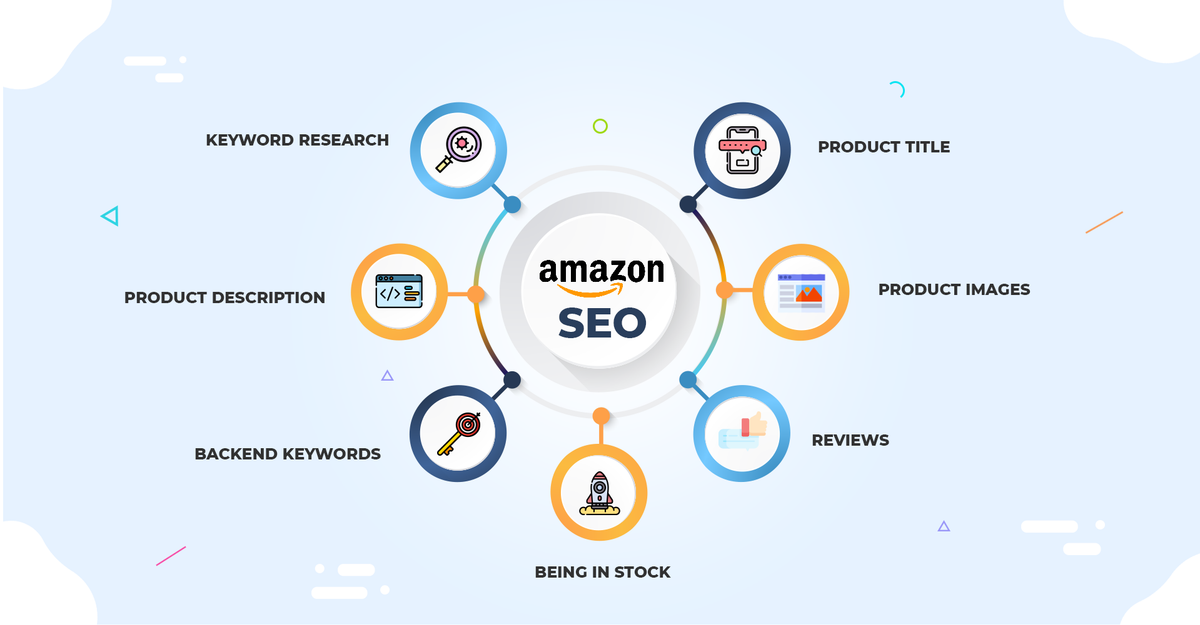
Think of Amazon ranking as a system that evaluates products across three practical signal groups: relevance, performance, and trust. Amazon does not disclose the exact weighting, but these categories help sellers understand what they can optimize.
Group 1: Relevance — "Does This Product Match the Query?"
Relevance is the entry gate. Before the algorithm can rank your product, it needs to determine whether your product is a legitimate match for the search query.
Where relevance signals come from:
Product title — One of the strongest relevance fields. Place your primary keyword naturally in the title, preferably near the beginning, while still following Amazon’s title requirements and keeping the title readable for shoppers.
Bullet points — Bullet points help Amazon and shoppers understand the product’s features, use cases, and benefits. They also influence conversion by answering common purchase objections quickly.
Product description — Lower algorithmic weight than title and bullets, but still indexed. Use it to expand on features, tell the product's story, and include secondary keyword variants naturally.
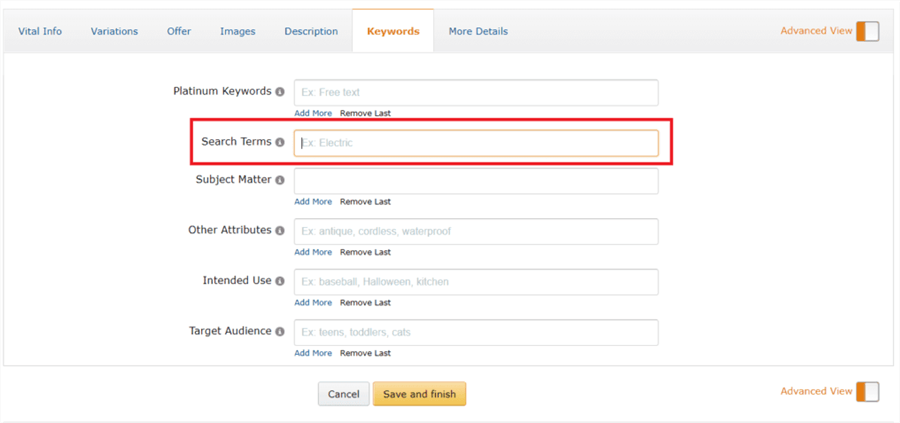
Backend search terms — The hidden keyword fields in Seller Central. These are invisible to shoppers but fully indexed by Amazon. This is where you place long-tail variants, common misspellings, alternate names, and terms that don't fit naturally in customer-facing copy.
💡 Pro tip: Backend search terms give you 249 bytes (not characters — bytes). Don't repeat keywords already in your title or bullets; Amazon indexes those automatically. Use the backend fields for terms that would look unnatural in customer-facing copy: abbreviations, regional synonyms, and long-tail phrases.
Category and subcategory — Amazon uses your category placement to understand what type of product you're selling. Miscategorization hurts both relevance scoring and BSR calculation.
Group 2: Performance — "Does This Listing Convert?"
Once Amazon determines your product is relevant, it evaluates how well your listing performs when shown to shoppers. This is where most of the ranking differentiation happens.
Conversion rate (CVR) — The percentage of shoppers who view your listing and then purchase. It is one of the most important performance signals sellers can improve directly. When a listing converts well for a relevant keyword, it suggests that the product is matching shopper intent, which can support ranking momentum over time.
What drives conversion rate:
- Main image quality and thumbnail appeal
- Price positioning relative to category average
- Review count and average star rating
- A+ Content presence and quality
- Prime eligibility and shipping speed
- Listing completeness (all fields filled, no suppression warnings)
Click-through rate (CTR) — The percentage of shoppers who see your product in search results and click on it. Low CTR signals to the algorithm that your product isn't compelling for that query — and rankings will degrade over time. The main image is the primary CTR driver; it's the only visual signal in a grid of search results.
Sales velocity — How fast and how consistently your product sells. A product with steady daily sales usually sends a stronger long-term performance signal than one that relies only on a short promotional spike.
Dwell time and engagement — How long shoppers spend on your listing page and how they interact with it (scrolling through images, reading A+ Content, watching videos). Higher engagement signals that your listing is satisfying buyer intent, which feeds positively into ranking.
Group 3: Authority & Trust — "Is This a Reliable Seller?"
The A10 algorithm introduced a stronger weighting for seller-level signals — not just listing-level performance. Amazon wants to surface products from sellers it trusts to deliver a good customer experience.
Seller account health — Order Defect Rate (ODR), Late Shipment Rate, and Pre-Fulfillment Cancel Rate are all monitored. Strong account health supports overall seller trust and reduces the risk of listing suppression, delivery issues, and customer experience problems that can indirectly hurt performance.
Customer reviews — Review count matters, but A10 weights recency more heavily than A9 did. Recent reviews can be more persuasive to shoppers than old reviews because they reflect the current product, packaging, and customer experience. A steady flow of authentic reviews can improve buyer trust and support conversion.
Fulfillment method — FBA (Fulfilled by Amazon) products receive a ranking preference because Amazon controls the logistics and can guarantee delivery speed and return handling. Seller Fulfilled Prime (SFP) receives similar treatment. Merchant Fulfilled (MFN) without Prime eligibility is at a disadvantage.
External traffic that converts — One of the most significant A10 changes: driving traffic to your Amazon listing from outside Amazon (social media, influencer content, email, blogs) and having that traffic convert is rewarded with a ranking boost. Amazon interprets external traffic as evidence of broader brand demand — a signal that the product has value beyond Amazon's own ecosystem.
How to Optimize for the Amazon Ranking Algorithm — 6 Actionable Steps
Step 1: Conduct Keyword Research
Keyword research for Amazon is different from Google keyword research. You're not looking for content topics — you're looking for the exact phrases buyers type when they're ready to purchase.
How to build your keyword list:
- Start with your primary keyword (the most direct description of your product) and identify 3–5 high-volume variants using keyword research tools like Helium 10 Cerebro or Jungle Scout Keyword Scout.
- Run a reverse ASIN lookup on your top 3 competitors — this reveals every keyword Amazon associates with their listings, including long-tail terms you may have missed.
- Segment your keyword list into three tiers:
- Tier 1 (primary): High volume, high relevance — goes in your title
- Tier 2 (secondary): Medium volume, high relevance — goes in bullet points
- Tier 3 (long-tail): Lower volume, high specificity — goes in backend search terms
Title structure that works:
Place your Tier 1 keyword in the first 80 characters. Lead with the product type, not your brand name. Include the most important differentiating attribute (size, material, key feature) early.
- ❌ BrandName Premium Insulated Water Bottle — Stainless Steel, BPA-Free, 24oz, Midnight Black
- ✅ Insulated Water Bottle 24oz, Stainless Steel, BPA-Free, Keeps Cold 24 Hours | BrandName
💡 Pro tip: After publishing any listing change, check indexing within 48–72 hours by searching amazon.com for your ASIN + the keyword you added. If the product appears, you're indexed. If not, the keyword may be suppressed or the field may not have been saved correctly.
Step 2: Optimize Your Listing for Maximum Conversion Rate
Since conversion rate is the algorithm's most influential performance signal, every element of your listing should be evaluated through one lens: does this make a shopper more or less likely to buy?
Main image — Your single highest-leverage optimization. In a search results grid, the main image is the only visual differentiator. It needs to fill 85%+ of the frame, be on a pure white background (Amazon requirement), and show the product at the angle that makes its most compelling feature immediately obvious.
Secondary images — Build a visual story: lifestyle image (product in use), infographic (key specs called out visually), size/scale reference, comparison image (your product vs. the generic alternative), and a packaging/unboxing image if relevant.
Bullet points — benefit-first structure — The most effective bullet point format leads with the customer outcome, not the product feature:
- ❌ Feature-first: "Made with 18/8 food-grade stainless steel double-wall vacuum insulation"
- ✅ Benefit-first: "Keeps drinks cold for 24 hours — double-wall vacuum insulation locks in temperature through your entire workday"
A+ Content — Amazon states that Basic A+ Content can increase sales by up to 8%, while well-implemented Premium A+ Content can increase sales by up to 20%. The comparison chart module is particularly effective — it lets you articulate your product's advantages without the shopper leaving your page.
Pricing — Price isn't about being cheapest; it's about being the best perceived value. If you're priced above the category median, your listing needs to justify it through stronger social proof, better images, or a clearly communicated quality advantage.
Step 3: Build Sales Velocity with a PPC-to-Organic Flywheel
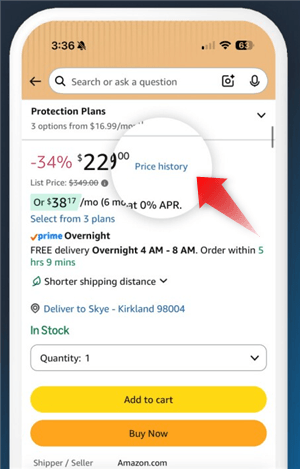
PPC does not directly buy organic ranking, but it can help generate early traffic and sales data for listing needs. When ads drive relevant clicks and profitable conversions for target keywords, those sales can support organic ranking momentum over time.
The flywheel:
- Run Sponsored Products campaigns on your Tier 1 and Tier 2 keywords
- Generate consistent daily sales for those keywords (even 5–10 sales/day is meaningful)
- Amazon's algorithm registers the sales velocity signal for those keywords
- Organic ranking for those keywords improves over 2–4 weeks
- As organic ranking improves, gradually test lower bids or budget shifts while monitoring total sales, organic position, TACoS, and conversion rate.
- Redirect freed budget to the next keyword tier and repeat
Campaign structure for ranking acceleration:
- Use exact match campaigns for your Tier 1 keywords — you want clean, keyword-specific sales data
- Set bids to achieve at least 5–8 clicks per day per keyword
- Monitor organic position weekly; when a keyword hits top 10 organic, begin tapering PPC spend
- Never cut PPC abruptly — taper over 2–3 weeks to avoid a sales velocity drop that could trigger a ranking decline
⚠️ Warning: The most common mistake is pulling PPC spend too quickly after reaching page one. Ranking momentum is fragile in the first 30 days. Taper, don't cut.
Step 4: Drive External Traffic That Converts
This is the A10 signal that most sellers ignore — and it's one of the clearest competitive advantages available to brands with any external marketing presence.
When a shopper clicks a link from Instagram, a blog post, or an influencer's YouTube video and then purchases on Amazon, the algorithm registers this as a high-quality signal: your product has demand beyond Amazon's own ecosystem. This is weighted positively in A10 in a way it wasn't in A9.
Practical external traffic sources:
- Influencer content: A micro-influencer (10K–100K followers) in your product category linking directly to your Amazon listing can generate meaningful external traffic at relatively low cost
- Amazon Attribution links: Use Amazon's free Attribution tool to create trackable links for each external traffic source — this lets you measure which channels actually convert, not just which ones send clicks
- Email marketing: If you have a customer email list, a product launch email with an Amazon link is one of the highest-converting external traffic sources available
- Social media organic: Product demonstration content on TikTok, Instagram Reels, or YouTube Shorts that links to your Amazon listing in the bio or description
📌 Note: External traffic is only useful when it brings qualified shoppers. Broad, low-intent campaigns may increase sessions without increasing purchases, which can weaken conversion performance. Focus on audiences that already understand the product category and are close to buying.
Step 5: Manage Reviews
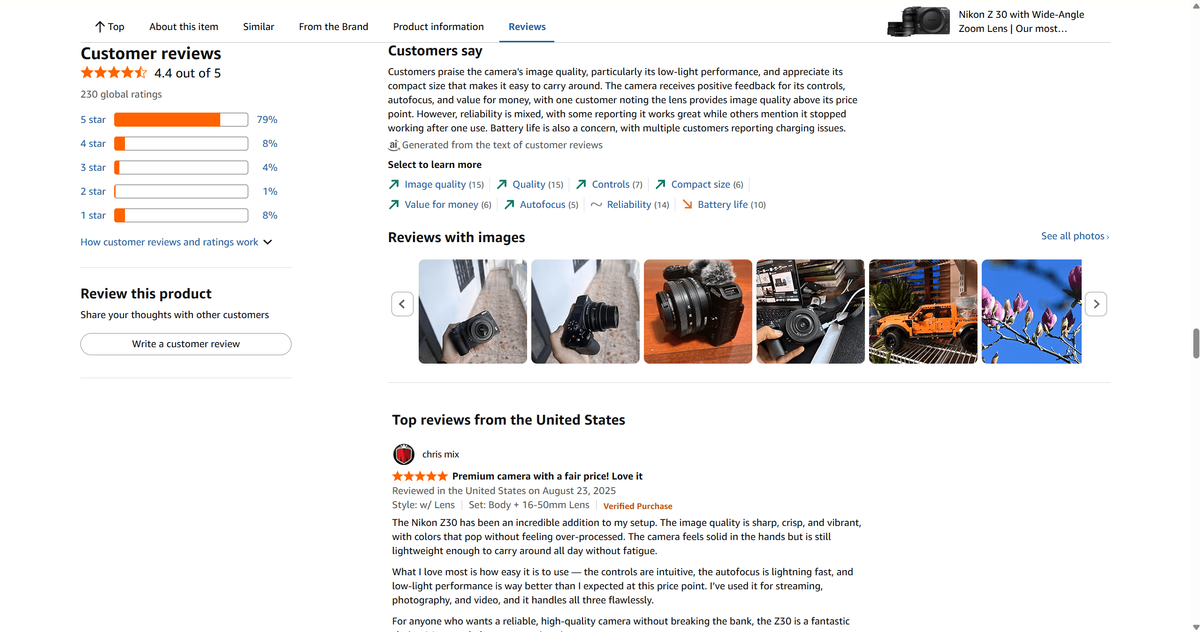
Reviews are both a conversion driver and a ranking signal. The A10 algorithm weights review recency more heavily than A9 did — a steady flow of new reviews signals ongoing product quality and customer satisfaction.
Getting more reviews compliantly:
- Use Amazon's "Request a Review" feature for eligible orders within the allowed window.
- For FBA sellers, the request is sent automatically if you enable it in your account settings
- For negative reviews, Amazon does not allow direct public comments on product reviews. However, if you are enrolled in Amazon Brand Registry, you can use the Contact Customer feature. If a review violates Amazon policy, report it through the proper channel. Most importantly, fix the underlying issue before trying to recover rating momentum.
What to do when your rating drops:
A rating decline from 4.3 to 3.9 is not just a conversion problem — it's a ranking problem. A declining rating can hurt conversion because shoppers may lose trust before they click “Buy.” Lower conversion can then weaken ranking performance over time.
- Identify the root cause (product defect, packaging issue, listing misrepresentation)
- Fix the underlying problem before trying to recover the rating
- Increase the volume of review requests to accelerate the influx of new reviews
- Consider a short-term price reduction or coupon to boost sales velocity while the rating recovers
Step 6: Never Let Inventory Hit Zero
When your inventory hits zero, Amazon stops showing your listing in search results.
Inventory management rules for ranking protection:
- Maintain a minimum of 30 days of inventory coverage at all times — more during Q4 and Prime Day windows
- Set restock alerts at 45 days of coverage, not 15 — by the time you hit 15 days, you're already at risk if inbound shipping is delayed
- For FBA sellers, factor in the 2–4 week inbound shipping and check-in window when calculating reorder points
- If you do stock out, restock as quickly as possible, restart ads carefully on your most relevant keywords, consider a short-term coupon, and monitor profitability while rebuilding sales velocity
How to Build Competitive Intelligence
Beyond understanding how does ranking work on Amazon and what to do, building competitve intelligence is a long-trem tactic. It acts as the source of practical strategies.
What Competitive Intelligence Looks Like in Practice
Keyword gap analysis: Which keywords do your top competitors rank for that you don't? These are your fastest ranking opportunities — terms with proven search volume where you're simply not indexed or positioned.
Review gap analysis: What do your competitors' 2–4 star reviews complain about? Those complaints are your listing's next bullet points — if your product solves what they can't.
Pricing pattern analysis: Are competitors using coupons to boost CTR? Are they raising prices before Prime Day and discounting back to normal? Understanding their pricing behavior helps you plan your own promotional calendar.
Listing quality benchmarking: Do your competitors have A+ Content? How many images do they use? Are their bullet points benefit-first or feature-first? Knowing where they're weak tells you where you can leapfrog them.
Scale Amazon Competitive Intelligence with AllyHub
The challenge with competitive intelligence is repeatability. Checking competitor ASINs, keyword visibility, price changes, coupons, review themes, and listing updates once is manageable. Doing it every week in a consistent format is where most teams lose time.
AllyHub is a browser-native AI copilot that automates this entire workflow. You give it your competitor ASINs, target keywords, preferred sources, and report format, then turn the process into a reusable workflow asset.
It helps collect permitted public listing data, organizing competitor analysis, analyzing reviews, tracking price history and coupon changes, and turning the findings into a reusable weekly report workflow.
What an AllyHub can do for Amazon researching:
Task | Manual Time | With AllyHub |
Keyword gap analysis (5 competitors × 20 keywords) | 3–4 hours | Automated |
Review sentiment summary (500 reviews per ASIN) | Full day | Minutes |
AllyHub is compounding workflow memory. Each run teaches AllyHub your competitor set, your preferred report structure, and the signals you care about most, so future reports become faster and more consistent. That aligns better with AllyHub’s ROTI positioning: every task should create reusable knowledge, not just a one-time output.
FAQ: Amazon Ranking Algorithm
What is the Amazon ranking algorithm?
The Amazon ranking algorithm (currently A10) determines which products appear for a shopper’s query and in what order. Sellers often use the term “A10” to describe the current ranking environment.
How does the Amazon A10 algorithm differ from A9?
Compared to A9, sellers should focus less on keyword stuffing or ad spend alone and more on the signals that consistently support ranking: relevance, click-through rate, conversion rate, sales consistency, inventory availability, customer reviews, and seller performance.
How often does Amazon update its ranking algorithm?
Amazon doesn't publish a changelog for algorithm updates, but the system updates continuously. Ranking positions can shift daily based on changes in sales velocity, conversion rate, and competitor performance.
How long does it take to rank on Amazon?
There is no fixed timeline. A new listing may take several weeks to gain stable keyword visibility, while competitive categories can take longer. Ranking speed depends on category competition, keyword difficulty, listing quality, pricing, reviews, ad strategy, inventory availability, and how consistently the product converts.
What is the fastest way to improve Amazon ranking?
The fastest practical levers are usually main image optimization, keyword indexing fixes, price or coupon testing, and improving the first few elements shoppers see in search results. A better main image can improve CTR, while stronger listing content and social proof can improve conversion.
How do I know what keywords my competitors rank for?
For recurring competitor keyword analysis, AllyHub can help organize approved data sources, compare competitor ASINs against your target keyword set, and generate a reusable keyword gap report. This is especially useful for teams that need the same competitive view updated regularly.
What to Do Next
Here's how the Amazon algorithm works and what to do. Start with the highest-leverage action: audit your main image and your keyword indexing. These two elements have the fastest impact on the algorithm's performance signals — CTR and relevance — and neither requires a product change or a significant budget.
When you're ready to move from one-time optimization to ongoing competitive intelligence, AllyHub can help you automate your full competitive monitoring workflow — tracking ranking positions, extracting competitor review sentiment, and generating complete reports.