Amazon backend keywords are the invisible layer of your listing that dictates index eligibility directly to the Amazon algorithm without cluttering your readable text. For Amazon brands and e-commerce marketers, optimizing this single field is the highest-leverage, lowest-effort optimization available in Seller Central.
This comprehensive guide delivers a professional, data-backed blueprint to master your hidden search terms.
Key Takeaways
- What they are: Amazon backend keywords are hidden search terms entered in Seller Central that Amazon's algorithm uses to index your product — customers never see them.
- Indexing ≠ ranking: Backend keywords determine whether your product is eligible to appear for a query. Ranking for that query still depends on sales velocity, conversion rate, and reviews.
- The byte limit is non-negotiable: The US, UK, and EU marketplaces enforce a strict 249-byte limit. Exceed it by even one byte and Amazon ignores the entire field.
- No duplication needed: Don't repeat keywords already in your title, bullets, or description — Amazon already indexes those. Use backend space for new terms only.
- Use the full workflow: Research → cluster → filter → byte-optimize → test indexing → iterate. Skipping any step leaves ranking potential on the table.
What Are Backend Keywords on Amazon?
Amazon backend keywords (referred to as "Search Terms" or "Generic Keywords" in Seller Central) are hidden search phrases embedded in your product listing. They are visible only to Amazon’s algorithm, never to shoppers.
Their core purpose is to balance conversion rate with keyword coverage. While your visible frontend copy (Title and Bullet Points) must remain highly readable and conversion-focused, the backend field provides an invisible reservoir to capture additional long-tail search traffic without cluttering your customer-facing text.
To unlock the full potential of your backend keywords, you must understand how Amazon processes search intent through a two-stage funnel.
Inside Amazon’s Search Algorithm: Indexing, A9, and COSMO
Indexing vs. Ranking
Sellers often confuse these two entirely different stages of the Amazon search loop:
- Stage 1 — Indexing (The Ballot): This is binary. Your product is either indexed for a search term or it isn't. Backend keywords signal eligibility; if you are not indexed for a phrase, your listing will never appear in those search results, no matter how great your visible copy is.
- Stage 2 — Ranking (The Election): Once indexed, your product enters the pool to compete for actual search position. This is where the A9/A10 algorithm calculates your placement based on performance metrics like sales velocity, conversion rate, CTR, reviews, and pricing.
The A9 Keyword Weighting Hierarchy
Not all listing fields carry equal weight. To maximize visibility, place your highest-value search terms according to this ranking signals hierarchy:
- Product Title (Highest): The primary ranking driver. The first 80 characters carry the most weight.
- Bullet Points (High): Scanned entirely by the algorithm, with the first bullet packing the strongest punch.
- Backend Search Terms (Medium): The critical hidden engine used strictly to expand your baseline indexing eligibility.
- Product Description & A+ Content (Medium-Low): Indexed for relevance but carries significantly less ranking weight.
Semantic Clustering & The COSMO Intent Layer
Amazon's search algorithm has evolved far beyond basic exact-string matching. Today, its contextual semantic layer (COSMO) groups related terms into concepts to interpret real-world buyer intent. This changes how you should deploy your backend bytes:
- Skip Surface Duplication: Amazon automatically handles standard plurals, singulars, and word-order changes. If you index for "waterproof hiking boots," the system already covers variants like "hiking footwear rain." Do not waste bytes repeating variations of the same words.
- Target Semantic Gaps: Focus your backend space exclusively on fresh conceptual angles—like unique use cases and specific audiences—that are entirely missing from your visible frontend copy.
- Capture Contextual Intent: COSMO actively maps human problems to product solutions (e.g., matching "something to keep drinks cold on a hike" straight to an insulated water bottle).
🎯 Actionable Blueprint: Stop over-focusing on generic product descriptors. Use your backend bytes to target intent-based phrases (e.g., gift for college student) and contextual use cases (e.g., gym bag water bottle) to capture profitable niches where your frontend copy cannot naturally go.
How to Add Backend Keywords to Your Amazon Listing
Here's the step-by-step process for adding or updating backend keywords in Seller Central:
Step 1. Log in to Amazon Seller Central.
Step 2. Navigate to Inventory → Manage All Inventory from the top menu.
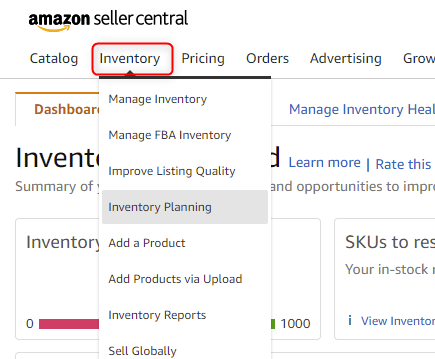
Step 3. Find the product you want to optimize and click Edit on the right side.
Step 4. Click the "Keywords" tab in the listing editor. This is where backend keyword fields live.
Step 5. Locate the "Search Terms" field — this is the primary backend keyword field. It accepts up to 250 bytes.
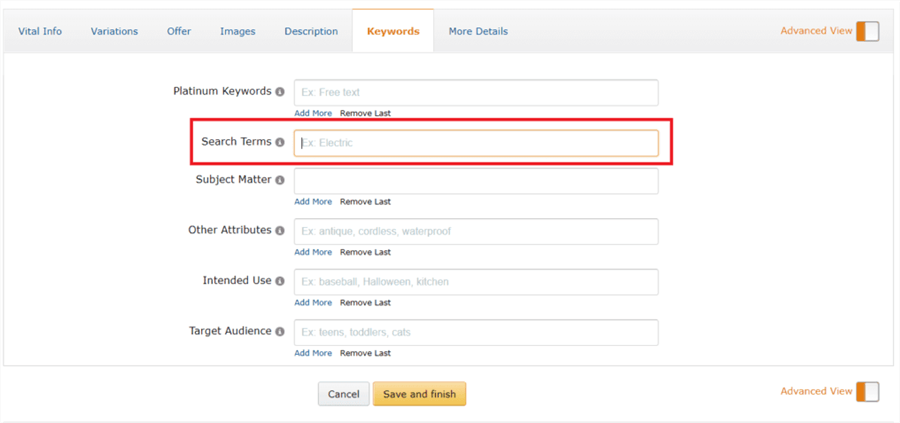
Step 6. Enter your keywords separated by single spaces. No commas, no semicolons, no quotation marks.
Step 7. Check the other keyword fields in the same tab: "Subject Matter," "Target Audience," "Other Attributes," and "Intended Use." These are secondary fields that also contribute to indexing — fill them with relevant terms.
Step 8. Click Save and Finish to apply your changes.
💡 Pro tip: Changes to backend keywords typically take 24–72 hours to be indexed by Amazon. After updating, verify indexing by searching "ASIN + keyword" on Amazon. If your product appears in results, it's indexed for that term.
Backend Keywords vs. Frontend Keywords: What Goes Where
Content Type | Frontend (Visible) | Backend (Hidden) |
Primary keyword | ✅ Title (first) | ❌ Already indexed |
Top 2–3 secondary keywords | ✅ Bullet points | ❌ Already indexed |
Good vs. Bad Backend Keywords: Real Examples
To illustrate what belongs in your hidden search terms, let's look at a concrete example for a Portable Blender with the following frontend title: "Portable Blender for Smoothies — 20oz USB Rechargeable Personal Blender."
❌ What NOT to Put in Your Backend Keywords
Avoid wasting space or risking suspension by strictly filtering out these five types of bad data:
- Frontend Duplicates: Avoid entries such as "portable blender smoothies 20oz". Amazon already indexes every word in your visible title and bullets; repeating them yields zero new search coverage.
- Competitor Brand Names: Do not include phrases like"NutriBullet BlendJet Ninja". This is a direct terms-of-service violation that triggers silent listing suppression or account suspension.
- Irrelevant Keyword Stuffing: Avoid terms like "kitchen appliance food processor juicer". A portable blender is not a food processor; irrelevant terms dilute your relevance scores and waste bytes.
- Promotional & Subjective Fluff: Leave out marketing buzzwords like "best blender 2026 top rated must have". Amazon does not index subjective commentary, and these terms can trigger backend policy flags.
- Punctuation & Extra Formatting: Never format your text with symbols like "portable-blender, smoothie-maker". Commas, hyphens, and semicolons consume valuable byte space. Use single spaces only.
✅ What GOOD Backend Keywords Look Like
The most effective backend strings fill the semantic gaps your frontend copy cannot naturally cover. Focus your 249 bytes on these high-converting targets:
- Synonyms & Descriptors: Target alternative terms shoppers use to find your product type, such as "compact small travel maker".
- Intent & Use Cases: Capture the context of use rewarded by Amazon's COSMO layer, like "gym bag protein shake post workout".
- Audience Targeting: Address specific buying motives or gift intents, such as "gift college student dorm room kids".
- Abbreviations & Formats: Use variations your title missed, like "BPA free 20 oz USB C" (covering the space variant for "20oz" and hyphen variant for "USB-C").
- Common Misspellings: Capture missed traffic from high-volume typos like "portable blender".
- Foreign Languages: Target major secondary buyer segments in your marketplace using terms like "licuadora portatil batidora".
The Well-Optimized Final String
By combining these rules and eliminating all redundant word repetitions, a high-performing backend string for this product looks like this:
mini travel compact gym bag protein shake post workout bottle BPA free dorm room gift college student USB C 20 oz licuadora portatil blendar
Total Weight: ~156 bytes. This tight, ultra-optimized format avoids repeating the word "blender" entirely, leaving ample margin under the 249-byte limit for seasonal updates or fresh advertising discoveries.
The 6-Step End-to-End Backend Keyword Workflow
You can learn the detailed steps from keywords research to find the right backend keywords for your listing.
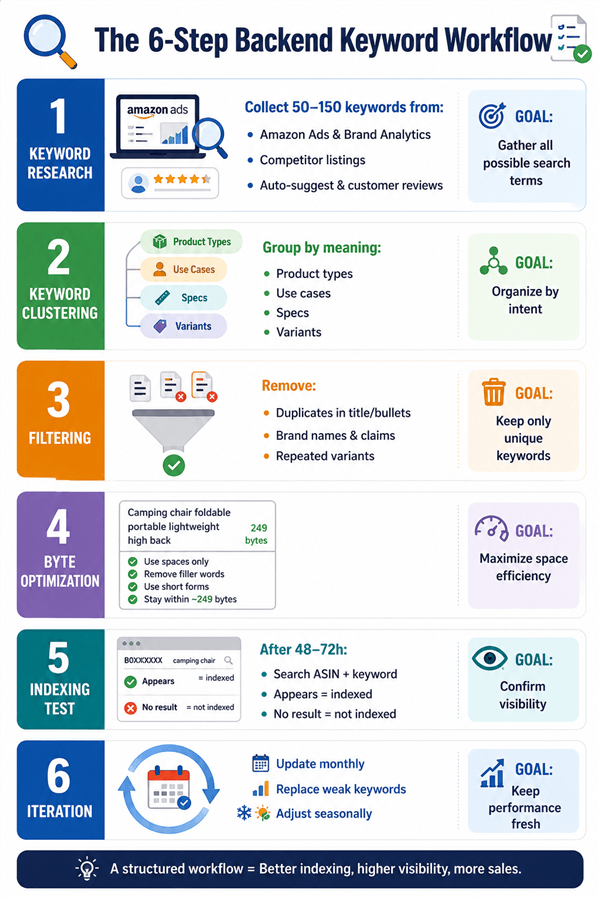
Step 1: Research — Build Your Raw Keyword Pool
High-leverage optimization begins by expanding your horizon. At this stage, your only objective is to collect a massive pool of 50 to 150 potential keyword candidates without worrying about restrictions or formatting.
To build a comprehensive source list, gather data from these core channels:
- Amazon Native Data: Download your latest Advertising Search Term Report to pull high-impression but low-purchase phrases, and leverage Amazon Brand Analytics (ABA) to identify high-frequency category terms.
- Competitor Content: Deconstruct the titles and bullet points of your top 5 to 10 ranking competitors. Look for high-value descriptive keywords that are completely missing from your own listing.
- Customer Language: Monitor the Amazon search bar’s Auto-suggest dropdown for long-tail variants. Additionally, scan customer reviews on your listing and competitor products to capture the exact, organic vocabulary shoppers use.
Step 2: Clustering — Group by Semantic Theme
Dumping your raw keyword pool directly into your listing will result in a messy string that fills your limit too quickly. To maximize your search footprint, you need to systematically organize your raw terms into distinct semantic buckets based on underlying logical concepts.
A well-rounded backend field should feature keywords balanced across various categories. Group your terms into product descriptors (such as mini blender, compact blender), contextual use cases (like gym bag blender, camping smoothie maker), technical specifications (such as 20 oz, USB C), and common misspellings or foreign languages (like blendar, licuadora portatil).
Step 3: Filtering — Strip Out the Noise
Once your keywords are organized, it is time for a thorough cleaning. Amazon's search engine relies heavily on accurate relevance signals, meaning that including filler or low-quality phrases will dilute your listing’s overall SEO authority.
Apply these filtering rules in strict chronological order:
- Remove Frontend Duplicates: Cross-reference your list against your visible Title, Bullets, and Description. If a word is already there, erase it from your backend pool—Amazon will not double-index it.
- Purge Prohibited Terms: Eliminate trademarked competitor brand names, subjective sales claims (best, top-rated, must-have), and temporary, time-sensitive statements.
- Merge Surface Variants: Amazon’s modern algorithm natively interprets word order, prepositions, and singular versus plural formats. If you keep "waterproof hiking boots," you can confidently delete "hiking boots waterproof."
Step 4: Byte Optimization — Maximize the 249-Byte Limit
With a polished list of 20 to 40 high-value keywords, your next task is to condense them into Amazon's rigid backend field. Because you are dealing with a strict ceiling, every single space counts toward your final visibility score.
To pack the field efficiently, separate your keywords using single spaces only. Avoid commas, hyphens, or semicolons entirely, as punctuation marks consume valuable bytes without feeding the algorithm. You can save extra space by utilizing short abbreviations (using USB C instead of USB Type-C) and cutting out filler prepositions. Always paste your string into an online byte counter prior to uploading, keeping the target weight at 248 bytes for a safe margin.
Step 5: Indexing Test — Verify Live Visibility
Approximately 48 to 72 hours after saving your updates in Seller Central, you must verify that Amazon’s backend indexing layer has actually recognized your hidden search terms. This is a crucial step that many sellers accidentally overlook.
The manual testing method is simple: head to the live Amazon storefront and search [Your Product ASIN] + [Target Keyword] (for example: B08XYZ1234 travel blender). If your product appears in the search results, it is officially indexed. If the system returns a "no results found" page, the keyword has not been picked up.
⚠️ Critical Safe Guard: If your indexing test reveals that none of your new backend keywords are working, your character string almost certainly exceeded 250 bytes. When the limit is breached, Amazon does not display an error message in Seller Central; it silently disables the entire Search Terms field. Recount your bytes carefully and re-upload.
Step 6: Iteration — Keep the Data Fresh
Consumer search behavior is constantly shifting, meaning your backend optimization is an ongoing process rather than a static task. High-performing brands treat hidden keywords as dynamic, fluid assets that compound ranking gains over time.
Develop a routine to cycle out stagnant phrases and reinforce new trends. Every month, analyze your advertising reports to discover high-converting paid terms that can be moved over to boost organic coverage. Additionally, update your use-case and audience terms seasonally—such as swapping out summer travel phrases for holiday gift queries in Q4—to align your hidden text with real-time shopping habits.
Common Backend Keyword Mistakes (and How to Fix Them)
Mistake | Why It Hurts | Fix |
Exceeding 250 bytes | Entire field is silently ignored by Amazon | Use a byte counter; keep at ≤248 bytes |
Repeating title/bullet keywords | Wastes byte space on already-indexed terms | Audit visible copy first; only add new terms |
Beyond Backend Keywords: How Smart Marketers Scale Amazon SEO
Optimizing backend keywords manually works fine for a handful of SKUs. But for e-commerce marketers managing dozens or hundreds of listings, the real challenge is scaling without burning hours on repetitive data collection.
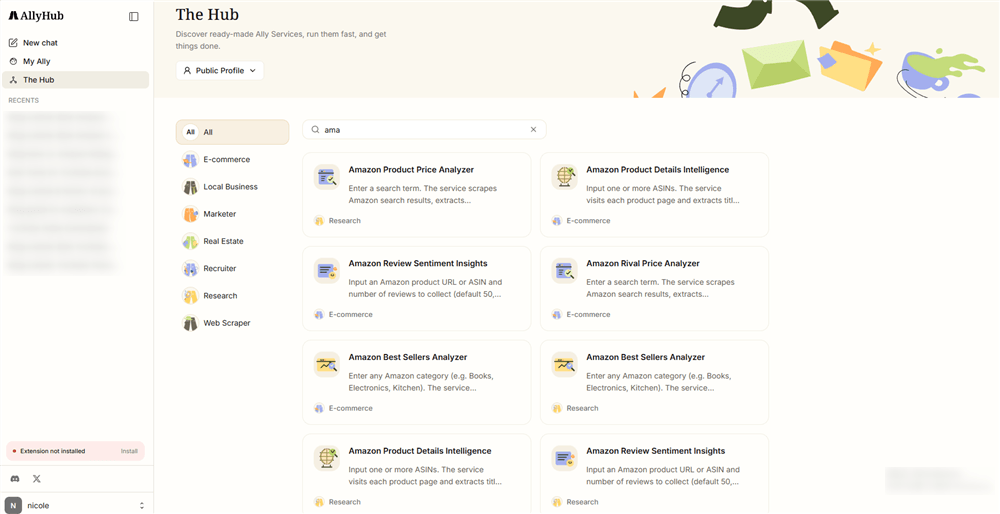
This is where autonomous AI changes the equation. AllyHub is an AI agent platform that handles the tedious research and data extraction work behind Amazon optimization:
- Bulk Competitor Scraping: Extracts titles, bullets, and visible keywords from hundreds of competitor ASINs simultaneously for instant gap analysis.
- Automated Search Term Analysis: Scans your Seller Central reports to flag high-impression, low-purchase terms across your entire catalog.
- Batch Indexing Monitoring: Runs automated checks across massive SKU counts to surface exactly which backend keywords aren't picking up visibility.
- Review Vocabulary Mining: Scrapes category-wide customer reviews to extract organic consumer phrases that convert.
Traditional AI Thinks to Finish. AllyHub Thinks to Improve.
The problem with traditional AI tools is that they waste intelligence. Every time you run a standard scraping or data analysis task, legacy agents start from absolute zero—charging you repeatedly to execute the exact same workflow.
AllyHub operates on a completely different paradigm built around ROTI (Return on Token Investment). It treats execution not as a recurring cost, but as an investment that builds assets.
The first time AllyHub runs an Amazon research pipeline, it maps out the structure and autonomously creates a reusable "Skill" or "Playbook". From the second run onward, it skips redundant exploration and reuses its learned workflows.
Because your AllyHub never starts from scratch again, its productivity compounds with every task. By eliminating repetitive exploration, AllyHub delivers up to 5x more output on subsequent runs, making your digital data pipelines exponentially more efficient over time.
Frequently Asked Questions
What are backend keywords on Amazon?
Backend keywords are hidden search terms entered into Seller Central (the "Search Terms" field) that are visible only to Amazon’s algorithm. They allow you to index for additional synonyms, abbreviations, and long-tail phrases without cluttering your customer-facing listing copy.
Why do backend keywords matter for Amazon sellers?
They are a high-leverage optimization tool that boosts visibility through four key advantages:
- Zero Copy Adjustments: They expand your search footprint by 20–40 queries without changing a word of your visible text.
- Competitor Shielding: Backend keywords cannot be directly viewed by competitors, as Amazon keeps this data private.
- PPC Optimization: Broadening your organic indexing footprint directly improves the relevance score and efficiency of your Sponsored Products campaigns.
- Capturing Real Intent: They cleanly catch messy search habits—like misspellings, use-case phrases, and Spanish terms—that wouldn't fit naturally into your title.
Do Amazon backend keywords affect ranking?
Indirectly. Backend keywords control indexing (eligibility to appear in search). Once you are indexed for a term, your actual search position (ranking) is determined by performance metrics like sales velocity, conversion rate, and reviews.
How many bytes are allowed in Amazon backend keywords?
The limit is strictly 250 bytes (not characters) for US, UK, and EU marketplaces. Exceeding this limit by even a single byte causes Amazon to silently ignore the entire field. Keep your string at ≤248 bytes to remain safe.
What is the difference between indexing and ranking on Amazon?
- Indexing is binary; it means your product is in Amazon’s candidate pool and is eligible to show up for a query.
- Ranking is the specific position your listing occupies within those search results, which is earned via sales performance and customer conversion.
Do I need to include both singular and plural versions of a keyword?
No. Amazon’s algorithm automatically accounts for standard singular and plural forms. Save your byte space for unique words, and only include irregular plurals if they change significantly (e.g., "mouse" and "mice").
How do I know if my backend keywords are indexed?
Go to the live Amazon storefront and search [your ASIN] + [keyword] 48 to 72 hours after updating your listing. If your product appears in the results, it is successfully indexed. If zero terms index, your byte count likely crossed the 249-byte ceiling.
Should I include competitor brand names in my backend keywords?
No. Including trademarked competitor brand names is a direct violation of Amazon’s Terms of Service. Doing so can trigger quiet listing suppression or complete account suspension.
How often should I update my backend keywords?
Review them at least quarterly. You should also run updates during seasonal demand shifts, after downloading fresh Advertising Search Term Reports, or when launching new catalog variations.
Can AllyHub help with Amazon keyword research at scale?
Yes. AllyHub automates tedious extraction tasks by bulk-scraping competitor listings, filtering Search Term Reports, mining customer review vocabulary, and running automated batch indexing checks across massive SKU catalogs.