Over 70% of Amazon sales happen on the first page of search results. If your product is sitting on page 3 or worse, page 5, it might as well not exist. When done right, a product can be found easily and customers can get the right product.
Understand what is Amazon product ranking and what factors affect Amazon product ranking, you may build a repeatable framework for pushing products to page one. This guide focuses on how to do effective Amazon optimization, from how the algorithm works, the key ranking factors, to five concrete steps you can execute right now. Let's dive in to improve any product's organic position.
Key Takeaways
- Ranking depends on relevance, conversions, and sales performance.
- Keyword indexing is required before ranking can happen.
- Better CTR and conversion rates support stronger search visibility.
- PPC can accelerate sales growth and indirectly support rankings.
- Inventory availability is critical to maintaining ranking momentum.
What is Amazon Product Ranking
Amazon product ranking refers to where your product appears in Amazon search results for a specific keyword. The higher your ranking, the more visibility, clicks, and potential sales you can generate.
It is important to distinguish organic ranking from Best Sellers Rank (BSR). Organic ranking measures keyword visibility, while BSR reflects category-wide sales performance.
Google SEO vs. Amazon SEO
This is the single most important concept to internalize before you touch a single listing:
Dimension | Google SEO | Amazon SEO |
Core goal | Match valuable content to search intent | Match the product most likely to sell to search intent |
Authority signal | Backlinks, domain authority, content depth |
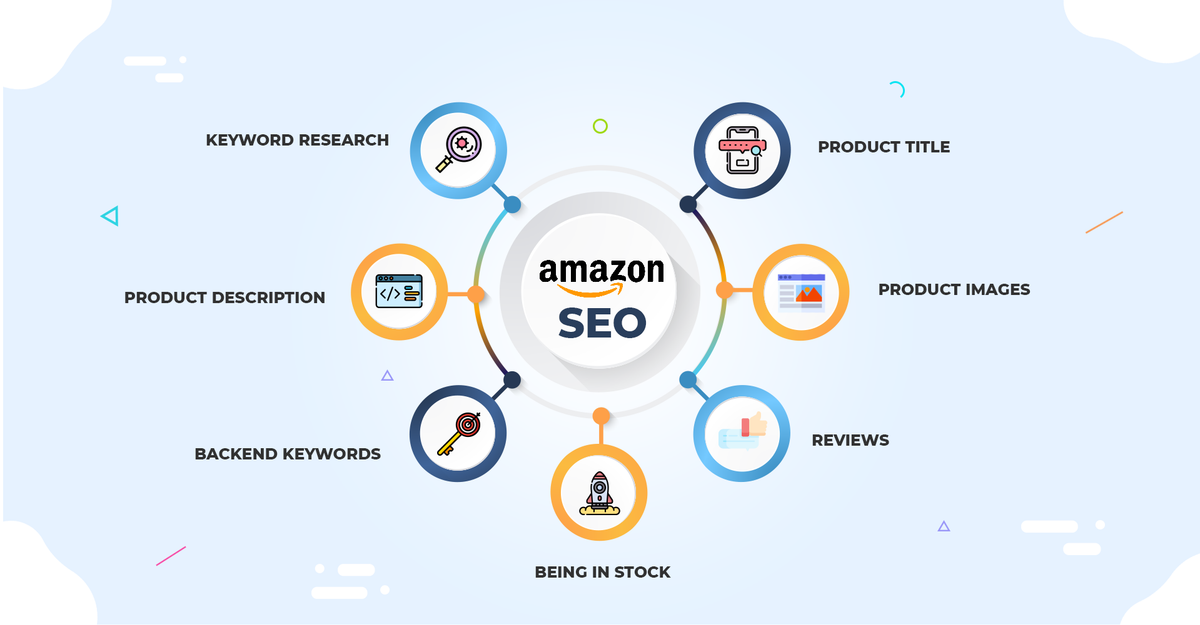
In short: Google wants to inform. Amazon wants to sell. Every ranking decision Amazon makes flows from one question: which product is most likely to result in a satisfied customer and a completed transaction?
How the Amazon Algorithm Affects Product Ranking
Many sellers refer to Amazon's current search and ranking system as "A10", although Amazon has not officially adopted this terminology. The underlying principle remains the same: Amazon prioritizes products that are most likely to satisfy shoppers and generate purchases.
1. Relevance — "Does This Product Match What the Shopper Typed?"
Relevance is the entry ticket. If Amazon doesn't think your product is relevant to a search query, you won't appear at all — no matter how well you convert.
Where relevance signals come from:
- Title: The first 80 characters carry the most weight. Your primary keyword needs to appear here, naturally.
- Bullet points: Amazon reads these for keyword context — but more importantly, they influence whether the shopper stays on the page.
- Backend search terms: The hidden keyword fields in Seller Central. This is where you place long-tail keywords, common misspellings, and terms that don't fit naturally in the customer-facing copy.
- Category and subcategory: Amazon uses your placement to understand what type of product you're selling.
2. Conversion Rate — "Once a Shopper Lands on This Listing, Do They Buy?"
Conversion rate is widely considered the single most influential ranking factor under A10. Amazon's logic is straightforward: if your listing convinces more shoppers to buy than the listing next to it, your product deserves to be shown first.
What drives conversion rate:
- Main image quality and click appeal: The first conversion decision happens in the search results grid — does your thumbnail earn the click?
- Price positioning: If you're 20% more expensive than the competitive average, your conversion rate needs to be justified by stronger social proof or listing quality.
- Review count and average rating: Higher review volume and stronger ratings generally improve shopper trust and conversion rates.
- A+ Content: Amazon has reported that A+ Content can improve conversion rates when used effectively.
- Shipping speed and Prime eligibility: FBA products convert better. This is a documented algorithmic preference.
3. Sales Velocity — "How Fast and How Consistently Does This Product Sell?"
Sales velocity is the algorithm's measure of sustained demand. A product that sells 10 units a day every day for a month is algorithmically stronger than a product that sold 300 units in a single day and then flatlined.
This is one reason PPC campaigns are often used to support organic ranking growth. PPC can indirectly improve organic rankings by generating additional sales, engagement, and conversion signals that Amazon may use to evaluate listing performance.
How to Improve Amazon Product Ranking with 5 Steps
Now let's translate the algorithm into action.
Step 1: Optimize Keyword Indexing
If Amazon doesn't index your product for a keyword, you can't rank for it. Period. Keyword indexing is the prerequisite — and it's where many agency-managed listings fall short.
How to structure your title for indexing and conversion
Place your primary keyword in the first 80 characters of the title. This isn't just for Amazon's algorithm — those first 80 characters are what mobile shoppers see in search results. If your keyword is buried after your brand name, a 5-word product descriptor, and a color variant, you're losing both indexing weight and CTR.
Example structure:
- ❌ BrandName | Premium Stainless Steel Insulated Water Bottle, BPA-Free, Leak-Proof, 24oz, Midnight Black
- ✅ Insulated Water Bottle 24oz — Stainless Steel, BPA-Free, Keeps Drinks Cold 24 Hours | BrandName
The second version leads with the primary keyword, delivers the key benefit early, and still includes the brand name. It indexes stronger and reads better.
What to do with Backend search terms
Include | Don't Include |
Long-tail keyword variants | Keywords already in your title |
Common misspellings | Competitor brand names (TOS violation) |
Synonym terms shoppers might use | Punctuation (Amazon ignores it) |
💡 Pro tip: Amazon’s AI shopping assistant, Rufus, reflects Amazon's broader shift toward understanding product context and shopper intent. This makes clear, descriptive, and customer-focused listing content increasingly important.
Step 2: Optimize Click-Through Rate
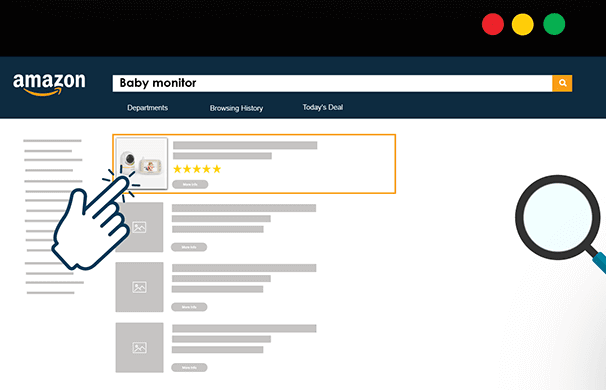
If shoppers see your listing in search results but scroll past it, Amazon notices. Low CTR may indicate that shoppers do not find your listing compelling for a given query, which can negatively affect overall search performance over time.
What drives CTR in Amazon search results
Main image: The main image is the only visual signal in a grid of text-heavy results. It needs to:
- Fill 85%+ of the frame with the product
- Be on a pure white background (Amazon requirement — non-compliance gets you suppressed)
- Show the product at an angle that makes its key feature immediately obvious
- Stand out from the competing thumbnails in your category
Coupon badge: The green "Save X%" badge in search results is one of the strongest CTR boosters available. Even a 5% coupon can materially improve your click-through rate — and that improvement feeds directly into your ranking. The coupon doesn't need to be large to work; the visual badge itself does heavy lifting.
Price visibility: If your price is competitive for your category, make sure it's not hidden behind variations or complex pricing structures. The shopper needs to see, at a glance, that your product is a good deal.
✅ Recommended workflow: Run a main image A/B test (Amazon's Manage Your Experiments tool supports this for brand-registered sellers). A 10% improvement in CTR from a better main image compounds across every keyword you rank for.
Step 3: Skyrocket Conversion Rate
CTR gets shoppers to your page. Conversion rate determines whether Amazon keeps showing your page to the next shopper.
What drives conversion rate
Pricing strategy: Price isn't about being the cheapest — it's about being the best value. If you're priced above the category median, your listing needs to justify it: more reviews, better images, stronger A+ Content, or a clearly communicated quality advantage. If you're priced below the median, your conversion rate will be naturally stronger — but your margin needs to sustain it.
A+ Content impact: A+ Content (Enhanced Brand Content) modules have a measurable effect on conversion rate. The comparison chart module is particularly effective — it lets you articulate why your product is better than alternatives without the shopper leaving your page. If you're brand-registered and not using A+ Content, you're leaving conversion points on the table.
- Review volume: More reviews generally improve buyer confidence.
- Rating quality: Higher ratings usually support stronger conversion rates.
- Review recency: Recent reviews help demonstrate ongoing customer satisfaction.
Notes: The safest method to get more reviews is Amazon's "Request a Review" button in Seller Central.
Step 4: Drive Sales with PPC
PPC can indirectly improve organic rankings.
- Bid on high-relevance keywords with Sponsored Products
- Generate consistent daily sales for those keywords
- Amazon's algorithm registers the sales velocity signal
- Organic visibility may improve as sales performance strengthens
- As organic ranking climbs, you can reduce PPC bids on those terms
- Redirect budget to new keywords and repeat
How to execute this properly:
- Start with exact-match campaigns on your 10–15 highest-priority keywords
- Set bids to achieve at least 5–10 daily clicks per keyword
- Monitor the organic ranking for each keyword weekly
- When a keyword hits top 5 organic, reduce the PPC bid by 20% and test whether organic volume holds
- Redirect freed-up budget to the next tier of keywords
⚠️ Warning: Don't pull PPC spend too quickly once you hit page one. Ranking momentum is fragile — a sudden drop in sales velocity, even if organic, can trigger a ranking decline. Taper, don't cut.
Step 5: Avoid Stockouts
If there's one mistake that destroys more ranking progress than any other, it's going out of stock.
When your inventory hits zero, your listing becomes unpurchasable. Amazon immediately stops showing it in search results. The sales velocity signal — which took weeks or months to build — flatlines. When you restock, you're effectively starting from scratch: Amazon's algorithm has no recent sales data to work with, and your ranking will have collapsed.
How to prevent stockouts:
- Maintain sufficient inventory coverage
- Monitor restock timelines closely
- Plan ahead for Prime Day and Q4
- Recover quickly with PPC and promotions if stockouts occur
How to Track Amazon Product Ranking
Next, you need to follow up the ranking to check if the optimization works and adjust anytime. But typing your keyword into the Amazon search bar and scrolling to find your product is a time-waster.
Manual checking may get inaccurate position depending on personal browsing history, purchase history, and location. Rankings vary by marketplace region. And manual checking is physically impossible to do consistently when you're managing 50 ASINs across 100 keywords each. Here's how to track Amazon product ranking automatically.
Automated Ranking Tracking
Ranking automation enables you to get daily or weekly snapshots of where each ASIN ranks for each target keyword, compare your position vs. top 3 competitors for the same keywords, visualize ranking trend, and export ranking data into structured reports.
AllyHub is built for exactly this use case. The AI agent can batch-track ranking positions across any number of ASINs, pull competitor pricing and review data from the same search results, and export everything into a structured Excel or report format — all on a schedule. For an agency managing dozens of client catalogs, this turns a team-wide weekly task into a single automated workflow for ranking tracking and competitor analysis.
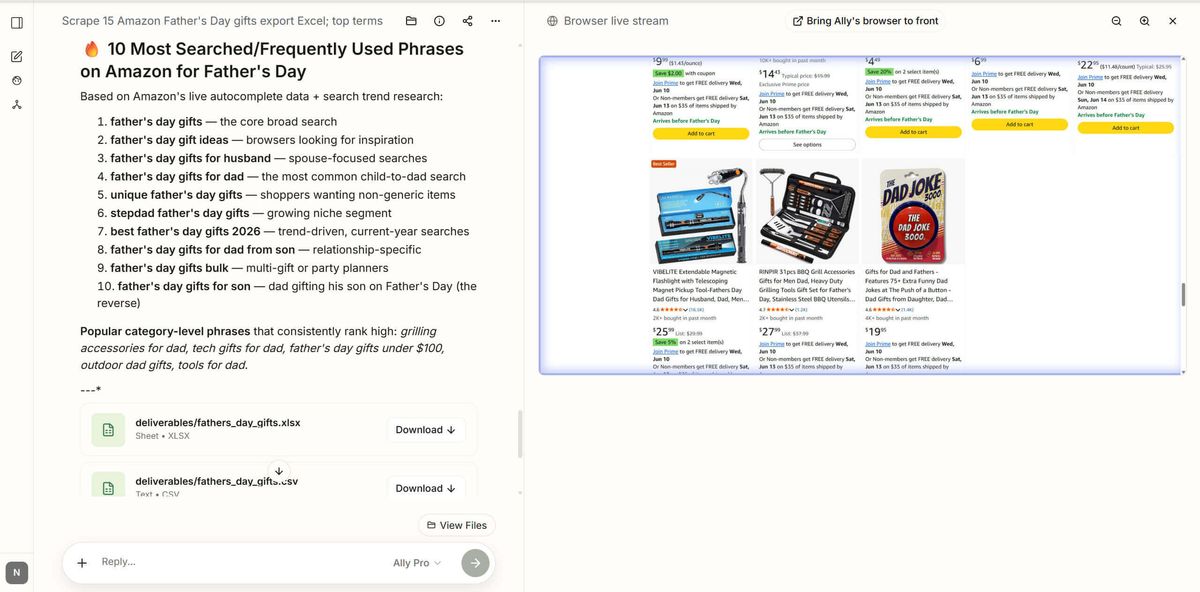
What AllyHub can track for your ranking reports:
- Your ASIN's organic position for each target keyword
- Competitor ASINs appearing above and below you
- Pricing, review count, and rating for every result on the page
- Changes in position over time (weekly or monthly snapshots)
✅ Recommended workflow: Set up AllyHub to run a ranking scan every Monday for your top 50 client keywords. By the time you open your dashboard, the data is already collected, structured, and ready to share.
Frequently Asked Questions of Amazon Product Ranking
How long does it take to rank on Amazon?
For a new listing that is well-optimized, expect 2–4 weeks of consistent sales before you see stable organic ranking for target keywords. High-competition categories with entrenched competitors can take 6–8 weeks or longer. The key variable is not time — it's consistent daily sales for the keywords you want to rank for.
Does PPC affect organic ranking on Amazon?
Yes — and this is one of the most important dynamics in the Amazon product ranking algorithm. Sponsored Products campaigns can help generate the sales activity that often supports stronger organic visibility over time.
What is Amazon BSR vs. Organic Ranking?
- BSR (Best Sellers Rank) measures a product's total sales volume within its category relative to all other products in that category, refreshed hourly. It reflects overall sales performance, not keyword-specific visibility.
- Organic Ranking is the position your product appears in search results for a specific keyword. BSR and organic ranking are correlated, but distinct — and optimizing for one doesn't automatically optimize the other.
How do I find my Amazon product ranking?
The most reliable way to know your actual ranking position is to use an automated ranking tracker. Tools like Helium 10's Keyword Tracker, Jungle Scout's Rank Tracker, and AllyHub's automated ASIN monitoring can pull accurate, geo-neutral ranking data across multiple keywords and competitors.
Can I rank on Amazon without PPC?
Technically yes — but practically, for competitive categories, it's extremely difficult. Without PPC, you're relying entirely on your listing's organic visibility to generate initial sales, which is a chicken-and-egg problem: you need sales to rank, and you need ranking to get sales. PPC breaks that loop by generating sales that feed the ranking algorithm.
What to Do Next
You now understand how to do effective Amazon optimization to get any product ranking higher in Amazon search results. You can start with Step 1 today: audit the keyword indexing of your highest-priority ASIN. Check that your primary keyword is in the first 80 characters of the title, and more. That's a 30-minute task with immediate impact.
Try AllyHub to run your full ranking monitoring workflow on a schedule.