Amazon competitor analysis is the process of researching the sellers and products competing for the same customers as your own listings. It helps understand where they're strong, where they're weak, and where market gaps exist that you can exploit.
This guide gives you a repeatable, 6-step Amazon competitor analysis framework — a proper SOP you can run every month, before every major promotion, and before every new product launch. We'll show you how to reverse-engineer what's working for your top competitors, identify the gaps they've left open, and turn those gaps into your next competitive advantage.
Key Takeaways
- Amazon competitor analysis is an ongoing process: Run it monthly and before major promotions or product launches.
- Start with the right competitors: Use BSR lists, “Customers also viewed,” and sponsored placements to find the ASINs actually competing with you.
- Look beyond the listing: Strong analysis connects keywords, pricing, reviews, ads, and listing quality.
- Competitor weaknesses are opportunities: Review complaints and listing gaps can help shape your positioning.
- Automation makes it scalable: Ongoing tracking is easier with tools that monitor price changes, reviews, rankings, and listing updates.
Why Conduct a Competitor Analysis on Amazon?
Amazon rewards listings that are relevant, competitive, and likely to convert. Competitor analysis helps you understand why rivals rank higher, where your listing falls short, and what opportunities you can act on. Here's what a structured competitor analysis actually gives you:
- Keyword opportunities: Find high-volume terms your competitors rank for that you've missed.
- Listing benchmarks: Understand what "good" looks like in your category (title structure, image quality, A+ content depth), so you know how to optimize your own listing.
- Pricing intelligence: Know when competitors discount, how their BSR responds, and whether their pricing is stable or reactive.
- Positioning gaps: The most common complaints in competitor reviews are your best product development and marketing brief. If customers keep saying a competitor's product is "hard to assemble," that's a positioning opportunity you can own.
- Ad strategy signals: Understand which keywords competitors are bidding on and where they're running Sponsored Brand ads.
Next is the step-by-step SOP to do an Amazon competitor analysis:
Step 1: Identify Your True Competitors on Amazon
Before you analyze competitors, make sure you’re focusing on the products actually competing for the same keywords, clicks, and customers.
Direct vs. Indirect Competitors
- Direct competitors sell essentially the same product to the same customer.
- Indirect competitors solve the same customer problem with a different product. A glass water bottle, a collapsible silicone bottle, or a premium hydration pack might all be competing for the same purchase decision — even if they don't show up in the same keyword search.
Both matter. Direct competitors tell you what you need to match or beat. Indirect competitors tell you where the category is heading and what customer needs aren't being fully served.
How to Find Your Real Top 3–5 Competitors
Method 1: BSR (Best Sellers Rank) Lists
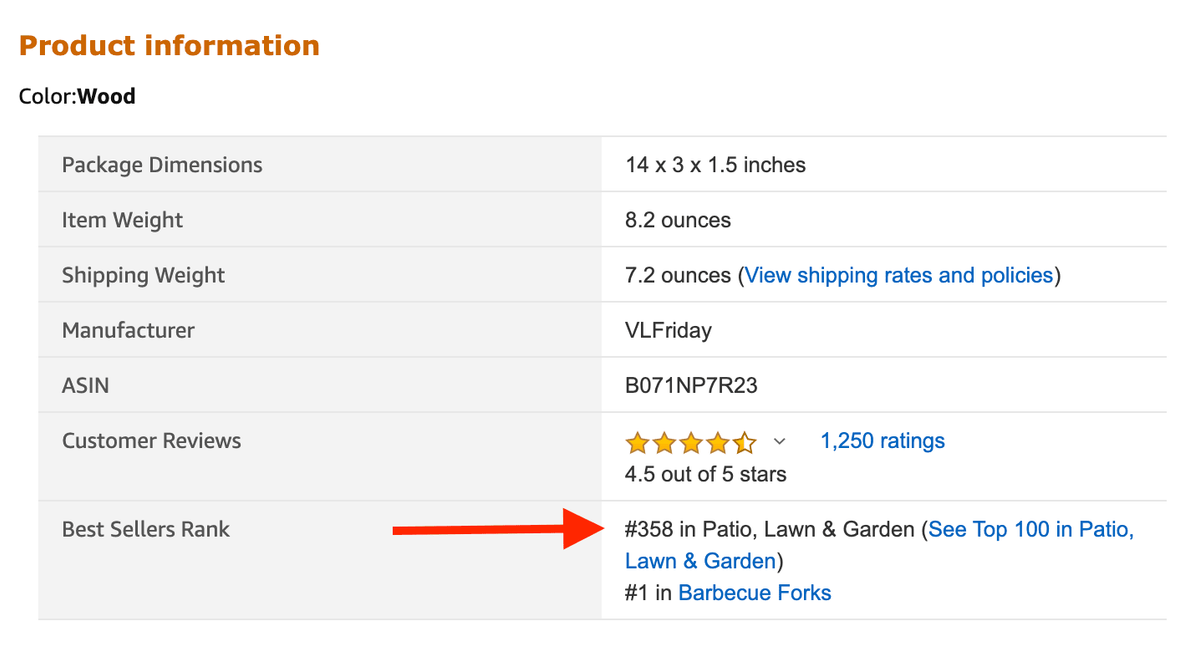
Navigate to your product's category BSR list (open product detail page, scroll down to the “Product information”, and find the "Best Sellers Rank"). Filter to your specific subcategory. The top 10–20 products here are the ones Amazon's algorithm is already rewarding — these are your true benchmarks, regardless of whether they appear in your keyword searches.
Method 2: "Customers Who Viewed This Item Also Viewed"
Navigate to your own listing (or your closest competitor's listing) and scroll to the "Customers who viewed this item also viewed" carousel. This is Amazon's behavioral data telling you exactly which products are in the same consideration set in real buyers' minds.
Method 3: Sponsored Products Overlap
If the same ASINs repeatedly appear in sponsored placements for your core keywords, treat them as competitors worth monitoring. It may indicate keyword overlap, product targeting, or aggressive category-level advertising.
Output: A shortlist of 3–5 competitor ASINs. Write them down. Everything in the next five steps runs through this list.
Step 2: Run a Keyword Gap Analysis
Keyword gap analysis is the process of finding keywords your competitors rank for that you don't — or where they rank significantly higher than you, including the long-tail terms that drive consistent, lower-competition sales.
How to Do a Reverse ASIN Lookup
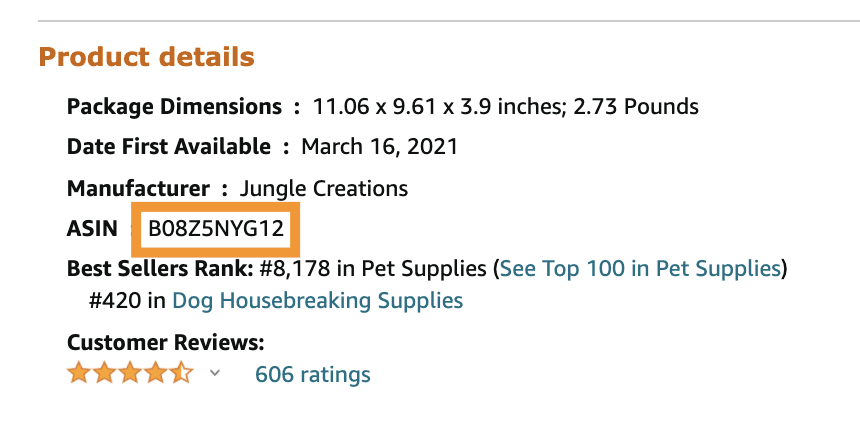
Reverse ASIN analysis means taking a competitor's ASIN and pulling every keyword Amazon's algorithm associates with their listing. Tools like Helium 10's Cerebro and Jungle Scout's Keyword Scout are the standard options for this.
The process:
- Enter your competitor's ASIN into the reverse lookup tool.
- Filter results by search volume (start with 500+ monthly searches).
- Sort by "Ranking Position" to see which keywords they're on page 1 for.
- Export the full list.
What to Look For
High-volume head terms: Which broad, high-competition keywords are they ranking on page 1 for that you're not? These are your gap targets — they require listing optimization and potentially PPC investment to close.
Long-tail keyword opportunities: Search for keywords with 200–1,000 monthly searches where your competitor ranks in positions 1–10 but you don't appear at all. These are often faster wins — lower competition, more specific buyer intent, easier to rank for with targeted copy changes.
Keyword overlap vs. keyword gaps: Build a simple comparison: keywords where you both rank (competitive parity), keywords they rank for that you don't (their advantage), and keywords you rank for that they don't (your advantage to defend).
💡 Pro tip for brand managers: When reporting to leadership, the keyword gap table is one of the clearest ways to show competitive position. "We're missing 47 keywords our top competitor ranks for, representing an estimated X,000 monthly impressions" is a data point that drives budget decisions.
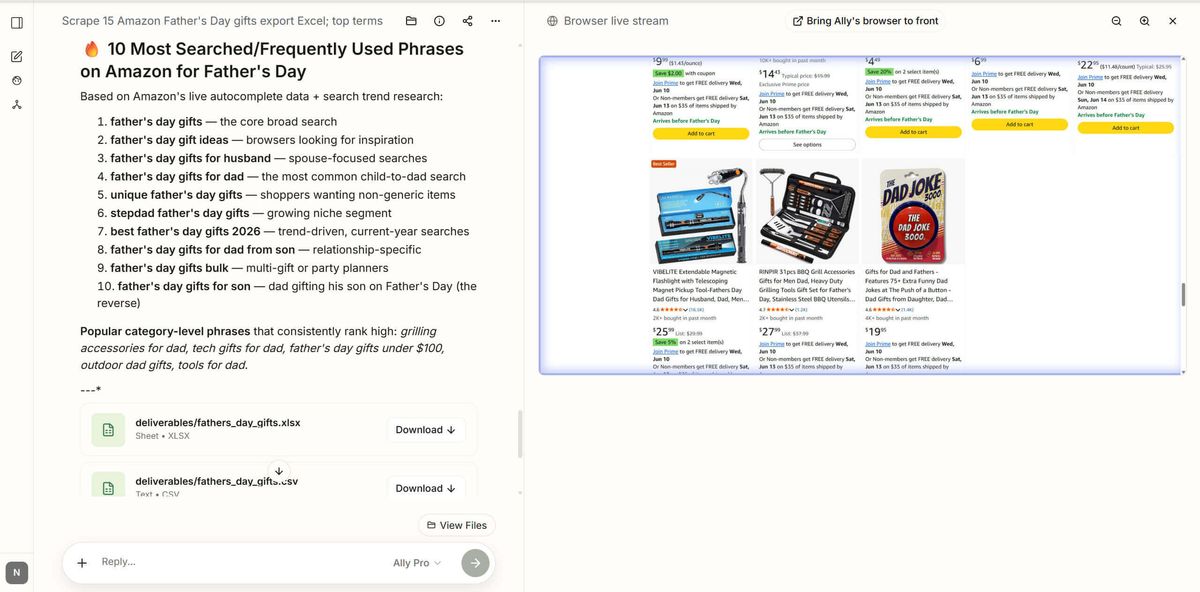
Going deeper with AllyHub: Once you've identified the top 20 keywords per competitor, you can use AllyHub to batch-scrape the top 20 organic results for each of those keywords and run a deep comparison across all of them simultaneously — pulling listing titles, bullet structures, pricing, and review counts into a single structured report. What would take hours of manual tab-switching becomes a single automated workflow.
Step 3: Audit Competitor Listings
Keyword rankings get buyers to the listing. The listing itself closes the sale — or loses it. A listing audit is a structured review of how competitors present their products — title, bullet points, main image, secondary images, A+ content, and video. The goal is to identify what they're doing well (so you can match it) and where they're weak (so you can outperform them).
Evaluate Main Image Quality
The main image is the only thing a buyer sees before they decide whether to click. Study your competitors' main images with this checklist:
- White background compliance: Does it meet Amazon's requirements while still standing out?
- Product angle and fill: Does the product fill 85%+ of the frame? Is the angle showing the most compelling feature?
- Visual differentiation: In a grid of 20 similar products, does their thumbnail stand out? Why?
Then look at the full image gallery:
- Lifestyle images: Do they show the product in use, in a context the target buyer recognizes?
- Infographic/feature callout images: Are they highlighting specific specs or benefits visually?
- Size/scale reference images: For products where dimensions matter, are they showing scale clearly?
- Comparison images: Are they directly comparing themselves to a generic alternative or a named competitor?
📌 Note: Image quality is one of the most underrated conversion levers on Amazon. A listing with identical keywords but better images will consistently outperform on CTR and conversion rate.
Analyze the Title Structure
Count how many keywords they've embedded in the title. Note the order — the first 80 characters are what appear in mobile search results. Are they leading with the brand name, the product type, or a key feature? What conversion-driving words appear (e.g., "BPA-free," "leak-proof," "dishwasher safe")?
Review Bullet Points
The best-performing listings use a "benefit-first" structure — the customer outcome comes before the feature. Compare:
- ❌ Feature-first: "Made with 18/8 food-grade stainless steel"
- ✅ Benefit-first: "Keeps drinks cold for 24 hours — double-wall vacuum insulation locks in temperature all day"
Read each competitor bullet and ask: are they selling features or outcomes? If they're selling features and you can sell outcomes, that's a differentiation opportunity.
Assess A+ Content Depth
Scroll to the bottom of their listing. Do they have A+ Content (enhanced brand content)? If yes:
- Are they using it for cross-selling (linking to other products in their catalog)?
- Are they using comparison modules to position against competitors?
- Is the visual quality significantly higher than their main listing images?
If they have strong A+ Content and you don't, that's a gap to close. If their A+ Content is weak, that's an opportunity to leapfrog them.
Notes: Don’t copy competitor listings. It can create compliance, originality, and brand differentiation issues. Use competitor audits to understand the category standard, then write original copy around your own advantages.
Step 4: Analyze Competitor Reviews for Positioning Gaps
This is the highest-value step in the entire framework — and the one most sellers skip because it's time-consuming. Don't skip it.
Why 2–4 Star Reviews Are Especially Useful for Finding Gaps
Five-star reviews tell you what customers love. That's useful for validation. But 2–4 star reviews tell you what customers wish were different — and that's where your competitive advantage lives.
A buyer who gives 3 stars is still a buyer. They purchased, they used the product, and they have a specific, articulate complaint. That complaint is:
- A real problem your competitor hasn't solved
- A potential bullet point for your listing ("Unlike other brands, our X doesn't Y")
- A product development signal if you're sourcing or manufacturing
What to look for in competitor reviews:
Review Signal | What It Means for You |
"Great product but packaging was damaged" | Opportunity: emphasize your packaging quality |
"Runs small / sizing is off" | Opportunity: add a detailed size chart and "true to size" callout |
"Battery life shorter than advertised" | Opportunity: if yours is better, make it a headline claim |
Look for patterns — a complaint that appears in 15 reviews is a systematic product or brand failure, not a one-off. Those are your highest-value differentiation points.
The Manual Review Problem
Reading 500–1,000 reviews per competitor manually is not realistic if you're managing multiple ASINs or reporting on a regular cadence. You'd spend an entire day just on this step.
This is where AI-powered review analysis changes the workflow entirely. AllyHub's Review Sentiment Analysis can scrape a competitor's full review set and generate a structured summary in minutes — breaking down the top praised features, the most common complaints, recurring themes by star rating, and specific phrases customers use repeatedly. What used to take a full afternoon becomes a 2-minute automated report you can run for every competitor on your list.
Step 5: Analyze Pricing and Promotional Strategies
Price is not a static number on Amazon. Tracking price history helps you know about a competitor's strategy, margin structure, and promotional calendar. Treating price as a snapshot is a mistake.
How to Read a Competitor's Pricing History
Keepa is the standard tool for Amazon price history tracking. Enter any ASIN and you'll see a full price chart going back years.
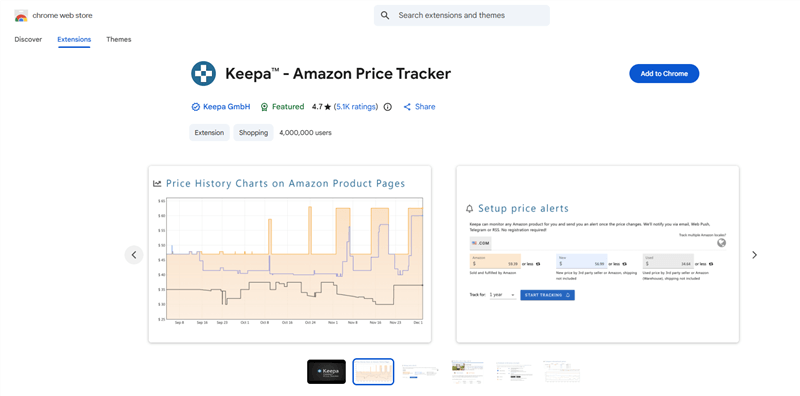
What to look for:
- Baseline price vs. promotional price: What's their "normal" price, and how far do they discount during promotions? A product that regularly drops from $34.99 to $24.99 is using price as a primary conversion lever — their margin structure supports it.
- Coupon and discount patterns: Do they run persistent coupons (the green "Save X%" badge visible in search results)? Coupons improve CTR in search results. Even before the buyer clicks — they're a visibility tool as much as a conversion tool.
- Prime Day and peak season behavior: Look at their price history around Prime Day, Black Friday, and Q4. Do they raise prices 2–3 weeks before a sale event, then "discount" back to their normal price? This is a common tactic to inflate the "was" price for the sale badge. Knowing this pattern helps you plan your own promotional calendar more strategically.
- Price elasticity signals: If a competitor raised their price by $5 and their BSR didn't move significantly, their product has strong brand loyalty or limited direct competition at that price point. If their BSR dropped sharply after a price increase, they're price-sensitive — and you may be able to hold a higher price if your listing quality justifies it.
Building a Competitor Price Matrix
For brand managers who need to report competitive pricing regularly, a structured price matrix is essential. Track your top 5 competitors across:
- Current price
- Lowest price in the last 90 days
- Current coupon/discount status
- Prime Exclusive Discount eligibility
- Price-to-review-count ratio (a proxy for perceived value)
Step 6: Assess Competitor Advertising Strategy
The final step covers that most competitor analysis guides overlook: advertising behavior.
Reading Their Ad Strategy
Are they bidding on your brand keywords? Search for your own brand name on Amazon. If a competitor's Sponsored Product appears in the results, they're running a defensive/offensive keyword strategy against you. This is common and worth knowing — it means they consider you a direct threat.
Sponsored Brand vs. Sponsored Product presence: A competitor running Sponsored Brand ads (the banner-style ads at the top of search results) has brand registry and is investing in top-of-funnel visibility. This signals a more sophisticated, longer-term strategy than pure Sponsored Product bidding.
Ad placement patterns: Search your top 5 keywords at different times of day. Note which competitors appear consistently in the top sponsored positions. Consistent presence = high bids and healthy margins. Inconsistent presence = budget-capped campaigns or testing phases.
💡 Pro tip: If a competitor suddenly disappears from sponsored positions for a keyword they previously dominated, it often signals a budget cut, a campaign restructure, or an inventory issue. These are windows to increase your own bids and capture their share.
Bonus: How to Automate Your Amazon Competitor Analysis
Running this 6-step analysis once is valuable. Running it consistently is what actually moves the needle. An automated workflow is needed for quick and clear analysis:
Manual Step | Automated Version |
Check competitor listings for changes | Auto-detect ASIN title, bullet, and image changes |
Track pricing across 5 competitors | Scheduled price matrix export to Excel, weekly |
Read new reviews for complaint themes | AI sentiment summary triggered when review count changes |
AllyHub is built for exactly this kind of workflow. Its AI agent can be configured to run your full competitor monitoring stack on a schedule — scraping ASIN data, pulling review sentiment, generating price matrices, and exporting everything into a structured report you can share with your team or present to a client.
For example: you can instruct AllyHub to scrape the top 20 competitor listings for a keyword, extract all reviews mentioning specific pain points, and output a structured Excel report with sentiment scores by product attribute. A task that takes 4+ hours manually runs in minutes. And because AllyHub builds reusable workflows from each task, the second time you run the same analysis, it skips the setup entirely — delivers results faster and at lower cost.
FAQs about How to Do Amazon Competitor Analysis
What is the best tool for Amazon competitor analysis?
There's no single best tool for Amazon competitor analysis— the right stack depends on what you're analyzing. Helium 10 and Jungle Scout are the most comprehensive paid platforms for keyword and sales data. Keepa is the standard for price history. For review analysis and bulk ASIN monitoring at scale, AllyHub fills the gap that traditional Amazon tools don't cover — AI-powered sentiment analysis and automated multi-ASIN reporting that runs on a schedule.
How often should you do competitor analysis on Amazon?
At minimum, once a month for active listings. Before every major promotional event, run a full analysis 3–4 weeks in advance, so you have time to act on what you find. The goal is to catch competitor moves before they affect your sales, not after.
How do I find a competitor's keywords on Amazon?
The most reliable method is reverse ASIN lookup using tools like Helium 10 Cerebro or Jungle Scout Keyword Scout.
Can I do Amazon competitor analysis for free?
Partially. For eligible brand-registered sellers, Amazon Brand Analytics provides useful first-party reports such as Search Query Performance and Market Basket Analysis. The BSR lists and "Customers also viewed" sections are free to read manually. Keepa has a free tier with a limited price history. For reverse ASIN keyword data and bulk analysis, paid tools are effectively required — Helium 10 and Jungle Scout both offer free trials.
What to Do Next
You now have a complete 6-step framework for Amazon competitor analysis. Use this framework consistently to build a durable competitive advantage instead of reacting to competitors after they move.
AllyHub can turn manual analysis to automated competitive intelligence, run your full monitoring workflow on a schedule — so your competitive data is always current, always structured, and always ready to present.