Amazon prices change constantly due to promos, repricing, and competition, making the current price unreliable without context. That’s why many people constantly wonder: "Is this actually a good price, or just a fake deal?"
For marketers, it goes further — tracking Amazon price history helps validate campaign timing, benchmark competitors, and avoid misleading discount signals in ads and promotions.
Reddit discussions around Amazon pricing reflect the same issue: users don’t trust the displayed “deal” without seeing what the product actually sold for before.
The challenge is simple: Amazon shows the current price, not the pricing pattern behind it. This guide shows 6 practical ways to check past prices on Amazon.
Key Takeaways
- Amazon now shows 30/90/365-day price history via Rufus (US, UK, CA, IN), no extension needed
- CamelCamelCamel: free and simple for tracking individual ASINs with price alerts
- Keepa: more advanced insights including Buy Box, sales rank, and seller data
- Most tools are single-ASIN focused — managing multiple products quickly becomes manual and time-consuming
- AllyHub: automates bulk ASIN tracking, structured data export, and repeatable workflows for scalable monitoring
- Start with free tools (CCC/Keepa), upgrade to AllyHub when you need to track multiple ASINs or run recurring analysis
Why Amazon Price History Matters for Marketers
Amazon's pricing is dynamic. Sellers adjust prices multiple times per day. Algorithms reprice automatically. Lightning Deals inflate "original" prices before slashing them. Without historical context, you're making decisions based on a single data point in a constantly moving dataset.
Here's what Amazon price tracking actually unlocks for marketers:
- Campaign timing: Identify true low-price windows
- Competitor tracking: Understand pricing patterns during key events
- Buy Box strategy: Define historical price ranges that win visibility
- Ad optimization: Improve conversion and reduce ACoS with better timing
- Promo validation: Verify if “discounts” are genuinely below historical levels
⚠️ Note: Fake or inflated reference prices make historical data essential for protecting both ad performance and promotion credibility.
Amazon Price Tracking Methods: Side-by-Side Comparison
Method | Cost | Price History Depth | Bulk Tracking | Buy Box Data | Best For |
Amazon / Rufus | Free | Up to 365 days |
How to See Price History on Amazon via Rufus (Method 1)
No tools required — available directly on Amazon product pages
Amazon quietly rolled out a native price history feature powered by its AI shopping assistant, Rufus. This is the fastest way to check past prices on Amazon without installing anything.
Step 1. Open any Amazon product page — navigate to the item you want to research on Amazon (US, UK, Canada, or India).
Step 2. Look for the "Price History" link — it appears near the current price on the product detail page. Click it to open the price chart.
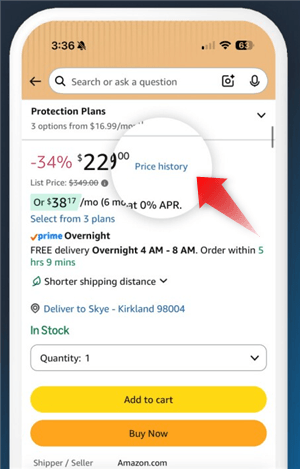
Step 3. Or ask Rufus directly — click the Rufus chat icon and type: "Has this item been on sale in the past 30 days?" or "What's the lowest price this product has been in the last year?"
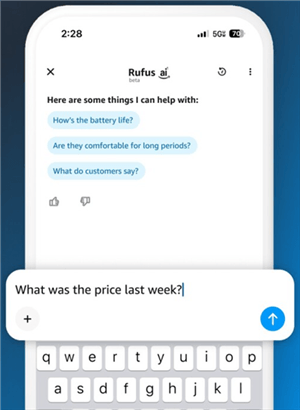
Step 4. Toggle the time range — view 30-day, 90-day, or 365-day price history.
📌 Availability note: This feature is currently live in the US, UK, Canada, and India. It may not be available for all product categories or all sellers.
Best for:
- Quick one-off price checks before making a purchase decision or setting a promotional price
- Marketers who need a fast sanity check without leaving Amazon
- Verifying whether a competitor's "sale" is genuine before matching it
Other 5 Methods to Track Item Price on Amazon
Method 1: CamelCamelCamel — The Free Amazon Price Tracker
The most widely used free tool for checking past prices on Amazon
CamelCamelCamel (CCC) is the benchmark free tool for Amazon price tracking. It covers millions of products across Amazon's major marketplaces and provides clean, readable price history charts going back years.
How to Use CamelCamelCamel:
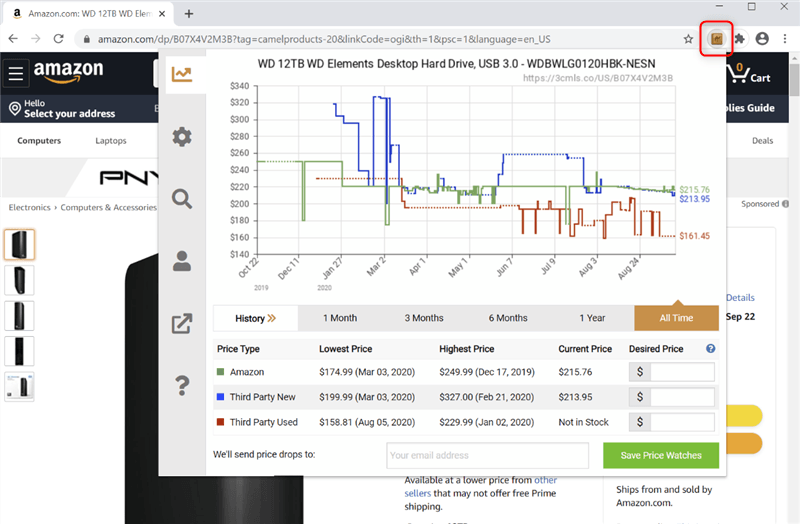
- Go to CamelCamelCamel website — or install "The Camelizer" browser extension for Chrome, Firefox, Edge, Opera, or Safari.
- Paste the Amazon product URL or ASIN — CCC will instantly pull up the full price history chart for that item.
- Read the chart — the chart shows Amazon's price, new third-party prices, and used prices over time. Hover over any point to see the exact price on that date.
- Set a price alert — create a free account and set an email alert for when the price drops below your target threshold.
- Use The Camelizer extension — if installed, a price history chart appears directly on the Amazon product page as you browse, saving you the copy-paste step.
💡 Pro tip for marketers: CCC's price history charts are exportable as images — useful for including in competitive analysis decks or client reports. Right-click the chart and save it directly.
Best for:
- Marketers researching individual products for campaign planning or pricing benchmarks
- E-commerce sellers who want a free, reliable baseline before investing in paid tools
- Anyone who needs years of price history data (CCC archives go back much further than Amazon's native 365-day view)
Method 2. Smarter Amazon Price Tracking with AI - AllyHub
AllyHub is an AI-powered automation platform that helps teams scale repetitive web workflows and data collection.
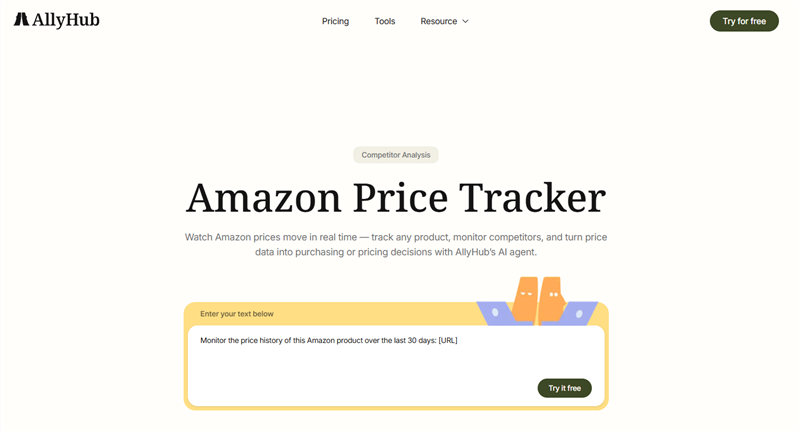
AllyHub’s Amazon Price Tracker goes beyond simple price history by combining AI-driven browsing with structured data extraction. Monitor the price history of this Amazon product over the last 30 days while going beyond basic charts. Instead of just showing charts, it helps you track, collect, and reuse competitor pricing data at scale, turning one-time checks into a repeatable workflow.
Key Features
- Bulk ASIN price tracking: Track prices across multiple products in one run — not limited to single-ASIN lookups
- Structured data export: Export clean datasets (price, reviews, BSR, sellers) into Excel for analysis
- Repeatable workflows: Save tracking setups and rerun them anytime for continuous monitoring
- AI-powered data extraction: Automatically navigate Amazon pages and capture data like a human, reducing manual work
- Context beyond price: Combine pricing with reviews, rankings, and seller data to understand market changes more clearly
Best For
- Sellers tracking multiple competitors or product lines
- Teams needing exportable pricing datasets (not just charts)
- Agencies doing recurring competitor analysis
- Anyone who wants scalable, repeatable price monitoring workflows instead of one-off checks
Method 3: Keepa — The Professional Amazon Price Tracker
The most data-rich tool for serious Amazon sellers and market analysts
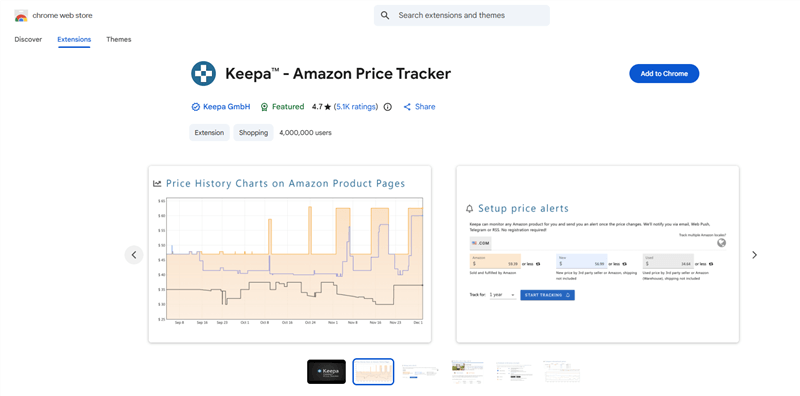
Keepa is the tool of choice for professional Amazon sellers, market researchers, and e-commerce analysts. Where CCC gives you a clean price chart, Keepa gives you a full data layer: Buy Box history, sales rank, inventory levels, third-party seller count, and more — all overlaid on the same timeline.
How to Use Keepa:
- Install the Keepa browser extension — available for Chrome, Firefox, Edge, Safari, and Opera. Once installed, Keepa charts appear automatically on every Amazon product page.
- Read the layered chart — Keepa overlays Amazon price, new/used third-party prices, Buy Box price, and sales rank on a single interactive chart. Toggle each data layer on/off.
- Analyze Buy Box history — for sellers, this is the critical layer. See which price points historically won the Buy Box and how often Amazon itself held it.
- Set price and availability alerts — Keepa sends notifications when the price drops, when Amazon goes out of stock, or when a new seller enters the listing.
- Use the API for bulk data — Keepa's API (paid) allows programmatic access to price history for thousands of ASINs — essential for large catalog management.
📌 Pricing note: Keepa's basic extension is free with limited data. The premium plan (~€19/month) unlocks full historical data, advanced filters, and API access. For professional sellers managing more than 50 ASINs, the premium plan pays for itself quickly.
Best for:
- Amazon sellers who need Buy Box data and sales rank history alongside price tracking
- Market researchers analyzing pricing trends across a product category
- Agencies managing multiple seller accounts that need API-level data access
Method 4: Honey — Price Tracking with Automatic Coupon Application
Best for marketers who also want to monitor competitor promotions and coupons
Honey (now owned by PayPal) combines Amazon price tracking with automatic coupon discovery. Its "Droplist" feature lets you track items and get notified when prices drop — and it extends beyond Amazon to Walmart, Target, and other retailers.

How to Use Honey for Amazon Price Tracking
- Install the Honey browser extension — available for Chrome, Firefox, Safari, and Edge. It's free.
- Browse to an Amazon product page — Honey's icon will appear in your browser toolbar and on the page.
- Click "Add to Droplist" — set your target price, and Honey will notify you when the item hits that price.
- View price history — Honey shows a price history graph for the item, including any available coupon discounts.
💡 Marketer use case: Honey is particularly useful for monitoring how competitors use coupons and Lightning Deals alongside their base price changes. If a competitor's "price drop" is actually a coupon stack, Honey will show you that — CCC and Keepa may not.
Best for:
- Marketers who want to track competitor promotions across Amazon and other retailers simultaneously
- Teams monitoring whether competitor "deals" are genuine price cuts or coupon-driven discounts
- Anyone who wants price tracking without a separate dedicated tool
Method 5: Bulk Amazon Price Tracking with AmzMonitor
For marketers managing large product catalogs or competitive intelligence at scale
The earlier methods work well for individual products. But once you’re tracking dozens or hundreds of ASINs, manual checking or single-product tools quickly fall apart.
That’s where AmzMonitor comes in — built specifically for scalable Amazon price and competitor tracking.
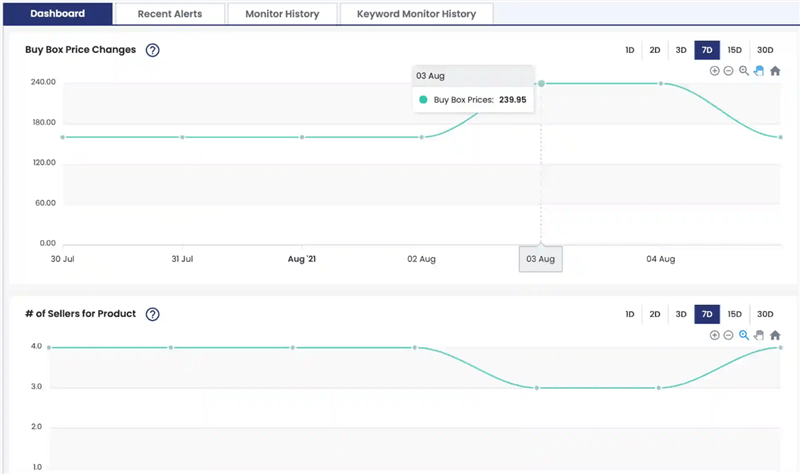
Instead of visiting product pages one by one, AmzMonitor lets you automate the entire workflow: track hundreds of ASINs, monitor price changes in real time, and centralize everything into structured dashboards or exports.
What Bulk Price Tracking Looks Like with AmzMonitor
- Create your ASIN watchlist — add your own listings, competitor products, or full category sets into AmzMonitor.
- Set monitoring rules — define what to track: price, Buy Box status, seller count, or stock changes.
- Automate data collection — AmzMonitor continuously checks product pages and logs updates with timestamps.
- Build price history automatically — every change is stored, creating a growing dataset over time.
- Export or visualize insights — push data into Excel or dashboards to analyze trends, pricing pressure, and competitor behavior.
Unlike basic trackers that focus on single-ASIN charts, AmzMonitor is designed for scale, turning fragmented price checks into a structured monitoring system for entire product portfolios.
Best for:
- Category managers tracking large ASIN sets across multiple competitors
- Agencies running ongoing e-commerce intelligence reports
- Amazon sellers building long-term price and Buy Box history datasets at scale
Which Method Should You Use? (By Scenario)
Your Scenario | Recommended Tool | Why |
Checking if a competitor's Prime Day deal is genuine | CamelCamelCamel | Free, fast, years of history — shows if the "sale" price is actually lower than the historical average |
Optimizing your Buy Box pricing strategy | Keepa (premium) |
FAQs on Amazon Price Tracking
How do I check price history on Amazon without installing anything?
Use Amazon’s built-in Rufus feature. Click “price history” or ask Rufus about past prices to see recent trends (30/90/365 days).
Does Amazon price tracking work on mobile?
Yes. Rufus works in the Amazon app. For third-party tools, use CamelCamelCamel via mobile browser.
Is it legal to track Amazon's price history?
Yes, tracking public prices is legal. Just avoid large-scale scraping that may violate Amazon’s ToS.
Why does Amazon's price history matter for ad campaigns?
It helps identify optimal pricing windows to improve conversion rates and lower ACoS.
What's the difference between CamelCamelCamel and Keepa?
CamelCamelCamel is simple and free; Keepa offers more advanced data like Buy Box and sales rank.
Can I track Amazon price history for products I don't sell?
Yes. You can track any public ASIN for competitor analysis.
How can AllyHub help with Amazon price tracking at scale?
AllyHub automates bulk data collection and exports structured reports, making recurring tracking much more efficient.
The Bottom Line
Amazon price tracking isn't just a consumer habit — it's a core competency for any marketer or seller operating on the platform. The tools exist, they're mostly free, and the data they provide is genuinely actionable.
Here's the practical starting point:
- For quick checks: Use Amazon's native Rufus feature or CamelCamelCamel — no setup, no cost.
- For serious sellers: Install Keepa and pay for the premium plan — the Buy Box and sales rank data alone justify the cost.
- For scale: When you're tracking more than 20–30 ASINs regularly, manual tools become a bottleneck. That's when web automation tools like AllyHub become the right investment.
The marketers who win on Amazon aren't the ones with the biggest ad budgets — they're the ones who understand the pricing landscape well enough to move first, price right, and promote credibly. Price history data is how you get there.