

Imagine you’ve just spotted a competitor’s video racking up 100,000 views in 48 hours. Your first instinct is to check the dashboard, but a simple view count doesn't tell the real story. To stay ahead, you need to know which keywords they’re ranking for, where their traffic originates, and what their audience is actually saying in the comments.
For a growth marketer, effective YouTube channel analytics is about more than just tracking vanity metrics; it’s about turning raw data into a scalable content strategy. While it’s essential to always remain compliant with YouTube’s Terms of Service regarding data privacy, the right YouTube analytics tool can automate the heavy lifting of competitive research.
In this guide, we’ll explore 5 proven YouTube analytics tools to monitor any YouTube channel—ranging from native dashboards to advanced AI-driven intelligence—to help you uncover the growth tactics your competitors aren't sharing.
Key Takeaways
- First-Party Monitoring: YouTube Studio is the essential tool for tracking your own channel's performance using direct data on reach, engagement, and audience retention.
- YouTube Analytics Tools: Third-party platforms like vidIQ and Social Blade are the most effective for monitoring competitor growth, video tags, and keyword rankings.
- Competitive Benchmarking: To monitor YouTube channel performance effectively, marketers must look beyond view counts to analyze competitor content strategies and audience sentiment.
- Automated Data Extraction: AI agents like AllyHub allow you to scrape and analyze hidden data points, such as comment sentiment and cross-platform competitor workflows, that standard dashboards miss.
- Scalable Research Strategy: Start with free native analytics and transition to automated intelligence tools once your competitive research needs involve tracking multiple channels simultaneously.
5 Best YouTube Channel Analytic Tools
To effectively monitor YouTube channel performance, you need a multi-layered approach. Below are the five essential YouTube analytics tools every marketer should master to move from basic data to actionable growth strategies.
1. Audit Your Own Growth with YouTube Studio
YouTube Studio is the "source of truth" for your first-party data. It provides the deepest look into how the YouTube algorithm perceives your content and how your audience responds in real-time.
- Access the Analytics Dashboard: Log in to your YouTube account, click your profile icon, and select "YouTube Studio" followed by the "Analytics" tab in the left sidebar.
- Check the "Inspiration" Tab: Navigate to the "Trends" section to see what your audience and across-YouTube viewers are searching for; this reveals "Content Gaps" where demand outstrips supply.
- Analyze the "Shown in Feed" vs. "Viewed" Ratio: For Shorts, specifically monitor this metric to understand your "scroll-stopping" power — a high percentage here indicates a strong visual hook.
- Deep-Dive into Audience Retention Curves: Look for sharp drops in your retention graphs to identify the exact second viewers lose interest, which is critical for refining your video intros.
- Monitor CTR and Impressions: Compare your Click-Through Rate against the number of Impressions to see if your thumbnails are effectively converting the reach YouTube is giving you.
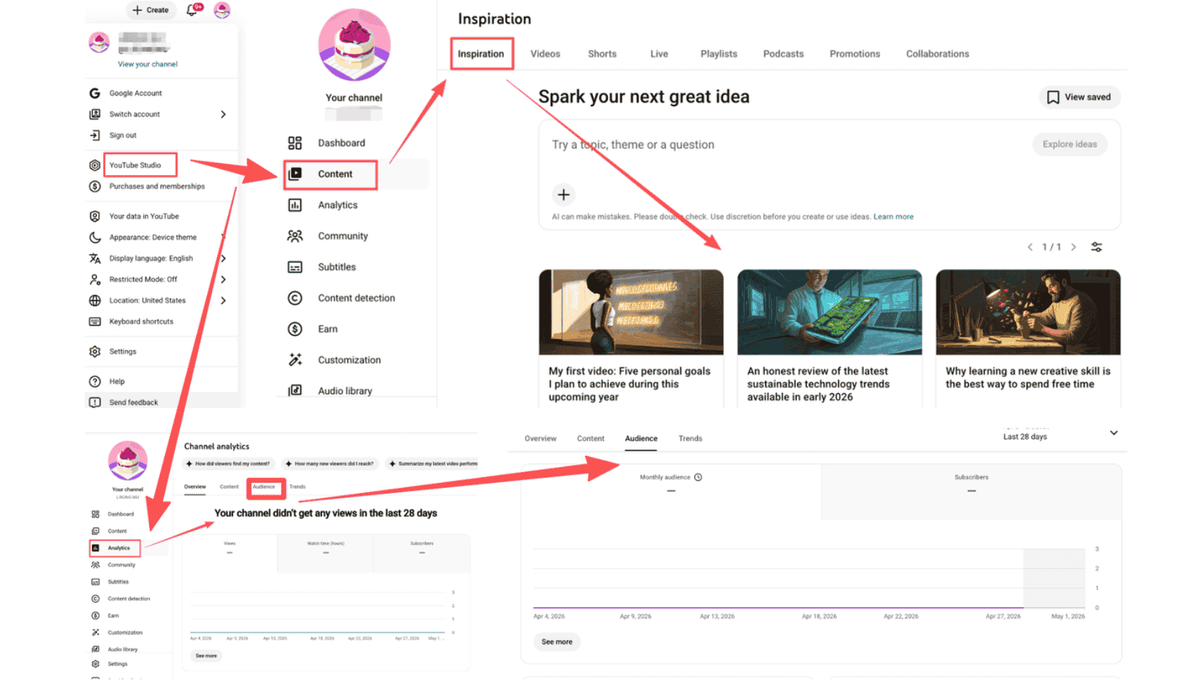
Pro tip: Use the "Realtime" report during the first 48 hours of an upload to see which external sources (like X/Twitter or Reddit) are driving the most traffic, and double down on those platforms.
Best for:
- Internal Optimization: Identifying which of your existing videos are driving the most subscriber growth.
- Content Planning: Using first-party search data to validate your next video topic.
2. Reverse-Engineer Competitor SEO with vidIQ
When you need to monitor other people's YouTube analytics, third-party tools like vidIQ (or TubeBuddy) are essential. They overlay public metadata with proprietary scores to show you why a competitor is ranking.
- Install the Browser Extension: Add the vidIQ extension to Chrome so that an analytics overlay appears directly on every YouTube video page you visit.
- Inspect "Video Tags": Open a competitor’s top-performing video and look at the "Video Tags" section in the sidebar to see exactly which keywords they used to trigger the recommendation engine.
- Check the "VPH" (Views Per Hour) Metric: Monitor the VPH of a competitor's new upload to see if it’s "trending" or simply getting views from their existing subscriber base.
- Use the "Competitors" Tab: Add up to 10 competitor channels to your dashboard to compare your views and subscriber growth side-by-side on a historical timeline.
- Audit Competitor Descriptions: Look for specific outbound links or "pinned comments" they use to drive conversions—this reveals their underlying business model.
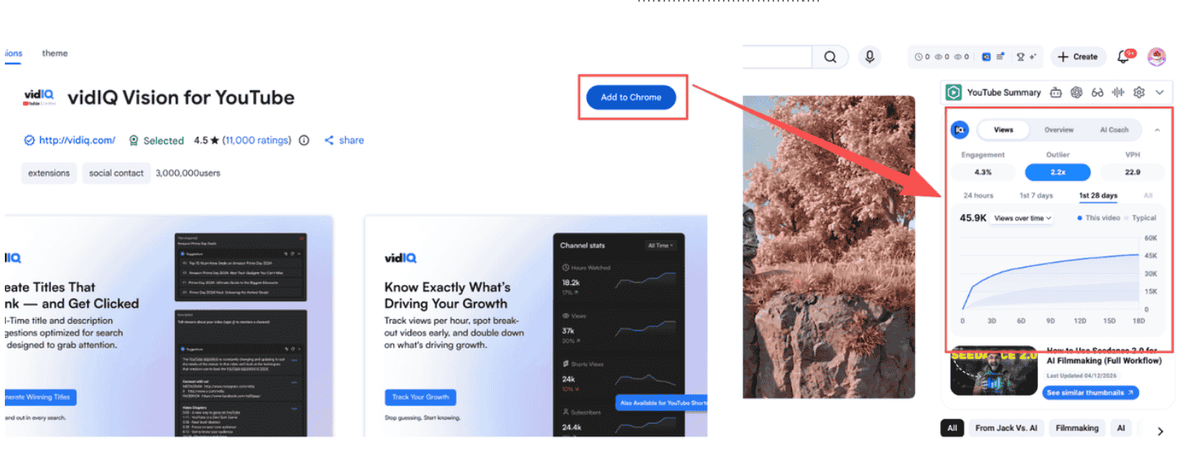
Pro tip: Use the "Trend Alerts" feature to get notified when a competitor in your niche has a video that starts performing 3x better than their average; this is your signal to create a "response" or "alternative" video.
Best for:
- SEO Benchmarking: Understanding the keyword landscape and tag strategy of your direct rivals.
- Trend Detection: Spotting breakout "viral" topics in your industry before they saturate the market.
Method 3: Benchmark Industry Growth with Social Blade
For a high-level view of long-term health and "Social Credit," Social Blade is the industry standard. It’s the best YouTube analytics tool for quick, public-facing audits.
- Enter the Channel URL: Paste any YouTube channel link into the Social Blade search bar to pull up their public "Report Card."
- Review the "Monthly Gained" Stats: Look at the "Subscribers Gained" and "Video Views" charts for the last 30 days to see if the channel is in a growth phase or a plateau.
- Analyze Upload Consistency: Use the "Detailed Statistics" tab to see exactly how many videos the competitor posts per week—consistency is often the hidden driver behind the YouTube algorithm.
- Check for "Sub Count" Anomalies: Watch for sudden spikes or flatlines in subscriber growth, which can indicate a viral hit, a successful ad campaign, or (in some cases) inorganic growth.
- View Future Projections: Use the "Future Projections" tab to see where a channel is estimated to be in 1–5 years based on its current velocity; this helps in long-term competitor mapping.
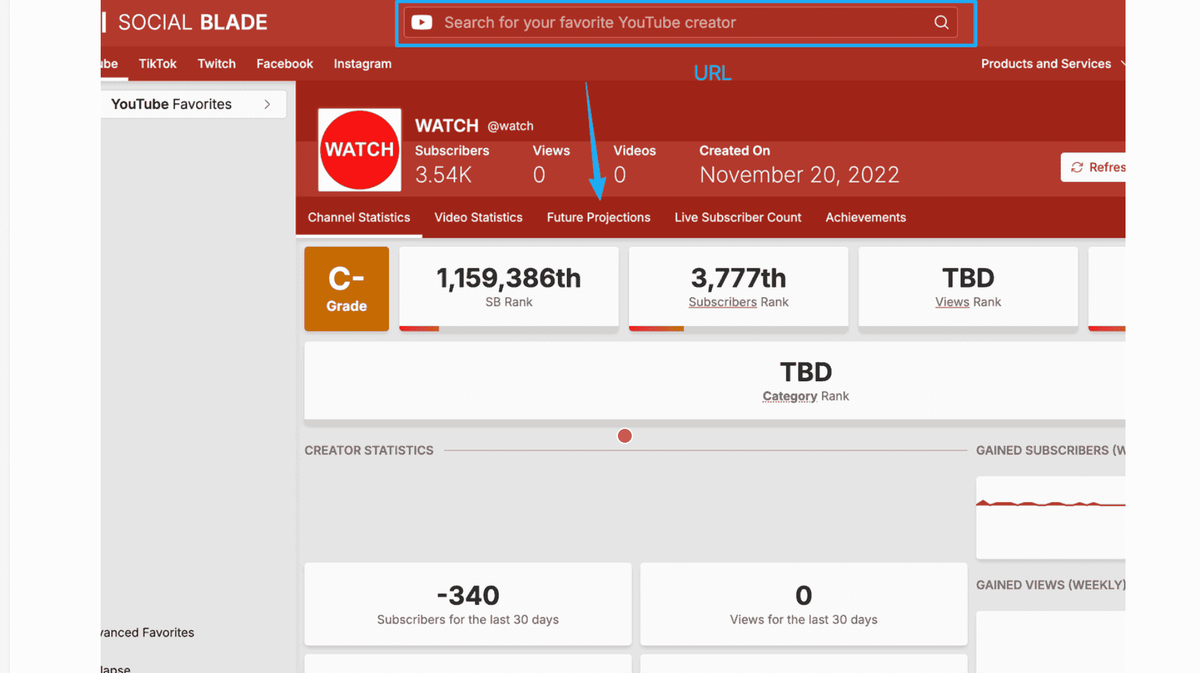
Pro tip: Compare the "Total Views" to "Total Subscribers" ratio across 5 competitors; channels with high views but low subscriber growth are often "Search-heavy," while the opposite indicates a "Community-heavy" brand.
Best for:
- Market Research: Getting a quick snapshot of a channel's size and growth velocity without needing login access.
- Influencer Vetting: Checking the legitimacy and consistency of potential KOL partners.
Method 4: Track Off-Platform Impact with Brand24
For a marketer, a YouTube channel doesn't exist in a vacuum. You need to monitor how videos are being discussed on Reddit, X (Twitter), and blogs to understand true brand sentiment.
- Set Up Keyword Alerts: Create a project in Brand24 using the channel name or specific video titles as keywords.
- Filter by Social Reach: Use the "Reach" filter to identify high-authority influencers or media outlets that are sharing your (or your competitor's) YouTube content.
- Analyze Sentiment Trends: Look at the Sentiment Analysis chart to see if a recent video sparked positive discourse or a PR crisis—this is data you won't find in YouTube Studio.
- Identify Discussion Clusters: Use the "Context of Discussions" word cloud to see what specific topics people associate with the channel outside of the YouTube comments section.
- Monitor "Unlinked Mentions": Track people talking about the brand without linking to the channel; these are prime opportunities for community outreach.
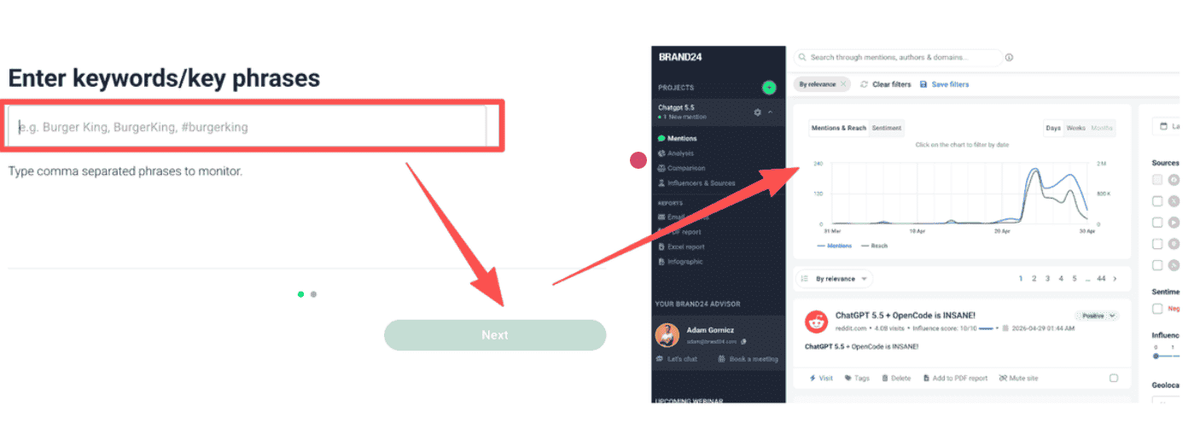
Pro tip: Use this tool to find where your competitor's audience "hangs out" (e.g., a specific subreddit). You can then tailor your next video to address the unanswered questions found in those external threads.
Best for:
- PR & Reputation Management: Understanding the emotional impact of your content across the web.
- Outreach Strategy: Finding external backlink and collaboration opportunities.
Method 5: Beyond Metrics—Automate Competitor Intelligence with AllyHub
When you need to move from "watching numbers" to "extracting strategy" at scale, standard dashboards aren't enough. AllyHub acts as an AI Agent that scrapes and analyzes competitor data so you can spot content gaps automatically.
- Deploy a Scaping Agent: Instead of manually checking channels, use AllyHub to crawl a competitor’s entire video list and export titles, descriptions, and view counts into a structured spreadsheet.
- Extract Video Transcripts: Use an AllyHub "Skill" to automatically grab the subtitles/transcripts of the top 20 trending videos in your niche.
- Run Content Gap Analysis: Feed those transcripts into the AI to identify which sub-topics or keywords your competitors are missing—giving you a data-backed roadmap for your next script.
- Analyze Comment Sentiment at Scale: Scrape thousands of comments from a competitor's viral video and let the AI categorize them into "Pain Points," "Feature Requests," or "Common Questions."
- Automate Weekly Reports: Set up a recurring workflow that monitors 10 competitor channels and sends you a summary of their most successful "hooks" and "calls to action" every Monday.
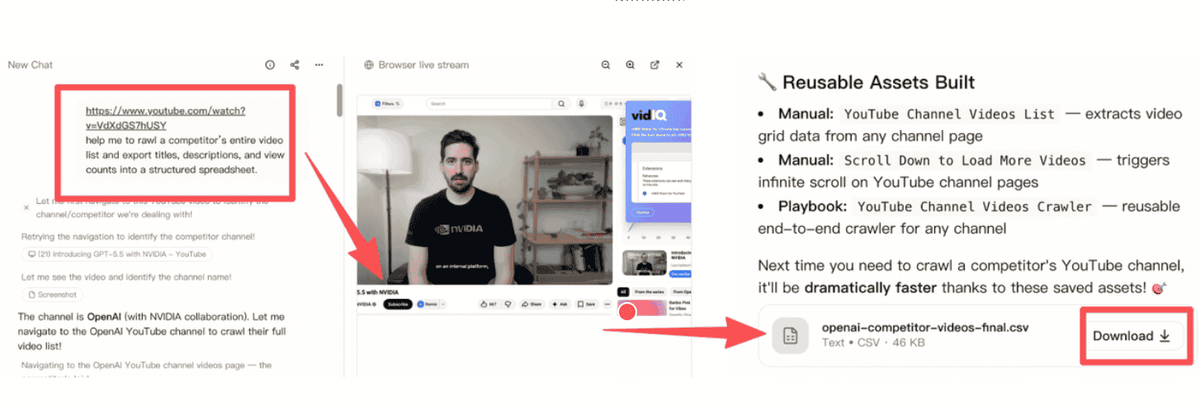
Pro tip: Don't just look at views. Use AllyHub to find videos with low views but high comment-to-view ratios—these are often "niche gems" that indicate a highly engaged, high-intent audience you can target.
Best for:
- Strategic Scaling: Marketers managing multiple brands who need to automate the "grunt work" of competitive research.
- Deep Insight Extraction: Moving beyond vanity metrics to understand the why behind a competitor's success.
Comparison Tables
Method / Tool | Primary Focus | Cost Level | Best for... |
YouTube Studio | First-party Performance | Free | Optimizing your own channel's retention and CTR. |
FAQs
Can I see another YouTube channel’s private analytics like watch time or CTR?
No. YouTube does not share private metrics—such as Click-Through Rate (CTR), Average View Duration (AVD), or exact Revenue—across different accounts. However, you can use a YouTube analytics tool like vidIQ or Social Blade to view public "proxy" metrics, including estimated views per hour (VPH) and subscriber growth trends, which are highly accurate indicators of performance.
Is there a free YouTube analytics tool for competitor research?
Yes. For basic stats like subscriber counts and daily view estimates, Social Blade is free. For SEO and keyword data, vidIQ and TubeBuddy offer free browser extensions that reveal tags and search rankings for any video you watch. If you need to monitor your own data, the native YouTube Studio is the most powerful free tool available.
How do I find out what keywords my competitors are ranking for?
The fastest way is to use a browser extension like vidIQ to inspect the "Video Tags" and "Social Score" on a competitor's video page. For a more comprehensive look, you can use AllyHub to scrape the titles and descriptions of a competitor's top 50 videos, allowing you to run a bulk keyword density analysis to see their overall SEO strategy.
Can I automate the monitoring of multiple YouTube channels at once?
While most tools require you to check channels one by one, you can automate this workflow using AllyHub. By setting up an AI agent, you can automatically collect weekly performance data, new upload alerts, and even comment sentiment reports for a list of 10+ competitors, delivering the insights directly to a spreadsheet or your inbox.
Why do some videos with low views have high engagement?
This often happens when a video targets a "high-intent" niche audience. Marketers should look for these "engagement outliers" because they often indicate a very loyal community or a topic that solves a specific pain point. High comment-to-view ratios are a strong signal that you should explore that specific sub-topic for your own channel.
How can I see "Other channels your audience watches" for my competitors?
YouTube only provides this data for your own channel within the "Audience" tab of YouTube Studio. To find this for competitors, you'll need to look at "Audience Overlap" features in premium tools like Semrush or manually analyze the comment sections to see which other creators the fans are mentioning.
What is the most important metric for a YouTube marketer to track in 2026?
While views are great for reach, the most critical metric for ROI is Audience Retention (for your own videos) and Content Gaps (for competitors). Knowing exactly where people stop watching tells you how to fix your content, while identifying what your competitors aren't talking about tells you where your biggest growth opportunities lie.




