You've published a video. It's well-produced, the topic is solid, and you've spent hours on the script. Three weeks later: 47 views, mostly from your own team.
The problem isn't the content. It's the infrastructure around it — the keyword research you skipped, the thumbnail you didn't A/B test, the analytics you never checked. YouTube marketing without the right tools is like running paid ads without a tracking pixel: you're spending effort with no feedback loop.
This guide covers the 7 best YouTube marketing tools for marketers in 2026 — what each one does, who it's best for, and how to use it step by step. Whether you're managing a brand channel, running campaigns for clients, or building a content engine from scratch, these tools cover every stage of the workflow.
Key Takeaways
- YouTube marketing tools span four categories: SEO/keyword research, analytics, content creation, and social media management — most marketers need at least one from each.
- TubeBuddy and vidIQ are the two essential YouTube-specific tools: both offer keyword research, competitor analysis, and optimization features; TubeBuddy leads on A/B testing, vidIQ leads on AI-powered content ideation.
- YouTube Studio is free and underrated: its built-in Search Analytics and Inspiration tab give you real audience data without paying for a third-party tool — start here before upgrading.
- Marketers managing multi-channel presence should layer in Hootsuite or Sprout Social for scheduling, comment management, and cross-platform analytics.
- Start with YouTube Studio + TubeBuddy (free tier): this combination covers keyword research, basic analytics, and optimization for most channels — upgrade to paid tools once you're publishing consistently.
What Is YouTube Marketing?
YouTube marketing is the practice of using YouTube as a channel to build brand awareness, generate leads, drive traffic, and convert viewers into customers. For marketers, it combines content strategy, search engine optimization (YouTube is the world's second-largest search engine), paid advertising, and community management — all within a single platform.
Unlike social media platforms where content decays within hours, YouTube videos compound over time. A well-optimized video can generate views and leads for years after publication. That compounding dynamic is what makes YouTube marketing uniquely valuable — and uniquely dependent on the right tools to execute well.
What YouTube marketing actually involves for a marketer:
- Keyword research: Finding topics your audience searches for on YouTube and Google
- Video SEO: Optimizing titles, descriptions, tags, and thumbnails to rank in search results
- Analytics: Understanding watch time, click-through rate (CTR), audience retention, and traffic sources
- Competitor analysis: Identifying what's working in your niche before you invest in production
- Content scheduling: Publishing consistently without manual effort
- Community management: Responding to comments, moderating spam, and building audience relationships
Each of these tasks has dedicated tools — and the right stack depends on your channel size, team structure, and marketing goals.
YouTube Marketing Tips Before You Pick a Tool
Before diving into the tools, three principles that separate effective YouTube marketers from those who spin their wheels:
Pro tip: The algorithm doesn't reward frequency — it rewards watch time and engagement. One well-optimized video per week outperforms five rushed ones every time.
- Define your goal before choosing tools. Brand awareness channels need different tools than lead-generation channels. A brand awareness play prioritizes reach and impressions; a lead-gen play prioritizes CTR, watch time, and conversion tracking.
- Keyword research comes before production. The biggest waste in YouTube marketing is producing a video for a topic nobody searches for. Run keyword research before scripting — not after.
- Thumbnails and titles drive CTR; CTR drives everything else. YouTube's algorithm surfaces videos with high click-through rates. A/B testing thumbnails and titles is one of the highest-ROI activities on the platform.
Tool 1: YouTube Studio — The Free Foundation
YouTube Studio is YouTube's native analytics and management dashboard. It's free, built directly into the platform, and contains data no third-party tool can replicate — because it comes straight from YouTube itself.
How Marketers Can Use YouTube Studio
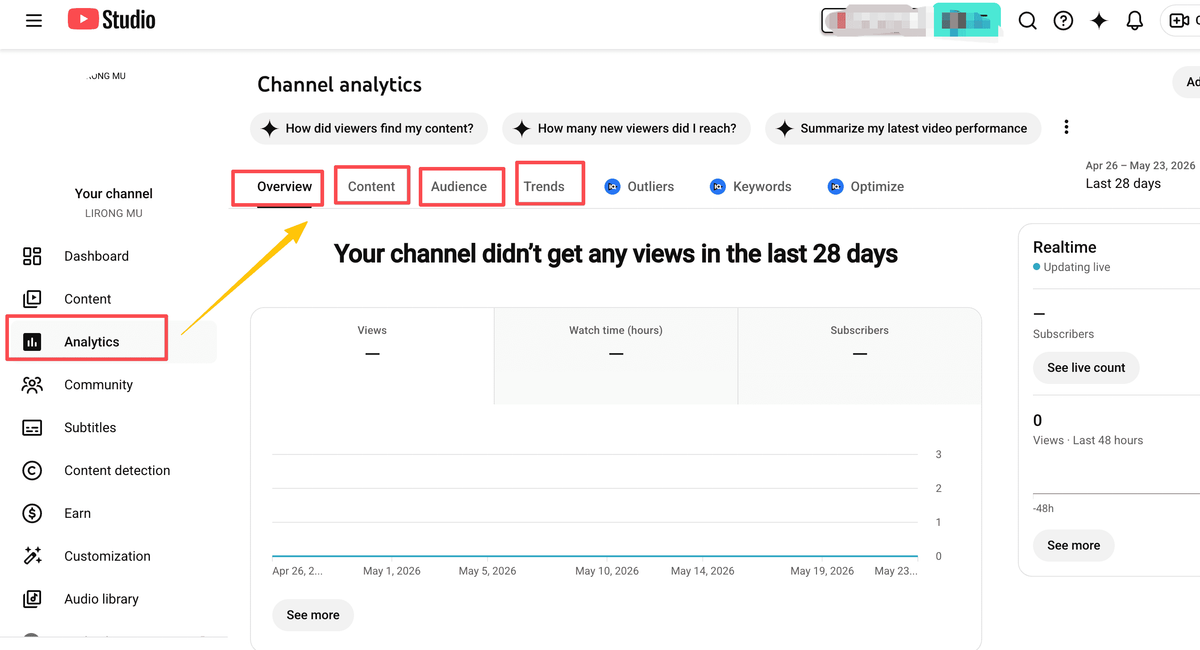
- Navigate to YouTube Studio at studio.youtube.com and sign in with your brand account.
- Go to Analytics → Research tab (also called the "Inspiration" tab in some regions). Type in a topic to see what your audience is actually searching for on YouTube — this is real search demand data, not estimates.
- Check the "Content" tab to see which videos are driving the most watch time, impressions, and CTR. Sort by "Impressions click-through rate" to identify your best-performing thumbnails and titles.
- Review "Audience" tab for demographic data — age, geography, and when your audience is most active. Use this to schedule uploads for peak engagement windows.
- Use the "Reach" tab to understand traffic sources: YouTube Search, Suggested Videos, External, Browse Features. If Search is low, your SEO needs work. If Suggested is high, your content is being recommended — double down on that format.
- Set up email notifications for comments and new subscribers so you can respond within the first hour of publishing (early engagement signals boost algorithmic distribution).
Best for:
- Marketers just starting a YouTube channel
- Teams that need real audience data without a paid subscription
- Anyone who wants to understand traffic sources before investing in third-party tools
Note: YouTube Studio's keyword data shows relative search volume (high/medium/low), not exact numbers. For precise volume data, you'll need TubeBuddy or vidIQ.
Tool 2: TubeBuddy — YouTube SEO and A/B Testing
TubeBuddy is a browser extension that integrates directly into YouTube Studio, adding a layer of SEO tools, keyword research, and productivity features on top of YouTube's native interface. It's one of the most widely used YouTube marketing tools among professional creators and brand channels.
How to Use TubeBuddy for YouTube Marketing
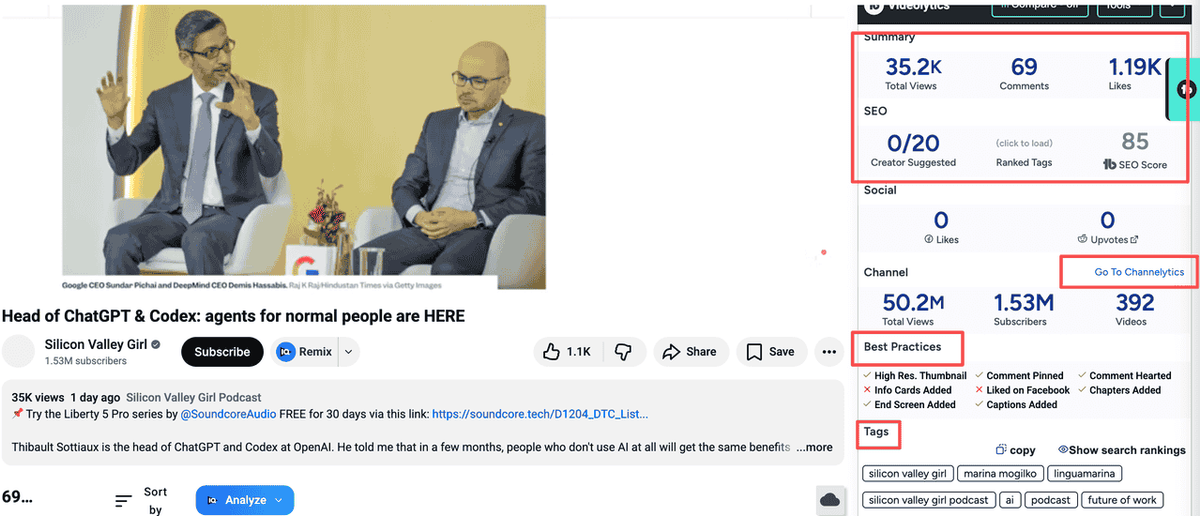
- Install the TubeBuddy browser extension from the Chrome Web Store and connect it to your YouTube account.
- Use the Keyword Explorer to research topics before scripting. Enter a keyword and TubeBuddy shows you search volume, competition score, and related keywords — with a "TubeBuddy Score" that tells you how rankable the keyword is for your channel size.
- Run a Tag Explorer on competitor videos to see which tags they're targeting. This reveals keyword gaps you can exploit.
- Set up A/B tests for thumbnails and titles on your published videos. TubeBuddy rotates between two versions and shows you which drives higher CTR — this is the feature that sets TubeBuddy apart from most competitors.
- Use Bulk Processing to update end screens, cards, or descriptions across multiple videos at once — essential for channel rebrands or adding new CTAs to your back catalog.
- Check the SEO Studio before publishing each video: it scores your title, description, and tags against your target keyword and gives specific improvement suggestions.
Best for:
- Marketers managing channels with 10+ published videos
- Teams running A/B tests on thumbnails and titles
- Agencies managing multiple client channels (TubeBuddy supports multi-channel management)
Feature | Free Tier | Pro ($4.99/mo) | Legend ($19.99/mo) |
Keyword Explorer | Limited | ✅ Full | ✅ Full |
A/B Testing | ❌ |
Tool 3: vidIQ — AI-Powered Content Ideation and Competitor Analysis
vidIQ is TubeBuddy's closest competitor, but with a different emphasis: where TubeBuddy excels at A/B testing and bulk operations, vidIQ leads on AI-powered content ideation and competitor intelligence. Its daily AI-generated video ideas feature is particularly useful for marketers who struggle with consistent content planning.
Using vidIQ for YouTube Marketing Research
- Install the vidIQ browser extension and connect your YouTube channel.
- Open the "Ideas" tab in the vidIQ dashboard. The AI generates daily video ideas based on your channel's niche, current trends, and search demand — each idea comes with an estimated view potential score.
- Use the Competitor Analysis tool to add 3–5 competitor channels. vidIQ tracks their upload frequency, average views per video, and which videos are outperforming their channel average — these are your content gap opportunities.
- Run keyword research using vidIQ's Keyword Research tool. It shows search volume, competition, and a "vidIQ Score" similar to TubeBuddy's. Cross-reference both tools for the most reliable keyword data.
- Use the AI Title Generator to generate 10+ title variations for a video concept. Test the top 2–3 options against each other using TubeBuddy's A/B testing (the tools complement each other well).
- Check the "Trending" tab to see which videos in your niche are gaining momentum right now — useful for reactive content that capitalizes on current search spikes.

Best for:
- Marketers who need structured content calendars and regular video ideas
- Channels in competitive niches where competitor intelligence is critical
- Teams using AI to accelerate scripting and optimization workflows
Pro tip: vidIQ's "Outlier" feature identifies videos that significantly outperformed a channel's average. When you find a competitor's outlier video, analyze its title, thumbnail, and topic — that's your clearest signal of what the algorithm is rewarding in your niche right now.
Tool 4: Google Trends — Free Keyword Validation
Google Trends is a free tool that shows search interest over time for any keyword — and critically, it has a YouTube Search filter that shows trend data specifically for YouTube queries. For marketers, it's the fastest way to validate whether a topic is growing, declining, or seasonal before investing in production.
Using Google Trends for YouTube Marketing Research
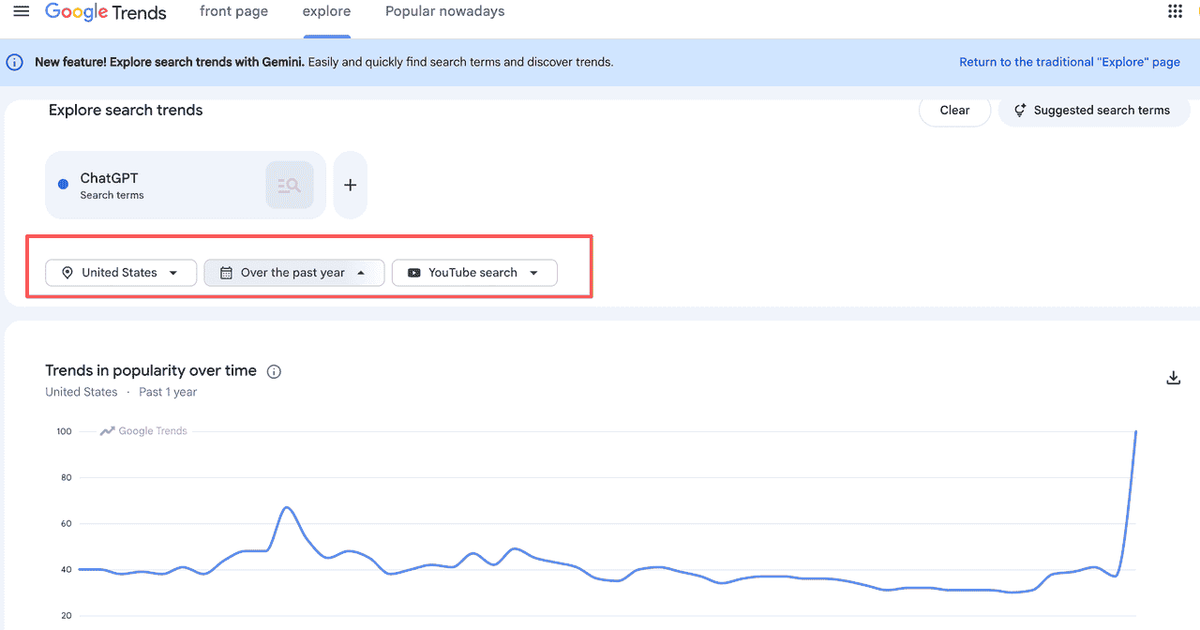
- Go to Google Trends and enter your target keyword.
- Switch the search type from "Web Search" to "YouTube Search" using the dropdown below the search bar. This filters the data to YouTube-specific search behavior.
- Set the time range to "Past 12 months" for seasonal patterns, or "Past 5 years" for long-term trend direction. A keyword with consistent or growing interest is a safer bet than one that peaked two years ago.
- Scroll to "Related queries" and switch to "Rising" to find breakout keywords in your topic area — these are emerging search terms with high growth potential and lower competition.
- Compare up to 5 keywords side by side to determine which variant has the strongest demand. For example, compare "youtube marketing tips" vs. "youtube marketing strategy" vs. "youtube marketing for beginners" to find the highest-demand angle.
- Use the geographic data to identify which regions have the highest interest in your topic — useful for localizing content or targeting specific markets with YouTube Ads.
Best for:
- Marketers validating keyword ideas before scripting
- Teams planning quarterly content calendars around seasonal demand
- Brands targeting specific geographic markets
Tool 5: Canva — Thumbnail and Channel Art Creation
Thumbnails are the single highest-leverage visual asset in YouTube marketing. According to YouTube's own Creator Academy, 90% of the best-performing videos on YouTube use custom thumbnails. Canva makes it possible to create consistent, on-brand thumbnails at scale — even without design skills.
Using Canva to Create YouTube Thumbnails
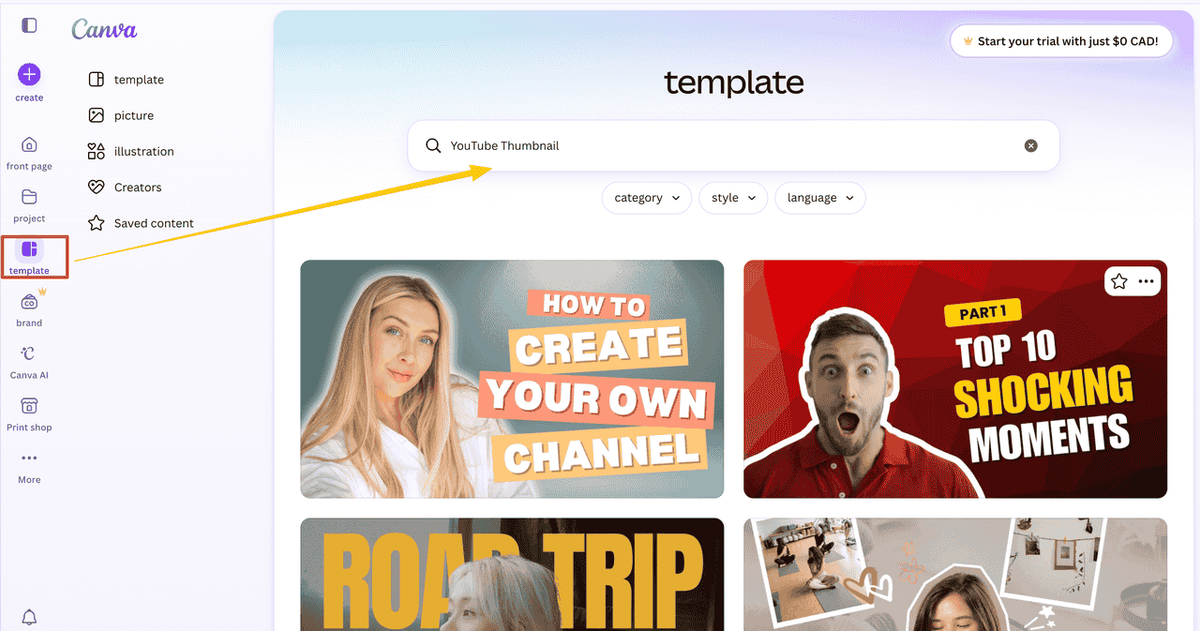
- Open Canva and search for "YouTube Thumbnail" in the template library. Canva's templates are pre-sized at 1280×720px (YouTube's recommended thumbnail size).
- Choose a template that matches your brand's visual style. Look for templates with high contrast, large readable text, and a clear focal point — these are the elements that drive CTR.
- Replace the template image with a high-quality photo or screenshot from your video. Use a frame where your face shows a clear, expressive reaction — faces with visible emotion consistently outperform neutral expressions in thumbnail tests.
- Add your title text in 3–5 words maximum. Use a font size large enough to read on a mobile screen (where most YouTube views happen). Avoid full sentences — thumbnails are not descriptions.
- Apply your brand colors to the background and text elements. Consistent color schemes across thumbnails build channel recognition — viewers start to recognize your content in their feed before they read the title.
- Export at PNG format and upload directly to YouTube Studio when publishing or updating a video.
Best for:
- Marketing teams without in-house designers
- Channels that need to produce thumbnails at scale (weekly or more)
- Brands building a consistent visual identity across their YouTube library
Pro tip: Create a Canva template with your brand colors, fonts, and logo locked in place. Every new thumbnail starts from this template — it cuts thumbnail production time from 30 minutes to under 10.
Tool 6: Hootsuite — Multi-Channel Scheduling and Comment Management
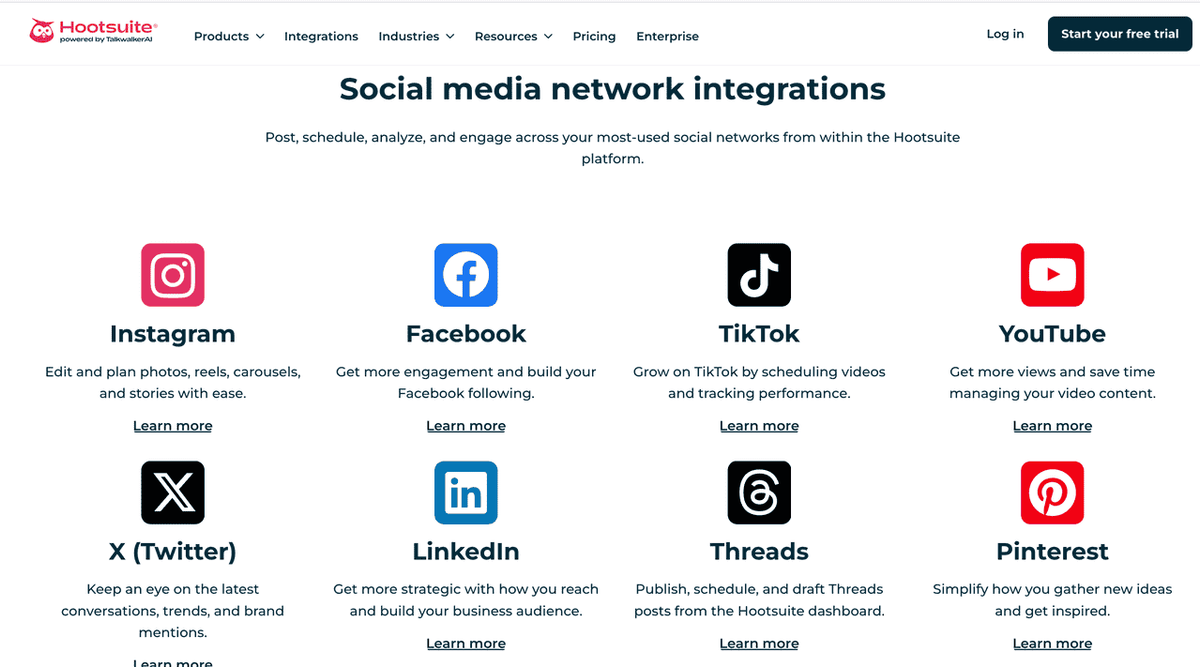
Hootsuite is a social media management platform that includes YouTube as one of its supported channels. For marketers who manage YouTube as part of a broader social media strategy — not as a standalone channel — Hootsuite provides scheduling, comment management, and cross-platform analytics in a single dashboard.
How Marketers Can Use Hootsuite
- Connect your YouTube channel to Hootsuite from the account settings. You can connect multiple YouTube channels alongside Instagram, LinkedIn, X, and other platforms.
- Schedule video uploads by creating a new post, selecting YouTube as the destination, and uploading your video file. Add your title, description, tags, and thumbnail directly in Hootsuite's composer — no need to switch to YouTube Studio for publishing.
- Set up a content calendar using Hootsuite's Planner view. Map out your YouTube publishing schedule alongside other social content to ensure consistent cross-channel promotion.
- Manage comments from the Hootsuite Inbox, which aggregates YouTube comments alongside messages from other platforms. Assign comments to team members, mark them as resolved, and filter out spam — all without opening YouTube Studio.
- Use OwlyWriter AI to generate YouTube descriptions, titles, and content ideas directly within Hootsuite's composer. This is useful for teams that need to produce metadata at scale.
- Pull cross-platform analytics from Hootsuite's Reports section to compare YouTube performance against other channels — useful for quarterly marketing reviews and budget allocation decisions.
Best for:
- Marketing agencies managing multiple client YouTube channels
- Brand teams running YouTube as part of a multi-channel social strategy
- Teams that need comment moderation workflows with assignment and escalation
Tool 7: Sprout Social — Advanced Analytics and Influencer Discovery
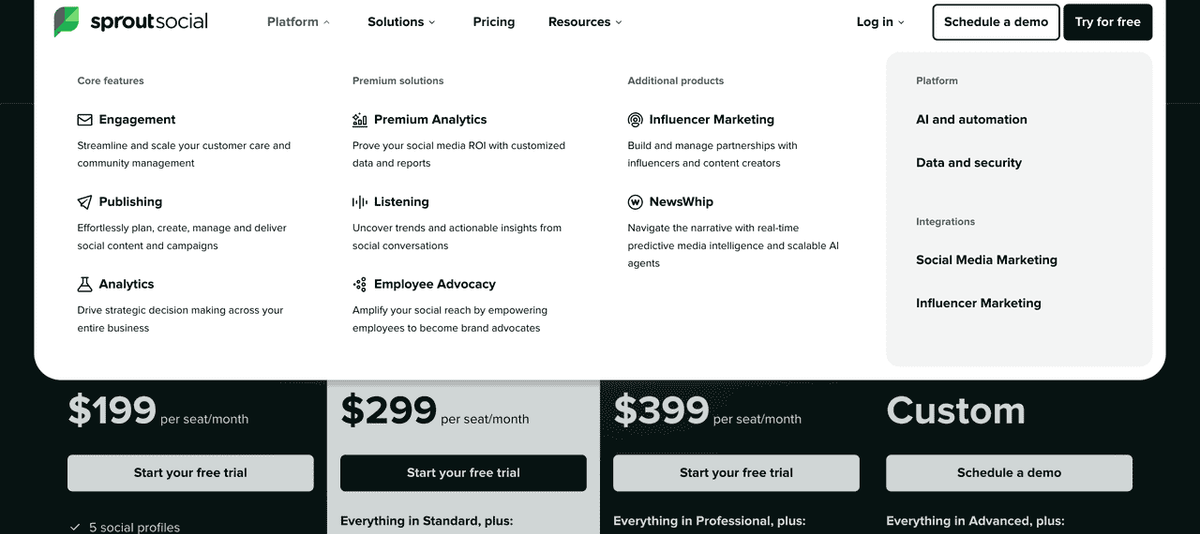
Sprout Social positions itself at the premium end of social media management, with stronger analytics and reporting capabilities than Hootsuite. For YouTube marketing specifically, its standout features are audience demographic analysis, competitor benchmarking, and influencer discovery — capabilities that matter most to larger marketing teams with dedicated YouTube strategies.
How Sprout Social Helps Plan YouTube Campaigns
- Connect your YouTube channel in Sprout Social's account settings. The platform pulls in historical data for the past 13 months.
- Set up competitor profiles by adding competitor YouTube channels to Sprout's Listening module. Track their upload frequency, average engagement rates, and top-performing content — this gives you a benchmark for your own channel's performance.
- Use the Audience Demographics report to understand your viewers' age, gender, and geographic distribution. Cross-reference this with your buyer persona to identify alignment gaps — if your audience skews younger than your target customer, your content strategy needs adjustment.
- Identify influencer partners using Sprout's influencer discovery tools. Search for YouTube creators in your niche by topic, audience size, and engagement rate — then filter by audience demographics to find creators whose followers match your target customer profile.
- Build custom reports for stakeholder presentations. Sprout's report builder lets you combine YouTube metrics with data from other channels into a single branded PDF — useful for monthly marketing reviews.
- Use the Smart Inbox to manage YouTube comments alongside other social interactions, with sentiment analysis to flag negative comments for priority response.
Best for:
- Enterprise marketing teams with dedicated YouTube budgets
- Brands running influencer marketing programs on YouTube
- Teams that need executive-level reporting across multiple social channels
YouTube Marketing Tools Comparison Table
Tool | Primary Use | Best For | Free Tier | Starting Price |
YouTube Studio | Analytics + SEO | All marketers | ✅ Free | Free |
Which Tool Is Right for Your Situation?
Scenario | Recommended Tools | Why |
Just starting a YouTube channel | YouTube Studio + Google Trends | Free, covers keyword research and analytics |
Growing channel (10–50 videos) | YouTube Studio + TubeBuddy Pro | A/B testing and SEO optimization become critical |
The Workflow Gap Most YouTube Marketing Tools Leave Behind
Most YouTube marketing tools solve one job at a time. One tool helps with keyword research. Another helps with thumbnails. Another schedules posts or checks performance.
That is fine for occasional publishing. It gets messy when your team needs to publish every week. Research lives in one tab, competitor notes in another, thumbnail ideas in a design tool, and performance data somewhere else. By the time you write the next brief, half the context is already lost.
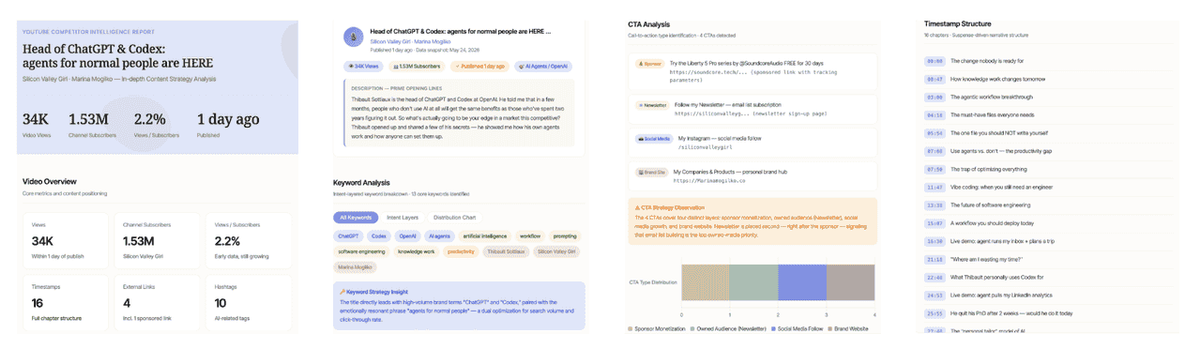
This is where AllyHub can help. AllyHub is not a replacement for YouTube Studio, vidIQ, Canva, Hootsuite, or Sprout Social. It works better as a workflow layer for the repetitive work around those tools: collecting research, summarizing competitor videos, organizing keyword ideas, preparing briefs, and turning scattered inputs into a process your team can reuse.
For a YouTube marketing team, that might mean:
- Pulling competitor video details into one research sheet
- Summarizing titles, descriptions, tags, hooks, and CTAs from selected videos
- Turning keyword and trend notes into a content brief
- Creating a repeatable checklist for titles, descriptions, thumbnails, and upload metadata
- Organizing weekly performance notes before the next planning meeting
The point is simple: individual tools help with individual tasks. AllyHub helps keep the work between those tasks from becoming another manual project.
Recommended: If you're running YouTube marketing as part of a broader content operation and find yourself doing the same research and reporting tasks every week, AllyHub's workflow automation is worth exploring. Try AllyHub — the first few workflows are free to run.
FAQ
What are YouTube marketing tools?
YouTube marketing tools are software platforms that help marketers research topics, optimize videos, design thumbnails, manage publishing, monitor competitors, engage communities, and analyze performance.
What are the best YouTube marketing tools for beginners?
The best beginner stack includes YouTube Studio, Canva, TubeBuddy or vidIQ, and an AI workflow tool like AllyHub to organize research, ideas, scripts, and repurposing.
Which YouTube marketing tool is best for SEO?
TubeBuddy and vidIQ are two of the strongest tools for YouTube SEO because they help with keyword research, metadata optimization, tags, titles, and competitor analysis.
How do marketers use YouTube for lead generation?
Marketers use YouTube for lead generation by creating educational videos, product tutorials, comparisons, case studies, webinars, and problem-solving content that links viewers to landing pages, demos, newsletters, or downloadable resources.