

You refresh the page and the number hasn't moved. Or you watch your own video a few times and nothing changes. Or you check your analytics and the count looks lower than you expected. If you've ever wondered what's actually going on behind that number — you're not alone.
YouTube's view counting shows how much people are watching your content, but it isn't just a tally of every play.There's a whole system behind it designed to filter out noise and count only what it considers genuine engagement. Once you understand how it works, a lot of confusion disappears.
How Does YouTube Count Views?
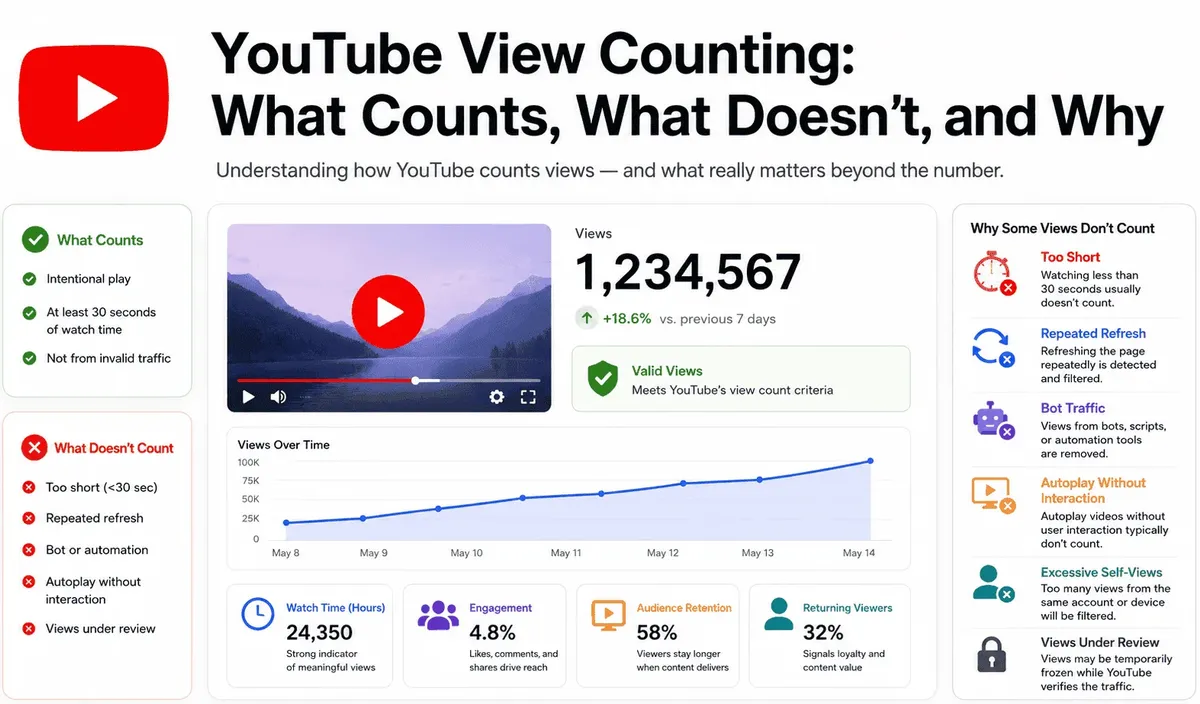
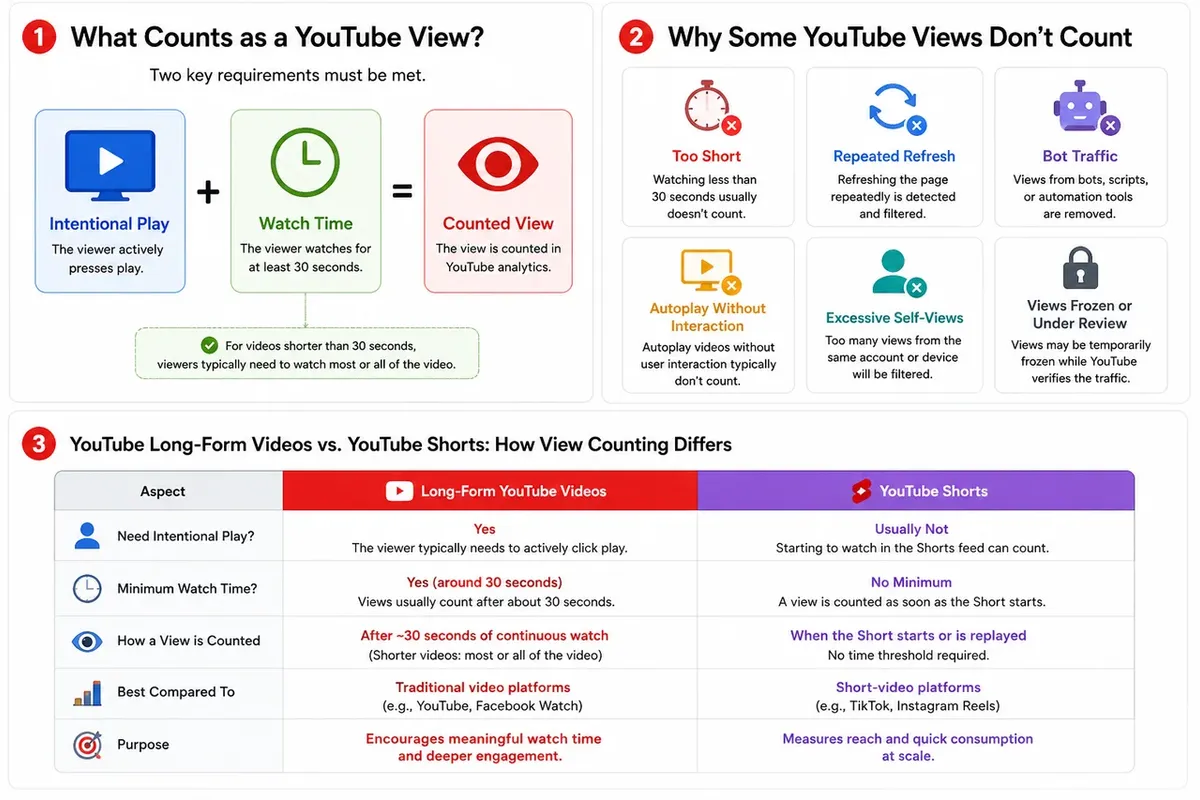
For a view to register on YouTube, two things generally need to happen:
- The viewer has to intentionally play the video. Autoplay doesn't always count. If a video starts playing in the background without the user actively choosing to watch it, YouTube may not register it as a view. The intent to watch matters.
- The viewer needs to watch for at least 30 seconds. This is the most commonly cited threshold. If someone clicks on a video and leaves within a few seconds, it won't count. For videos shorter than 30 seconds, the viewer typically needs to watch most or all of it.
These two rules together mean that a "view" on YouTube is meant to represent a real person who chose to watch and actually stayed.
Why Don't Some Watches Count as Views?
This is where most of the confusion comes from. Here are the most common reasons a watch doesn't register:
Watching for less than 30 seconds
The single most common reason. If someone clicks and bounces quickly — whether because the thumbnail was misleading or the content didn't hook them — it doesn't count. This is intentional: YouTube wants views to reflect genuine interest, not just clicks.
Refreshing the page repeatedly
Reloading a video page over and over from the same device or IP address gets flagged as suspicious behavior. YouTube's system identifies this pattern and filters those plays out. It won't help inflate a count — it just gets ignored.
Bot traffic and automated plays
Any views generated by bots, scripts, or automated tools are detected and removed. YouTube has been running anti-fraud systems for years, and they're fairly good at identifying non-human traffic. These views may appear briefly and then disappear when the system catches up.
Your own views — up to a point
Watching your own video a few times is fine and does count initially. But repeatedly rewatching your own content to boost numbers gets filtered out. YouTube tracks this and stops counting after a certain point.
Embedded videos without user interaction
Videos embedded on external websites can count — but only if the viewer actively presses play. If the embed is set to autoplay and the user never interacts with it, it typically won't register.
The view count is frozen or processing
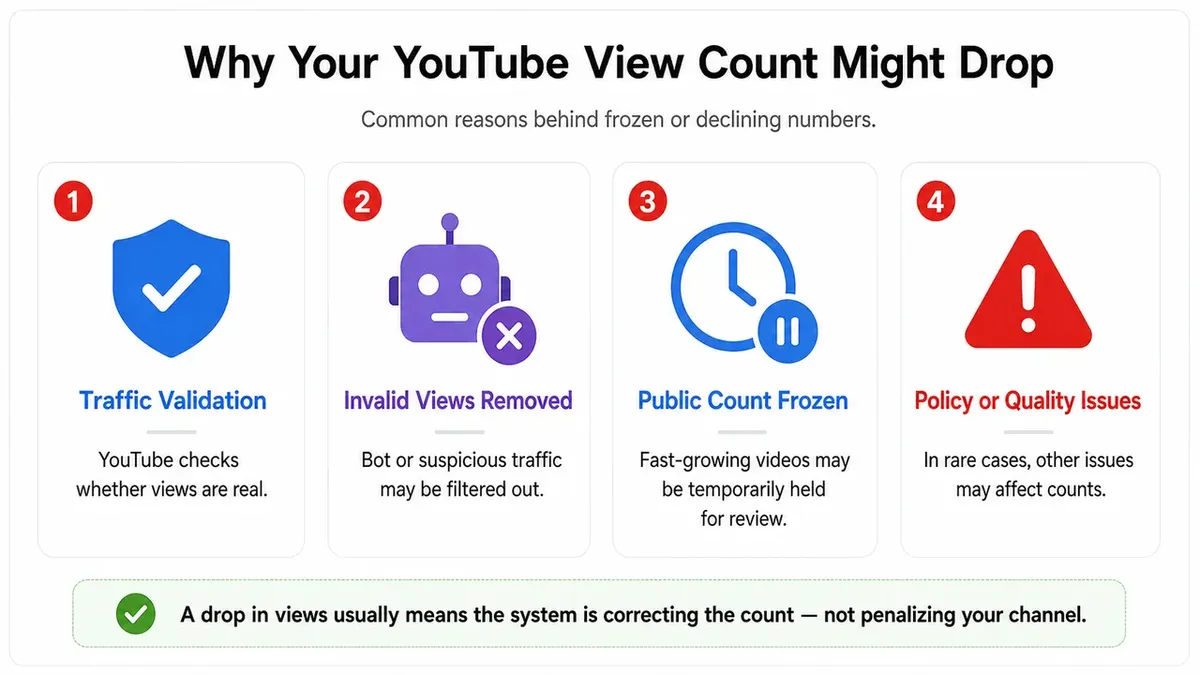
This one surprises a lot of people. When a video is new and gaining views quickly, YouTube temporarily slows or freezes the public count while it validates the incoming traffic. This is normal. The count catches up once the verification process runs. It doesn't mean views are being lost — they're just being held for review.
How Does YouTube Shorts Count Views?
As of early 2025, YouTube Shorts count views differently. A view registers every time the Short starts playing or is replayed — there's no 30-second requirement. This aligns Shorts with how TikTok and Instagram Reels count views, where any play counts.
If you're comparing view counts between long-form videos and Shorts, keep this in mind — the numbers aren't directly comparable.
What Are Views Counting of Live Streams and Replays?
During a live stream, a view counts if the viewer watches for at least 30 seconds. The same rule applies when someone watches the recorded replay after the stream ends.
One thing worth noting: live stream view counts can look lower than expected because concurrent viewers and replay views are tracked separately in YouTube Analytics.
What Actually Matters More than View Count?
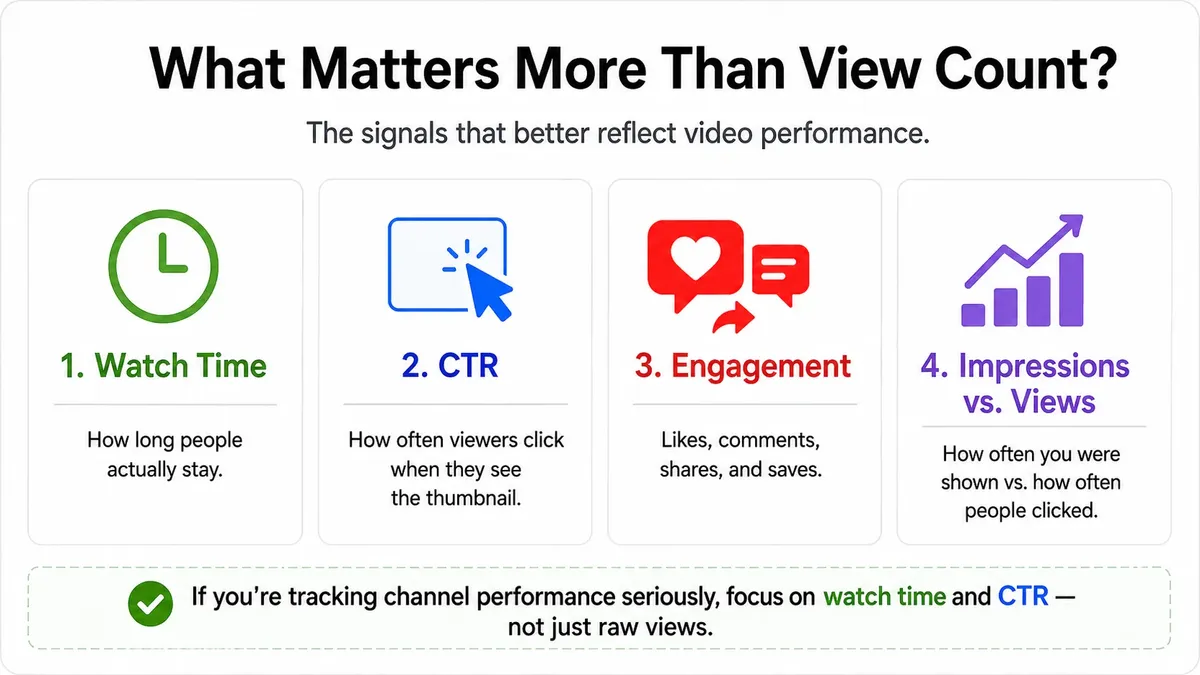
YouTube View count is a primary performance metric for channel growth, which is visible and easy to fixate on— but YouTube's algorithm weighs several other signals more heavily when deciding how to distribute a video:
- Watch time is the big one. How long people actually stay is more important than how many clicked. A video with fewer views but high average watch duration will often outperform one with more views but high drop-off.
- Click-through rate (CTR) measures how often people click your thumbnail when it's shown to them. A high CTR tells YouTube the title and thumbnail are working.
- Engagement — likes, comments, shares, saves — signals that the content resonated. These interactions carry weight in recommendations.
- Impressions vs. views is a distinction worth understanding. Impressions count every time your thumbnail was shown to someone. Views count when they actually clicked and watched. The gap between the two is your CTR.
If you're tracking channel performance seriously, watch time and CTR are the numbers to focus on — not just raw view count.
How to Count YouTube Views and Track Other Metrics with AllyHub
Understanding how views count is one thing — consistently tracking the right numbers across your channel (or across competitors) is another.

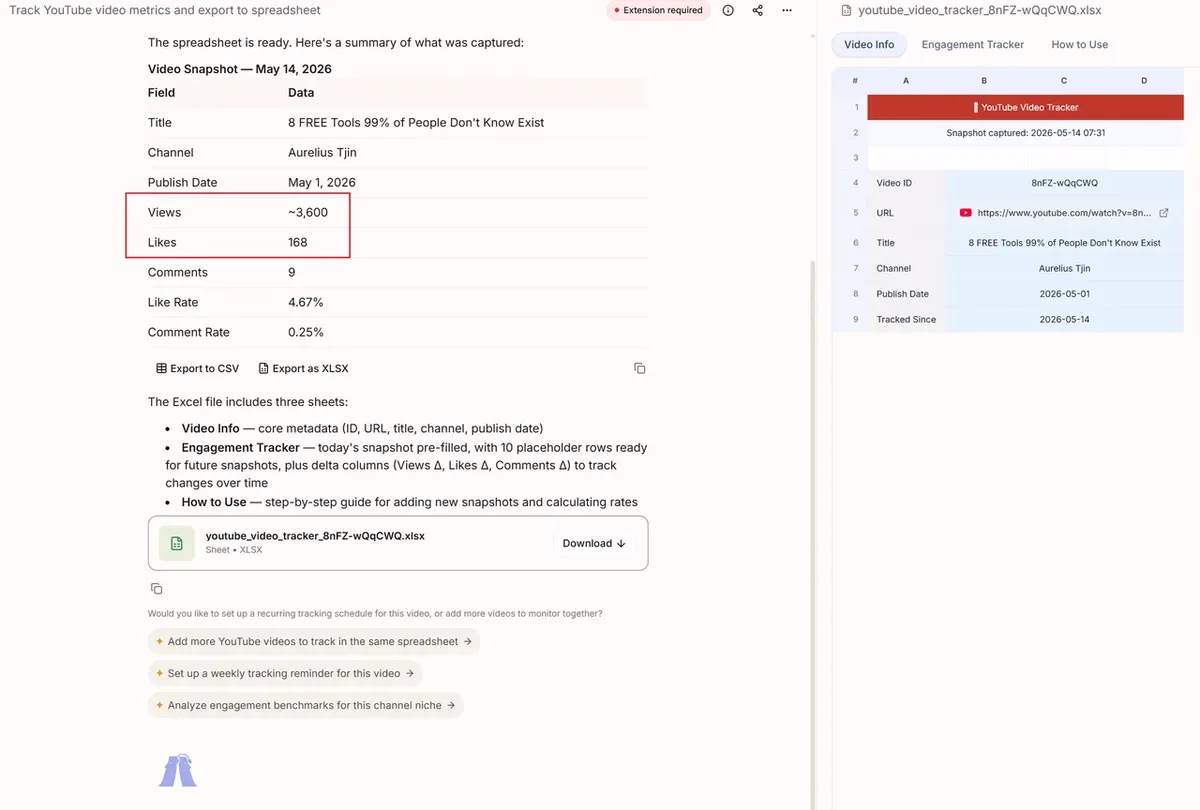
AllyHub lets you pull structured data from YouTube channels in plain language — view counts, watch time trends, engagement rates, video performance over time — and export it to a spreadsheet without manual copy-pasting. If you're monitoring multiple channels or tracking how a niche is performing week over week, AllyHub handles the extraction and keeps the data organized.
The first time you set up a channel tracking task, AllyHub learns the page structure and saves it as a reusable Recipe. Every subsequent run — whether you're refreshing the same channel or expanding to new ones — executes faster. The workflow compounds the more you use it.
For creators and researchers who want to go beyond what YouTube Studio shows, AllyHub gives you the flexibility to track exactly what you need, on your own schedule.
For example, if a competitor publishes a new video, you can use AllyHub to track how its view count changes over the first 24 or 48 hours. AllyHub can collect the video URL, title, publish time, views, likes, comments, and engagement changes, then export the results into a spreadsheet. Instead of checking the same video manually throughout the day, you get a clear timeline of how fast the video is gaining traction.
Why Your View Count Might Drop?
It happens, and it's alarming when it does. The most common cause is YouTube's periodic audit of view counts — when the system identifies and removes views it has flagged as invalid, the public count goes down.
This isn't a penalty. It's the system doing what it's designed to do: keeping counts accurate. If you've seen a sudden drop, it usually means some views that were counted initially didn't pass the validation check.
In rare cases, a significant drop can indicate a policy issue with the video — but that's typically accompanied by other notifications in YouTube Studio.
FAQs for YouTube View Counting
Does watching your own YouTube video count as a view?
Yes, for the first few watches. After that, YouTube filters out repeated self-views from the same account or device. Watching your video once or twice to check quality is fine — it won't meaningfully affect your count either way.
Do embedded YouTube videos count as views?
Yes, if the viewer actively presses play and watches for at least 30 seconds. Autoplay embeds without user interaction typically don't count.
Do repeat views count?
Yes — but with limits. YouTube allows multiple views from the same user to count, but not indefinitely within a short window. The general pattern is that after a handful of views from the same account or device within a 24-hour period, additional plays stop registering. The exact threshold isn't published by YouTube, but the intent is clear: repeat viewing is valid, repeat refreshing to game the count is not.
Why is my YouTube view count stuck?
New videos with fast-growing view counts often have their public count temporarily frozen while YouTube validates the traffic. This is normal and the count will update once verification is complete.
Does rewatching a YouTube video count as a view?
Yes, up to a point. YouTube allows a limited number of repeat views from the same user within a 24-hour window. After that, additional replays from the same source stop counting.
Do YouTube shorts views count the same way?
No. Shorts count a view every time the video starts playing or is replayed — there's no 30-second minimum. This is different from standard YouTube videos.
Why did my view count go down?
YouTube periodically audits view counts and removes views identified as invalid or bot-generated. A drop in count is the system correcting artificial traffic, not a penalty.
Final Thoughts
The view count is the most visible number on any YouTube video — but it's also one of the most misunderstood. Once you know that YouTube is filtering for genuine intent, a 30-second minimum, and real human behavior, the quirks start to make sense: the frozen count, the self-view limit, the views that disappear overnight.
For most creators, the more useful shift is moving attention from view count to watch time and CTR. Those are the numbers that actually drive growth — and they tell a much more honest story about how your content is landing.




