You're setting up a new listing in Seller Central and you notice a field labeled "Platinum Keywords." You fill it in, assuming it must do something — after all, it's right there in the interface. Then you wonder why your organic rankings haven't budged.
Here's the truth: Amazon Platinum Keywords have been functionally dead since 2016. The field still appears in some Seller Central interfaces, but filling it in has zero impact on your product's search visibility. If you've been spending time on it, you've been optimizing a ghost — and misunderstanding how Amazon SEO actually works.
This guide explains exactly what Amazon Platinum Keywords were, why they were removed, and — more importantly — the full set of strategies that actually drive Amazon rankings in 2026.
Key Takeaways
- Platinum Keywords are obsolete (ended in 2016) and have no SEO impact.
- The field may still appear in Seller Central, but it’s ignored by Amazon.
- No direct replacement — Amazon SEO now relies on relevance + performance signals.
- Keywords get you indexed; rankings are driven by clicks, conversions, and sales.
- AI (e.g., Rufus) favors contextual, intent-based listings over keyword stuffing.
What Is a Platinum Keyword on Amazon?
A Platinum Keyword on Amazon was a specialized backend search term field available exclusively to sellers enrolled in the Amazon Platinum Seller program. This program was designed for high-volume merchants who met specific performance thresholds — think enterprise-level sellers moving significant GMV through the platform.
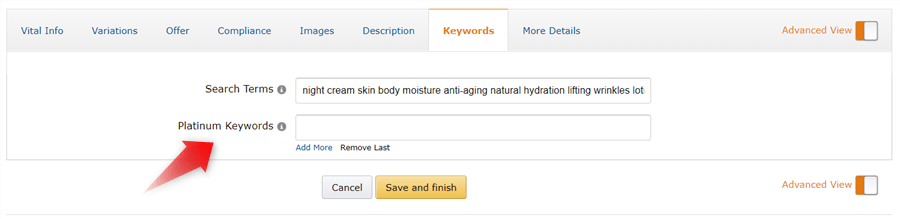
The Platinum Keywords field gave these sellers additional keyword capacity beyond the standard backend search terms. The idea was straightforward: more keyword real estate meant more indexing opportunities, which theoretically translated to broader search visibility.
At the time, Amazon's search algorithm was more keyword-density-driven. Stuffing relevant terms into every available field — visible or hidden — had a measurable impact on rankings. Platinum Keywords were a legitimate advantage for the sellers who had access to them.
📌 Note: The Amazon Platinum Seller program was a separate tier from Amazon's current seller programs (Individual, Professional, Brand Registered). It was not the same as Amazon Platinum Prime or any customer-facing "Platinum" designation.
Amazon Platinum Keywords 2026: Removed and No Longer Relevant
The Amazon Platinum Seller program was discontinued in 2016. With it went the functional value of Platinum Keywords.
Why Amazon Removed the Platinum Program
Amazon's decision to wind down the Platinum Seller program reflected a broader shift in how the platform approached search optimization. As Amazon's catalog grew into hundreds of millions of listings, the A9 algorithm evolved from a keyword-matching engine into a behavioral relevance engine — one that weighs purchase history, click-through rates, conversion rates, and customer engagement signals alongside keyword presence.
In this new model, giving a subset of sellers extra keyword fields created an uneven playing field without meaningfully improving the customer experience. Amazon's core interest is always the buyer, and a buyer doesn't care whether a seller had Platinum status in 2014.
What "Removed" Actually Means in Practice
"Removed" doesn't mean the field disappeared from every interface. Many sellers still see a "Platinum Keywords" field in their Seller Central listing editor — particularly in older category templates or flat file uploads. This creates genuine confusion.
The critical distinction: the field exists in the UI, but Amazon's indexing system ignores it entirely. You can fill it with your best keywords, your worst keywords, or nothing at all — the outcome for your search rankings is identical.
⚠️ Warning: Do not waste your keyword research efforts on the Platinum Keywords field. Any time spent optimizing it is time not spent on the strategies that actually move rankings.
Confirming the Field Is Dead
If you run an indexing test — searching for a term you've placed only in the Platinum Keywords field — you will not find your ASIN indexed for it. The same term placed in the active Search Terms field will index within 24–72 hours. Multiple Amazon seller communities and agency practitioners have confirmed this consistently over the years.
What Replaced Platinum Keywords: The Backend Search Terms Field
There is no one-to-one replacement, but Amazon's Search Terms field now serves the primary keyword indexing role. The Amazon backend keywords system (also the Search Terms field) is invisible to shoppers but fully readable by Amazon's indexing system.
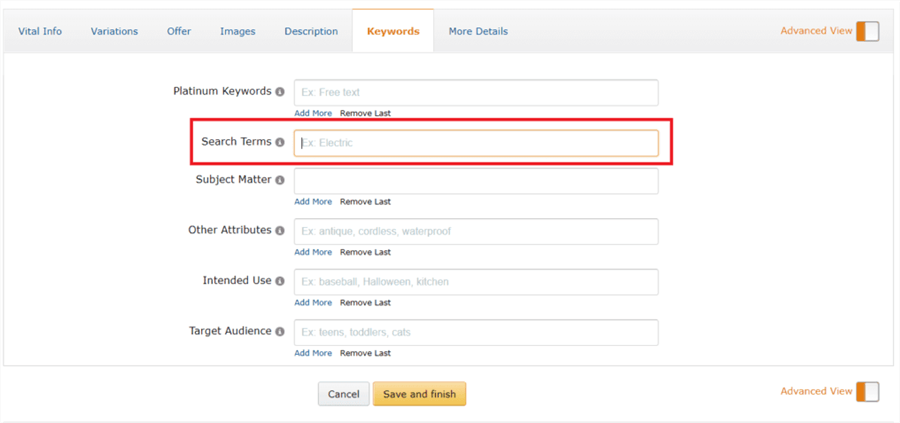
The Essentials: What You Need to Know
- 250-byte limit (not characters): The US marketplace enforces a hard byte limit. Standard English letters count as 1 byte each; special characters, accented letters, and non-Latin scripts consume 2–4 bytes. Exceeding the limit causes Amazon to ignore the entire field — not just the overflow.
- No duplication: Amazon already indexes every term in your title, bullet points, and description. The backend field should contain only terms that don't appear in your visible copy — synonyms, alternate spellings, use-case phrases, audience-specific terms, and relevant Spanish translations for the US market.
- Format cleanly: Separate terms with single spaces only. No commas, no punctuation, no repetition.
- Refresh seasonally: Keyword demand shifts. Review and update your Search Terms field 2–3 times per year, especially before Prime Day and Q4.
Include | Exclude |
Synonyms not in visible copy | Terms already in title/bullets/description |
Common misspellings Amazon doesn't auto-correct | Competitor brand names (policy violation) |
Relevant Spanish translations (US market) | Subjective claims ("best," "cheapest") |
But here's the important context: the backend Search Terms field is just one input signal among many. Getting indexed for the right terms is the prerequisite. What determines where you rank within those results is a much broader set of factors — which is what the next section covers.
How to Make Your Amazon Keywords Perform Better
Indexing is just the entry requirement. To rank, your listing must prove relevance and customer satisfaction through four critical layers.
Visible Listing Copy & Rufus AI Optimization
Your visible copy feeds both Amazon’s traditional index and its Rufus AI natural language engine.
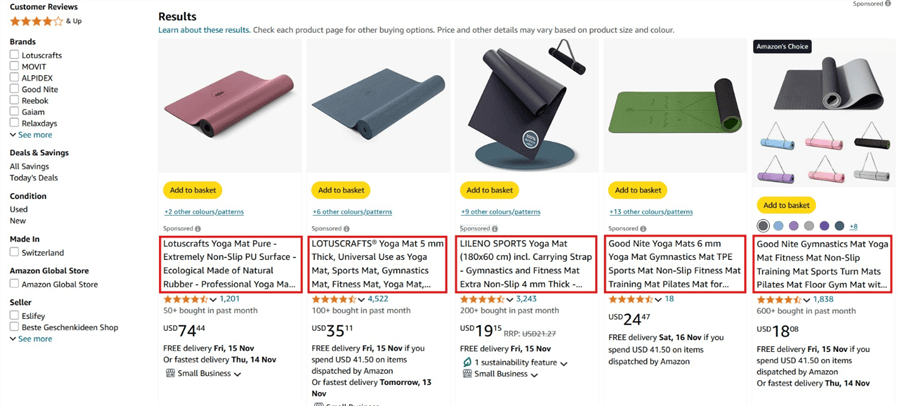
- Product Title: Place primary keywords within the first 80 characters (mobile cutoff). Keep total length under 200 characters to prevent truncation and lower CTR.
- Bullet Points: Use all 5. Lead with customer benefits and naturally weave in secondary keywords. Keep under 250 characters for mobile display.
- A+ Content & Q&A: A+ Content drives the conversions that fuel rankings. Rufus AI scans your entire listing—including A+ text and Q&As—to answer natural language queries. Explicitly state who it's for (e.g., "for toddlers") and use cases (e.g., "yoga mat knee pain support").
Win the Click (Optimize for CTR)
If shoppers search your keyword but don't click your listing, Amazon drops your rank.
- Main Image: Pure white background, product fills 85%+ of frame, high-res (1600–2000px) for zoom.
- Price & Badges: Keep prices competitive. Badges (Best Seller, Amazon's Choice) directly boost CTR.
- Social Proof: Maintain a 4.0+ star rating with visible review volume.
Convert the Click (Optimize for CVR)
High clicks with zero conversions signal a relevance mismatch to the algorithm.
- Media Gallery: Use lifestyle shots, dimension infographics, and product demo videos.
- Reviews: Use Amazon Vine for early reviews on new listings; aggressively monitor and address negative feedback.
- Pricing & Programs: Use dynamic pricing tools to stay competitive. Enroll consumables in Subscribe & Save to secure predictable sales velocity.
Drive Sales Velocity & Operational Health
Sales velocity is the ultimate ranking accelerator.
- PPC (Sponsored Products): Treat PPC as a ranking investment. Conversions from paid ads directly boost organic ranking for that keyword.
- Promotions: Use Coupons, Lightning Deals, and external traffic (social media/influencers) to spike early velocity.
- Operational Health: Going out of stock resets your ranking momentum. Amazon penalizes your visibility for low seller feedback, high return rates, and slow customer response times.
The Full Picture: How These Signals Work Together
Amazon's algorithm doesn't evaluate any of these factors in isolation. It builds a composite picture of each listing's relevance and customer experience quality. Here's how the signals stack:
Signal Layer | What It Tells Amazon | Primary Levers |
Keyword indexing | "This listing is eligible for this query." | Title, bullets, backend Search Terms |
Click-through rate | "Shoppers find this listing relevant." |
Keywords open the door. Everything else determines whether you walk through it.
How AI Tools Can Accelerate Your Amazon SEO Workflow
Managing keyword research, listing audits, competitor analysis, and performance monitoring across dozens or hundreds of ASINs is one of the most time-consuming parts of Amazon account management. This is where AI-powered automation tools are changing the workflow for e-commerce marketers.
AllyHub is an AI agent platform that automates the heavy lifting of Amazon SEO. Instead of manual copy-pasting, AllyHub can:
- Scrape competitor listings at scale to extract keyword patterns.
- Pull and analyze Amazon search term reports automatically.
- Monitor review sentiment across your catalog.
- Compile structured optimization briefs.
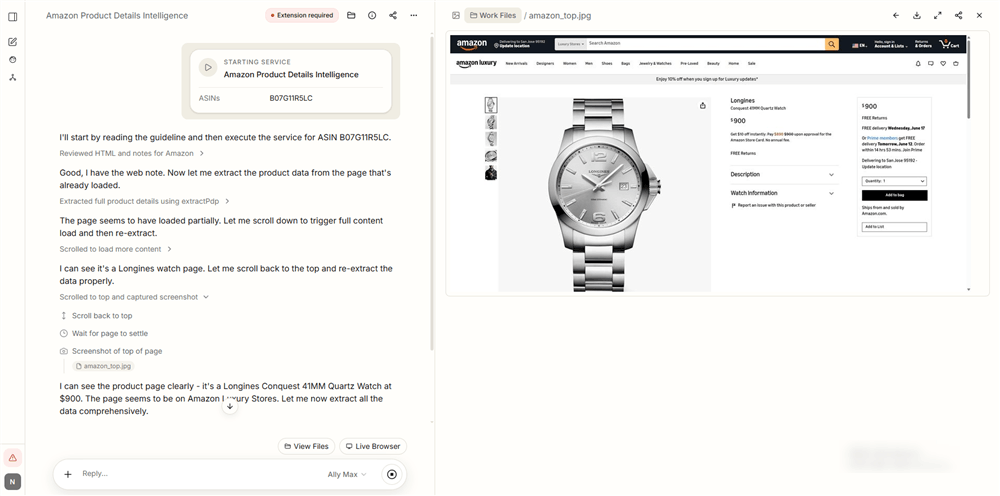
The best part? It compounds. Every time AllyHub runs a workflow, it learns your category and product structure, making each subsequent research cycle faster and smarter.
FAQs on Platinum Keyword on Amazon
What is a Platinum Keyword on Amazon?
A Platinum Keyword on Amazon was a backend search term field available exclusively to sellers in the Amazon Platinum Seller program — a now-defunct tier for high-volume merchants. The program was discontinued in 2016, and the Platinum Keywords field no longer affects product indexing or search rankings. If you see this field in Seller Central, you can safely ignore it.
Are Amazon Platinum Keywords still available in 2026?
No. Amazon Platinum Keywords were effectively removed when the Platinum Seller program ended in 2016. While the field may still appear in some Seller Central interfaces or flat file templates, Amazon's algorithm does not index or use any keywords entered there. Focus your optimization efforts on the active Search Terms field and the broader listing quality signals covered in this guide.
What replaced Amazon Platinum Keywords?
No single field replaced Platinum Keywords. What replaced the keyword-density approach of that era is a comprehensive set of relevance and customer experience signals: optimized visible listing copy (title, bullets, A+ Content), backend Search Terms, click-through rate, conversion rate, sales velocity, review quality, and operational health. Amazon's algorithm now evaluates all of these together.
What is the difference between Platinum Keywords and backend keywords?
Platinum Keywords were an additional keyword field available only to Platinum Sellers — and they no longer work. Backend keywords (the "Search Terms" field in Seller Central) are the active, functional equivalent available to all Professional sellers. Backend Search Terms are indexed by Amazon and directly influence which search queries your listing appears for, subject to the 250-byte limit.
How many backend keywords can I add on Amazon?
The US marketplace allows up to 250 bytes in the Search Terms field. This is not the same as 250 characters — special characters, accented letters, and non-Latin scripts consume more bytes per character. Exceeding the limit causes Amazon to ignore the entire field, so always verify your byte count before saving.
Do keywords alone determine Amazon rankings?
No. Keywords determine which queries your listing is eligible to rank for. Where you actually rank within those results is determined by behavioral signals — primarily click-through rate, conversion rate, and sales velocity. A listing with mediocre keywords but strong conversion data will outrank a keyword-perfect listing with poor conversion performance.
How does Rufus AI affect Amazon keyword strategy?
Rufus AI interprets natural language queries and matches products based on contextual relevance, not just keyword presence. This means listings that clearly communicate who the product is for, what problem it solves, and in what contexts it's used — in natural, readable language — are better positioned for AI-driven discovery. Keyword stuffing actively works against Rufus optimization.
What to Do Right Now
If you've been spending time on Amazon Platinum Keywords, stop. Redirect that effort to the signals that actually move rankings:
- Audit your backend Search Terms field — check byte count, remove duplicates from visible copy, eliminate prohibited terms, add Spanish translations for the US market
- Review your title — primary keyword in the first 80 characters, key attributes included, under 200 characters total
- Evaluate your main image — does it meet Amazon's technical requirements? Is it compelling enough to earn the click over competitors?
- Check your conversion rate — if it's below category average, identify whether the gap is in images, reviews, pricing, or A+ Content
- Pull your PPC Search Term Report — high-converting paid terms that aren't in your backend field are your fastest keyword wins
- Seed your Q&A section — add 3–5 common questions with clear answers to give Rufus AI more structured data to work with
The Platinum Keywords field is a relic. The combination of keyword relevance, listing quality, and conversion performance is what drives rankings in 2026.