Here's what most Amazon sellers overlook: the generic keywords field in Seller Central. It's invisible to shoppers, takes less than five minutes to fill out, and yet it's one of the highest-leverage levers you have for expanding your product's search footprint on Amazon.
This guide covers everything you need to know — what Amazon generic keywords are, the exact format Amazon requires, the official guidelines you must follow, and a step-by-step process for optimizing the field to its full 250-byte potential.
Key Takeaways
- Amazon generic keywords (backend search terms) are hidden keywords in Seller Central used by the A9 algorithm for indexing, not shown on the listing page.
- Use single spaces only; avoid punctuation. Do not repeat words, as they waste limited byte space.
- The limit is 250 bytes; exceeding it causes the entire field to be ignored (stay under ~245 bytes).
- Use this field for synonyms, variations, abbreviations, and long-tail terms not already in your listing.
- Start with the Search Term Report to find converting queries and fill gaps not covered in your title or bullets.
What Are Amazon Generic Keywords?
Amazon generic keywords are backend search terms entered in the "Generic Keyword" field inside your product listing in Seller Central. They are completely invisible to shoppers — they never appear on your product page — but Amazon's A9 search algorithm reads them to determine which search queries your product is relevant for.
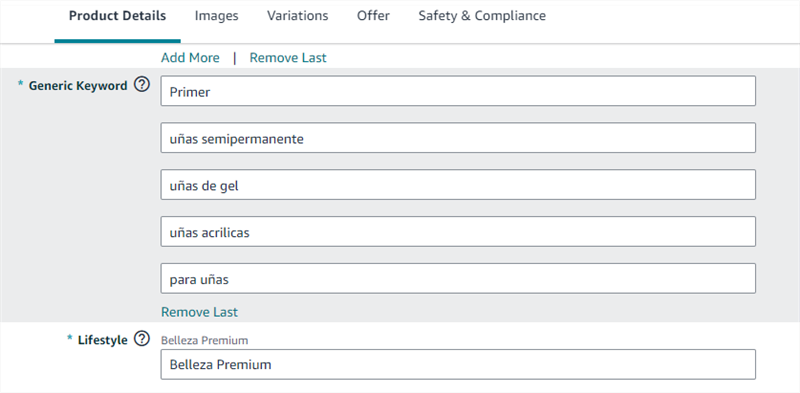
Think of them as a private signal you send directly to Amazon's algorithm. When a shopper types a query that matches one of your backend keywords, your product becomes eligible to appear in those search results — even if that exact phrase doesn't appear anywhere in your visible listing.
Why Generic Keywords Matter for E-Commerce Marketers
For digital marketers and e-commerce managers running Amazon storefronts, the generic keywords field is a precision tool for:
- Expanding search coverage without cluttering your listing with awkward keyword stuffing
- Capturing long-tail queries that convert well but have low enough volume that they don't belong in your title
- Indexing for synonyms and alternate names that different buyer segments use for the same product
- Recovering missed traffic from spelling variations, abbreviations, and regional terminology
A well-optimized generic keywords field can meaningfully expand the number of search queries your product is indexed for — without changing a single word of your customer-facing copy.
Also Read: What are Amazon Platinum Keywords >
Amazon Generic Keywords Rules
Getting Amazon generic keywords right is non-negotiable. Amazon’s algorithm is strict — incorrect formatting or invalid terms can cause your entire field to be ignored.
How Amazon Generic Keywords Must Be Written
Amazon generic keywords are not written like sentences or tags — they must follow a strict space-separated structure.
✔ Correct format example
wireless earbuds noise cancelling bluetooth headphones gym workout sport
This is essentially a continuous string of search terms separated only by spaces, not punctuation or formatting symbols.
Core formatting rules
Rule | Explanation |
Single spaces only | Use spaces between keywords or phrases |
Lowercase preferred | Improves readability and prevents formatting errors (Amazon’s algorithm is case-insensitive) |
Multi-word phrases allowed | Keep phrases intact (e.g., “noise cancelling earbuds”) |
❌ What you must NOT use
Amazon will ignore or misinterpret entries containing:
- commas (,)
- quotation marks (" ")
- semicolons or hyphens as separators
- articles or prepositions (a, an, the, for, of, by, with)
How Amazon processes your keywords
Amazon’s algorithm is more flexible than the formatting rules suggest. It automatically handles:
- plural variations (earphone/earphones)
- word order changes
- basic stemming and variations
This means your job is not to “rewrite variations”, but to cover different search intents without duplication.
250-Byte Limit (Strict System Constraint)
The generic keywords field is limited to 250 bytes (not characters), which is one of the most important technical constraints in Amazon SEO.
Byte vs Character Breakdown
- Standard letters and numbers: ~1 byte per character
- Special symbols (e.g., %, &, ™): 2–4 bytes
- Accented or non-standard characters: may use multiple bytes
This is why keyword length can be misleading if you only count characters instead of bytes.
What Happens If You Exceed the Limit?
Amazon does not partially accept overflow. Instead, the system behaves in a strict all-or-nothing way:
If you are within 250 bytes → keywords are indexed normally
If you exceed 250 bytes → the entire field is ignored
Even a small overflow can result in zero backend keyword coverage, meaning all optimization effort is wasted.
Safe Optimization Range
To avoid accidental overflow during editing or system parsing, it is best to stay slightly below the official limit.
- Target range: ≤245 bytes
- Purpose: provides a safety buffer for hidden character costs or minor edits
- Best practice: always verify using a byte counter tool before saving
What Amazon Allows vs Prohibits
Amazon backend keywords are designed for search expansion, not promotional or duplicated content.
Category | Allowed | Prohibited |
Product language | Synonyms, alternate names | Brand names (yours or competitors) |
Search variations | Spelling differences | ASIN numbers |
Amazon may not always give explicit warnings. Instead, it may:
- silently ignore keywords
- partially suppress indexing
- reduce search visibility without explanation
👉 This makes compliance more important than volume.
No Repetition Rule (Core Optimization Principle)
Your backend keywords should expand coverage, not duplicate existing indexing.
Your listing is already indexed through:
- Title
- Bullet points
- Product description
So repeating the same words here:
- does not improve ranking
- does not increase indexing power
- consumes valuable byte space
How to Optimize the Amazon Generic Keywords Field: Step-by-Step
Step 1: Audit Your Existing Listing
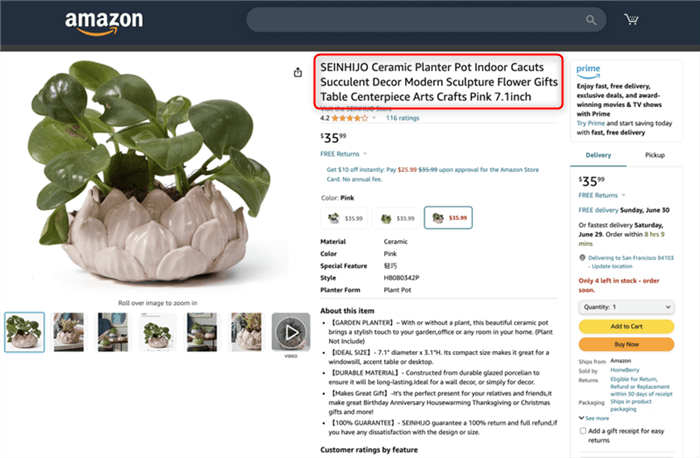
Start by reviewing your current listing and extracting all indexed terms from your product title, bullet points, product description, and brand name. Amazon’s system already recognizes these words, so they should not be reused in your backend keywords. The goal of this step is simply to build a clean exclusion list before doing any keyword research.
Step 2: Pull Search Term Report
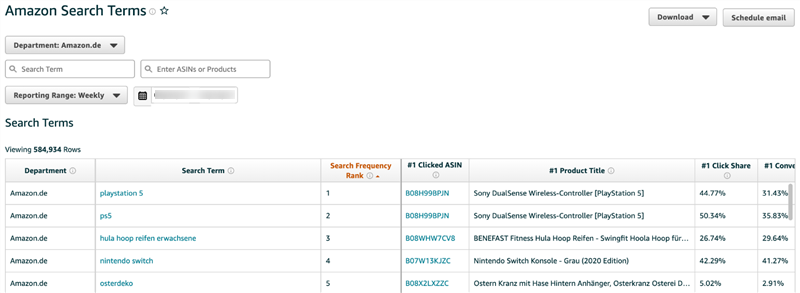
Next, go to Seller Central and open the Search Term Report under Advertising Reports. This report shows the exact queries shoppers used before clicking or purchasing your product. Focus especially on search terms that generated conversions, as well as high-impression terms that still have weak click performance. Exporting and sorting the data by orders helps you quickly identify the most valuable real-world keywords.
Step 3: Identify Keyword Gaps
After analyzing your own search data, expand your keyword pool using external discovery methods. Amazon autocomplete is a strong starting point, since it reflects real-time shopper behavior. You should also check competitor listings, especially the “Customers also searched for” sections, to understand alternative search patterns. For deeper analysis, reverse ASIN tools like Helium 10, Jungle Scout, or SellerSprite can reveal keywords your competitors rank for but you currently miss. The goal here is to capture new intent-based keywords such as use-case terms, attribute descriptors, and problem-solution phrases.
Step 4: Format Your Keyword List
Once you have your full keyword set, convert it into Amazon’s required backend format. This means removing punctuation, symbols, and duplicate words, then converting everything into lowercase. You should also eliminate common stop words like “a,” “the,” “for,” or “with,” since they do not add indexing value. Finally, merge everything into a single space-separated string that represents all selected terms.
Example:
noise cancelling wireless gym sport earphones bt 5.0 bluetooth workout running sweat resistant
Step 5: Validate Byte Usage
Before saving, check your final string using a byte counter tool. Keep in mind that Amazon measures by bytes, not characters, so special symbols may increase size unexpectedly. If your result exceeds the limit, trim lower-priority or overly generic terms first while preserving high-intent keywords. The safest approach is to stay slightly under the limit to avoid indexing issues.
Step 6: Save and Verify Indexing
After saving your updated backend keywords, allow time for Amazon to re-index your listing. In most cases, this takes around 24 to 48 hours. You can then manually test indexing by searching for specific backend terms or using keyword tracking tools. If certain keywords do not appear after a few days, they may be restricted or ignored, and should be adjusted or replaced.
Step 7: Update Regularly
Amazon search behavior changes over time, so this process should not be a one-time task. Every 60 to 90 days, revisit your Search Term Report, identify new converting queries, and refresh your backend keywords accordingly. At the same time, remove outdated or underperforming terms and recheck your byte usage to ensure everything still fits within the limit.
What to Put in Amazon Generic Keywords vs. Other Listing Fields
A common question from e-commerce marketers: how do you decide what goes in the generic keywords field versus the title, bullets, or description?
Content Type | Best Location |
Primary keyword (highest volume, most relevant) | Product title |
Key features and benefits | Bullet points |
Use cases and detailed descriptions | Product description |
The generic keywords field is your overflow reservoir — it captures everything relevant that doesn't belong in customer-facing copy. Its job is to expand your search footprint, not to duplicate what's already indexed.
Beyond Keyword Optimization: How Marketers Automate Amazon Research at Scale
Optimizing the generic keywords field is a research-intensive process — especially when you're managing multiple ASINs or running competitive analysis across categories. The manual workflow (collecting search term reports, analyzing competitor listings, and organizing keyword data) can quickly become time-consuming.
This is where AI-powered research tools change the workflow. AllyHub is an AI agent platform designed to automate data-heavy parts of Amazon keyword research — including analyzing competitor listings, extracting publicly available listing signals, and organizing keyword data into structured outputs, allowing teams to focus more on strategy and decision-making.
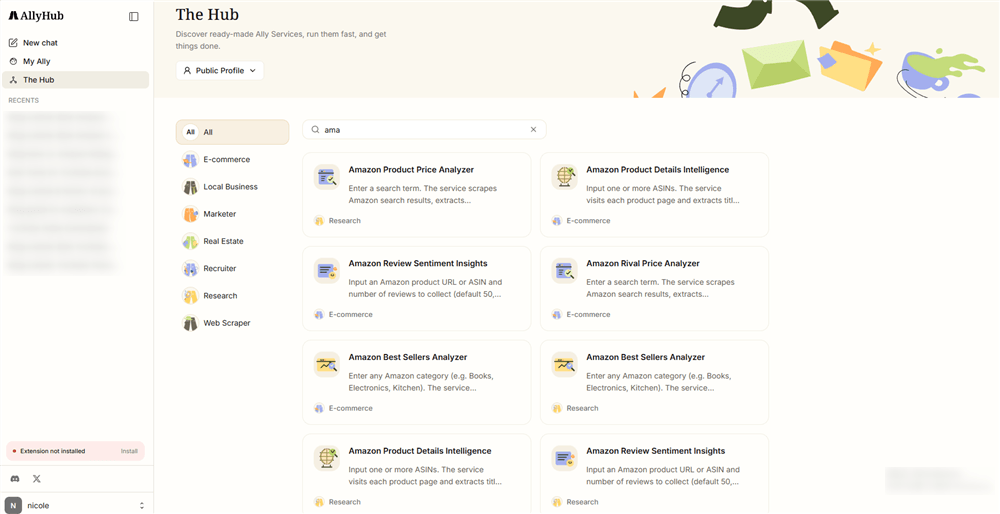
For example, AllyHub can:
- Analyze top competitor listings and extract keyword patterns from titles and bullet points
- Aggregate category-level and ranking-related product insights to identify emerging attributes
- Generate structured keyword research outputs by combining multiple data sources in one workflow
Recommended use case: If you're managing multiple ASINs or running cross-category keyword research, automating the data collection layer with a tool like AllyHub can significantly reduce manual research workload, allowing teams to focus on higher-value optimization work.
AllyHub’s approach focuses on workflow automation across tasks. Over time, repeated research processes become more streamlined and structured, improving efficiency in ongoing Amazon SEO operations.
Frequently Asked Questions
What are the key rules for Amazon generic keywords?
Amazon generic keywords must stay within 250 bytes, use single-space separation, and avoid duplicate or already-indexed words. The entire field will be ignored if it exceeds the byte limit or violates formatting rules.
How should I build and optimize my backend keywords?
Start by using your Search Term Report, then expand with autocomplete suggestions and reverse ASIN research to find missing high-intent terms. After collecting keywords, remove duplicates, format them into a single space-separated string, and ensure everything fits within the byte limit before saving.
How often should I update generic keywords for best results?
Update every 60–90 days. Focus on adding new converting search terms, removing underperforming keywords, and adjusting based on changes in search behavior or seasonality. Rechecking indexing after updates ensures your keywords are still being recognized by Amazon.
Summary: Amazon Generic Keywords Optimization Checklist
Before you save your generic keywords field, run through this checklist:
- All terms separated by single spaces (no commas, quotes, or semicolons)
- All text in lowercase
- No words repeated — each unique word appears only once
- No words already present in your title, bullets, or description
- No brand names (yours or competitors')
- No ASINs, subjective claims, or prohibited terms
- Total byte count is 250 or fewer (ideally under 245)
- Field contains synonyms, spelling variations, abbreviations, and long-tail phrases
- Calendar reminder set for 60–90 day review
The generic keywords field is small — 250 bytes is not a lot of space. But used correctly, it's one of the most efficient ranking levers available to Amazon sellers. Every byte you optimize is a byte working for you around the clock.