Many marketing teams treat keyword research as a final checklist item. The video idea comes first, production comes second, and search demand is checked right before publishing—if it is checked at all.
The problem is that YouTube rewards audience demand, not production effort. A beautifully edited video targeting a keyword nobody searches for will often lose to a simpler video built around a topic viewers are actively looking for.
That is why understanding top YouTube searches matters. When you know what your audience is already searching for, you can prioritize video ideas with proven demand instead of relying on guesswork. This guide will introduce 6 practical methods to find the most searched keywords in your niche.
Key Takeaways
- Start with YouTube-native data: YouTube Studio and YouTube’s own search suggestions are the best free starting points because they reflect how people search on YouTube.
- Use trends carefully: Trending keywords on YouTube can move fast, but not every spike is worth a video. Look for search intent, audience fit, and content gaps.
- Validate before producing: Use Google Trends, vidIQ, TubeBuddy, or Semrush to check whether a keyword has enough demand and whether your channel has a realistic chance to rank.
- Do not chase only global searches: Broad searches like music, gaming, and ASMR may have huge volume, but marketers usually get better results from niche keywords with clearer intent.
- Turn research into a system: Once you collect keyword ideas, organize them by topic, funnel stage, competition, and publish priority instead of leaving them in random tabs.
What Are Top YouTube Searches?
Top YouTube searches are the terms people type into YouTube when they are looking for videos, tutorials, reviews, entertainment, product help, or answers.
Some searches are huge and broad. These often include music, gaming, kids’ content, ASMR, celebrity names, sports, and major news events.
For marketers, those global terms are usually not the real opportunity. A SaaS brand, agency, e-commerce business, course creator, or B2B team does not need to rank for “music” or “Minecraft.” It needs to find the searches that connect to its audience, product, and funnel.
What Top YouTube Searches Usually Look Like
Category | Common Search Types | Why They Stay Popular |
Music and entertainment | Songs, music videos, karaoke, live performances | Repeat viewing and broad global demand |
Gaming | Game names, walkthroughs, updates, livestreams | Highly engaged communities and frequent new content |
For most marketers, the strongest opportunities are usually in how-to, review, comparison, tutorial, and problem-solving searches.
These terms may not have the biggest search volume, but they often have stronger business value. A keyword like "how to create a youtube ad funnel" may be smaller than "youtube ads", but the searcher is much closer to a marketing problem your brand can solve.
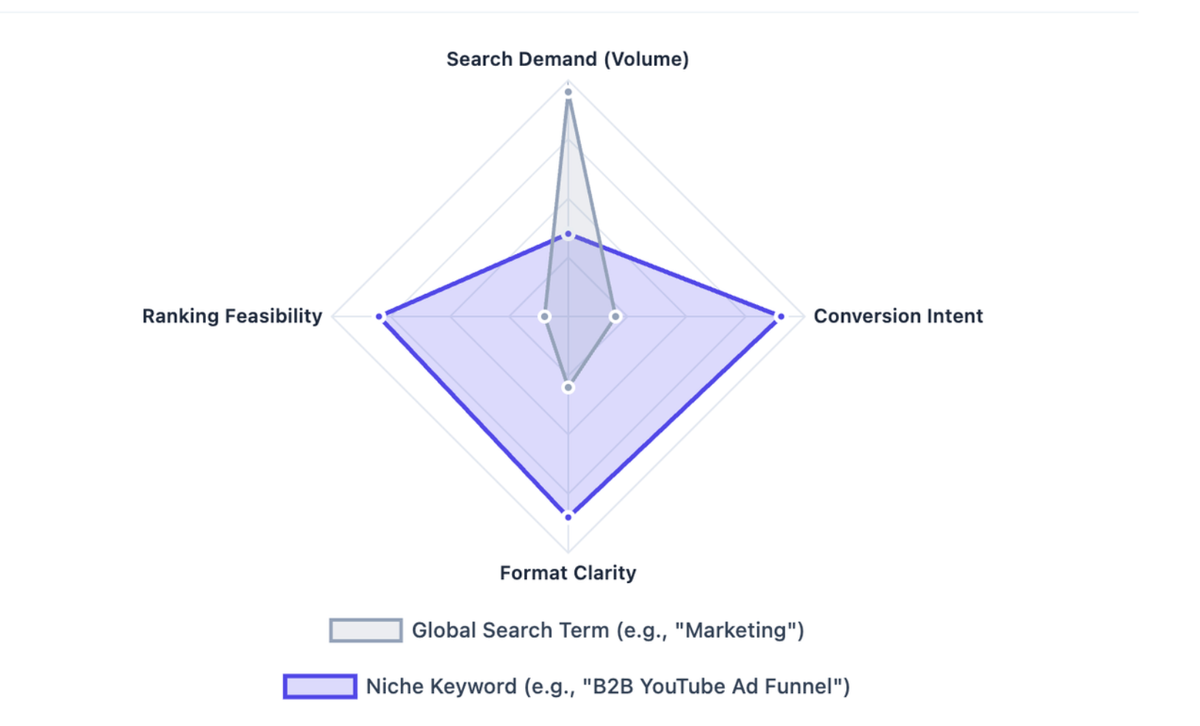
Note: Big global search volume does not always mean high marketing value. A smaller keyword with clear intent can produce better leads, better subscribers, and better campaign ideas.
Method 1: YouTube Studio Search Insights (Free, Native)
YouTube's own analytics tool is the most underutilized keyword research resource available — and it's completely free.
How to access it:
- Go to YouTube Studio and log in to your channel.
- Click Analytics in the left sidebar.
- Select the Research tab (also called "Search Insights" in some regions).
- You'll see two sections: Your viewers' searches and Searches across YouTube.
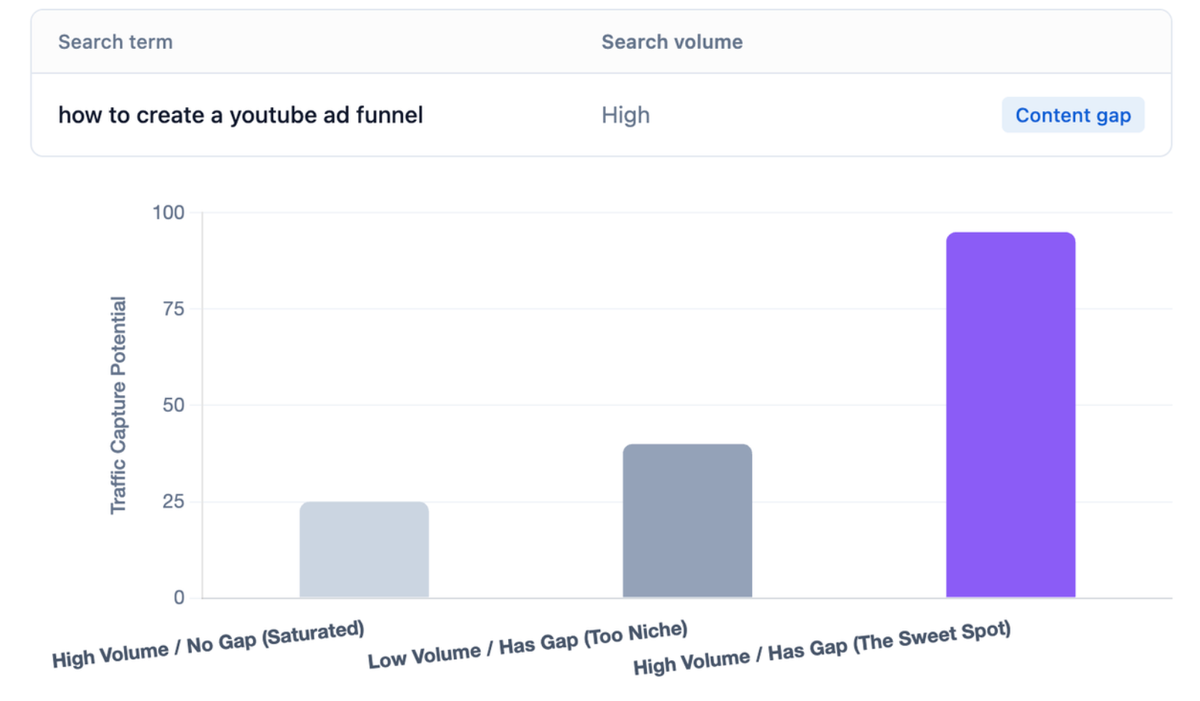
What each section tells you:
- Your viewers' searches: Keywords your existing audience is searching for — high-relevance, pre-qualified intent.
- Searches across YouTube: Broader platform-wide search data, including volume indicators (High / Medium / Low) and content gap flags — searches where demand exists but quality content is scarce.
Pro tip: The content gap signal is YouTube's way of telling you "viewers are searching for this, but not finding great answers." For marketers, this is the equivalent of a low-competition, high-intent keyword in Google SEO.
Best for:
- Marketers managing an active YouTube channel with existing viewership
- Finding audience-specific keyword opportunities without a paid tool
- Identifying content gaps before competitors do
Method 2: Google Trends — YouTube Search Filter
Google Trends is widely used for Google SEO, but most marketers don't know it has a dedicated YouTube search filter — making it one of the most powerful free tools for finding trending keywords on YouTube.
How to use it:
- Go to trends.google.com and enter your seed keyword.
- In the dropdown that defaults to "Web Search," change it to YouTube Search.
- Set your time range (last 12 months for seasonal patterns; last 90 days for recent trends).
- Scroll down to Related queries and filter by Rising — these are keywords with the fastest growth rate.
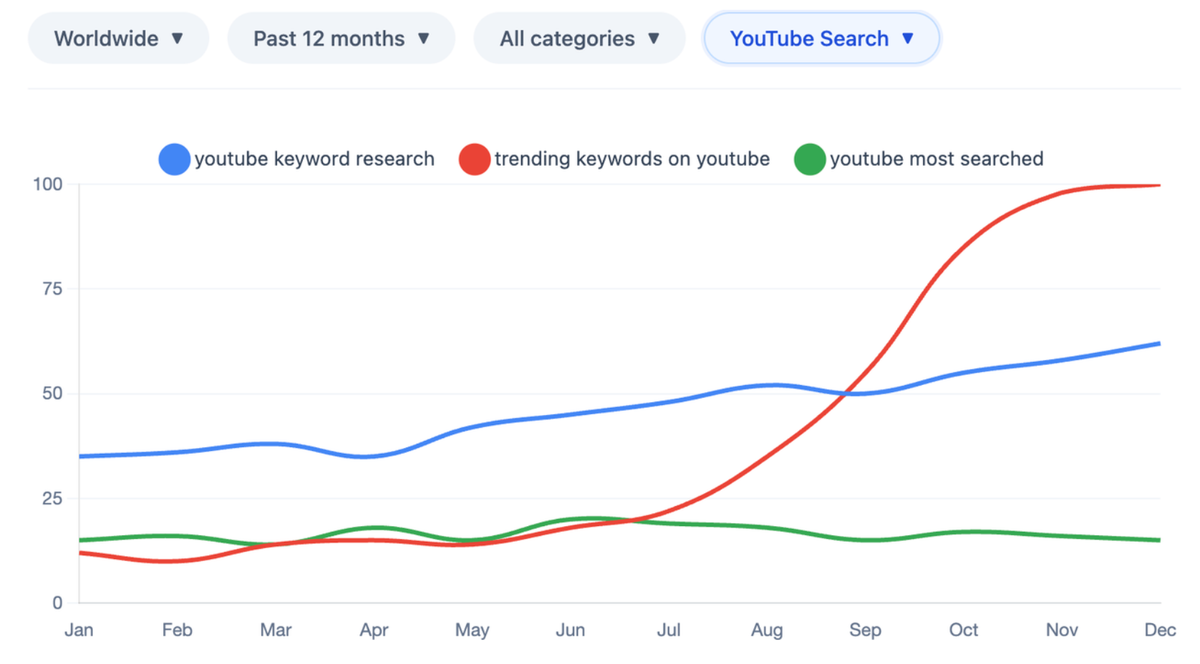
What to look for:
- Breakout labels (shown as "+500%" or "Breakout") indicate explosive growth — early-mover advantage territory.
- Seasonal spikes reveal when to publish content for maximum timing impact.
- Regional interest shows where a trend is strongest — useful for geo-targeted campaigns.
Advanced tactic: how to compare multiple keywords via Google Trends
Use the "Compare" feature to evaluate 2–5 keyword variants side by side. For example, comparing "youtube most searched keywords" vs. "trending keywords on youtube" vs. "youtube keyword research" shows which term has the strongest and most consistent search momentum.
Pro tip: Rising queries in Google Trends often appear 2–4 weeks before they peak in YouTube search volume. Publishing content during the rise — not at the peak — is where the biggest discoverability gains happen.
Method 3: YouTube Autocomplete + Related Searches
YouTube's search bar is a direct window into what real users are searching for right now. The autocomplete suggestions are generated from actual search frequency — not editorial picks.
How to use it systematically:
- Open YouTube in an incognito/private browser window (removes personalization bias).
- Type your seed keyword and pause before pressing Enter — the dropdown shows the top autocomplete suggestions.
- Add a letter after your keyword (e.g., "youtube marketing a", "youtube marketing b") to surface long-tail variants alphabetically.
- After watching a video, scroll down to the search results page and note the "Related searches" section at the bottom — these are algorithmically related queries.
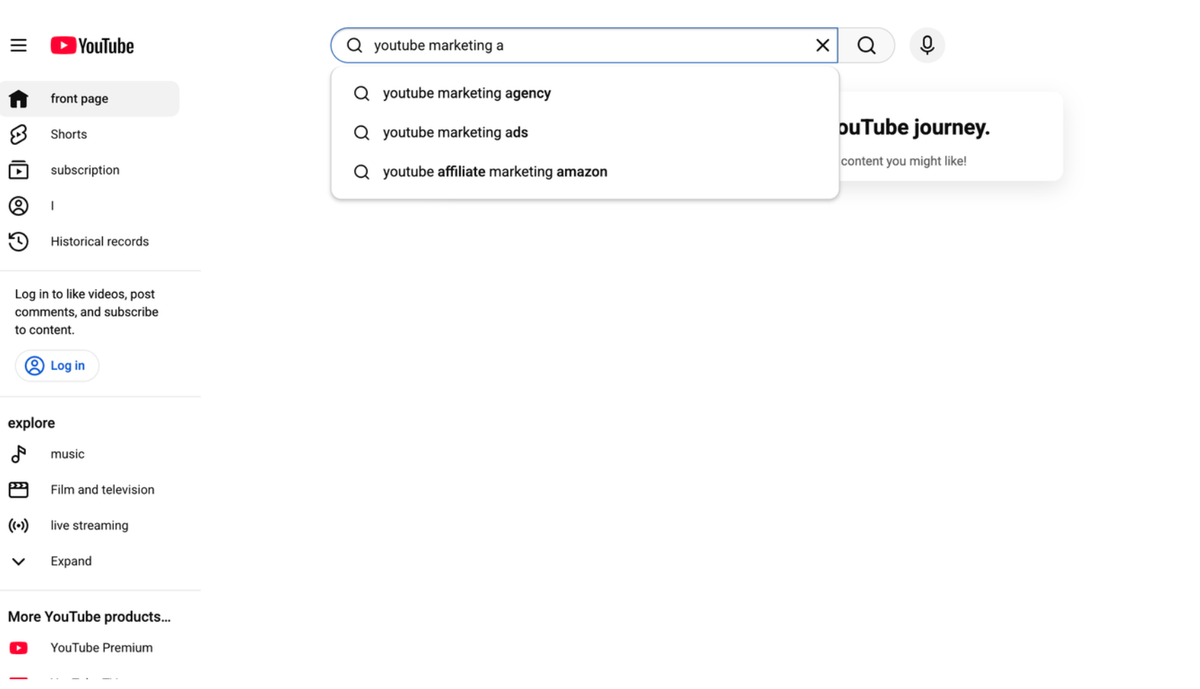
Scaling this with a tool:
Keyword Tool.io automates this process, generating hundreds of autocomplete-based suggestions from a single seed keyword. It's particularly useful for building a comprehensive long-tail keyword list quickly.
Caveat: Autocomplete suggestions reflect search frequency but don't show exact volume or competition data. Always validate high-priority keywords with a tool that provides search volume estimates before committing to content production.
Method 4: vidIQ — YouTube-Native Keyword Intelligence
vidIQ is one of the two dominant YouTube-specific keyword tools (alongside TubeBuddy), and it's particularly strong for trend discovery and competitive analysis.
How vidIQ Helps Discover Trending Keywords on YouTube
- Keyword Inspector: Appears directly on YouTube search results pages, showing real-time search volume, competition score, and related queries without leaving YouTube.
- Rising Keywords module: Surfaces keywords with accelerating search velocity — the trending keywords on YouTube before they peak.
- Top Keyword Opportunities: Personalized recommendations based on your channel's existing performance and niche.
- Competitor analysis: See which keywords are driving traffic to competitor videos — reverse-engineer their keyword strategy.
Step-by-step keyword research workflow with vidIQ:
- Install the vidIQ browser extension.
- Search for your seed keyword on YouTube — the Keyword Inspector panel appears on the right.
- Note the Search Volume and Competition scores. Target keywords with High volume + Low/Medium competition.
- Click "Related Keywords" to expand into the full keyword cluster.
- Check the Trend graph — look for keywords with a rising trend line over the last 30–90 days.
- Export your shortlist to a spreadsheet for prioritization.
Metric | What It Means | Target Range |
Search Volume | Monthly searches on YouTube | 1,000–100,000 (niche-dependent) |
Competition Score | How hard it is to rank | Under 50 for new channels; under 70 for established |
Best for:
- Marketers who need YouTube-specific data (not Google SEO proxies)
- Channels actively tracking keyword rankings across multiple videos
- Competitive intelligence — understanding what's working for rivals
Method 5: TubeBuddy — Keyword Explorer with Channel-Weighted Scoring
TubeBuddy takes a different approach to keyword research: its Weighted Score adjusts keyword difficulty based on your specific channel's size and authority. A keyword that's too competitive for a new channel might be perfectly attainable for an established one — TubeBuddy accounts for this.
How TubeBuddy Helps Track Keyword Rankings
- Keyword Explorer: Enter any keyword and get search volume, competition, and a channel-specific opportunity score.
- Search Rank Tracking: Monitor where your videos rank for target keywords over time — essential for measuring SEO progress.
- Tag Suggestions: Automatically suggests relevant tags based on your video title and description.
- A/B Testing: Test different titles and thumbnails to optimize CTR for your target keywords.
How to use Keyword Explorer:
- Install TubeBuddy and connect it to your YouTube channel.
- Click the TubeBuddy icon and open Keyword Explorer.
- Enter your target keyword — you'll see the Overall Score (green = good opportunity for your channel).
- Review the Search Volume, Competition, and Optimization Strength metrics.
- Check the Related Keywords tab for variant opportunities.
- Use the Search Rank Tracker to monitor your video's position after publishing.
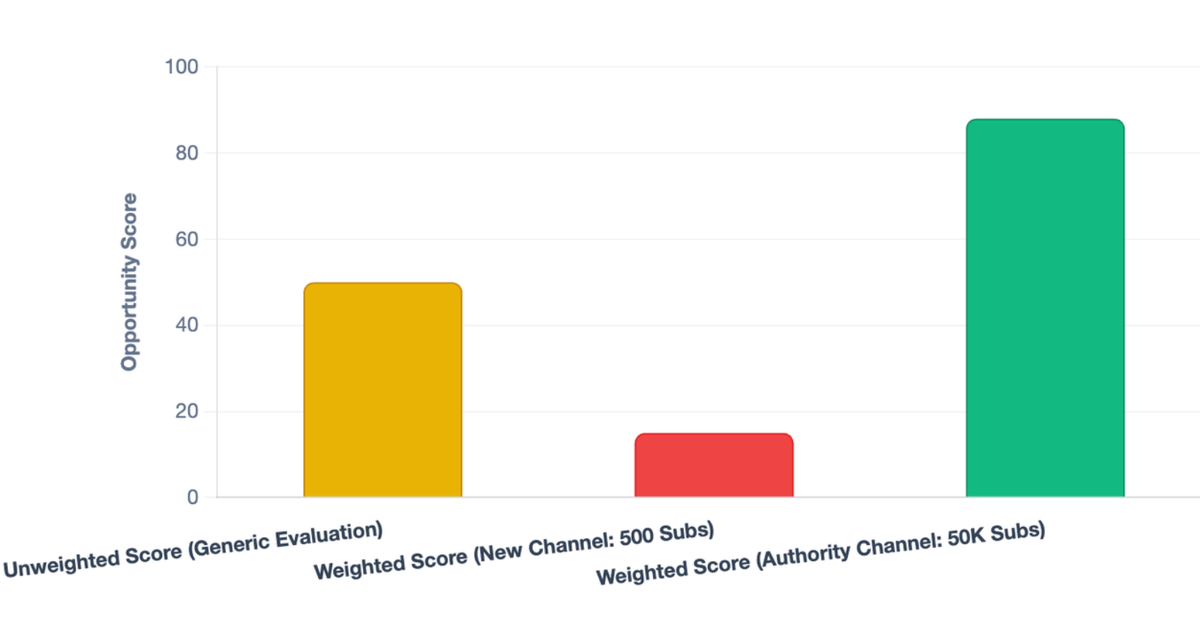
Pro tip: TubeBuddy's Weighted Score is particularly valuable for marketers managing channels at different growth stages. A keyword scoring 65 for a 10K-subscriber channel might score 45 for a 500-subscriber channel — the same data, but actionable differently.
Method 6: Semrush — Cross-Platform Keyword Intelligence
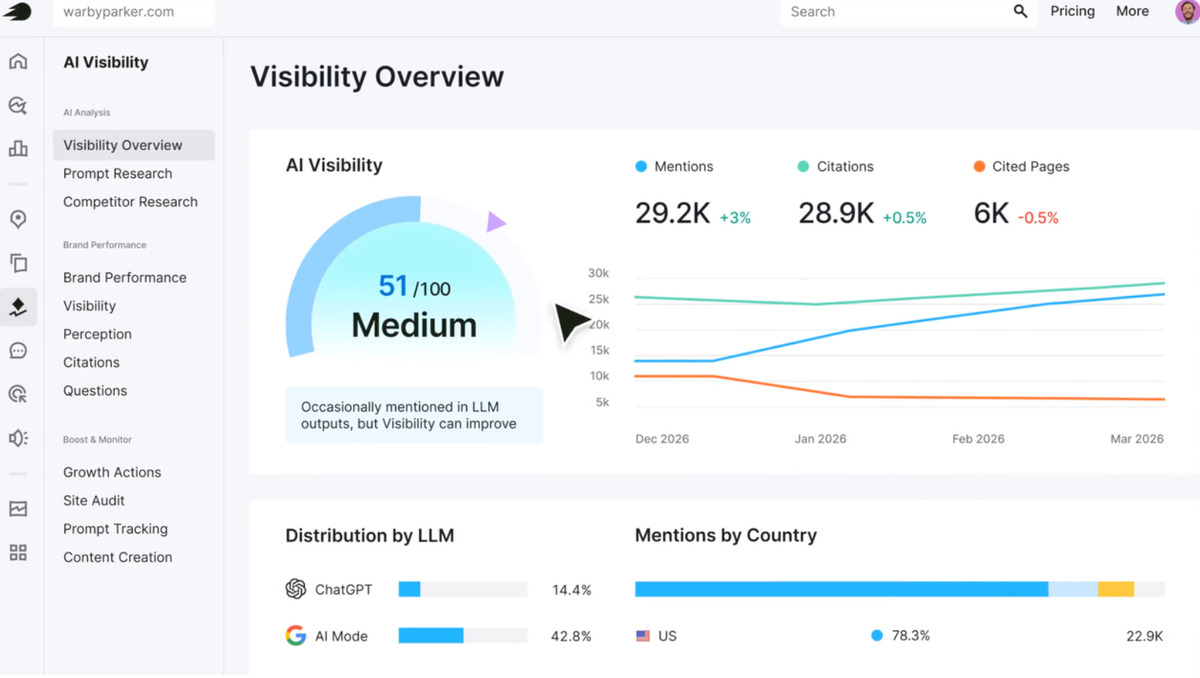
Semrush is primarily known for Google SEO, but its Keyword Analytics for YouTube app (available in the Semrush App Center) extends its data to YouTube search — making it the strongest option for marketers who need to align YouTube and Google keyword strategies.
Why this matters for marketers:
YouTube videos frequently rank in Google search results, especially for how-to and tutorial queries. A keyword that performs well on YouTube often has significant Google search volume too — and vice versa. Semrush lets you identify these cross-platform opportunities in one workflow.
Key features:
- YouTube Keyword Ideas: Enter a seed keyword and get related YouTube search terms with volume and competitive rate data.
- Fast-Growing Keywords: Identifies keywords with the highest recent growth rate — the trending keywords on YouTube with momentum.
- Top Videos for Keyword: Shows which videos currently rank for your target keyword — competitive intelligence for content positioning.
- Keyword Magic Tool: Find Google keywords that trigger video SERP features — these are high-value targets where a YouTube video can rank on Google's first page.
Step-by-step workflow:
- Open Semrush App Center → Keyword Analytics for YouTube.
- Enter your seed keyword and select your target country.
- Filter by Competitive Rate (Low to Medium) and sort by Search Volume (High to Low).
- Export the top 20 candidates.
- Cross-reference with the Keyword Magic Tool to identify which terms also trigger video carousels in Google — these are your highest-priority targets.
Best for:
- Marketers running integrated Google + YouTube content strategies
- Identifying keywords where YouTube videos can rank on Google's first page
- Teams that already use Semrush for Google SEO and want to extend the workflow
Tool Comparison: Finding Top YouTube Searches
Tool | Best For | Search Volume Data | Competition Signal | Trend Signal | Cost |
YouTube Studio | Channel and audience-specific insights |
Note: Tool pricing and feature access change often. Check the current plan details before building a workflow around any paid feature.
The Part Keyword Tools Usually Don’t Fix: Your Research Gets Messy Fast
Many teams already use traditional tools to discover keywords. The challenge usually comes later—organizing research across dozens of pages, screenshots, competitor videos, and spreadsheets.
This is where AllyHub fits into the workflow. Rather than replacing keyword research tools, AllyHub helps marketers collect, structure, and analyze research data so keyword opportunities are easier to compare and prioritize.
A practical setup could look like this:
- Collect 20–30 keyword ideas from YouTube Studio, Google Trends, autocomplete, vidIQ, or TubeBuddy.
- Add competitor videos, search result pages, and trend pages into your research workflow.
- Ask AllyHub to pull out useful fields such as keyword, intent, trend status, competitor angle, video format, CTA, and notes.
- Review the output before turning it into a video brief or content calendar.
- Reuse the same workflow next week or next month, instead of rebuilding the research process from zero.
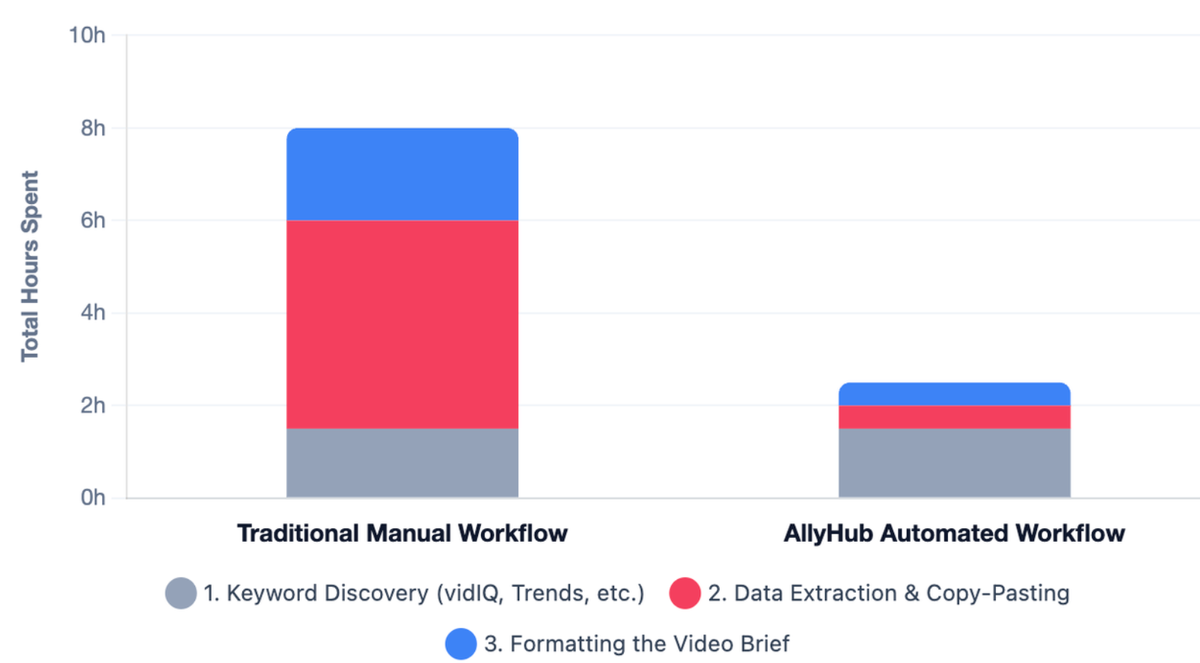
The keyword tools help you find the opportunity. AllyHub helps you keep the research organized enough for your team to actually use.
FAQ
Is Google Trends accurate for YouTube keyword research?
Google Trends is useful for direction, timing, and comparison, but it does not provide exact YouTube search volume. Use it to spot momentum, then validate important keywords with YouTube Studio, vidIQ, TubeBuddy, or another YouTube keyword tool.
What is the best YouTube keyword research tool for marketers?
For free research, use YouTube Studio, Google Trends, and autocomplete. For paid validation, vidIQ and TubeBuddy are strong YouTube-native options. If you also care about Google SEO, Semrush can help connect video topics with broader search demand.
How often should marketers check YouTube keyword trends?
For active channels, a weekly keyword check is usually enough. Review YouTube Studio, Google Trends, and one keyword tool every week, then do a deeper content planning review monthly.
What is the difference between top YouTube searches and trending keywords on YouTube?
Top searches usually refer to high-demand terms with large search volume. Trending keywords are terms with rising interest over a shorter period. A keyword can be trending without being one of the biggest searches overall.
How do I find trending keywords on YouTube before they become competitive?
The easiest method is to combine YouTube Studio Search Insights with Google Trends using the YouTube Search filter. Look for rising queries, content gaps, and topics with increasing momentum over the last 30–90 days.