

Most people only see YouTube trending videos from their own country — and don’t realize they’re missing what’s going viral elsewhere. If you’ve ever tried to find trending videos in another country, you’ve probably hit the same problems: no global trending page, unclear settings, and inconsistent results across tools.
YouTube trends are region-specific by default, but with the right method, you can access what’s trending in any market in under a minute.
In this guide, you’ll learn the fastest ways to see YouTube trending videos in other countries — plus how to track trends across multiple regions for content research, marketing, or creator discovery.
Key Takeaways
- Fastest method: Change your YouTube content location in Settings → General → Location — takes under 60 seconds, no tools required.
- Best for multi-country research: Third-party tools like Lenos and TubePilot cover 110+ countries with filtering by category, views, and trending streak.
- Best free option: Google Trends (YouTube filter) gives free regional trend data with historical comparison — no account needed.
- Key insight for marketers: YouTube's trending page updates every ~30 minutes and is non-personalized — meaning it reflects genuine regional demand, not algorithmic personalization.
- Bottom line: Combine YouTube's native location switch for quick checks with a dedicated trend-tracking tool for systematic, multi-market research.
How to See YouTube Trending Videos in Other Countries
Method 1: Change YouTube's Built-In Location Setting
The simplest way to see regional trending videos in other countries is to change your content location directly inside YouTube. No third-party tools, no VPN required.
On Desktop (Browser)
Step 1. Open YouTube and sign in to your account.
Step 2. Click your profile picture in the top-right corner.
Step 3. Select Location from the dropdown menu.
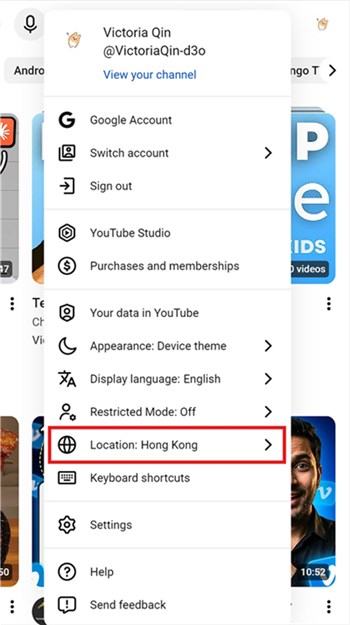
Step 4. Choose the country you want to explore from the list.
Step 5. Navigate to Explore → Trending in the left sidebar.
YouTube will now display the trending videos for the country you selected.
On Mobile (iOS / Android)
- Open the YouTube app and tap your profile photo (top-right corner).
- Go to Settings → General → Location (or simply “Location,” depending on your app version).
- Select your target country.
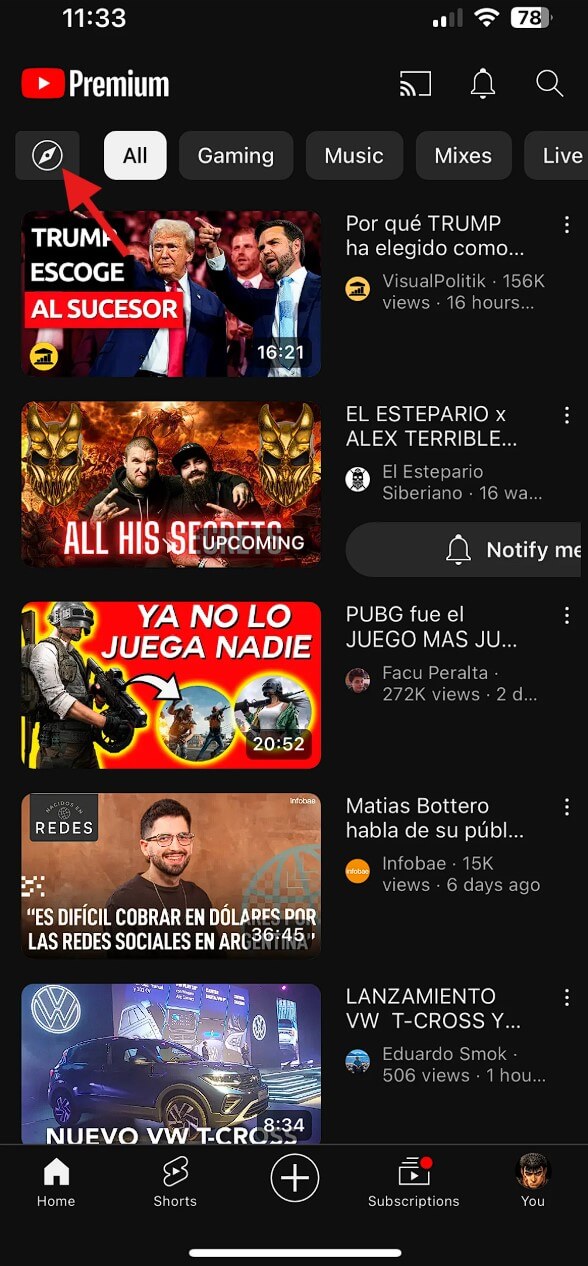
- Return to the home screen and tap the Compass icon at the top.
- Browse the Trending / popular content sections (these may appear as categories like Music, Gaming, or News rather than a single “Trending” page).
What to Know About This Method
- Coverage: YouTube supports location switching for most countries where the platform is available.
- Update frequency: Trending lists refresh approximately every 30 minutes.
- Limitation: You can only view one country at a time. For multi-market research, you'll need to switch locations repeatedly — which is where third-party tools become more efficient.
- No global trending page: YouTube does not offer a worldwide trending view. Trends are always tied to a specific country.
📌 Note: Changing your content location affects trending videos and some regional recommendations, but it does not change your account's primary region for monetization or other settings.
Method 2: Use Google Trends (YouTube Filter)
Google Trends is a free, underused tool for tracking what's gaining momentum on YouTube across different countries — including historical data that YouTube's native trending page doesn't provide.
How to Use Google Trends for YouTube Regional Data
Step 1. Go to trends.google.com.
Step 2. Enter a topic or keyword in the search bar.
Step 3. Set the country using the location dropdown (top-left).
Step 4. Change the Search type filter from Web Search to YouTube Search.
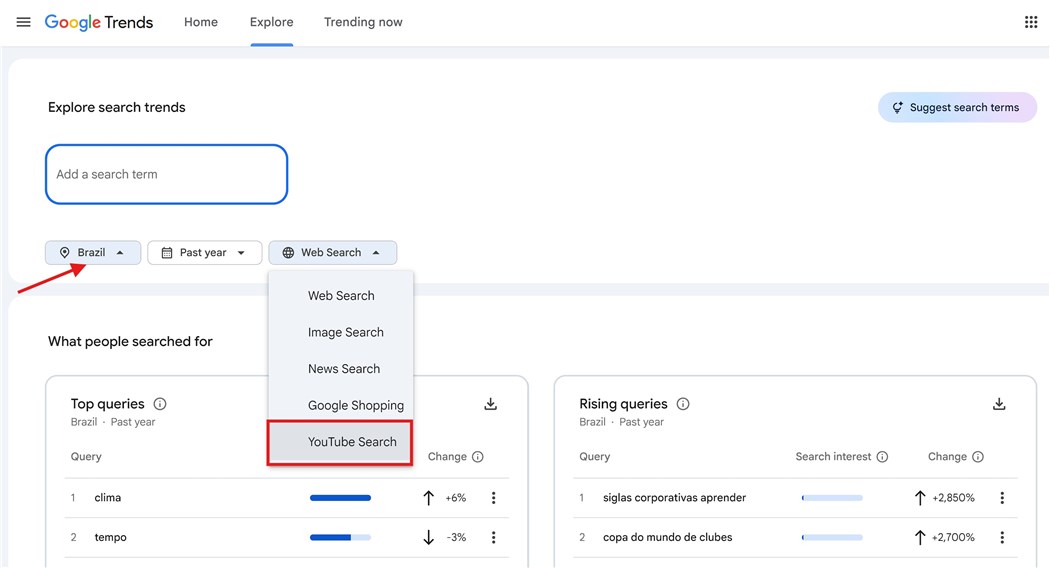
Step 5. Analyze the Interest over time graph and the Related queries section for rising topics.
Why This Works for Marketers
- Historical comparison: See whether a trend is rising, peaking, or declining in a specific market — context that YouTube's trending tab doesn't give you.
- Cross-country comparison: Add multiple countries to the same chart to see where a topic is gaining traction fastest.
- Rising queries: The "Breakout" label on related queries signals topics with 5,000%+ growth — these are early-stage trends worth acting on.
⚠️ Warning: Google Trends shows search interest, not view counts or engagement. A topic trending in search doesn't always translate to trending video content — cross-reference with YouTube's native trending page for confirmation.
Method 3: TrendMapper — Interactive World Map for YouTube Trends
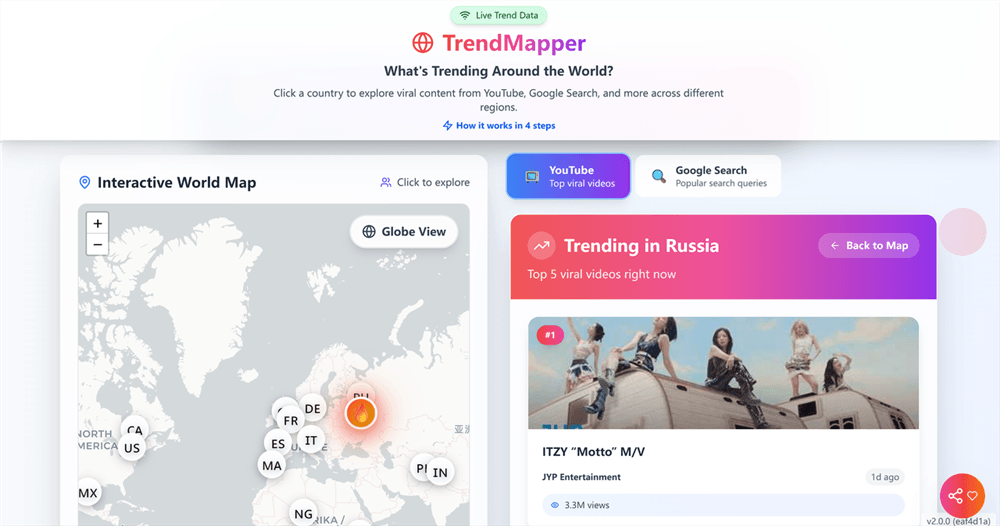
TrendMapper is a dedicated YouTube trend-tracking tool built around an interactive world map. Click any country on the map and instantly see what's trending on YouTube in that region.
Key Features
- Coverage: 40+ countries with real-time trending data.
- Data source: Aggregates from YouTube's official API, updated every 12 hours.
- Interface: Visual world map — intuitive for quick country-by-country exploration.
- Use case: Best for marketers who want a fast, visual overview of global trends without setting up filters.
How to Use It
- Visit the Trendmapper app.
- Click on any country on the world map.
- Browse the trending video list for that country — titles, thumbnails, view counts, and channel names are displayed.
Best for: Digital marketers doing a quick global scan to identify which markets are generating the most interesting content in a given category.
Limitations: Fewer countries than Lenos or TubePilot; no category filtering or historical data.
Method 4: Lenos — 110-Country Trending Tracker with Historical Data
Lenos offers one of the most comprehensive YouTube trending databases available, covering 110 countries with filtering options that go well beyond what YouTube's native interface provides.
Key Features
- Coverage: 110 countries.
- Filters: Category (music, gaming, news, entertainment, etc.), date range, view count, and trending streak (how many consecutive days a video has stayed in the trending tab).
- Historical data: Browse trending videos from past dates — useful for identifying seasonal patterns or retroactively researching what drove a spike in a market.
- Free tier available.
How to Use It
Step 1. Go to Lenos and navigate to the YouTube Trending tool.
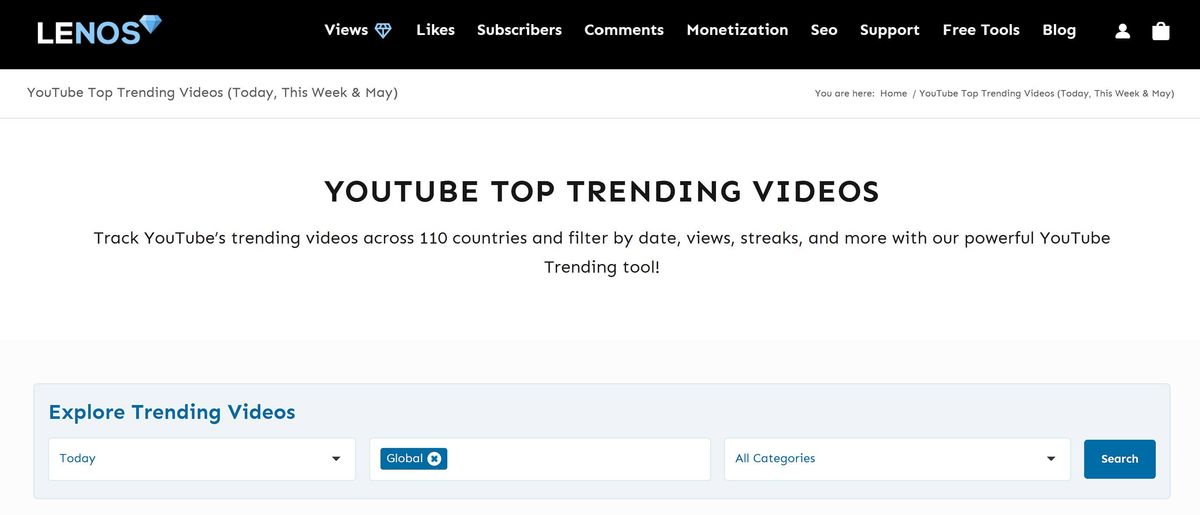
Step 2. Select your target country from the dropdown.
Step 3. Apply category and date filters as needed.
Step 4. Sort by streak to find videos with sustained trending performance — these are the most reliable signals of genuine audience demand, not one-day viral spikes.
Best for: E-commerce marketers researching product categories across multiple markets; content teams building a systematic trend-monitoring workflow.
Limitations: Interface is functional but not visually polished; some advanced filters require a paid plan.
💡 Pro tip: Sort by "streak" rather than views. A video that's been trending for 7+ consecutive days has proven staying power — it's a stronger content signal than a one-day viral hit.
Method 5: TubePilot — 110-Region Trending with Category Filtering
TubePilot is primarily an AI-powered YouTube growth tool, but its free trending tracker is one of the most capable available for regional research.
Key Features
- Coverage: 110 regions.
- Filters: Category, video length, upload date, sort by streak or views.
- Free to use for the trending tracker feature.
- Additional context: Pairs trending data with AI-generated video ideas and script tools — useful if you want to move from research to content production in one platform.
How to Use It
Step 1. Visit tubepilot.ai and open the Trending Videos tool.
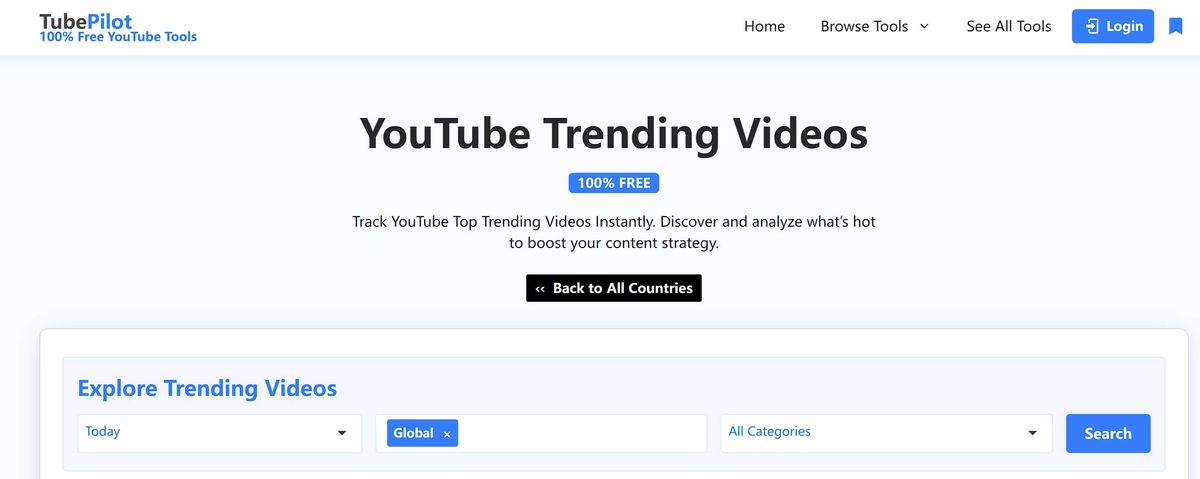
Step 2. Select your target region and category.
Step 3. Filter by upload date to focus on recent trends.
Step 4. Sort by streak to identify sustained performers.
Best for: Content creators and marketers who want to go from trend discovery to content ideation in a single workflow.
Limitations: The trending tracker is a secondary feature — the platform is primarily optimized for content creation, not deep trend analytics.
Method 6: vidIQ — Trending Data with Creator Intelligence
vidIQ is a well-established YouTube analytics platform that includes regional trending data alongside creator-level intelligence — making it particularly useful for influencer marketing teams.
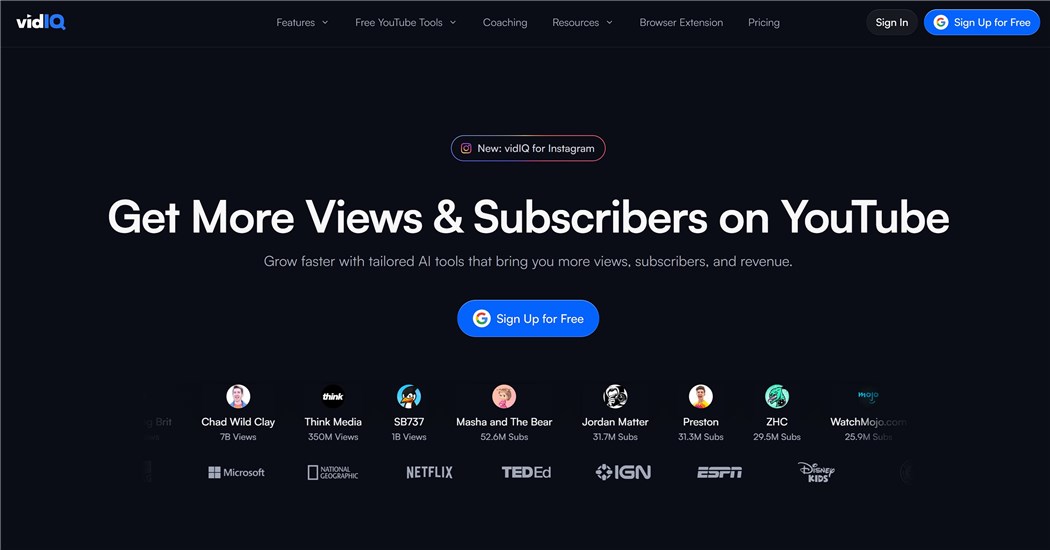
Key Features
- Trending tab: Shows trending videos by country with view velocity data (how fast views are accumulating).
- Creator insights: See channel size, subscriber growth rate, and engagement metrics for the creators behind trending videos.
- Keyword research: Cross-reference trending topics with search volume data to assess whether a trend has lasting SEO value.
- Free and paid tiers.
How to Use It
- Sign up at the VidIQ official website and connect your YouTube account (optional for trending research).
- Navigate to the Trending section.
- Select your target country.
- Filter by category and sort by view velocity to find fast-rising content.
Best for: Influencer marketing managers who need both trend data and creator performance metrics in one place.
Limitations: Full trending features require a paid plan; free tier has limited country coverage.
Method 7: Automate Regional Trend Research with AllyHub
Manually checking trending videos across multiple countries is manageable once, but inefficient as a recurring workflow. If you're monitoring trends weekly or across 5–10 markets, automation becomes a clear advantage.
AllyHub is an AI agent platform that can automate browser-based research tasks — including collecting and structuring YouTube trending data across multiple countries, scraping Reddit, TikTok, and LinkedIn jobs.
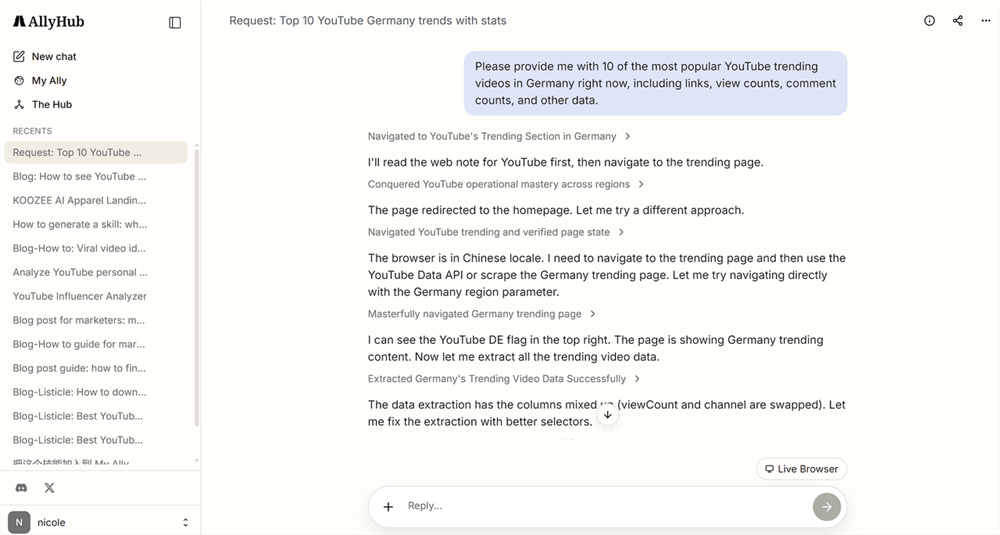
How It Works
Instead of manually switching locations or checking multiple tools, you can give AllyHub a single prompt like:
“Find the top trending YouTube videos this week in the US, Japan, Brazil, and Germany. Extract titles, views, channels, and categories. Identify repeated formats or emerging trends. Output as a structured report.”
AllyHub will then:
- Open YouTube and switch between target countries
- Extract trending video transcripts, titles, views, channels, etc.
- Optionally pull supporting signals from Google Trends (YouTube filter)
- Compile everything into a structured output (Excel, Notion, or HTML report)
- Highlight patterns such as recurring formats, fast-rising topics, or cross-market overlaps
Example Use Case
A marketing team could set up a recurring workflow that:
- Tracks trending videos in 5–10 countries every Monday
- Extracts and standardizes key data fields
- Identifies trends appearing across multiple regions
- Delivers a ready-to-use report for content planning
Why This Is Different from Other Tools
Unlike tools like vidIQ or Lenos that provide access to trend data, AllyHub focuses on:
👉 automating the research process itself
- No manual switching between countries
- No repetitive data collection
- No need to combine multiple tools manually
How to Use Regional Trending Videos in Your Marketing Strategy
Knowing how to access regional trending videos is step one. Turning that data into a competitive advantage is step two. Here's how marketers are using this data effectively:
1. Content Arbitrage: Spot Trends Before They Cross Over
Monitor trending videos in markets that typically lead your home market by 2–4 weeks (South Korea and Japan often lead in entertainment formats; Brazil and India lead in certain music and lifestyle categories). When you see a format gaining traction there, you have a window to produce a localized version before it saturates your primary market.
2. Influencer Discovery in Emerging Markets
The creators behind regional trending videos are often mid-tier (100K–1M subscribers) and still accessible for partnerships. Use vidIQ or Lenos to identify which channels are consistently producing trending content in your target market, then reach out before their rates reflect their growing influence.
3. Product Demand Validation for E-Commerce
If a product category is generating trending YouTube content in a market you're considering entering, that's a strong demand signal. Cross-reference with Google Trends (YouTube filter) to confirm whether search interest is also rising — two aligned signals significantly reduce market entry risk.
4. Seasonal and Cultural Content Planning
Use Lenos's historical data to map what trended in a specific country during the same period last year. This gives you a cultural content calendar — local holidays, events, and seasonal behaviors that drive YouTube engagement in that market.
5. Competitive Intelligence Across Markets
Track whether your competitors' content is trending in specific regions. If a competitor's video is on a 10-day trending streak in Germany, that's a signal worth investigating — what topic, format, or hook drove that performance?
Quick Comparison: Methods at a Glance
Method | Countries | Free | Historical Data | Category Filter | Best For |
YouTube Location Setting | Most countries | ✅ |
FAQ: How to See YouTube Trending Videos in Other Countries
Why do regional YouTube trending videos matter?
YouTube trends are country-specific, not global — meaning what’s popular in one market may be completely different in another. For marketers, this creates an opportunity to spot emerging formats early, understand real-time audience interests, discover rising creators before they become expensive, and identify product demand signals in different regions using largely non-personalized trending data.
Can I see worldwide trending videos on YouTube?
No. YouTube does not offer a global trending page. Trending content is always tied to a specific country or region. To see what's trending globally, you need to check multiple countries individually — either through YouTube's location setting or a third-party tool like Lenos or TubePilot that aggregates data across 110+ regions.
How often does YouTube's trending list update?
YouTube's trending tab updates approximately every 30 minutes. The list is non-personalized — every user in the same country sees the same trending videos, making it a reliable demand signal rather than an algorithmically filtered feed.
Do I need a VPN to see trending videos in other countries?
No. YouTube's built-in location setting (Settings → General → Location) lets you switch your content region without a VPN. Third-party tools like Lenos and TubePilot also provide regional trending data without requiring any location spoofing.
What factors determine which videos appear on YouTube's trending page?
YouTube considers a combination of view count, rate of view growth, where views are coming from (including outside YouTube), video age, and how the video performs compared to other recent uploads from the same channel. It's designed to surface content that's broadly appealing in a region — not just content that's popular among a specific niche.
How can I track regional trending videos on YouTube over time?
Lenos is the best free option for historical trending data — you can select past dates to see what was trending in a specific country on any given day. Google Trends (with the YouTube filter) also provides historical interest data, though it measures search volume rather than video trending status.
What's the best tool for tracking YouTube trends across multiple countries simultaneously?
For systematic multi-country research, Lenos and TubePilot are the strongest free options, covering 110 countries with category filtering. For teams that need this as a recurring automated workflow, AllyHub can extract and compile trending data across multiple markets into a structured report on a schedule.
Can I use regional YouTube trending data for influencer marketing?
Yes — and it's one of the highest-value applications. Creators behind regional trending videos are often mid-tier and still accessible for partnerships. vidIQ is particularly useful here because it pairs trending data with creator-level metrics (subscriber count, growth rate, engagement rate), letting you evaluate partnership potential alongside trend relevance.




