YouTube trending video scrapers help marketers collect structured data from public YouTube pages, search results, video pages, channels, charts, and competitor content. So they will know what videos, topics, creators, hooks, and formats are gaining momentum right now — and take actions to turn that into content, ads, influencer outreach, or competitive intelligence.
This guide compares 7 YouTube trending video scrapers and trend-research tools for marketers. It covers what each tool is best for, what data it can collect, how to use it, pricing notes, limitations, and how to turn scraped YouTube data into a repeatable marketing workflow.
Notes: YouTube removed its general Trending page and Trending Now list in 2025, shifting discovery toward YouTube Charts, recommendations, search, Shorts, and niche communities. The YouTube Data API mostPopular chart was also adjusted: instead of reflecting the old Trending Now list, it now features videos from category charts such as Trending Music, Movies, and Gaming.
Key Takeaways
- Best overall workflow: The best YouTube trending video scraper setup combines category charts, YouTube search results, competitor channels, transcripts, and comments instead of relying on one trending feed.
- Best no-code scraper: Apify is the strongest starting point for marketers who need structured YouTube data exports without building a custom scraper.
- Best creator-intelligence tools: VidIQ and TubeBuddy are not pure scrapers, but they are useful for trend alerts, keyword research, content ideas, and optimization workflows.
- Best enterprise options: Bright Data and Oxylabs fit teams that need scalable APIs, delivery options, and technical control.
- Best insight layer: AllyHub is useful after scraping because it helps marketers turn raw YouTube data into competitor reports, content briefs, and repeatable research workflows.
- Biggest caveat: YouTube scraping has policy, copyright, and privacy risks. Use public data responsibly, avoid redistributing raw scraped datasets, and involve legal review for high-scale or commercial data products.
Why Marketers Need YouTube Trending Video Scrapers
YouTube is the world's second-largest search engine and the dominant platform for video content discovery. For marketers, trending video data is a direct signal of what audiences are actively engaging with — right now.
Here's what you can do with scraped trending data that you can't do with YouTube Studio alone:
- Spot content gaps before competitors do — identify trending topics in your niche that no one in your category has covered yet
- Reverse-engineer viral video formulas — analyze titles, thumbnails, descriptions, and tags of top-performing videos to understand what's driving clicks
- Validate content ideas with real data — instead of guessing, check whether a topic is gaining or losing momentum before investing production time
- Track competitor channels at scale — monitor which videos from rival brands are trending and what engagement patterns they're generating
- Fuel influencer discovery — find channels that are rapidly gaining traction in specific categories or regions
Important note on YouTube's ToS: YouTube's Terms of Service prohibit automated data collection. However, scraping publicly accessible data (not behind login) has generally been upheld as permissible in U.S. courts (see hiQ Labs v. LinkedIn). Use scraped data for internal research and analysis only — not for redistribution or commercial resale of the data itself.
What Data Can You Scrape from YouTube Trending Videos?
Before choosing a tool, define the data fields your marketing workflow actually needs.
Data point | Marketing use case |
Video title | Hook analysis, keyword research, content angle mining |
Video URL | Reference, audit trail, competitor library |
Channel name and URL | Creator mapping and influencer discovery |
For marketers, view velocity is usually more useful than total views. A video with 30,000 views in 24 hours may be a stronger trend signal than a video with 500,000 views accumulated over several years.
Best YouTube Trending Video Scrapers: Quick Comparison
Tool | Best For | Technical Skill Required | Free Tier | Starting Price | Data Volume | Key Differentiator |
Apify | Data-driven marketers, agencies | Low (no-code Actors) |
Tool 1: Apify YouTube Trending Scraper — Best for Data-Driven Marketers
Apify is a cloud-based automation platform with a marketplace of pre-built "Actors" — ready-to-run scrapers that require no coding. Its YouTube Trending Actors are among the most capable tools available for extracting structured trending data at scale.
Step-by-step: How to use Apify's YouTube Trending Scraper
- Create a free Apify account at apify.com — the free tier includes $5/month in platform credits.
- Navigate to the Apify Store and search for "YouTube Trending Videos" — you'll find several Actors including YouTube Trending Videos Scraper and YouTube Trend Spotter.
- Open the Actor and click "Try for free" to open the input configuration panel.
- Set your parameters: choose country/region, category (e.g., Music, Gaming, News), maximum results count, and output format (JSON, CSV, or Excel).
- Click "Start" — the Actor runs in Apify's cloud. No local setup required.
- Download your results from the "Storage" tab once the run completes. Export as CSV for spreadsheet analysis or JSON for dashboard integration.
- Schedule recurring runs using Apify's built-in scheduler to automate daily or weekly trend monitoring.
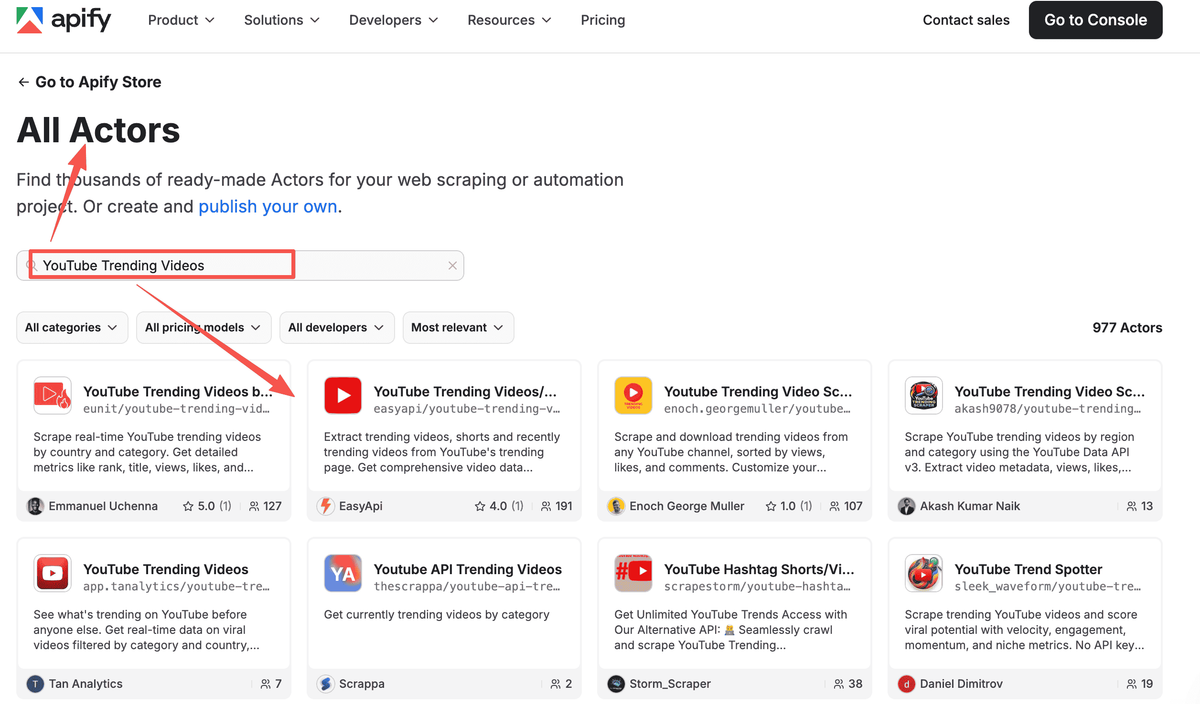
Pro tip for marketers: Use the YouTube Trend Spotter Actor specifically — it calculates composite scores including Velocity Score (how fast a video is gaining views), Momentum Score (whether growth is accelerating), and Niche Opportunity Score. These metrics are far more actionable than raw view counts for content strategy decisions.
Best for:
- Marketers who need bulk trending data for custom dashboards or reporting
- Agencies running competitive intelligence for multiple clients
- Content teams that want to automate weekly trend reports without developer support
Pricing: Free tier ($5/month credits). Starter plan at $49/month. YouTube Trending Actor runs cost approximately $0.05 per run or $2.00 per 1,000 trending videos.
Tool 2: VidIQ — Best for Real-Time Trend Alerts
VidIQ is a YouTube analytics and optimization platform with a Chrome extension that integrates directly into YouTube's interface. For marketers focused on content ideation and trend monitoring within a specific niche, VidIQ's trending features are among the most accessible available.
How VidIQ’s YouTube Trending Scraper Works
- Install the VidIQ Chrome extension from the Chrome Web Store and connect your YouTube account.
- Navigate to the VidIQ dashboard and open the "Trending" section under the Research tab.
- Set up Trending Alerts: configure views-per-hour thresholds to receive notifications when videos in your niche hit viral velocity.
- Use "Daily Ideas" — VidIQ's AI scans trending topics in your niche daily and generates personalized content suggestions based on what's gaining traction.
- Run keyword research on trending topics: enter a trending video title or topic into VidIQ's keyword tool to see search volume, competition level, and related keyword variants.
- Analyze competitor channels: use the Competitor Tracking feature to monitor which videos from rival channels are trending and what engagement patterns they're generating.
- Export data using VidIQ's reporting features for team sharing or client presentations.

Pro tip: VidIQ's "views per hour" metric is the most reliable early signal for viral content — a video hitting 10,000+ views/hour in its first 24 hours is a strong indicator of trending potential. Set alerts at 5,000 views/hour to catch trends before they peak.
Best for:
- Content marketers who want trend intelligence without leaving YouTube
- Marketers managing a single brand channel who need daily content ideas
- Teams that want trend data integrated with keyword research in one tool
Pricing: Free plan available (limited features). Basic plan at $7.50/month. Boost plan at $39/month. Coaching plan at $99/month.
Tool 3: TubeBuddy — Best for Trend-Based Content
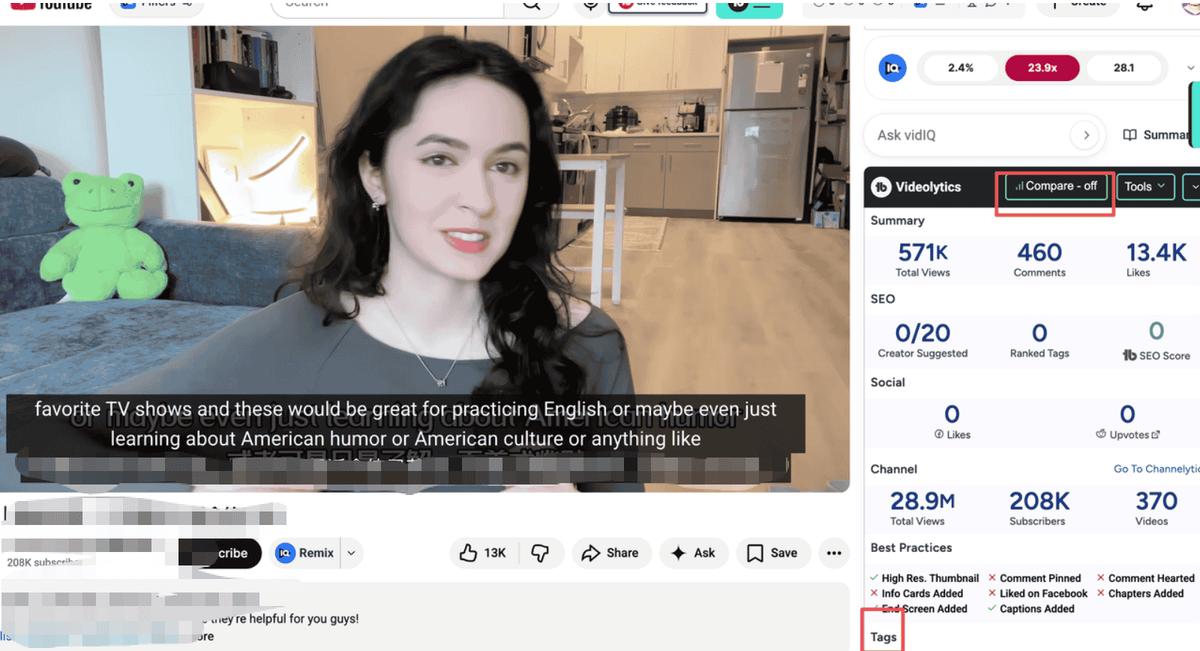
TubeBuddy is a browser extension and YouTube-certified tool that combines trend discovery with deep content optimization features. Unlike pure scrapers, TubeBuddy helps marketers not just find trending topics but act on them — optimizing titles, tags, and descriptions for maximum reach.
Step-by-step: Using TubeBuddy to Collect YouTube Trending Videos
- Install TubeBuddy from the Chrome Web Store and connect it to your YouTube channel.
- Open the "Video Topic Planner" from the TubeBuddy sidebar — this tool surfaces trending topics relevant to your channel's niche.
- Use "Topical Analysis" to identify emerging trends before competitors: TubeBuddy scans YouTube's search and trending data to flag topics gaining momentum in your category.
- Check the "Niche Leaderboard" to see which videos in your niche are currently trending and how your channel's content compares.
- Run a keyword search on any trending topic to see search volume, competition score, and optimization recommendations.
- Use "Channel Insights" to benchmark your content performance against competitors who are riding trending topics.
- A/B test your trending content: TubeBuddy's split-testing feature lets you test different titles and thumbnails on trending-topic videos to maximize CTR.
Best for:
- Marketers who want to both discover trends and optimize content for those trends in one workflow
- YouTube channel managers who need competitive benchmarking alongside trend data
- Teams that run A/B tests on video titles and thumbnails
Pricing: Free plan available. Pro plan at $4.99/month. Legend plan at $19.99/month (includes advanced trend features).
Tool 4: Bright Data YouTube Scraper API — Best for Enterprise-Scale Data
Bright Data is an enterprise-grade data collection platform with a dedicated YouTube Scraper API. It's built for organizations that need high-volume, reliable trending data with minimal maintenance overhead — Bright Data handles proxy rotation, anti-bot measures, and infrastructure at scale.
YouTube Scraper API Workflow for YouTube Trend Research
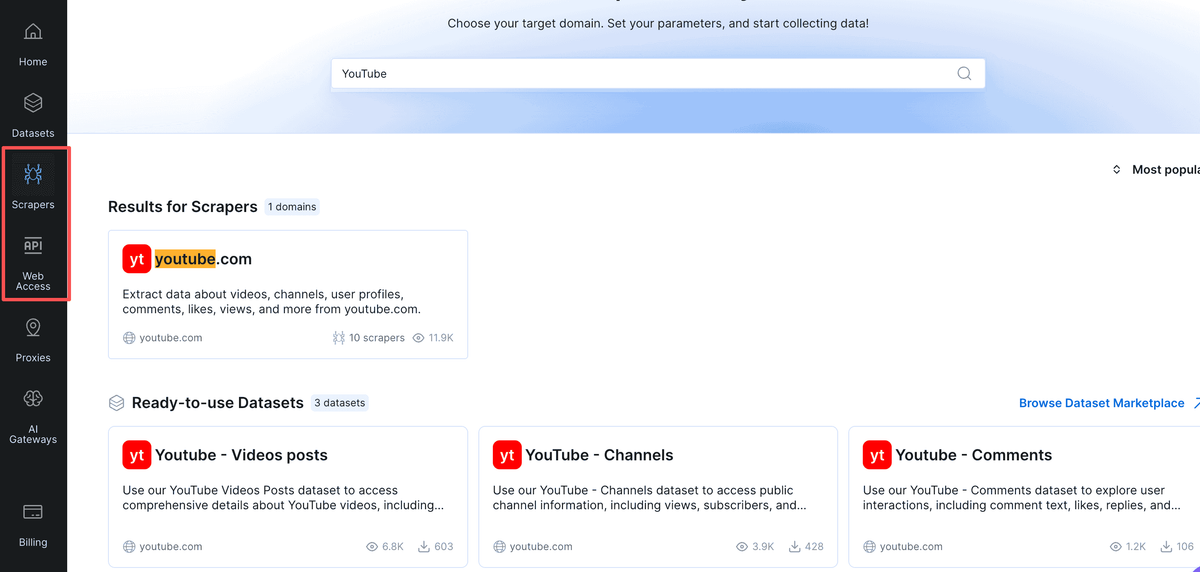
- Create a Bright Data account and navigate to the "Web Scraper IDE" or "Datasets" section.
- Select the YouTube dataset from the pre-built dataset marketplace — Bright Data offers ready-made YouTube trending video datasets updated on a schedule.
- Configure your data parameters: set region, category, date range, and the specific data fields you need (views, engagement, channel data, etc.).
- Choose delivery method: receive data via API endpoint, webhook, cloud storage (S3, GCS), or direct download in JSON, CSV, or NDJSON format.
- Set up scheduled delivery for automated weekly or daily trending data drops to your data warehouse or BI tool.
- Integrate with your analytics stack: Bright Data's structured output connects directly to tools like Google BigQuery, Tableau, or Power BI.
Best for:
- Enterprise marketing teams or agencies that need reliable, high-volume trending data at scale
- Data teams building custom YouTube trend dashboards or competitive intelligence systems
- Organizations that need SLA-backed data delivery with compliance documentation
Pricing: Usage-based pricing. Pay-as-you-go starts at approximately $0.001 per record. Monthly plans available from $500+. Free trial available.
Tool 5: Octoparse — Best No-Code Scraper for Non-Technical Marketers
Octoparse is a desktop-based visual scraping tool with pre-built YouTube templates. It's designed for marketers who want to extract trending video data without writing a single line of code — using a point-and-click interface to define what data to collect.
Using Octoparse to Collect YouTube Trending Data
- Download and install Octoparse (available for Windows and Mac) and create a free account.
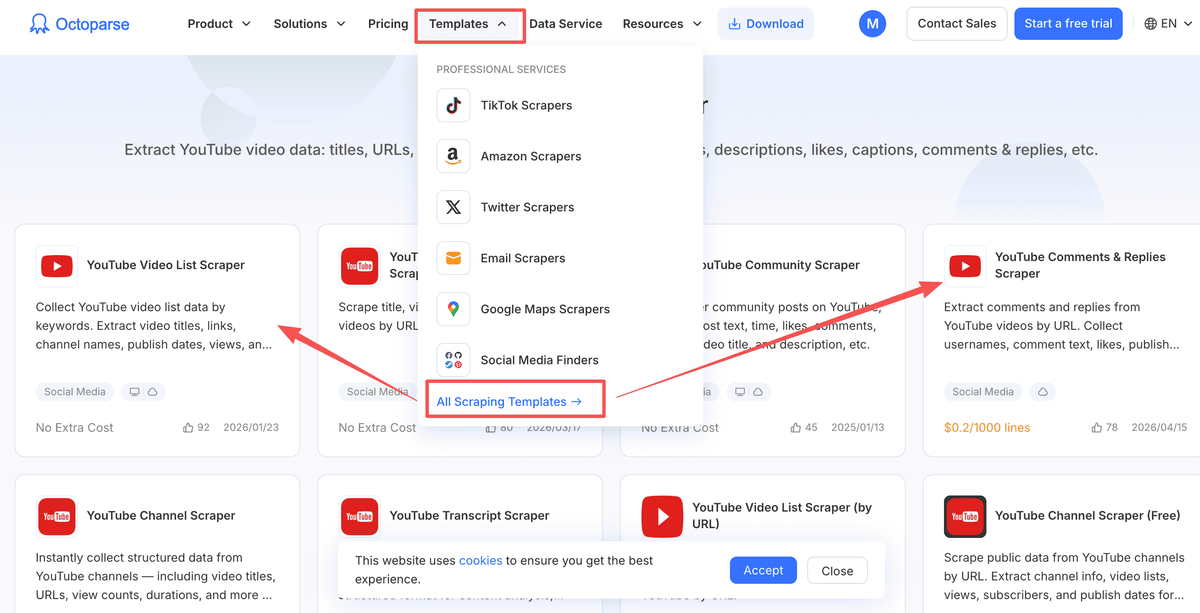
- Open the "Task Templates" section and search for "YouTube" — Octoparse provides pre-built templates for YouTube trending videos, channel data, and video metadata.
- Select the YouTube Trending template and click "Use this template."
- Configure the template: enter the YouTube trending URL for your target region (e.g., https://www.youtube.com/feed/trending?bp=... with the appropriate category parameter).
- Preview the extraction: Octoparse will highlight the data fields it will collect — verify that titles, views, channels, and engagement metrics are all captured correctly.
- Run the task: choose between local extraction (runs on your machine) or cloud extraction (runs on Octoparse's servers for 24/7 scheduling).
- Export results in CSV, Excel, JSON, or directly to Google Sheets.
Pro tip: Use Octoparse's cloud scheduling feature to run trending video extractions every morning at 8 AM — you'll have fresh trending data waiting in your inbox before your content planning meeting.
Best for:
- Marketing managers and content strategists who need trending data without technical support
- Small teams that want a one-time setup with recurring automated extractions
- Marketers who prefer a visual, point-and-click workflow over API configuration
Pricing: Free plan (2 cloud runs/day, limited data). Standard plan at $75/month. Professional plan at $209/month.
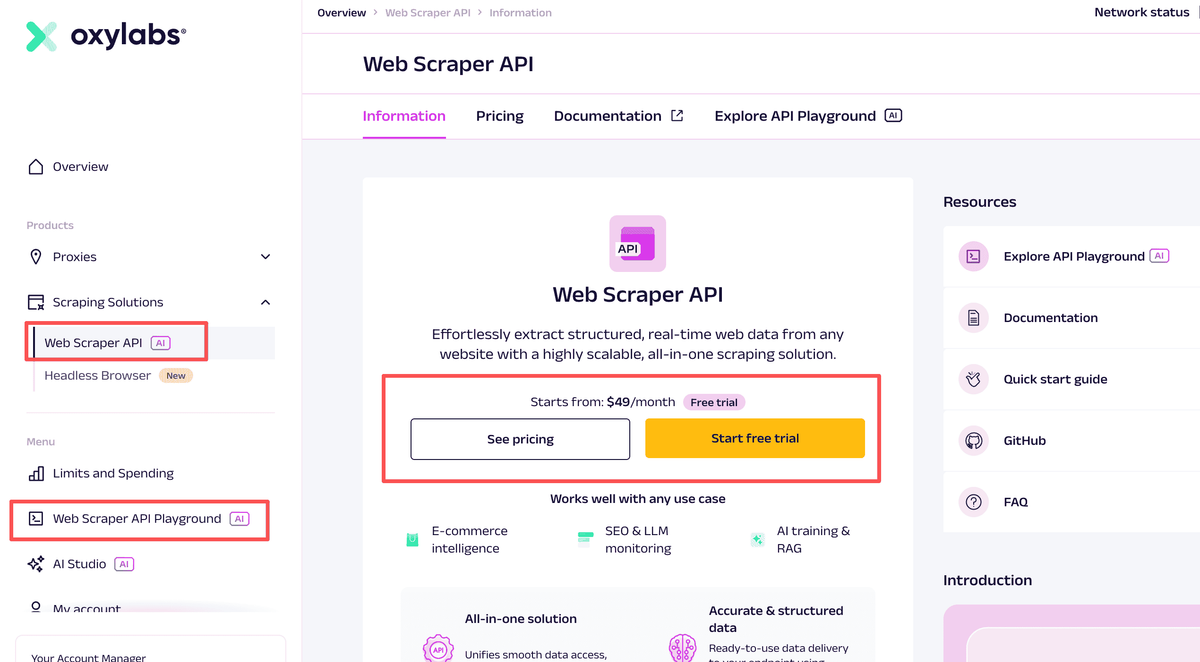
Tool 6: Oxylabs YouTube Scraper API — Best for Developer Teams
Oxylabs is an enterprise proxy and scraping infrastructure provider with a dedicated YouTube Scraper API. It's built for developer teams that need maximum reliability and scale — Oxylabs manages a pool of over 100 million residential IPs and uses AI-assisted parsing to adapt to YouTube's layout changes automatically.
Using Oxylabs YouTube Scraper API for Trend Data
- Sign up for Oxylabs and navigate to the "Scraper APIs" section — select the YouTube Scraper API product.
- Generate your API credentials from the dashboard.
- Make your first API request using the provided endpoint. A basic trending video request looks like:
curl -u 'username:password' \'https://realtime.oxylabs.io/v1/queries' \--header "Content-Type: application/json" \--data '{"source": "youtube", "url": "https://www.youtube.com/feed/trending", "geo_location": "United States"}'
- Parse the structured JSON response — Oxylabs returns clean, pre-parsed data including video titles, view counts, channel info, and engagement metrics.
- Set up geo-targeting: specify country codes to pull trending data for specific markets — critical for global marketing campaigns.
- Integrate with your data pipeline: Oxylabs supports direct integration with Python, Node.js, and most major programming languages.
Best for:
- Marketing technology teams building custom trend monitoring systems
- Agencies that need geo-targeted trending data across multiple markets simultaneously
- Organizations that require enterprise SLAs and compliance documentation
Pricing: Starts at $49/month. Enterprise plans available with custom pricing. Free trial with 5,000 results.
Tool 7: Databar.ai — Best for AI-Powered Trend Analysis
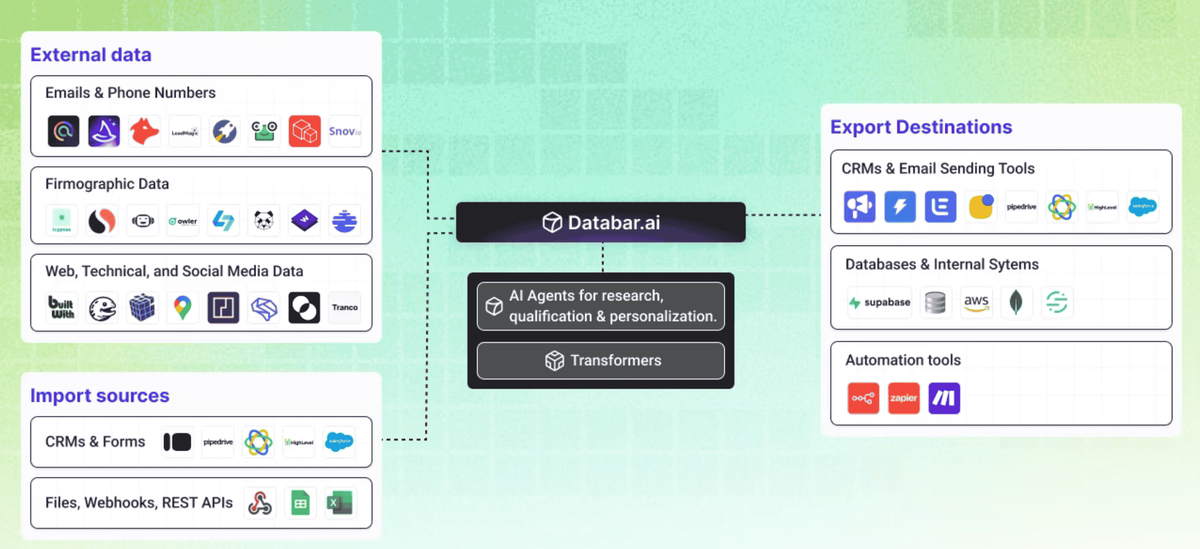
Databar.ai is a no-code data enrichment platform that combines YouTube scraping with AI-powered analysis. Unlike raw scraping tools, Databar.ai transforms extracted trending video data into actionable business intelligence — including sentiment analysis, content categorization, and CRM integration.
Using Databar.ai for YouTube Trend Analysis
- Create a Databar.ai account and navigate to the "Data Sources" section.
- Select "YouTube" from the available data connectors.
- Configure your data pull: choose trending videos by category, region, or keyword — Databar.ai handles the extraction automatically.
- Apply AI enrichment layers: enable sentiment analysis on video descriptions and comments, content categorization by topic, and engagement scoring.
- Build your analysis table: Databar.ai presents extracted data in a spreadsheet-like interface where you can filter, sort, and annotate trending videos.
- Export or integrate: push data to your CRM, Google Sheets, Airtable, or download as CSV/Excel for reporting.
- Set up recurring data refreshes to keep your trending video database current without manual re-runs.
Best for:
- Marketing teams that want trend data with AI-powered insights built in
- Marketers who need to connect YouTube trending data to CRM or campaign management tools
- Teams that want to combine trend monitoring with audience sentiment analysis
Pricing: Free tier available. Paid plans start at $49/month. Usage-based pricing for high-volume extractions.
Use-Case Recommendation Table
Your Scenario | Recommended Tool | Why |
You're a solo content marketer who needs daily trend ideas | VidIQ (free or Basic) | Trending alerts + AI content ideas with zero setup |
You manage a YouTube channel and want to optimize trending content | TubeBuddy (Pro) | Combines trend discovery with A/B testing and SEO optimization |
Beyond Scraping: How Smart Marketers Turn Trending Data Into Competitive Intelligence
Most marketers who use YouTube trending scrapers are ultimately trying to answer a bigger question: What content should I create, and when should I create it? Raw trending data — titles, view counts, engagement rates — gives you the inputs. But turning those inputs into a content strategy requires analysis, pattern recognition, and the ability to connect YouTube trends to your broader marketing goals.
AllyHub is an intelligent autopilot that works directly in your browser, designed for marketers who need to move from data collection to actionable insight without manual handoffs.
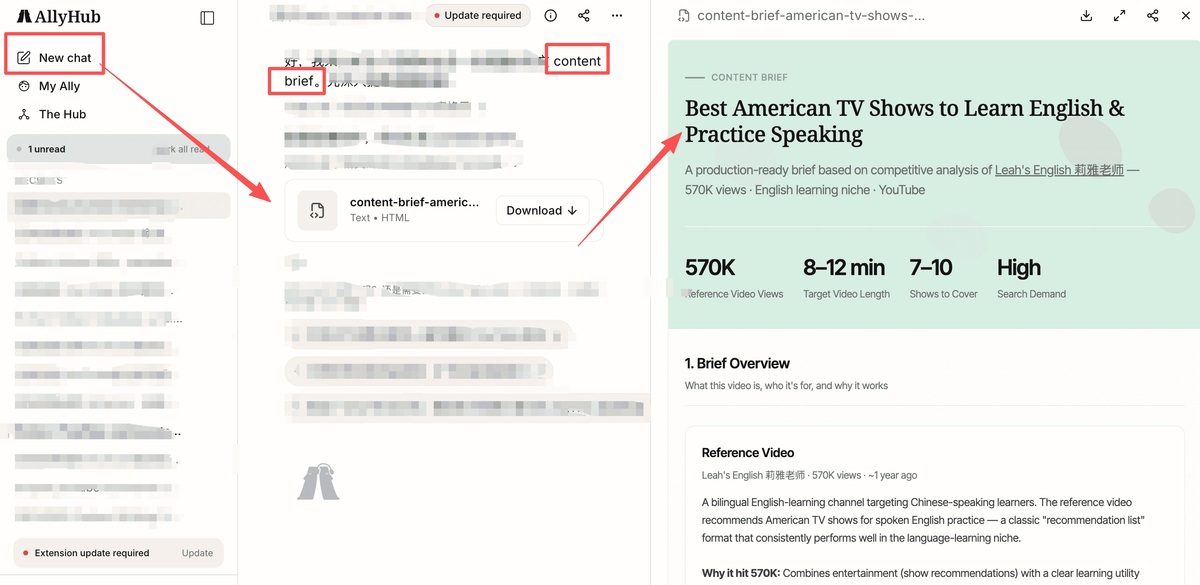
For marketers: If you're already using a YouTube trending scraper to collect data, AllyHub is the layer that turns that data into decisions. It's built for the "what do I do with this?" step that most scraping tools leave unanswered.
Frequently Asked Questions
Can I still scrape YouTube trending videos after the Trending page was removed?
Yes, but the workflow needs to change. Instead of relying on one general Trending page, marketers should monitor YouTube Charts, keyword search results, competitor channels, Shorts, transcripts, comments, and niche-specific video results.
Is scraping YouTube legal?
It depends on the method, scale, jurisdiction, and use case. YouTube’s platform policies restrict automated data collection, while legal treatment of public web scraping can vary. For internal marketing research, use public data responsibly and avoid redistribution. For high-scale or commercial data use, get legal review.
What YouTube data should marketers scrape first?
Start with title, URL, channel, publish date, views, comment count, description, thumbnail URL, and transcript availability. If your goal is messaging or content strategy, add transcripts and comments because they reveal audience language and objections.
How often should marketers scrape YouTube trending data?
For fast-moving niches, daily monitoring is useful. For competitor reporting or monthly content planning, weekly scraping is usually enough. The right cadence depends on how quickly your category changes and how often your team acts on the insights.
Can AllyHub replace a YouTube scraper?
AllyHub is better positioned as an AI workflow and analysis layer, not a replacement for every high-volume scraper. Use a dedicated scraper when you need bulk data extraction. Use AllyHub when you need to browse, organize, analyze, and turn YouTube trend data into marketer-ready outputs.
What's Next
YouTube trending data is one of the most underutilized signals in content marketing. Most marketers check the Trending tab occasionally — the ones who build systematic, automated workflows around trending data consistently outpace competitors on content timing and topic relevance.
Start with the tool that matches your current technical comfort level and data needs. If you're new to trend monitoring, VidIQ's free tier is the lowest-friction entry point. If you need bulk data for reporting or competitive intelligence, Apify's YouTube Trending Actor delivers the most value per dollar.
And when you're ready to move beyond data collection into automated analysis and content strategy, AllyHub is built for exactly that workflow.