You're staring at Amazon's Best Sellers page, scrolling through hundreds of products, and thinking: "I need this data — rankings, reviews, pricing — but there's no way I'm copying it all by hand." You're right. You shouldn't. Whether you're researching competitors, hunting for product opportunities, or tracking market trends, manually extracting Amazon Best Sellers data is slow, repetitive, and difficult to scale.
This guide covers three practical ways to scrape Amazon Best Sellers data, from no-code extensions to custom Python scripts and dedicated APIs. We'll also cover how to analyze that data once you have it, and the necessary legal considerations to keep in mind before you scale your extraction.
Key Takeaways
- No-code is the fastest path: Ready-made Amazon Best Sellers scrapers let you start extracting product names, prices, URLs, thumbnails, rankings, and category data without programming.
- Python is best for learning and customization: A custom script gives you control, but Amazon layouts change often, so expect blocking, selector maintenance, and limited reliability.
- APIs are better for repeatable workflows: Scraping APIs can return Amazon product, pricing, review, seller, and bestseller data without forcing your team to maintain scraping infrastructure.
- Amazon scraping carries both legal and contractual risk. Public product pages may be accessible without login, but Amazon’s Conditions of Use restrict data mining, robots, and similar extraction tools without express consent. For commercial monitoring, client reporting, or high-volume collection, get legal review before scaling.
- The real value is analysis: Marketers do not win by collecting raw Amazon Best Seller rows. They win by turning raw data into product, pricing, content, and competitor decisions.
What Amazon Best Sellers Data Can and Cannot Give You?
Amazon's Best Sellers pages are surprisingly rich data sources. Here's what you can typically extract from a category Best Sellers list:
Data Point | Example | Business Value |
Product ranking | #1 in Kitchen & Dining | Track category position |
Product title | “Instant Pot Duo 7-in-1…” | Analyze keywords and listing angles |
Important distinction: a Best Sellers category page gives you ranked product-list data above. Review text, bullet points, A+ Content, seller details, and historical BSR movement usually require product-page scraping, review-page scraping, a third-party dataset, or repeated snapshots over time.
Method 1: How to Scrape Amazon Best Sellers with a No-Code Tool
Best for: Marketers who need a quick category snapshot without writing code.
If you do not program — or simply value your time more than the learning curve — pre-built Amazon Best Sellers scrapers are the fastest way to get structured data. These tools handle page navigation, extraction, and exports to CSV, Excel, JSON, or HTML.
How It Works
- Choose a scraper platform. Popular options with Amazon Best Sellers support include Apify’s Amazon Bestsellers Scraper, Web Scraper, and other no-code data extraction platforms.
- Paste the target Amazon Best Sellers URL. For example, you can use a category URL such as https://www.amazon.com/Best-Sellers-Kitchen-Dining/zgbs/kitchen/
- Select your output fields. Common fields include product name, rank, price, URL, ASIN, rating, review count, and image.
- Run a small test first. Before scraping multiple categories, run one category and check whether the output matches what you need.
- Export the dataset. Download the results as CSV, Excel, JSON, or HTML and clean the fields before analysis.
Pros and Cons
Pros | Cons |
No coding required | Less control over custom logic |
Fast setup | Free tiers or trial limits may be restrictive |
Easy CSV/Excel export | Some tools support only selected marketplaces |
Pro tip for marketers: Choose a no-code scraper only after you know what decision you need to make. A “complete” dataset is not always better. For product opportunity research, rank, price, reviews, and rating may be enough. For messaging research, you will also need review text and product page details.
Method 2: How to Build an Amazon Best Sellers Scraper with Python
Best for: Marketers or analysts who are comfortable with basic scripting and want to understand how the data extraction works.
A Python scraper gives you control over the fields, cleaning logic, and export format. But it also creates maintenance work. Amazon page structures change, anti-bot systems are active, and simple selectors may break without warning.
Note that Amazon frequently changes page structures. Inspect the current HTML before relying on specific selectors.
Step 1: Install Required Libraries
You'll need Python 3.8+ and these packages:
Selenium can be useful for browser-based testing, but keep the first version simple. Add browser automation only when you have a clear need for it.
Step 2: Fetch the Page Carefully
Warning: A 200 response does not guarantee that you received the page you wanted. You may receive a blocked page, a CAPTCHA page, or a regional variation. Always inspect the HTML before trusting the output.
Step 3: Parse Product Cards
Amazon class names can be unstable. Use structural attributes where possible, validate the output manually, and avoid assuming that one CSS selector will keep working.
Step 4: Clean the Output
Step 5: Add Pagination Only After the First Page Works
Amazon Best Sellers categories often expose ranked products across multiple pages, but the exact pagination pattern can vary by category, marketplace, layout, and Amazon experiment. Do not build pagination until your first-page parser is stable.
A safer workflow:
- Save page 1 output.
- Manually inspect whether page 2 exists.
- Add one page at a time.
- Validate ranks and ASINs after each run.
- Stop if Amazon blocks or challenges the request.
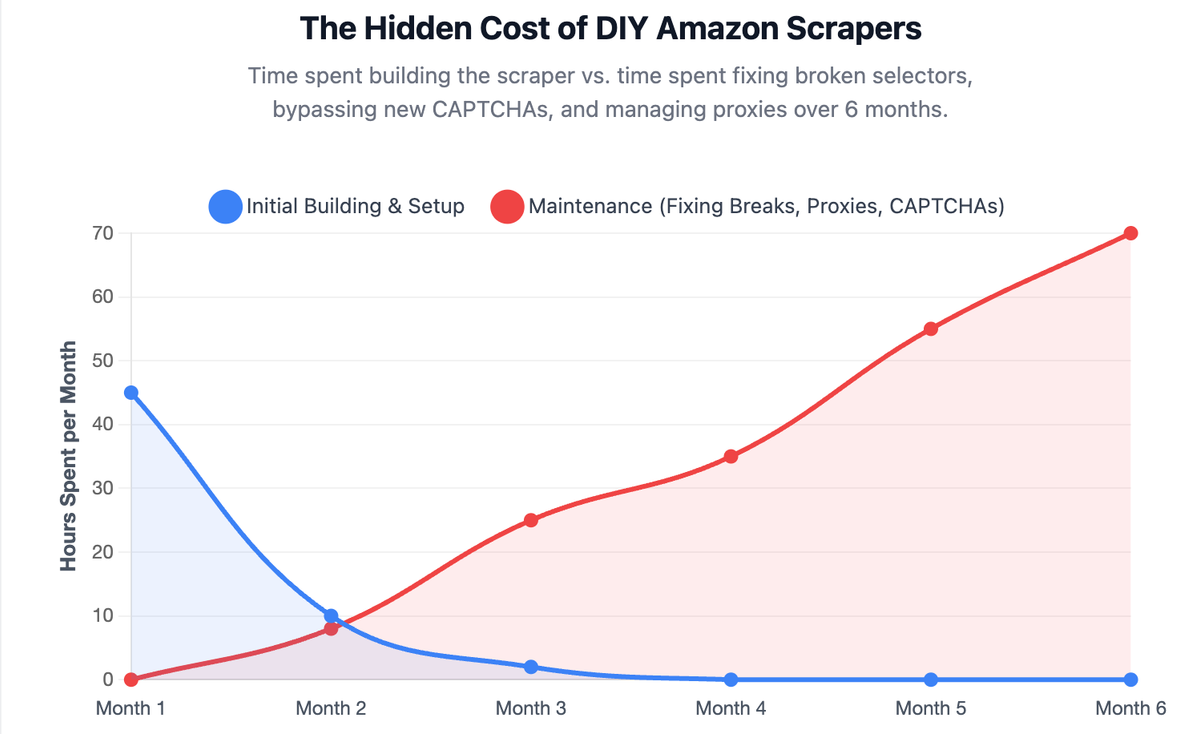
What to Expect When Building Your Own Scraper
- Blocking is common: Amazon actively protects its pages from automated extraction.
- Selectors break: Class names and layouts can change.
- Data needs cleaning: Price, rank, review count, and rating fields often need normalization.
- Scale changes the problem: A script that works for one category may fail across marketplaces or recurring reports.
Pro tip for marketers: A Python scraper is useful when your analyst needs to prove a data idea quickly. Once the workflow becomes recurring, move the logic into a managed API, approved data source, or automation platform.
Method 3: How to Scrape Amazon Best Sellers with an API
Best for: Teams that need repeatable Amazon data extraction without maintaining scraping infrastructure.
Scraping APIs sit between a DIY Python script and a full no-code tool. You send a request or configure a target, and the API handles extraction, parsing, localization, retries, and output formatting.
Popular Scraping APIs for Amazon
Service | Key Feature | Pricing Model |
Simple API, good for Python integration | Pay-as-you-go, free tier available | |
Enterprise-grade, built-in Amazon parser |
Example API Workflow
- Create an account with a data provider.
- Choose the Amazon Best Sellers target or endpoint.
- Enter the category URL, marketplace, location, and output format.
- Run a small test and validate the output.
- Schedule recurring pulls only after the sample data is clean.
- Send the final output to a spreadsheet, dashboard, or internal report.
Why APIs Beat DIY Scrapers for Scale
- Less maintenance: The provider maintains parsing and infrastructure.
- Cleaner output: Many APIs return structured JSON rather than raw HTML.
- Localization support: You can collect marketplace-specific data more consistently.
- Better reporting pipeline: APIs are easier to connect to BI tools, spreadsheets, or automated reports.
Note: An API does not remove your compliance obligations. It simply reduces engineering overhead. For commercial use, still review provider terms, Amazon terms, and your own data usage policy.
Which Amazon Best Sellers Scraping Method Fits Your Marketing Workflow?
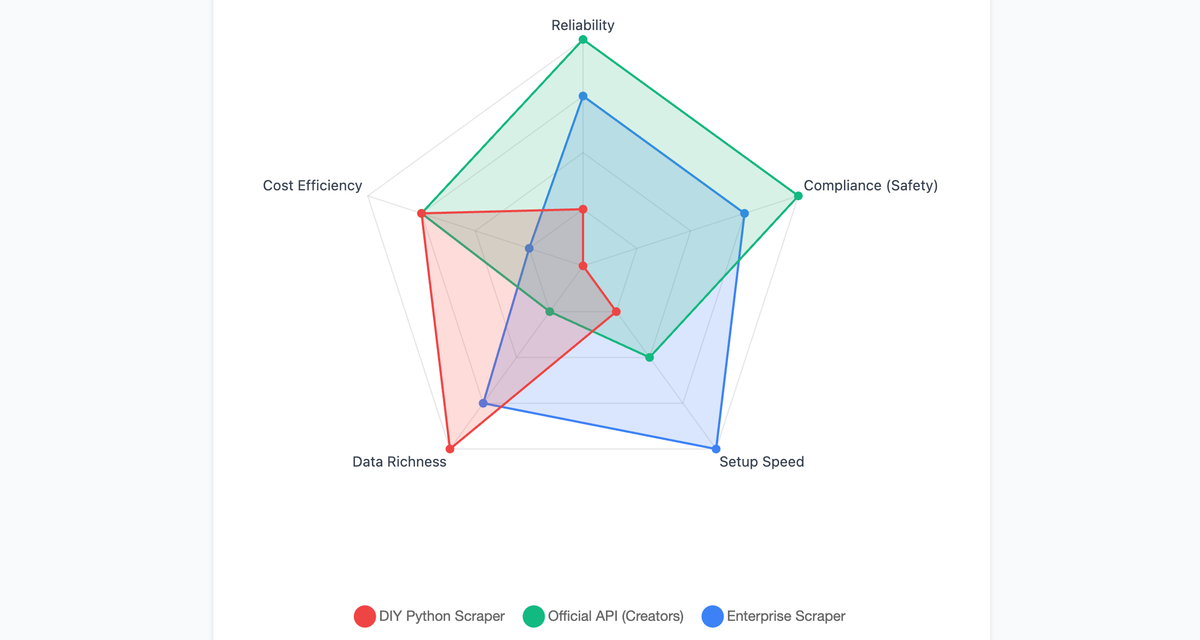
Criteria | No-Code Tool | DIY Python | Scraping API |
Setup time | Minutes | Hours to days | 30–60 minutes |
Technical skill required |
Pro tip for marketers: Start with the method that matches your decision frequency. One-off research does not need a full data pipeline. Weekly category monitoring probably does.
How to Analyze Amazon Best Sellers Data after Scraping
Scraping the data is only the first mile. The hard part — and the part that actually moves the needle — is turning raw Amazon Best Seller data into decisions.
Marketers do not need an “Amazon Best Sellers scraper” in isolation. They need answers:
- Which products in my category are gaining momentum?
- Which competitors are dropping prices or changing positioning?
- Which products have strong demand but weaker review moats?
- What do customers repeatedly complain about in competitor reviews?
- Which product angles should we use in ads, landing pages, buying guides, and comparison content?
A CSV with 100 product titles and prices does not answer these questions by itself. You need analysis, comparison, and pattern recognition on top of the raw data.
This is where AllyHub fits better as the workflow layer, not just another scraper. AllyHub can help marketers turn collected product data, review snippets, competitor pages, and research notes into repeatable outputs such as comparison tables and category reports.
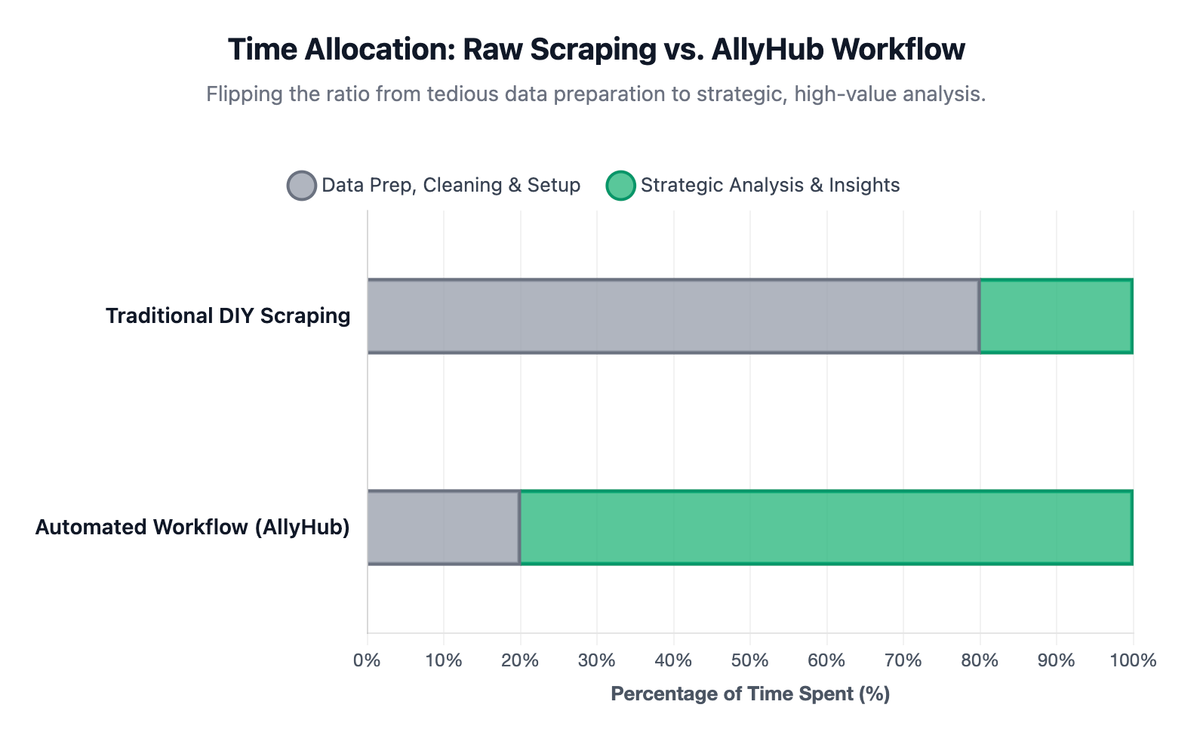
Practical AllyHub workflows for Amazon research:
- Competitor price monitoring report: Collect competitor product URLs, compare price changes, and summarize movement in a weekly report.
- Amazon review mining brief: Analyze review text to extract recurring buyer complaints, desired features, and messaging opportunities.
- Product opportunity research: Compare rank, review count, rating, price, and category positioning to identify products worth deeper research.
- Competitor deep dive: Turn public product pages, review patterns, and positioning claims into a structured competitor profile.
- Content and affiliate planning: Convert Best Sellers research into product roundup ideas, comparison angles, and buying-guide outlines.
No scripts to maintain, no proxies to configure, no selectors to fix when Amazon changes its layout.
The advantage is not that AllyHub magically removes every data-access constraint. The advantage is that once you have the data source, AllyHub helps automate the analysis and reporting layer so the team spends less time cleaning spreadsheets and more time acting on insights.
Is It Legal to Scrape Amazon Best Sellers?
Before choosing a tool or writing code, marketers need to understand the risk boundary.
There is a distinct difference between legal permissibility and platform terms of service. Scraping publicly available data (like product titles, prices, and public ratings) is generally legal in most jurisdictions, as the information is visible without logging in.
However, Amazon's Conditions of Use restrict automated data collection. The platform strictly prohibits the use of data mining, robots, or similar data-gathering and extraction tools without express written consent. For a marketer, this means the safest path is not simply "scrape harder"—it is choosing the right access method for your risk tolerance.
If Amazon detects unauthorized scraping activity, they can:
- Block your IP address.
- Display CAPTCHAs or other access challenges.
- Restrict access to pages or associated accounts.
- Take further action depending on the scale and commercial use case.
Important: This is not legal advice. Scraping rules vary by jurisdiction, use case, data type, and contract terms. For commercial monitoring, client reporting, resale datasets, or high-volume extraction, get legal review before scaling.
How to Collect Amazon Data Responsibly
Follow these practices to minimize operational risk:
- Start with your business question: Define whether you need a one-time category snapshot or continuous monitoring.
- Use official access where possible: Consider Amazon's approved affiliate APIs or Partner Networks if your use case qualifies.
- Avoid personal data: Never scrape customer identities, addresses, account data, or private information.
- Respect access controls: If Amazon shows a CAPTCHA or blocks access, treat that as a signal to stop and reassess your extraction method.
- Use reputable vendors for production: Enterprise scraping APIs and compliant data providers are much safer and more appropriate than fragile DIY scripts when the output feeds client dashboards or pricing systems.
FAQ
Is it illegal to scrape Amazon Best Sellers?
Scraping publicly available data from Amazon is generally legal in most jurisdictions. However, Amazon's Terms of Service explicitly prohibit automated data collection, and violating them can result in IP bans, CAPTCHA challenges, or — in extreme cases — legal action.
Does Amazon have an official API for Best Sellers data?
Amazon's Product Advertising API provides access to some product data, but it does not directly expose Best Seller Rank (BSR) or Best Sellers list positions. For BSR data specifically, scraping is currently the most reliable method.
What's the easiest way to scrape Amazon Best Sellers without coding?
Use a pre-built scraper from platforms like Web Scraper, Apify, or Bright Data. These tools offer visual interfaces where you select what data you want, and they handle the extraction and export. Setup takes minutes.
Can I scrape Amazon Best Sellers for free?
Yes, but with limits. You can write a small Python script for learning or use a free trial from a no-code tool. For reliable recurring monitoring, expect to pay for a managed tool, API, or data provider.
How often should I scrape Amazon Best Sellers?
It depends on your use case. Daily scraping makes sense if you're tracking competitor price changes or BSR movements. Weekly or monthly snapshots are sufficient for market trend analysis and product research.
Can AllyHub help with Amazon product research?
Yes. AllyHub is not a scraper. It is better positioned as a workflow layer for Amazon research: once you have a data source or a set of public pages to review, AllyHub can help organize the research steps, summarize patterns, and turn recurring tasks into reusable reports or Service assets.
What should I do if Amazon blocks my scraper?
Stop and reassess the workflow. Do not keep increasing request volume or trying to bypass access controls. Use a lower-volume approach, an approved API, a licensed data provider, or a reputable scraping API after reviewing compliance requirements.