The best YouTube tag extractor helps marketers uncover the hidden tags behind public YouTube videos, compare competitor metadata, and turn video SEO research into better titles, descriptions, hashtags, and content briefs. YouTube tags are not a magic ranking shortcut. YouTube says a video's title, thumbnail, and description are more important for discovery, while tags mainly help with misspellings and extra context.
The real value is not copying every tag from a viral video. The value is building a repeatable research workflow: collect competing videos, extract their tags, compare those tags with visible metadata, identify recurring keyword patterns, and apply the best insights to your own video strategy.
This guide covers 5 of the best YouTube tag extractors and tag research tools for marketers, with step-by-step instructions, honest assessments, comparison tables, and a final workflow showing how AllyHub can turn one-off tag research into repeatable competitor intelligence.
Key Takeaways
- Tags support YouTube SEO: YouTube tags are not a major ranking shortcut, but they can still help with misspellings, branded terms, long-tail variants, and extra topic context.
- Best simple extractor: TubeRanker Tag Extractor is a good starting point when you need a quick way to inspect competitor video tags without a complex workflow.
- Best full SEO workflow: TubeBuddy and vidIQ combine tag research with keyword scoring, competitor analysis, and broader upload optimization for marketers managing multiple videos.
- Best for tag ideas: RapidTags and Keyword Tool for YouTube are stronger for generating tag and keyword ideas than extracting hidden tags from a specific competitor video.
- Marketer’s key use case: Use tag extractors to audit 3–5 competing videos before publishing, then build your tag list around relevant patterns, not blind copying.
- Workflow upgrade: If you repeat YouTube competitor research every week, AllyHub can help turn tag extraction, metadata review, and reporting into a repeatable marketing workflow.
What Is a YouTube Tag Extractor?
A YouTube tag extractor is a tool that reveals the backend tags associated with a public YouTube video. These tags are not shown in the standard YouTube watch page, which makes them easy to miss during competitor research.
For marketers, tag extractors serve three core functions:
- Competitor intelligence: See which keywords, variants, brand terms, and topic labels competitors use to describe similar videos.
- Tag validation: Before publishing, check whether your planned tags match the language used across competing videos in your category.
- Content gap discovery: Identify recurring tag themes your competitors use that your own video library has not covered yet.
Note: YouTube's algorithm has evolved significantly. Tags are no longer a dominant ranking factor. Watch time, click-through rate, engagement, title relevance, thumbnail quality, and viewer satisfaction usually matter more. But for niche topics, branded terms, misspellings, and long-tail variants, tags can still provide useful supporting context. Think of them as a small metadata layer on top of your core video strategy.
The 5 Best YouTube Tag Extractors for Marketers
Tool 1: TubeBuddy — Best for Full YouTube SEO Workflow
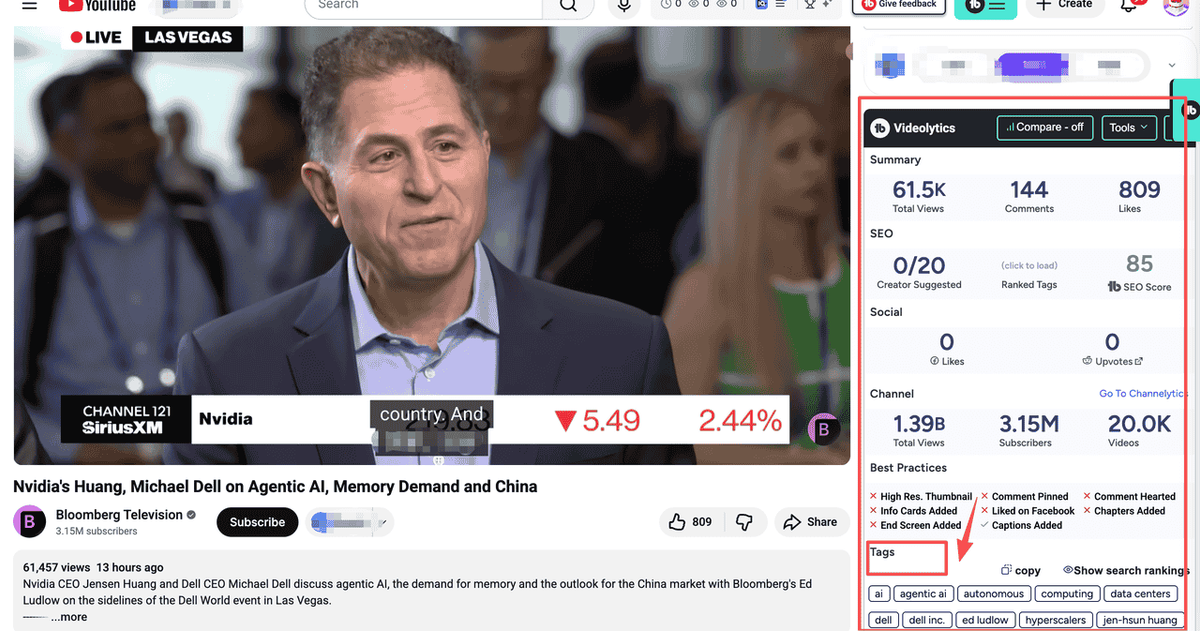
TubeBuddy is a browser extension that integrates directly into YouTube Studio. For marketers who manage YouTube channels professionally, it is one of the most complete tag workflow tools available.
TubeBuddy is useful because it does more than surface tags. It connects tag research with keyword suggestions, upload optimization, metadata checks, and broader YouTube SEO workflows.
How to Extract Tags with TubeBuddy
- Install the TubeBuddy Chrome extension and connect it to your YouTube account.
- Navigate to any YouTube video you want to analyze.
- Review the TubeBuddy panel that appears on the YouTube page.
- Look for the tag or SEO section where available tag data and keyword suggestions are displayed.
- Copy relevant tags into your research document or spreadsheet.
- In YouTube Studio, use TubeBuddy’s keyword tools to find additional relevant tag ideas before publishing.
Best for:
- Marketers managing 5+ videos per month who need a systematic tagging workflow
- Teams that want keyword scoring alongside tag research
- Channels focused on long-term YouTube SEO growth
- Brand channels that need a repeatable upload optimization process
Pricing: Free plan available with limited features. Paid plans vary by feature set.
Limitation: TubeBuddy is strongest when you are actively managing a YouTube channel. If you only need one quick competitor tag lookup, it may feel heavier than necessary.
Tool 2: vidIQ — Best for Competitive Intelligence
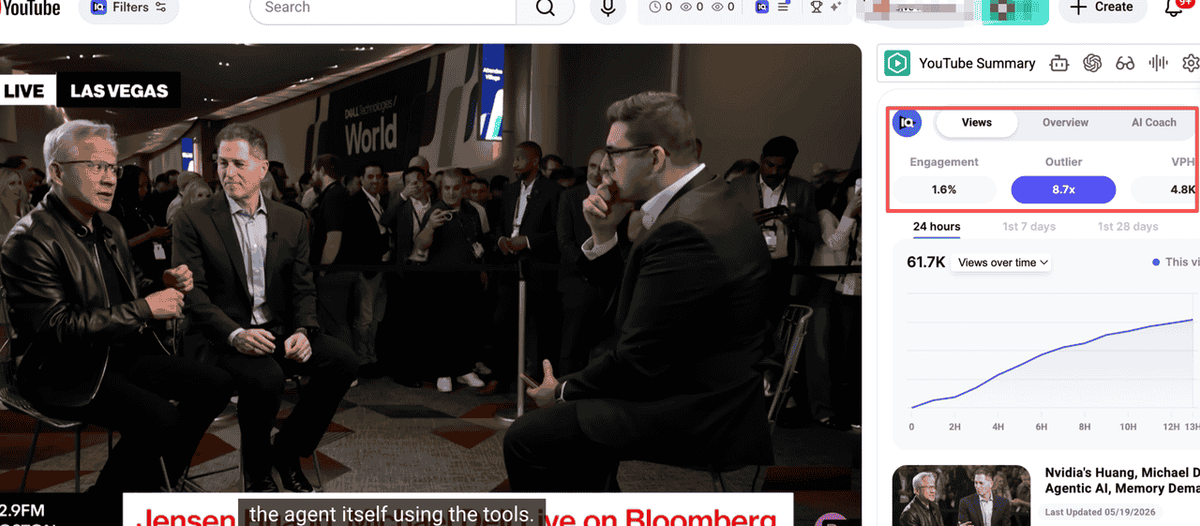
vidIQ is TubeBuddy’s main competitor and takes a more analytics-forward approach. Its tag research features are paired with broader SEO scoring, competitor insights, keyword suggestions, and optimization recommendations.
For marketers, vidIQ is useful because it helps evaluate whether a tag is worth targeting, rather than simply exposing a raw tag list.
How to View Video Tags with vidIQ
- Install the vidIQ Chrome extension.
- Open a YouTube video you want to analyze.
- Review the vidIQ sidebar that appears on the video page.
- Check the tag and SEO sections for visible keyword and metadata insights.
- Copy relevant tags into your research file.
- Use vidIQ’s keyword and competitor data to decide which tags fit your own video.
Best for:
- Marketers who want keyword recommendations alongside tag research
- Teams doing competitor benchmarking across multiple channels
- YouTube managers who want a single dashboard for research and optimization
- Growth teams that need both video metadata and performance context
Pricing: Free plan available. Paid plans vary depending on features.
Limitation: vidIQ can generate many keyword ideas, but marketers still need to manually remove irrelevant, misleading, or competitor-specific terms.
Tool 3: TubeRanker Tag Extractor — Best for Simple Tag Extraction
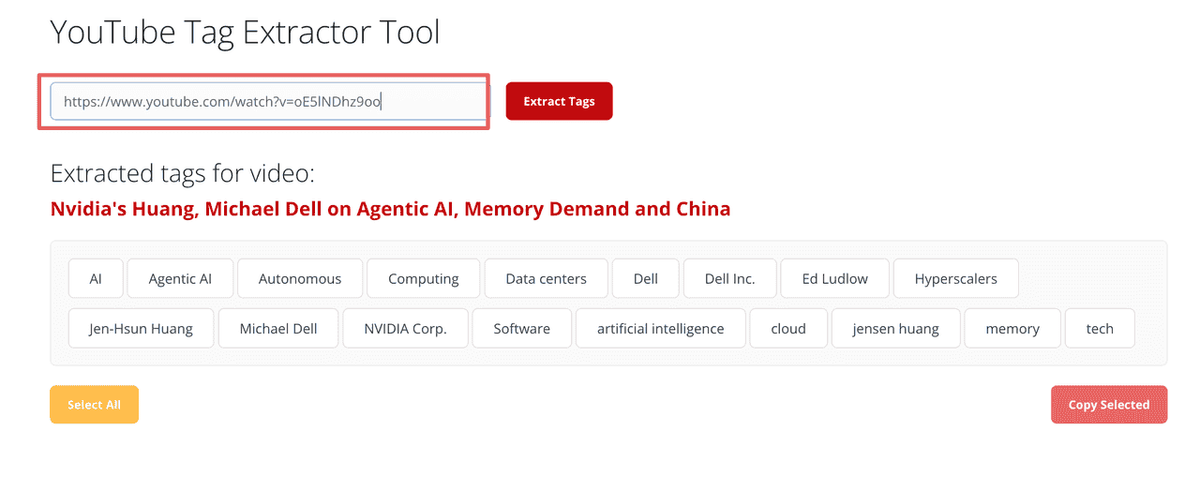
TubeRanker offers a dedicated YouTube Tag Extractor as part of its broader YouTube SEO suite. It is a good option when you want a lightweight way to inspect tags from a public video without using a full optimization platform.
For marketers, TubeRanker works well during quick competitor audits before publishing a video.
Find Video Tags Using TubeRanker
- Go to TubeRanker’s Tag Extractor tool.
- Paste the YouTube video URL into the input field.
- Click the extract button.
- Review the returned tag list.
- Remove irrelevant, competitor-specific, or misleading terms.
- Save useful terms into your YouTube SEO research sheet.
Best for:
- Marketers who want quick competitor tag checks
- Small teams doing lightweight YouTube SEO
- Channels that need simple tag extraction without a complex dashboard
- Teams that want to compare a few competitor videos before publishing
Pricing: Free access may be available for basic use. Paid features depend on TubeRanker’s current plans.
Limitation: TubeRanker is useful for extraction, but raw tags still need strategic interpretation. It should not replace full keyword research or YouTube Analytics review.
Tool 4: RapidTags — Best for Generating Tags from a Topic
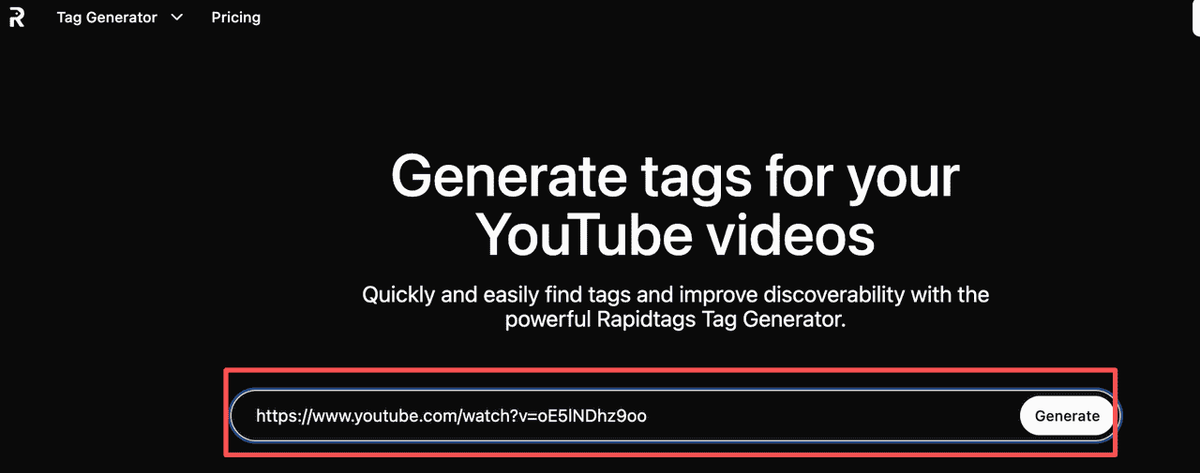
RapidTags takes a different approach. Instead of focusing only on extracting tags from an existing video, it helps generate a tag list from a topic, title, or keyword.
For marketers who want to build a tag list from scratch — or supplement extracted competitor tags with additional long-tail ideas — RapidTags is a fast option.
How to Check YouTube Tags with RapidTags
- Go to RapidTags.
- Type your video topic or primary keyword into the search field.
- Select your target language or region if relevant.
- Generate a list of tag ideas.
- Remove irrelevant or overly broad suggestions.
- Combine the best suggestions with competitor tags from other tools.
Best for:
- New videos where you do not yet have a strong competitor reference
- Marketers who want to expand an existing tag list
- Teams publish many videos and need quick metadata suggestions
- Creators looking for long-tail keyword variants
Pricing: Free access is commonly available for basic tag generation.
Limitation: RapidTags is better for tag generation than competitor tag extraction. Generated tags should always be reviewed for accuracy and relevance.
Tool 5: Keyword Tool for YouTube — Best for Search-Based Keyword Expansion
Keyword Tool for YouTube uses YouTube autocomplete data to generate keyword suggestions. It is not a pure tag extractor, but it is useful for marketers who want to validate tag ideas against real search language.
This tool is especially helpful when you want to move beyond competitor copying and build a search-informed tag strategy.
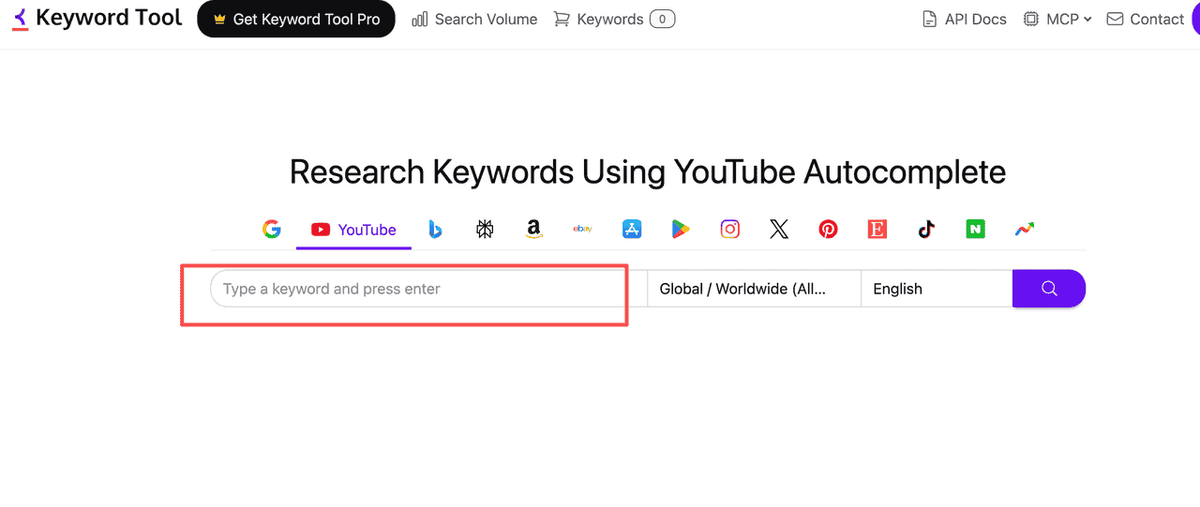
How to use Keyword Tool for YouTube
- Go to Keyword Tool’s YouTube section.
- Enter your primary keyword, such as “youtube tags to get views.”
- Review autocomplete-based keyword suggestions.
- Filter the list by relevance to your video topic.
- Use the strongest suggestions as title, description, chapter, hashtag, or tag ideas.
- Combine these terms with competitor tag insights from extraction tools.
Best for:
- Marketers who want to validate tags against search behavior
- Teams building tag lists for new content series
- Channels targeting international audiences
- SEO teams that want long-tail YouTube keyword ideas
Pricing: Free version available with limited data. Paid plans unlock more keyword metrics.
Limitation: Keyword Tool for YouTube does not directly show you why a competitor video performs well. It should be used as a keyword expansion tool, not as a standalone competitor research solution.
YouTube Tag Extractor Comparison Table
Tool | Best For | Main Function | Free Option | Marketer Fit | Limitation |
TubeBuddy | Full YouTube SEO workflow | Tag research, keyword suggestions, metadata optimization |
Use-Case Recommendation Table
Marketing Scenario | Recommended Tool | Why |
You need a full YouTube SEO workflow | TubeBuddy | It combines tag research with keyword suggestions and upload optimization. |
You want competitor intelligence | vidIQ | It pairs tag research with SEO scoring and broader competitive insights. |
After You Extract YouTube Tags, Use Them to Find Content Gaps
Tag extraction is a tactical move. It can show you how a video is described in backend metadata, but marketers should not treat tags as the reason a video performs well.
The real opportunity is using tag data as part of a broader competitive intelligence workflow. Here is what the most effective marketing teams do after extracting tags:
Step 1 — Extract tags from the top 5 competitor videos in your niche.
Build a master tag list. Identify which tags appear across multiple top-performing videos. These recurring terms are not guaranteed ranking factors, but they are useful signals of how competitors frame the topic.
Step 2 — Cross-reference tags with titles, descriptions, and visible metadata.
Tags are more useful when they reinforce the language already present in the title, description, script, chapters, and hashtags. If a competitor uses a phrase in both the title and tags, it may be more strategically important than a tag that appears only once.
Step 3 — Identify gaps in your own content library.
Which relevant keyword themes are competitors using that your channel has not covered yet? These gaps may point to missing content angles, not just missing tags.
Step 4 — Build a reusable tag and metadata template.
For recurring content series such as weekly tutorials, product reviews, customer education videos, or campaign videos, create a base metadata template. Then add video-specific tags, descriptions, and chapter keywords for each upload.
This kind of systematic YouTube intelligence work — extracting data, analyzing patterns, identifying gaps, and building repeatable workflows — is where AllyHub fits naturally.
AllyHub is an AI productivity platform built for marketers who run complex, multi-step research and content workflows. Instead of manually extracting tags from multiple competitor videos, copying data into spreadsheets, and cross-referencing keyword lists, you can describe the workflow once and let AllyHub help execute it: collecting video URLs, extracting metadata, identifying repeated patterns, and surfacing actionable insights in a structured report.
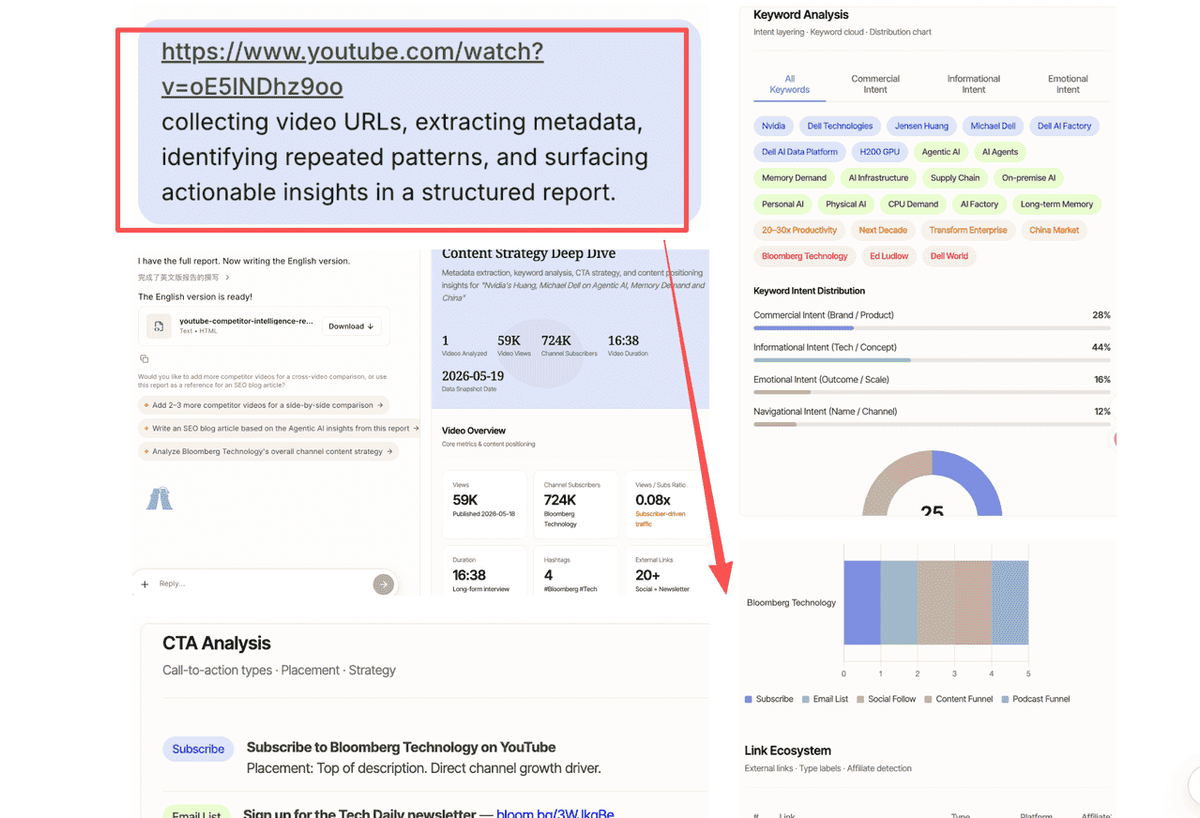
For marketing teams: If you're doing YouTube competitive research more than once a week, the manual tag extraction workflow described in this guide is a strong candidate for automation. AllyHub can help with extraction, analysis, and reporting, so your team focuses on strategy instead of data collection.
FAQ about YouTube Tag Extractors
What is a YouTube tag extractor?
A YouTube tag extractor is a tool that reveals the backend tags associated with a public YouTube video. Tags are not visible on the standard YouTube watch page, so extractors help marketers inspect competitor metadata and compare how similar videos are positioned.
How many tags should I use on a YouTube video?
There is no perfect number. A focused list of relevant tags is better than filling the tag field with loosely related terms. A practical structure is 1–2 exact-match tags, 2–3 broad category tags, and 3–5 long-tail variants.
What's the difference between YouTube tags and hashtags?
YouTube tags are hidden backend metadata added in YouTube Studio. Hashtags use the # symbol, appear publicly in the video title or description, and can help users browse related content. Tags and hashtags serve different functions, so marketers should optimize them separately.
How to Use YouTube Tags to Get More Views?
Use 5–10 relevant YouTube tags to add topic context, keyword variations, and common misspellings. Tags can help, but title, thumbnail, description, and engagement matter much more.
Can I extract tags from YouTube Shorts?
Some tag extractors may work with Shorts URLs, but tag optimization is usually less impactful for Shorts than for long-form search-based videos. Shorts discovery relies heavily on the Shorts feed, viewer response, retention, and engagement signals.
Which YouTube tag extractor is best for competitor analysis?
For full competitor analysis, TubeBuddy and vidIQ are strong options because they combine tag research with broader SEO and keyword tools. For quick tag extraction, TubeRanker Tag Extractor is a simpler option.
Can I use AllyHub to automate YouTube tag research?
Yes. AllyHub can help automate multi-step YouTube research workflows, including collecting competitor video URLs, extracting metadata, identifying repeated keyword patterns, and generating structured tag strategy reports. It is especially useful for marketing teams running regular competitive audits.
What's Next: Building a Repeatable YouTube Tag Workflow
The marketers who consistently improve on YouTube are not just doing more work. They are building smarter, more systematic workflows. Tag extraction is one piece of that system.
Here is a simple repeatable workflow to implement this week:
- Before publishing any video: Extract tags from the top 3–5 competing videos for your target keyword. Add only the most relevant terms to your own metadata plan.
- Monthly audit: Review your top competitor channels' most recent videos. Look for repeated keyword themes, content formats, and positioning patterns.
- Quarterly gap analysis: Identify which tag clusters and topic angles your competitors are building that your channel has not addressed yet.
- Workflow automation: If the process repeats every week or every month, use AllyHub to automate extraction, analysis, and reporting.
If you're managing a brand channel and want to run this workflow at scale — across dozens of videos and multiple competitors — AllyHub can help turn YouTube tag research into a repeatable marketing intelligence system.