

Key Takeaways
- The Hands vs. The Brain: RPA follows fixed rules and mimics repetitive actions; AI automation adds interpretation, prediction, and context-aware decision-making.
- Unstructured Data Is the Pain Point: A large share of business information lives in emails, PDFs, chats, tickets, and documents. Traditional automation struggles with this; AI automation can help interpret it.
- The Power Move: The ultimate strategy is Intelligent Automation (IA)—combining RPA’s execution speed with AI’s cognitive adaptability in a market surging toward $169.5 billion.
- Compounding Efficiency: Modern tools like AllyHub shift the focus from one-off task execution to compounding workflow intelligence over time.
Traditional automation works well when the process is stable: the same input, the same rule, the same output. But real business work is messier. Customers write in unexpected ways, documents arrive in different formats, websites change layouts, and teams need systems that can interpret context before taking action. That is where AI automation comes in.
What Is AI Automation?
AI automation is the fusion of artificial intelligence capabilities — including machine learning, large language models (LLMs), and natural language processing (NLP) — with execution tools that can trigger actions, update systems, and complete multi-step workflows automatically.
Unlike traditional automation, which follows a fixed script, AI automation can:
- Read and interpret unstructured data — emails, PDFs, voice transcripts, images
- Make context-aware decisions — understanding intent, sentiment, and nuance
- Adapt dynamically — adjusting behavior based on new inputs without manual reprogramming
- Improve over time — learning from feedback loops to get more accurate with each run
It's not about replacing human effort wholesale. It's about injecting cognitive capability into digital processes — some work that used to require human review can now be partially automated, routed, or drafted with a human approval step where needed.
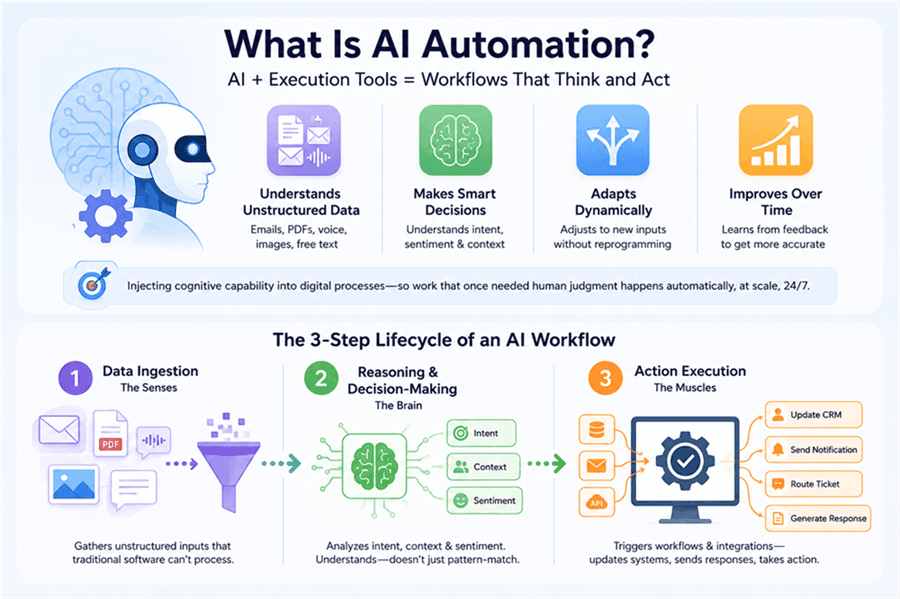
The 3-Step Lifecycle of an AI Workflow
Every AI automation workflow follows a core lifecycle:
- Data Ingestion (The Senses)
The system gathers inputs that traditional software can't process — unstructured emails, messy PDFs, audio transcripts, images, free-form text. This is where AI automation immediately outpaces RPA.
- Reasoning & Decision-Making (The Brain)
Using ML models or LLMs, the system analyzes intent, context, and sentiment. It doesn't just pattern-match — it understands. An AI reading a customer complaint can detect urgency, classify the issue type, and determine the appropriate response path.
- Action Execution (The Muscles)
Based on that reasoning, the system automatically triggers downstream workflows — updating a CRM, sending a notification, routing a ticket, generating a draft response, or calling an API. This is where RPA often re-enters the picture as the execution layer.
AI Automation vs. RPA: What's the Difference?
TL;DR: RPA mimics human actions (doing exactly what it's told). AI automation mimics human intelligence (handling ambiguity and making judgment calls).
Feature / Dimension | Robotic Process Automation (RPA) | AI Automation |
Core Function | Doing (mimics UI clicks) | Thinking (mimics human judgment) |
Data Input Type | Strictly structured (Excel, standardized databases) |
These aren't competing technologies. They're complementary layers. RPA handles the execution speed and precision. AI handles the interpretation and judgment. Together, they form what the industry now calls Intelligent Automation (IA).
Why RPA Alone Isn't Enough Anymore
While RPA is highly efficient for static tasks, relying on it exclusively exposes businesses to two massive operational bottlenecks:
The "Brittle Bot" Problem
RPA bots are rigid. They rely on exact UI coordinates and fixed rules. The moment a software update shifts a webpage button or a vendor tweaks an invoice layout, the bot breaks. As interfaces, templates, and business rules change, teams often spend significant time maintaining and patching RPA bots.
The Unstructured Data Wall
RPA is completely blind to unstructured data like free-form emails, legal contracts, and inconsistent PDF layouts, because it requires strict, predictable inputs. AI automation, powered by LLMs and NLP, bridges this gap by reading and interpreting context, allowing the system to process messy data without requiring a rigid template.
What Are Examples of AI Automation in Action
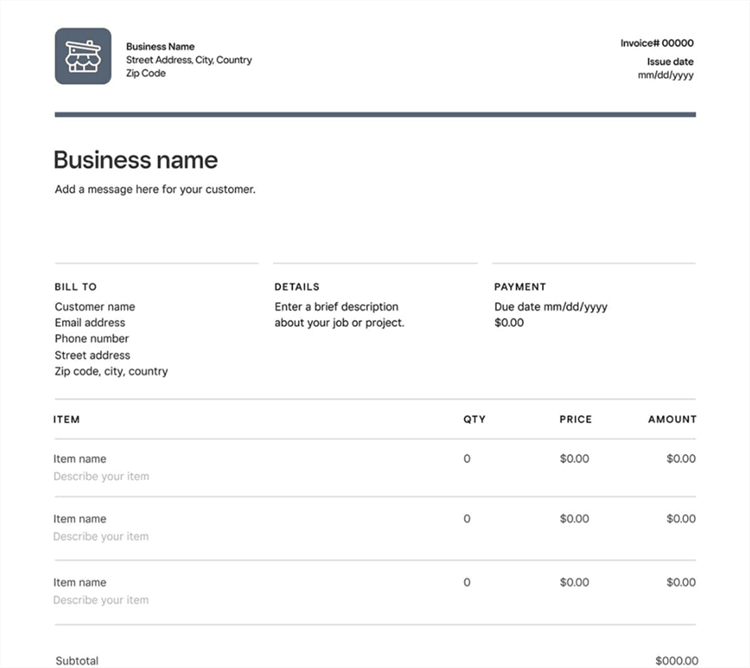
Use Case 1: Intelligent Invoice Processing
The old way (RPA only): Works perfectly — until a supplier changes their invoice template. Then the bot fails, someone gets an error alert at 2 am, and a human has to manually process a backlog.
The AI automation way:
- RPA monitors the inbox and downloads the email attachment
- AI reads the invoice — regardless of layout, language, or format — and extracts line items, totals, vendor details, and payment terms
- RPA or an API call inputs the validated data into the ERP system
Result: Reduced template dependency. The system can process many invoice formats, flag low-confidence fields, and route exceptions for human review.
Use Case 2: Customer Support Routing & Resolution
A customer emails: "I've been waiting three weeks for my replacement and nobody has responded to my last two messages. This is completely unacceptable."
An AI automation workflow:
- Reads the email and detects negative sentiment + high urgency + escalation pattern
- Classifies the issue type (delayed replacement, communication failure)
- Pulls the customer's order history from the CRM
- Drafts a personalized resolution email with a specific offer
- Routes to a human agent for 1-click approval — not from-scratch writing
The agent reviews, approves, and sends in under 30 seconds. The customer gets a response that feels personal and immediate.
Use Case 3: Automated HR Onboarding
Traditional keyword-matching resume screening misses strong candidates who describe the same skills differently. AI automation changes this:
- AI screens resumes based on semantic meaning — understanding that "led a team of 8 engineers" and "managed cross-functional engineering team" signal the same capability
- Qualified candidates are automatically moved to the next stage; rejection emails are drafted for others
- Background check requests are triggered automatically
- IT access provisioning is initiated based on the role description — the right tools, permissions, and accounts are set up before day one
This can reduce repetitive HR admin work, especially when paired with HRIS, IT provisioning, and approval workflows.
Better Together: The Rise of Intelligent Automation (IA)
The "AI vs. RPA" framing is outdated. The real question isn't which one to choose — it's how to combine them effectively.
Intelligent Automation (IA) — sometimes called Hyperautomation — is the architecture that brings both together:
- AI handles the cognitive layer: reading, interpreting, deciding, and generating
- RPA handles the execution layer: clicking, filling, submitting, and updating
- Orchestration tools (workflow platforms, APIs) connect the two into end-to-end pipelines
The result is automation that can handle the full spectrum of business processes — from the most structured, repetitive tasks to the most complex, judgment-heavy workflows.
By 2026, 72% of large enterprises will have implemented some form of AI automation, and 80% of organizations plan to embed intelligent automation into core workflows. The market is projected to reach $169.5 billion this year, growing at 31.4% annually.
This isn't a future trend. It's the current baseline for competitive operations.
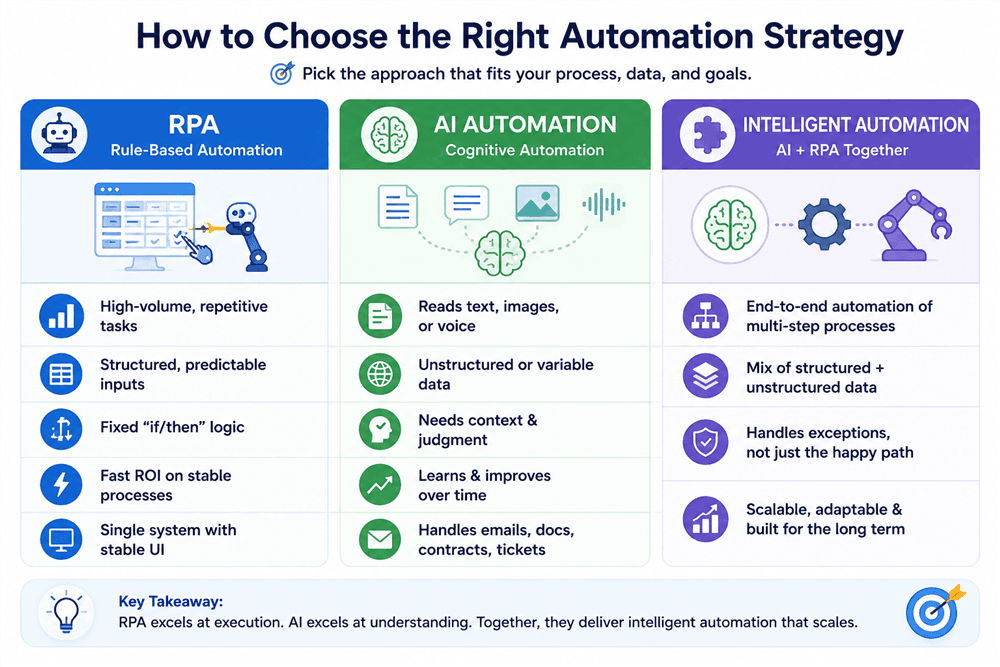
How to Choose the Right Strategy for Your Business
Use this decision framework before committing to either approach:
AllyHub: AI Automation That Compounds Over Time
Most AI automation tools execute tasks. AllyHub does something different — it builds intelligence as it works.
AllyHub is a browser-native AI copilot built for knowledge workers, marketers, and professional teams. It doesn't just automate individual tasks — it packages workflows into reusable Service assets, accumulates Skills from every completed task, and applies that compounding knowledge to make repeated workflows easier to rerun, refine, and standardize.
For digital marketers and e-commerce teams, this means:
- Research workflows that get smarter with every run — no re-explaining context from scratch
- Content pipelines that preserve preferred formats, workflow steps, and recurring research context
- Data extraction and reporting that operate your browser directly — clicking, scrolling, extracting — not just giving you instructions
- One-click reuse of any workflow you've built, without rebuilding it from scratch
The core philosophy is ROTI — Return on Token Investment. Every AI interaction should create lasting value, not just a one-time output. AllyHub gets your AI automation faster every time and delivers better results over time as it learns.
"You are the captain. Ally handles the navigation. Every task makes the system smarter and gives you more freedom."
If you're evaluating AI automation tools and your goal is operational leverage — not just task completion — AllyHub is worth a serious look.
Conclusion & Next Steps
AI automation isn't a luxury reserved for enterprise tech teams with seven-figure budgets. In 2026, it's the operational baseline for any business that wants to stay competitive.
The shift is clear: from rule-based execution to cognitive automation. From brittle bots that break on layout changes to adaptive systems that understand context, handle unstructured data, and improve over time.
The practical path forward:
- Audit your current workflows. Which ones are high-volume and structured? Those are RPA candidates. Which ones involve reading, interpreting, or deciding? Those need AI.
- Identify your unstructured data bottlenecks. Where are humans manually reading emails, contracts, or tickets? That's your highest-ROI AI automation opportunity.
- Start with one end-to-end pilot. Pick a process that has both structured execution steps and unstructured inputs. Build the full IA pipeline. Measure the time saved and error rate reduction.
- Choose tools that compound. The best AI automation investments aren't just faster — they get smarter. Look for platforms that accumulate knowledge across runs, not ones that start from scratch every time.
The businesses winning in 2026 aren't the ones with the most automation. They're the ones with the most intelligent automation — systems that learn, adapt, and compound value over time.
FAQs about AI Automation
Is RPA considered Artificial Intelligence?
No. RPA is rule-based software that mimics human actions on a UI — it doesn't learn, reason, or adapt. However, modern RPA platforms (UiPath, Automation Anywhere, Blue Prism) are increasingly integrating AI capabilities, blurring the line between pure RPA and intelligent automation.
Will AI automation replace human workers?
The evidence points to augmentation, not replacement. AI automation is designed to shift humans from "data entry" to "data oversight" — from executing repetitive tasks to reviewing, approving, and making higher-order decisions. Think of it as a powerful co-pilot: it handles the execution, you handle the judgment calls that actually matter.
What are the top AI workflow automation tools today?
For enterprise-scale deployments, UiPath and Automation Anywhere lead the RPA-plus-AI space. For agile, no-code workflow automation, Make (formerly Integromat) and Zapier are widely used. For knowledge workers and marketing teams who need browser-native AI automation that compounds over time, AllyHub offers a uniquely evolving approach — packaging workflows as reusable assets rather than one-off executions.
What's the difference between AI automation and intelligent automation?
They're often used interchangeably, but "intelligent automation" (IA) typically refers specifically to the combination of AI + RPA in a unified architecture. "AI automation" is the broader category that includes any automation powered by AI capabilities, whether or not RPA is involved.
How long does it take to see ROI from AI automation?
ROI depends on workflow volume, error rate, labor cost, integration complexity, and governance needs. Simple rule-based automations may show value quickly, while AI automation often requires more upfront design, evaluation, and monitoring before returns become clear.


