

The fundamental shift in AI is no longer about getting better answers—it’s about autonomous execution. Traditional LLM interactions force humans to do all the driving: you prompt, it responds. AI agents break this loop by taking a goal, breaking it into tasks, executing across tools, and delivering finished work without waiting for step-by-step instructions.
This guide covers everything you need to understand this shift:
- What an AI agent actually is — with a precise definition designed to cut through the buzzword fog
- How AI agents work — the four core components under the hood
- The critical distinctions between AI agents, AI assistants, and agentic AI
- Real-world use cases across industries
- A step-by-step framework for building your own AI agent
- How platforms like AllyHub let you deploy, discover, and manage agents without starting from scratch
Let's start with the definition that matters most.
Key Takeaways
- The Short Definition: An AI agent is a goal-driven software system that can plan, use tools, and execute multi-step workflows autonomously, rather than just answering questions.
- Agent vs. Assistant: Assistants are reactive (you prompt, they answer). Agents are proactive (you give a goal, they figure out the steps).
- Agentic AI refers to the broader system-level architecture where multiple agents collaborate, self-correct, and orchestrate complex workflows — beyond any single discrete agent.
- Building an AI agent requires five layers: goal definition, foundation model selection, memory design, tool integration, and guardrails. Each layer compounds the agent's effectiveness.
What Is an AI Agent?
Strip away the marketing hype, and an AI agent is an autonomous software architecture that operates in a continuous loop: Observe → Think → Act.
It perceives inputs from its environment, uses a Large Language Model (LLM) as its reasoning engine to decompose a goal, and executes actions using external tools and memory—with zero human intervention between steps.
How AI Agents Work: The 4 Core Components
Every AI agent — regardless of how it's built or what it does — runs on four foundational components:
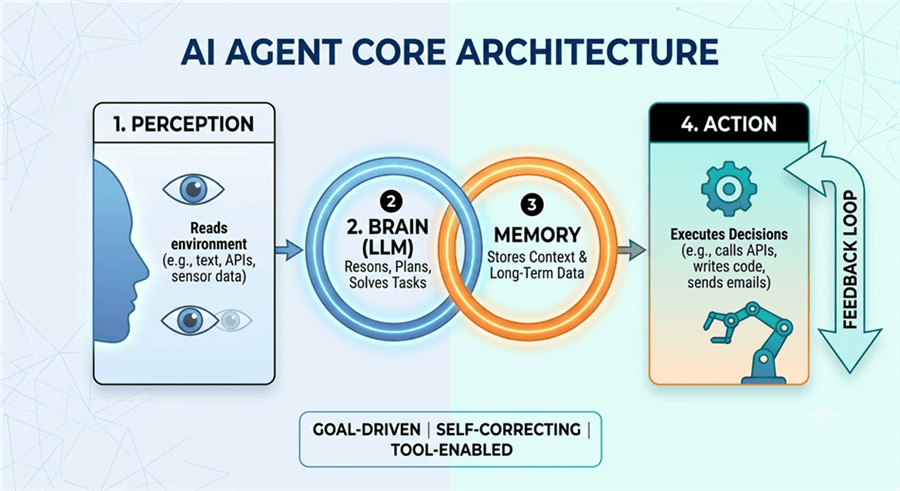
Perception (Inputs & Environmental Awareness)
The agent needs to sense its environment. This includes reading text, processing structured data, calling APIs to retrieve information, browsing web pages, reading files, or monitoring system states. Perception is the agent's eyes and ears — the richer and more reliable the inputs, the better the agent's situational awareness.
Brain/Reasoning (LLMs, Planning & Task Decomposition)
At the core of every modern AI agent is a large language model (LLM) acting as the reasoning engine. The LLM interprets the goal, decomposes it into actionable sub-tasks, decides what to do next, and evaluates whether the current output is good enough to proceed. More advanced agents use "chain-of-thought" or "tree-of-thought" reasoning to handle ambiguity and multi-path decisions.
Memory (Short-Term Context & Long-Term Storage)
Agents need memory to function across steps. Short-term memory is the active context window — what the agent currently "knows" about the task in progress. Long-term memory uses vector databases or structured storage to persist knowledge across sessions: past task results, learned preferences, domain-specific facts. Without memory, every task starts from zero. With it, agents compound their effectiveness over time.
Action /Tools (API Execution, Web Interaction & Computer Use)
This is where the agent actually does things. Actions include calling REST APIs, executing code, searching the web, filling forms, clicking UI elements, writing to databases, sending emails, or triggering other agents. The breadth of an agent's tool set determines the scope of tasks it can complete autonomously.
Ultimately, where traditional AI merely assists with individual tasks, an agent takes complete ownership of outcomes—setting the stage for how it differs from simple assistants and multi-agent systems.
AI Agent vs. AI Assistant vs. Agentic AI
The AI industry has a terminology problem. "AI agent," "AI assistant," "agentic AI," "autonomous AI," "copilot" — these terms are used interchangeably in marketing materials, press releases, and even technical documentation. The confusion is real, and it matters: if you don't know what you're building or buying, you can't evaluate whether it actually solves your problem.
Here's the breakdown.
Deep Dive 1: AI Agent vs. AI Assistant
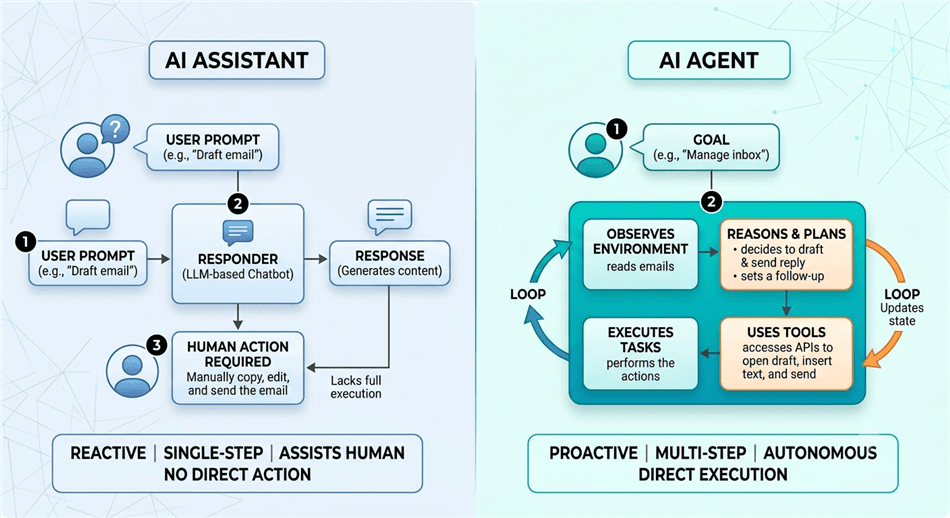
The distinction comes down to two axes: who initiates and how many steps.
An AI assistant is reactive. It waits for a prompt, processes it, and returns a response. The interaction is linear: one input, one output. Think of asking Siri for the weather, using GitHub Copilot to autocomplete a line of code, or querying a chatbot for a product recommendation. These are valuable tools — but they don't act without being asked, and they don't chain multiple actions together autonomously.
An AI agent is proactive and goal-driven. You give it an objective — "research the top 10 competitors in this market and produce a structured report" — and it figures out the steps: what to search, which pages to read, how to structure the data, what gaps to fill, and how to format the output. It doesn't stop after one step and ask "what should I do next?" It keeps going.
The practical implication: AI assistants are great for augmenting individual tasks. AI agents are built for completing workflows.
Deep Dive 2: AI Agent vs. Agentic AI
This distinction is about scope and architecture.
An AI agent (discrete) is a single, purpose-built system with a defined goal, a specific tool set, and a bounded operating environment. A customer support agent that handles refund requests. A research agent that monitors competitor pricing. A coding agent that reviews pull requests. Each is a discrete unit.
Agentic AI refers to the system-level architecture where multiple agents collaborate, delegate, and self-organize to accomplish goals that no single agent could handle alone. In an agentic AI system, a "manager" agent might decompose a complex goal and assign sub-tasks to specialist agents — a research agent, a writing agent, a data validation agent — then synthesize their outputs. The system can self-correct, spawn new agents dynamically, and adapt its own structure based on results.
Think of it this way: an AI agent is a specialist. Agentic AI is the organization those specialists work within.
Feature | AI Assistant (e.g., Copilot) | AI Agent (Discrete) | Agentic AI (Ecosystem) |
Autonomy Level | Low — awaits prompts | Medium-High — goal-driven | Fully autonomous/adaptive |
How to Build an AI Agent: A Step-by-Step Framework
Building an effective AI agent isn't about picking the right framework and writing code. It's about making five foundational decisions in the right order. Skip one, and the agent will fail in production — not because the technology doesn't work, but because the design was incomplete.
Step 1: Define Goal & Scope Boundaries
Narrow, bounded goals produce reliable execution; open-ended mandates cause hallucination loops. Before building, define:
- Primary Objective: Set a single, measurable goal (e.g., "Extract prospect contact data" rather than "Handle sales outreach").
- Input & Output Contracts: Define exact data formats accepted (APIs, unstructured text) and outputs required (JSON schemas, formatted summaries).
- Escalation Rules: Explicitly state what is out-of-scope and when the agent must stop and consult a human.
Step 2: Select Model & Memory Architecture
Agent performance relies on balancing reasoning depth against execution speed and cost:
- Model Selection: Production architectures often run a hybrid setup—using high-reasoning models (e.g., OpenAI o3, Claude 3.7 Sonnet, Gemini 2.5 Pro) for task decomposition, and fast inference models (e.g., GPT-4o mini, Gemini Flash) for low-complexity execution steps.
- Memory Design: Separate short-term active context (task-in-progress state) from long-term persistence (vector DBs or structured storage for preferences and past results).
Step 3: Equip Tools & Enforce Security
An agent's utility depends on its action space (APIs, web search, database writes, code execution).
- Tool Interfaces: Use native Function Calling to give the LLM structured tool definitions.
- Security & Controls: Enforce least-privilege access, store credentials in environment variables, log all write actions, and apply strict API rate limits to prevent runaway execution costs.
Step 4: Choose Your Tech Stack
- Code-First Frameworks: Use LangGraph for complex stateful logic, CrewAI for role-based multi-agent systems, or Microsoft AutoGen for collaborative multi-agent workflows.
- No-Code / Browser-Native Options: For operational teams avoiding cloud VM setup, browser-native extensions and visual builders (like AllyHub) allow users to deploy web execution workflows directly within active browser sessions.
Step 5: Implement Guardrails & Human-in-the-Loop (HITL)
Guardrails separate safe, enterprise-grade agents from risky experiments:
- Loop Ceilings: Set hard limits on task iterations (e.g., maximum 10 tool calls per execution) to prevent infinite loops.
- Output Validation: Require schema validation before any output triggers downstream actions.
- HITL Approval: Require explicit human confirmation before irreversible operations (e.g., database writes, financial transactions, sending external emails) or when confidence scores fall below threshold.
How AI Agents Transform Real Business Operations (Key Use Cases)
While traditional automation relies on rigid "if-then" rules, AI agents reason through complex situations to execute multi-step workflows autonomously:
- Customer Operations: Shifts from answering FAQs to end-to-end resolution—checking inventory, processing refunds, updating CRM records, and escalating complex edge cases without human handoffs.
- SEO & Marketing: Runs continuous background operations—monitoring SERP rankings, flagging technical site issues, analyzing competitor content gaps, and generating research briefs automatically.
- Engineering & Analytics: Acts as a force multiplier—reviewing pull requests, writing unit tests, querying live databases, and turning raw data into narrative business summaries.
- Supply Chain & Enterprise Operations: Handles dynamic exceptions where traditional RPA fails—tracking real-time supplier feeds, predicting delivery bottlenecks, and triggering adaptive reorder workflows.
Build vs. Buy: The Case for Browser-Native Agents
Building a custom AI agent using the 5-step framework above is powerful—but it requires engineering resources, API management, and cloud infrastructure. For most knowledge workers and marketers, the goal isn't to build an agent from scratch; it's to hire one that can start working today.
This is where AllyHub comes in.
True intelligence isn't just completing a task once—it's getting better and faster while doing it. This is where AllyHub shifts the approach. Instead of treating tasks as disposable, it focuses on Return on Token Investment (ROTI)—turning everyday execution into reusable skills so you never have to re-explain the same workflow twice.
Rather than functioning as a disposable execution engine, AllyHub builds a compounding layer of intelligence on top of your daily workflows:
- Real Browser Execution, Not Just Chat: AllyHub operates directly in your active browser environment—clicking, reading, extracting, and executing across web apps without requiring cloud API connectors.
- Every Task Becomes an Asset: Through its persistent Skills and Web Notes system, AllyHub logs context, DOM patterns, and operational logic from every run. The same task takes less time and fewer tokens on Run 3 than it did on Run 1.
- One-Click Workflow Reuse: Once a complex multi-step research or data pipeline is completed, you can package it into a 1-click "Service Card". Your team can trigger the exact same agent workflow instantly without re-explaining instructions.
Frequently Asked Questions
What is the difference between an AI model (LLM) and an AI agent?
An LLM (large language model) is the reasoning engine — it processes text and generates responses. An AI agent is a complete system built around an LLM: it adds perception (inputs), memory (persistence), tools (actions), and a control loop (the mechanism that keeps the agent working toward a goal across multiple steps). The LLM is the brain; the agent is the whole organism.
What are some real-world examples of an AI agent?
Examples span across industries:
Coding Agents: GitHub Copilot Workspace or Claude Code, which can independently read a repository, find bugs, and submit pull requests.
Browser Agents: AllyHub, which can autonomously navigate to an Amazon listing, extract reviews, and compile a sentiment report in Google Sheets.
Customer Support Agents: Systems like Intercom Fin, which can look up customer order histories in a database and process refunds autonomously.
Can AI agents run without human supervision?
Yes — and no. Technically, AI agents can execute long workflows without human input at every step. But responsible deployment always includes guardrails, escalation conditions, and audit logs. The practical standard in 2026 is "supervised autonomy": agents handle execution independently, but humans define the boundaries, review outputs, and retain override authority.
What are the best frameworks to build AI agents in 2026?
For code-first development: LangGraph (complex stateful workflows), CrewAI (role-based multi-agent systems), and AutoGen (multi-agent collaboration and debate). For no-code/low-code: AllyHub, Relevance AI, and Zapier Agents are the leading options for business users. The right choice depends on your technical depth and the complexity of your use case.
How do I choose between building a custom agent and using a standard automation tool?
Use standard automation (Zapier, Make, n8n) when your workflow is deterministic: the same inputs always produce the same outputs, and every step is predictable. Build an AI agent when your workflow requires judgment: handling variable inputs, adapting to unexpected results, reasoning about ambiguous situations, or operating across unstructured data. The rule of thumb: if you can write a complete flowchart for it, use automation. If the flowchart has too many "it depends" branches, use an agent.
Conclusion
The shift from conversational AI to autonomous AI agents isn't a future trend — it's the present reality of how work is being transformed in 2026. Understanding what AI agents actually are, how they differ from assistants and agentic systems, and how to build them responsibly is no longer optional knowledge for anyone working in technology, marketing, operations, or strategy.
The five-step framework in this guide gives you a practical starting point: define the goal, choose the right model, equip the right tools, select the right stack, and build in the guardrails that make autonomous execution safe. Start narrow. Validate in production. Expand scope as confidence grows.
And if you want to skip the infrastructure overhead and start with proven, compounding workflows — explore AllyHub to discover, deploy, and manage AI agents that get smarter with every run. Your first agent is one click away.



