

You search your brand name on X and get a messy feed: competitor chatter, bot posts, casual mentions, one strange use of your product name — and one useful customer question you almost miss.
The hard part of Twitter social listening is not finding posts. It is finding the conversations worth acting on. A broad keyword can return hundreds of results while burying the customer question, competitor complaint, product comparison, or emerging topic that should actually change your next move.
This 5-step workflow shows you how to define what you're listening for, build repeatable X queries, filter noisy results, evaluate useful posts, and turn recurring signals into content decisions.
Key Takeaways
- Start with a decision, not a keyword.
- Build queries around the way people actually talk, including variations, competitors, hashtags, and exclusions.
- Use Top and Latest for different purposes, rather than treating either as a complete view of the conversation.
- Listen beyond direct mentions: track brand language, competitors, category terms, and customer questions.
- Save your queries and findings so each listening pass becomes repeatable.
What is Twitter social listening?
Twitter social listening is the process of collecting and interpreting public X posts about your brand, competitors, audience, products, or niche.
Monitoring tells you what was said. Listening asks what keeps coming up, why it matters, and what you should create, change, or respond to next.
Meanwhile, the useful output is a pattern, question, opportunity, or problem that can change a content, product, or marketing decision.
Here is the 5-step workflow for turning X conversations into useful insights.
Step 1. Decide what you need to learn before you pick a keyword
Start with the decision, not the keyword. A useful listening pass has a job to do: find questions for next week's content, catch a recurring product complaint, understand how people compare competitors, or spot a topic worth covering. Here are the key points:
- Write the decision in one sentence. For example: “I need three audience questions to answer this week.” If you cannot say what the search is supposed to change, the query is probably too broad.
- Work backwards to the signal. A content research pass might look for repeated questions or objections. A competitor pass might look for claims people agree with, challenge, or compare against alternatives.
- Set the review cadence around the decision. Check fast-moving complaints or reputation issues more often than evergreen content themes. Also write down what would change your plan; otherwise, you are collecting mentions without a decision attached to them.
Keep the decision sentence next to the query. Six weeks later, the query may look arbitrary; the original question tells you whether it is still worth running.
Step 2. Build and refine X Search queries
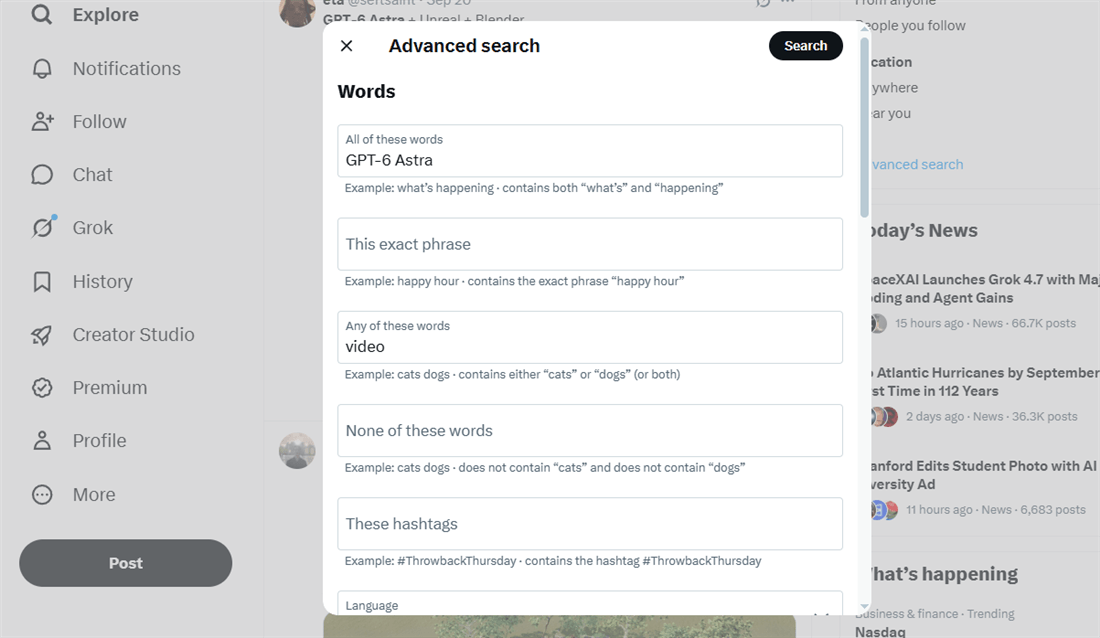
Once you know what you want to learn, translate that goal into searchable phrases and filters. X's Advanced Search lets you combine phrases, exclusions, accounts, dates, languages and other filters to narrow a search.
- Start with the exact phrase when the wording matters. "social listening" searches for that phrase. A search such as social listening requires both words to appear, but not necessarily next to each other. If you want either of two terms, use OR: "brand monitoring" OR "mention tracking".
- Exclude obvious noise. If a term repeatedly pulls in an unrelated topic, remove it with -term. If replies overwhelm a research pass, try -filter:replies; keep replies when objections, questions, or customer conversations are the signal you need.
- Add a date window when you need a repeatable sample. since:2026-09-01 until:2026-09-15 gives the query a defined period, making two listening passes easier to compare. X supports searches before, after, or within a specified date range.
- Use engagement filters selectively. min_faves:20, min_reposts:20, or min_replies:20 can surface posts with visible traction, but they also remove quieter conversations. Use them for trend or high-traction research, not as a default filter for audience discovery.
- Scope the people when the question is account-specific. from: finds posts from an account; to: finds replies to an account; and X also supports Lists for searches across a curated group.
Useful X search operators
Operator | What it does | Example |
"..." | Exact phrase | "social listening" |
OR | Either term or phrase | "brand monitoring" OR "mention tracking" |
X's operator support can change over time, so verify saved queries against the current Advanced Search documentation rather than assuming an old operator will continue to work.
Note: Do not over-filter the first pass. Exploration is where you learn the vocabulary people actually use. Once you know which phrases produce useful conversations, turn them into narrower repeatable queries.
Step 3. Organize your research into four listening buckets
Use the goal from Step 1 to decide which conversation types to monitor. Start with a few focused buckets rather than tracking every mention of your brand or category.
- Brand language. Track your brand name, product names, common misspellings, abbreviations, and phrases people use when describing the product. Include untagged mentions; direct @mentions are only part of the conversation.
- Competitors. Track competitor names and handles, then read both their posts and the conversations around them. Look for recurring praise, complaints, comparisons, objections, and claims people challenge.
- Category vocabulary. Search for the problem, workflow, or outcome before people use your product's language. Look for phrases such as “how do I…”, “alternative to…”, “why does…”, or “is there a tool for…”. Customer language is often more useful for query expansion than terminology written by vendors.
- Content opportunities. Track the language people use when asking questions, reacting to formats, discussing workflows, or sharing examples. This bucket is useful when your goal is to decide what to publish next, rather than monitor brand perception.
You can also use Reddit threads, Discord discussions, customer calls, or comments on other platforms to expand your vocabulary list. Just do not treat them as a substitute for X listening. Use them to improve your queries, then check whether those phrases actually appear in X conversations.
Step 4. Score what you collect
Collecting posts is easy. Deciding which ones matter requires more than engagement numbers.
Use views and engagement to prioritize posts for review, not to determine their value automatically. Compare medians when outliers distort a small sample, then read the posts for context. A low-engagement post may contain a useful customer question, while a viral post may be irrelevant to your research goal.
Metric | What it can tell you | What to check before drawing a conclusion |
Views | How much exposure a post received | A high view count does not mean the topic was relevant to your audience |
Engagement rate | Engagement relative to views |
Likewise, do not rely on automated sentiment labels without reading the underlying posts. Sarcasm, slang, context and mixed-language conversations can make simple positive/negative labels unreliable. For a small listening sample, manually tagging posts as question, complaint, praise, comparison, objection, or other is often more defensible.
Step 5. Turn findings into a content brief
Review the patterns from your listening pass and turn the most useful finding into a concrete content action. The table below shows how different signals can inform your next step.
Signal you found | What to investigate | Possible content action |
The same question appears across unrelated posts | Is the question recurring in your target audience? | Answer it directly in a post, video, or guide |
High saves relative to other posts | What information or format made the post worth saving? |
Use a one-screen listening brief to record the evidence, action, owner, and next review date:
Listening brief — week of [date]
Decision: [the question from Step 1]
Query: [exact query, including operators]
Window: [since / until]
Posts reviewed: [n]
Recurring phrases: [3 phrases + counts]
Highest-signal posts: [2–3 links + relevant metrics]
What changed: [the decision or content plan]
Action: [post, reply, product note, competitor note, or no change]
Owner: [person responsible]
Next run: [date]
When to Use X Search vs. a Social Listening Tool
Once the manual listening pass works, decide what is worth automating:
- Use X Search for occasional research, one-off topic checks, or small manual samples.
- Use alerts/monitoring tools when missing a brand mention, complaint, or campaign post would matter.
- Use a content-intelligence workflow when you need recurring research to become briefs, topic ideas, competitor notes, or content decisions. AllyHub is a tool that enables creators to use recurring research as an input for content decisions.
Here are the approach comparison for X social listening:
Approach | What you get | Main trade-off | Cost shape | Best fit |
X Search | Keyword, phrase, account, date, language and engagement filters for manual research | You run searches and interpret the results yourself |
AllyHub is relevant when X research needs to feed a broader content workflow. Its Radars support research around keywords, news sources, and specified X accounts, while other workflows support analysis and content development. It is not a real-time mention inbox or reply-management tool.
For example, we used AllyHub to research a simple X listening question: what does the bare query social listening actually surface?
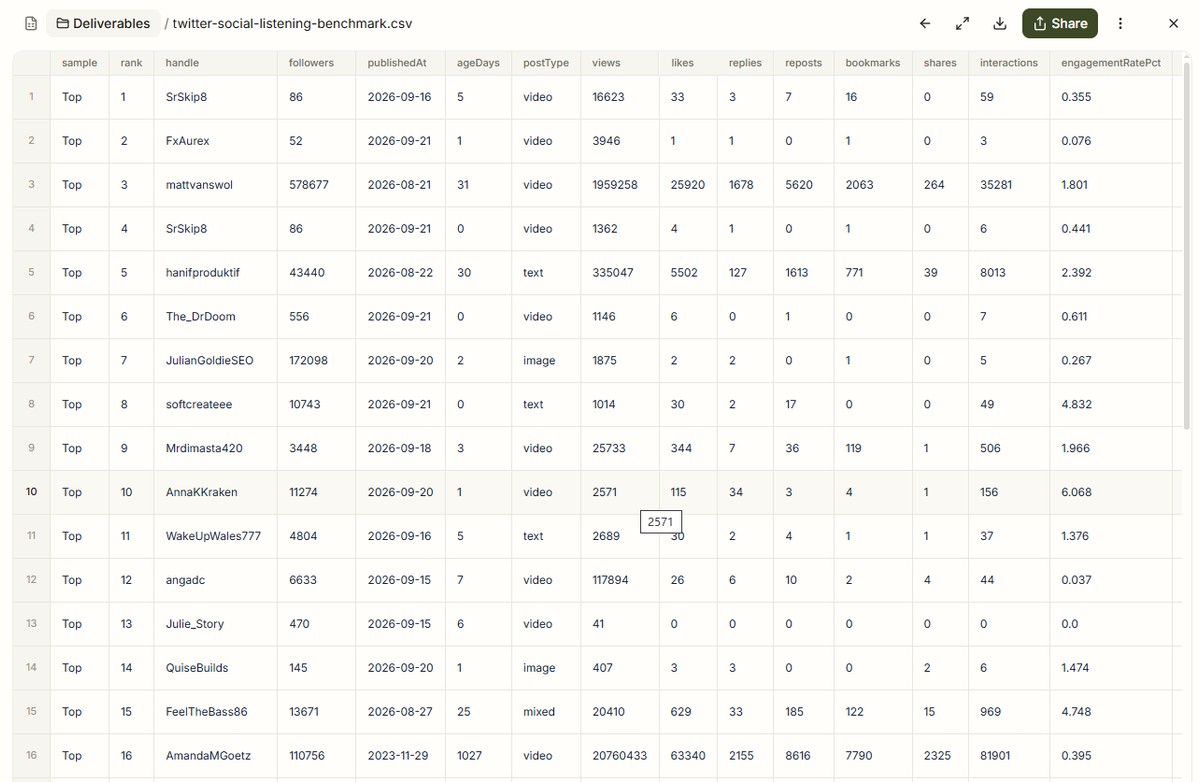
On 22 September 2026, we collected the first 20 posts from X Search's Top tab and the first 19 from Latest. We recorded views, likes, replies, reposts, bookmarks and author follower counts, then marked whether each post was genuinely about social listening.
Metric | Top (n = 20) | Latest (n = 19) |
Posts genuinely on topic | 7 (35%) | 6 (32%) |
Median views | 3,318 | 2,174 |
Three things stood out:
- Broad keywords create a lot of noise. Roughly two-thirds of both samples were off topic. The word "listening" pulled in unrelated conversations, so a broad keyword is only a starting point.
- Top and Latest are not interchangeable. The samples barely overlapped, and Top included a post published 1,027 days earlier. Popularity and recency answer different research questions.
- Outliers distort averages. Median views were around 2,000–3,300, while means exceeded 1.2 million because one 20.7M-view post dominated the calculation. Median-based comparisons are more useful for a small listening sample.
How we measured it: engagement rate = (likes + replies + reposts + bookmarks) ÷ views. On-topic classification was a manual yes/no judgement. This was one keyword, one day and one reviewer, so use it as a repeatable baseline, not industry data.
Turning the listening pass into a repeatable workflow
In AllyHub, Radars can run manual or scheduled research around X keywords, news sources, and specified X accounts. Use the results to identify patterns and develop content ideas. Social is a separate first-party analytics workflow for your own X and TikTok accounts; it is not a competitor-listening inbox.
The practical workflow is: Research → Filter → Analyse → Find patterns → Decide what to create
That is the difference between opening X Search every week and building a repeatable content-intelligence workflow.
FAQ
Is Twitter social listening free?
Yes, basic Twitter social listening can be free if you use X Search manually. The tradeoff is time: you have to run searches, filter noise, save examples, and turn findings into decisions yourself. Third-party tools or API-based workflows become useful when you need alerts, scale, storage, or repeatable reporting.
How many posts should I review before concluding?
There is no universal cutoff. For a recurring topic or phrase, review enough posts to see whether the same pattern appears repeatedly rather than relying on a single viral example. For small samples, compare medians and read the posts themselves instead of treating engagement as the conclusion.
Can I monitor X posts without the X API?
Yes, for manual research. X's Advanced Search lets you narrow posts by keywords, accounts, dates, languages and other fields. API-based or third-party workflows become more relevant when you need recurring collection, larger-scale data or your own storage and analysis.
Do I need sentiment analysis?
Not necessarily. If your goal is to find questions, complaints, objections or content opportunities, manually tagging a sample can be more useful than relying on a single sentiment score. Sentiment analysis becomes more valuable when you need to process a much larger volume consistently.
Should I track posts that never mention my brand?
Yes. Track the language people use to describe the problem, workflow, or outcome you care about — not just your brand name. These posts can reveal questions, objections and content gaps that a brand-mention search will miss.


