If you're trying to scrape Amazon product data, you've likely run into a familiar problem: competitors dominating an entire category — ranking at the top, collecting hundreds of reviews, and constantly adjusting prices. To compete, you need visibility into their strategy — including price points, keywords, review trends, and even inventory signals.
But here's the challenge: Amazon has thousands of listings per category. Manually collecting this data in a spreadsheet is not only time-consuming but also becomes outdated almost immediately. This is exactly where an Amazon scraper becomes essential.
In this guide, you'll learn four practical ways to scrape Amazon product data — from no-code tools to Python scripts to AI-powered solutions — with a clear breakdown of what each method costs, what it can handle, and which type of user it's best suited for.
Disclaimer:
For educational purposes only. Scraping Amazon data may be restricted by law and Amazon’s Terms. Ensure compliance and use responsibly; do not collect sensitive data.
Key Takeaways
If you want to scrape Amazon product data, here’s the fastest way to choose the right method:
- No-code tools → Best for beginners who want quick results without coding
- Python scraper → Best for developers who need full control and customization
- Amazon scraper APIs → Best for scaling, reliability, and bypassing anti-bot systems
- AI tools → Best for fast, structured data extraction with minimal setup
Is It Legal to Scrape Amazon Product Data?
Before scraping Amazon product data, it’s important to understand the legal context.
Scraping publicly available data (e.g., titles, prices, ratings, review counts) may be legally permissible in the U.S. under certain conditions. In hiQ Labs v. LinkedIn, the Ninth Circuit held that accessing publicly available web data does not necessarily violate the CFAA, which targets unauthorized access to protected systems.
However, Amazon’s Conditions of Use prohibit automated data extraction, including scraping. Violations may lead to IP bans, account suspension, or legal action.
Scraping sensitive or personal data may also trigger privacy laws depending on the jurisdiction.
👉 In practice, Amazon scraping sits in a legal gray area: public data may be accessible, but platform rules still strictly apply.
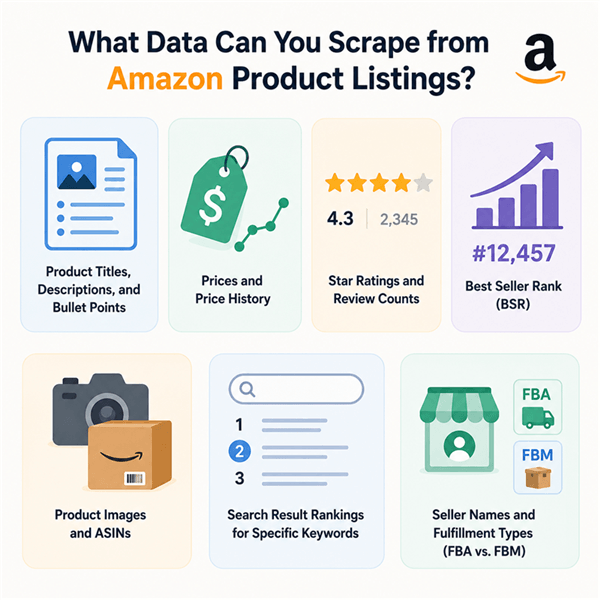
What Data Can You Scrape from Amazon Product Listings?
When you scrape Amazon product data, you can typically extract:
- Product titles, descriptions, and bullet points
- Prices and price history
- Star ratings and review counts
- Best Seller Rank (BSR)
- Product images and ASINs
- Search result rankings for specific keywords
- Seller names and fulfillment types (FBA vs. FBM)
Amazon Scraper Method Quick Comparison
Method | Technical Skill | Cost | Scale | Best For |
No-code tools (Browse AI, Octoparse) | None | Free–$100/mo | Medium |
How to Scrape Amazon for Product Data: 4 Methods
Method 1: No-Code Amazon Scraper Tools
Best for: Marketers with no coding background who need structured product data quickly, without technical setup.
No-code scraping platforms let you point and click on the data you want to extract. You define the fields, the tool handles the rest — including pagination, anti-bot handling, and export formatting.
How to Scrape Amazon Product Data with Browse AI
Browse AI is one of the most marketer-friendly no-code scrapers available, with pre-built Amazon templates.
- Sign up for a Browse AI account (free tier available).
- Select a pre-built Amazon robot — Browse AI has templates for Amazon product pages, search results, and review pages.
- Enter your target URL — paste in an Amazon search results page or product listing URL.
- Map the fields — confirm which data points to extract (title, price, ASIN, rating, review count, BSR).
- Run the robot — Browse AI navigates the page, handles pagination, and extracts the data.
- Export to CSV or Google Sheets — download your structured dataset.
💡 Pro tip: Use Browse AI's "monitor" feature to schedule recurring scrapes of competitor product pages. You'll get automatic alerts when prices change — no manual re-running required.
Best for:
- Marketers who need a one-time product research pull
- Teams tracking a small set of competitor ASINs (under 500)
- Anyone who needs data in Google Sheets without writing code
Limitations: Free tiers cap the number of rows per month. For large-scale scraping (thousands of ASINs), costs scale quickly.
Other No-Code Amazon Scrapers Worth Knowing
Tool | Best For | Free Tier | Notes |
Octoparse | Visual scraper with Amazon templates | Yes (limited) | Desktop app; good for beginners |
Method 2: Amazon Scraper APIs
Best for: Marketers or data teams who need reliable, high-volume Amazon data at scale — without managing proxies, CAPTCHAs, or anti-bot infrastructure.
Amazon is one of the most aggressively protected websites to scrape. It uses AWS WAF, IP-based rate limiting, browser fingerprinting, and JavaScript challenges to block automated access. Dedicated Amazon scraper APIs handle all of this for you.
How to Use a Scraping API to Scrape Amazon Product Data
Here's the general workflow using any major scraping API (Bright Data, for example)
Step 1. Sign up for Bright Data and get your API key
Step 2. Open the Amazon Scraper API
Step 3. Paste your Amazon product or search URL
Step 4. Send the request via API dashboard or code snippet
Step 5. Receive structured data (JSON or CSV)
Step 6. Export to Google Sheets, Excel, or your database
Example request structure (generic):
Send a GET request to your API endpoint with two parameters: the target Amazon product URL (or ASIN), and your API key. The API returns structured JSON with all product fields pre-parsed — no HTML parsing required.
📌 Note: Most scraping APIs charge per successful request. For price monitoring across 10,000 ASINs daily, costs can reach $200–$500/month depending on the provider. Always check pricing tiers before committing.
Amazon Scraper API Comparison
API | Best For | Starting Price | Amazon-Specific Endpoints | Reliability |
Enterprise-scale, highest reliability | Pay as you go or ~$500/mo (enterprise) |
Method 3: Python Amazon Scraper (Custom Code)
Best for: Developers or technically comfortable marketers who want full control over what data they extract and how it's processed — without paying per-request API fees.
Building a custom Python Amazon scraper gives you maximum flexibility, but it comes with real maintenance overhead. Amazon actively updates its anti-bot measures, which means your scraper will break periodically and require fixes.
How to Build a Basic Amazon Product Scraper in Python
- Prerequisites: Python 3.x, the requests library, BeautifulSoup4, and a rotating proxy service.
- Install dependencies: Use pip to install the three required libraries — requests for making HTTP calls, beautifulsoup4 for parsing HTML, and lxml as the parser engine.
- Set up request headers to mimic a real browser:
Import the requests and BeautifulSoup libraries, then define a headers dictionary that includes a realistic User-Agent string, Accept-Language set to en-US, and Accept-Encoding set to gzip, deflate, br. This makes your requests look like they're coming from a real browser rather than a script.
- Fetch the product page:
Set your target URL to the Amazon product page (e.g., amazon.com/dp/[ASIN]), then call requests.get() with your headers. Pass the response content into BeautifulSoup using the lxml parser to get a parsed HTML object you can query.
- Parse the data fields:
Use soup.find() to locate each data element by its HTML tag and identifier. For example: the product title lives in a <span> with the id productTitle; the price is in a <span> with the class a-price-whole; the star rating is in a <span> with the class a-icon-alt. Call .get_text(strip=True) on each to extract clean text.
- Export to CSV:
Import Python's built-in csv module, open a new file called amazon_products.csv in write mode, and use a csv.writer to write a header row (Title, Price, Rating) followed by a data row with the values you extracted. Repeat this in a loop for multiple products.
⚠️ Warning: Amazon's HTML structure changes frequently. Selectors that work today may break next week. If you're building a production scraper, plan for ongoing maintenance or use a scraping API instead. Also, without rotating proxies, your IP will be blocked quickly when scraping at scale.
Limitations: High maintenance burden; requires proxy management; breaks when Amazon updates its HTML structure.
Method 4: AI Agent Platforms — Scrape Amazon Product Data Without Code or APIs
Best for: Marketers who want to extract Amazon product data, analyze it, and turn it into actionable reports — all in one workflow without coding or API setup.
AI agent platforms like AllyHub combine browser automation, web data extraction, and analysis into a single conversational workflow. You describe what you want in plain English, and the agent handles data extraction, structuring, and report generation.
How to Scrape Amazon Product Data with AllyHub
AllyHub’s Web Scraping module can process Amazon pages or URLs, extract structured product data, and export it directly to Excel or CSV — no code, no APIs, no proxy management.
Step 1. Open AllyHub and start a new task.
Step 2. Describe your scraping goal in plain English — for example:
“Scrape the top 200 listings for ‘tempered glass screen protector’ on Amazon. Extract title, ASIN, price, star rating, review count, BSR, and seller name. Export to Excel.”
Step 3. AllyHub processes Amazon results pages, handles pagination, and extracts structured data automatically.
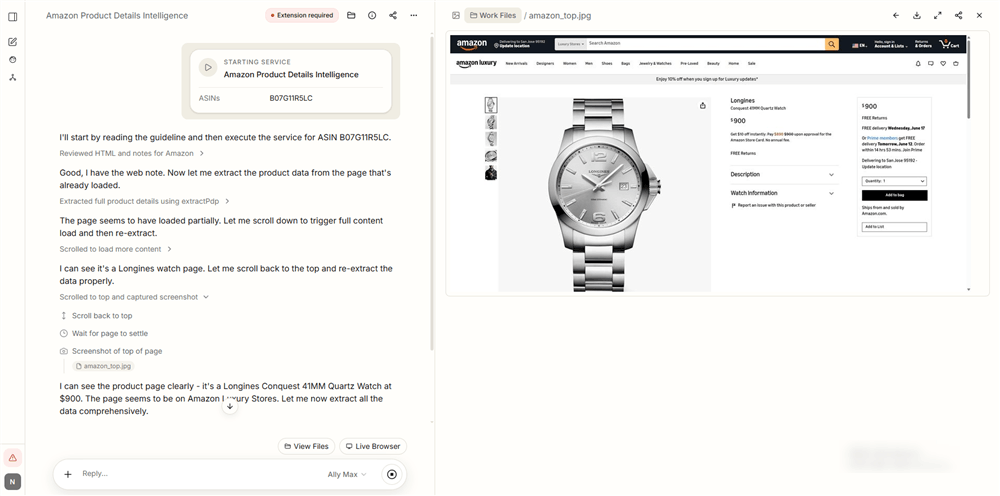
Step 4. Review the output — AllyHub delivers a clean Excel file with all fields populated.
Step 5. Perform follow-up analysis — for example:
“Which sellers appear most frequently? What’s the average price in the top 50 results? Flag listings with fewer than 100 reviews but a BSR under 5,000.”
💡 Pro tip: AllyHub is designed around ROTI (Return on Token Investment). The first time it explores an Amazon category, it creates reusable Recipes and execution knowledge. Future runs build on what it already knows, reducing repeated exploration and increasing the value produced by every token spent.
What makes this different from other methods:
Capability | No-Code Tools | Scraping APIs | Python | AllyHub |
No coding required | ✅ | ✅ | ❌ |
What Can You Do with Amazon Product Data?
Before choosing a method, it's worth being specific about why e-commerce and digital marketers actually use Amazon scrapers. The use cases drive the tool choice.
Use Case | Data Needed | Frequency |
Competitor price monitoring | Prices, Buy Box winner, seller count | Daily/real-time |
Product research & opportunity finding | BSR, review count, price range, category |
The more frequently you need data, and the larger the volume, the more you'll benefit from a dedicated API or automated pipeline rather than a one-off manual scrape.
Why Scraping Amazon is Difficult
While it’s possible to scrape Amazon product data, it’s far from straightforward. Amazon actively prevents automated scraping, which creates several technical challenges:
- Anti-bot protection systems: Amazon uses advanced detection mechanisms to identify non-human behavior, such as unusual request patterns or missing browser signals. Basic scripts are often blocked within seconds.
- CAPTCHA challenges: Frequent requests can trigger CAPTCHA pages, forcing manual verification and breaking automated scraping workflows.
- IP blocking and rate limiting: Repeated requests from the same IP address can quickly lead to temporary or permanent bans, making large-scale Amazon scraping unreliable without proxy management.
- Dynamic, JavaScript-loaded content: Many product details (such as pricing or availability) are loaded dynamically, which means simple HTML scraping often misses critical data.
Because of these challenges, choosing the right Amazon scraper — whether it's a no-code tool, API, or custom script — is essential for getting consistent and accurate data.
FAQ: Amazon Product Scraper
Is scraping Amazon legal?
Scraping public Amazon data is generally legal in the U.S. (hiQ v. LinkedIn precedent), but Amazon’s Terms of Service prohibit automated scraping, which may result in IP or account bans. Avoid login-protected or personal data.
What is the best Amazon scraper for non-technical users?
No-code tools like Browse AI and Octoparse are easiest for beginners. For a more advanced workflow that includes both scraping and analysis, AllyHub can generate structured reports in one step.
How much does it cost to scrape Amazon data?
Costs vary by method: no-code tools use monthly subscriptions, scraping APIs charge per request, and Python scraping is free but requires infrastructure and ongoing maintenance.
How can I scrape Amazon at scale without getting blocked?
Use dedicated scraping APIs such as Bright Data, Oxylabs, or ZenRows. They handle proxies, CAPTCHA solving, and rate limiting automatically.
What Amazon data can be legally scraped?
Public data includes product titles, prices, ratings, reviews, ASINs, BSR, seller information, and search rankings. Data behind login walls or containing personal information should not be collected.
How do I handle JavaScript-loaded Amazon pages?
Use scraping APIs with rendering support or tools like Playwright and Selenium. Simple HTTP requests often miss dynamic content.
Can AllyHub scrape and analyze Amazon data in one step?
Yes. AllyHub can extract structured Amazon data and immediately generate analysis and Excel reports in a single workflow without code.
What's Next
If you're starting from scratch, here's the fastest path to your first Amazon data pull:
- For a quick one-off research task: Use Browse AI's free tier with an Amazon search results template — you'll have structured data in under 10 minutes.
- For recurring competitive monitoring: Set up a scraping API (ZenRows or ScraperAPI have good entry-level pricing) and schedule daily pulls.
- For scraping + analysis in one step: Try AllyHub — describe your Amazon research goal in plain English and let it handle the extraction, structuring, and analysis automatically.
The marketers who get the most out of Amazon data aren't the ones who scrape the most — they're the ones who turn scraped data into recurring intelligence workflows that compound over time.