

TL;DR:
Web scraping is the automated process of extracting specific, unstructured data from websites and converting it into a structured format — like a spreadsheet, JSON file, or database. Think of it as automated copy-paste at scale: instead of manually copying prices, emails, or product listings one by one, a scraper does it in seconds at scale. While web crawling maps and indexes the web (like Googlebot does), web scraping targets and harvests specific data points from specific pages.
For growth teams and modern marketers, web scraping is the ultimate shortcut for competitive intelligence, lead generation, and scaling data workflows. This guide explains how scraping works, how it differs from crawling or browser automation, and how to choose a legal, scalable approach for your business.
What is Web Scraping?
Web scraping is the automated collection of data from websites.
Imagine you want to track the prices of 500 products on Amazon or across three competitor websites every morning. Doing it manually would take hours. A web scraper does it in minutes — automatically visiting each page, reading the price, and saving it to a file you can actually use.
For marketers specifically, web scraping is the engine behind a wide range of AI data extraction tools and web automation workflows, including:
- Competitor price monitoring dashboards
- Lead generation from public directories
- Social listening and sentiment tracking
- Content research and keyword gap analysis
- AI training datasets built from niche forums and review sites
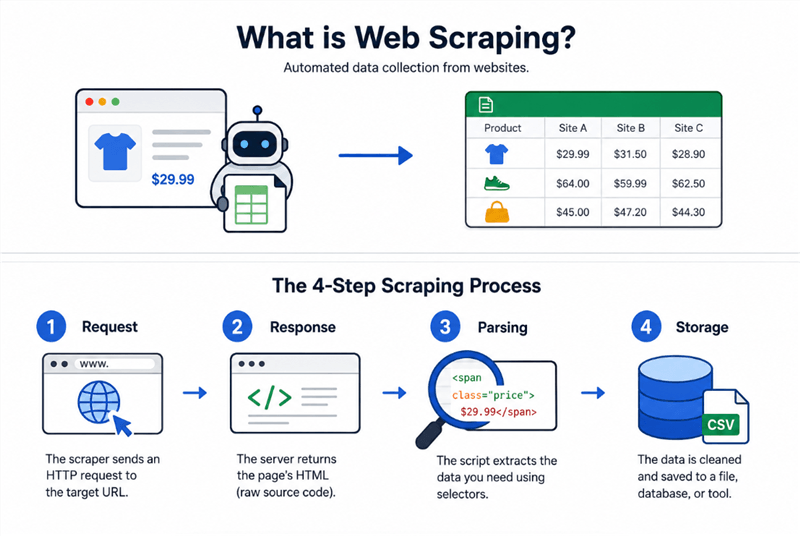
The 4-Step Scraping Process
Every web scraper — from a simple Python script to an enterprise-grade API — follows the same four-step loop:
Step 1. Request
The scraper sends an HTTP request to a target URL, just like your browser does when you type an address into the address bar. The difference: it does this programmatically, often across many pages, while following rate limits and access rules.
Step 2. Response
The server returns the raw HTML. This is the full source code of the page — all the text, links, and structure, before your browser renders it visually.
Step 3. Parsing
The scraping script isolates the specific data elements you care about using CSS Selectors or XPath — essentially, precise addresses within the HTML structure. "Give me the text inside every <span class="price"> tag" is a simple example.
Step 4. Storage
The parsed data is cleaned, formatted, and saved — to a CSV, JSON file, SQL database, or directly into a downstream tool like a spreadsheet or CRM.
That's it. The complexity comes from what happens when websites fight back (anti-bot systems, JavaScript rendering, login walls) — which is where the tool choice matters, and where we'll get into the details below.
Web Crawler vs. Web Scraper: Clearing the Confusion
These two terms get used all the time interchangeably — even by people who build these tools. They're related, but they solve fundamentally different problems.
Feature | Web Crawler | Web Scraper |
Primary Goal | Discover, catalog, and index URLs | Extract specific data points from target pages |
Scope | Broad — often scanning entire domains or the open web |
What is a Web Crawler (The Indexer)?
A web crawler is a bot that systematically browses the internet to discover and index content. Its job is navigation and mapping, not data collection.
The most famous example is Googlebot — Google's crawler that follows links across billions of pages to build the search index. It doesn't care about the price of a specific product; it cares about what pages exist, what they link to, and how they're structured.
Crawlers are broad by design. They start at a seed URL, follow every link they find, and keep going — building a massive map of the web (or a specific domain).
Primary focus: Discovery and indexing.
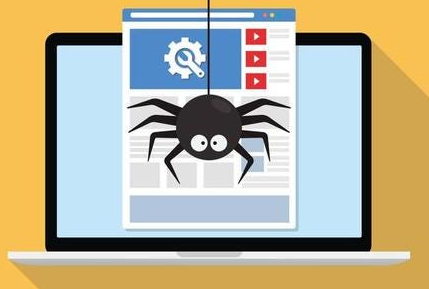
What is a Web Scraper (The Harvester)?
A web scraper is laser-focused. It knows exactly which pages it wants and exactly which data points it needs from those pages.
A scraper monitoring Amazon public product prices where permitted — it cares about the price, availability, and review count for a specific list of ASINs. It goes to those pages, extracts those fields, and stops.
Primary focus: Targeted data extraction from specific pages.
In practice, many production-grade scraping systems combine both: a crawler discovers the relevant pages, and a scraper extracts the data from each one. But conceptually — and for choosing the right tool — the distinction matters.
Web Scraping vs. Data Extraction: What's the Difference?
This one trips up a lot of people, so here's the clean mental model:
Data Extraction is the master umbrella concept. It refers to any process of pulling structured or unstructured data from a source — whether that source is a website, a PDF, a legacy database, an email inbox, a scanned document, or a physical form.
Web Scraping is a highly specific, web-based subset of data extraction. It only applies when the source is a live webpage.
For marketers, this distinction matters when you're evaluating tools. A tool that markets itself as a "data extraction platform" might handle PDFs, emails, and databases — but if you specifically need to pull data from websites at scale, you want a tool built for web scraping, not a general-purpose extraction layer.
The good news: modern AI-powered tools are increasingly blurring this line, handling multiple source types in a single workflow. But knowing the hierarchy helps you ask the right questions when evaluating vendors.
Web Scraping vs. Browser Automation
The choice between traditional scraping and browser automation depends entirely on how the target website loads its data.
- Traditional Scraping (Lightweight): Uses simple HTTP requests (like Python Requests) to fetch raw HTML. It is blazing-fast and resource-cheap, but completely blind to JavaScript. It is ideal for static blogs, raw feeds, and old-school HTML sites.
- Browser Automation (Heavyweight): Controls a real or headless browser (via Playwright or Selenium) to mimic human behavior—clicking, scrolling, and waiting for interactive elements to load. It can handle JavaScript-heavy pages, interactive elements, and infinite scroll. It can also support authenticated workflows when you have permission to access the data.
Decision Matrix: Which One Do You Need?
Scenario | Recommended Approach |
Static blog or news site | Traditional HTTP scraper |
Old-school HTML e-commerce site | Traditional HTTP scraper |
Modern React/Vue SPA | Browser automation |
A note on AI-powered scraping (2026 update): A third category is emerging rapidly — AI scraping layers that use LLMs to identify and extract data by meaning rather than rigid CSS selectors. Tools in this category can self-heal when website layouts change and accept natural language instructions instead of code. For marketers without engineering resources, this is increasingly the most practical entry point.
Tool Spotlight: AllyHub — Browser-Native Data Extraction for Marketers
If you're a marketer who needs to extract data from websites but doesn't want to write a single line of code, AllyHub is worth a look.
AllyHub is a browser-native AI copilot that works in the browser environment marketers already use — not a headless simulation. You describe what you want in plain language ("go to this page, scroll through the product listings, and pull out the name, price, and review count for each item"), and AllyHub helps execute the workflow and organize the results into a structured output.
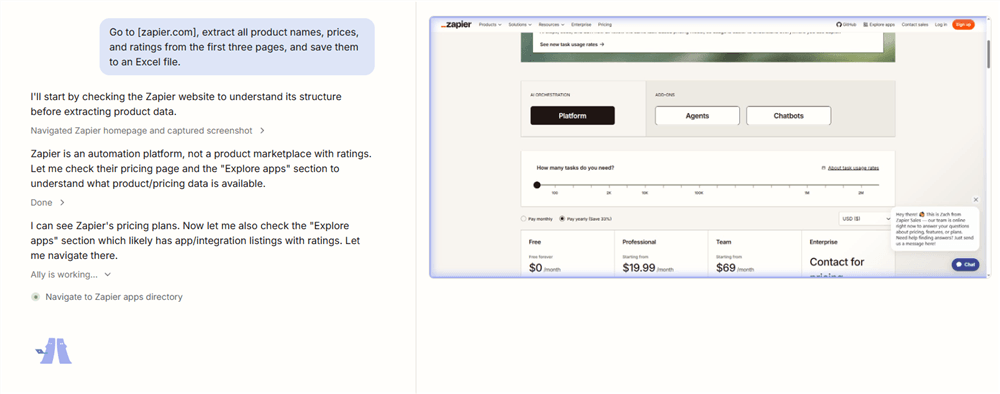
What it can realistically handle for marketers:
- Competitor price monitoring — visit product pages, extract pricing data, and save to a structured file
- Social media content research — browse public profiles or feeds and pull post data, engagement metrics, or comments
- SERP competitor analysis — open search results, navigate to competitor pages, and extract content structure or metadata
- Lead research — collect permitted public business information from directories or company pages.
Because it works through the browser, AllyHub is better suited than simple HTTP scrapers for workflows involving dynamic pages, scrolling, or multi-step interactions.
Where it fits (and where it doesn't): AllyHub is designed for task-by-task or workflow-level extraction — the kind of recurring research work a marketer does manually today. It's not a high-volume batch scraping engine; if you need to pull millions of records in parallel, a dedicated scraping API is still the right tool. But for the day-to-day data workflows that currently eat hours of your week, it's a practical alternative to either writing code or hiring someone to do it.
One practical advantage: any workflow you build in AllyHub can be saved as a reusable Service and triggered again with one click — so the second time you run a competitor price check, you're not starting from scratch.
Is Web Scraping Legal? Privacy and Compliance Framework
It depends. Legality doesn't depend on the act of scraping itself, but rather on what data you collect and how you access it.
The Golden Rule: Public vs. Private Data
The single most critical boundary in web scraping compliance is authentication.
Data Category | Real-World Examples | Legal Status & Key Precedents |
Public Data (Logged-Out) | Product prices, public directories, open blog posts | Lower risk, but not risk-free. Some U.S. cases have found that scraping publicly accessible pages does not automatically violate federal anti-hacking law, but ToS, privacy, copyright, and state-law claims may still matter. |
Private Data (Behind Login) | User profiles, SaaS dashboards, paywalled content |
3 Regulatory Boundaries to Watch
- CFAA (Anti-Hacking): Do not break down digital doors. Standard scraping via normal HTTP requests is generally lower risk, but actively bypassing technical barriers—like using fake accounts, brute-forcing logins, or deceptively cracking security walls—crosses into illegal territory.
- GDPR / CCPA (Data Privacy): "Public" does not mean a free-for-all. If your scraper collects Personally Identifiable Information (PII) like names, personal emails, phone numbers, or user photos, you must have a valid lawful basis under regional privacy laws.
- EU AI Act (2026 Enforcement): If you are scraping data specifically to train AI or Large Language Models (LLMs), you are now legally required to publish transparency summaries of your training data sources and strictly honor website copyright opt-out tags.
The "Good Citizen" Scraping Checklist
Beyond strict legality, practicing responsible scraping prevents your IPs from getting blacklisted and keeps you out of legal gray areas:
- Check robots.txt: Always review the target site's scraping preferences. While not always legally binding on public data, ignoring it completely destroys "good-faith" arguments in court.
- Implement Rate Limiting: Space out your requests. Bombarding a server with thousands of requests per second is the functional equivalent of a DDoS attack and will get you blocked instantly.
- Identify Your Bot: Declare a transparent and honest User-Agent string so target site administrators can see who you are and contact you if needed.
- Practice Data Minimization: Only scrape and store the specific fields required for your use case. Don't hoard data you don't need.
Common Modern Use Cases for Web Scraping
Web scraping has evolved well beyond its early reputation as a tool for SEO spammers and data hoarders. Here's where it's creating real business value in 2026:
AI Training & LLM Fine-Tuning
The explosion of custom AI models has created enormous demand for high-quality, domain-specific training data. Marketers and product teams are using tools like a Reddit scraper to extract niche forum discussions and community threads, building datasets for fine-tuning LLMs on their specific vertical. The Reddit v. Anthropic case (filed June 2025) signals that this space is getting more legally complex — but the demand isn't slowing down.
E-Commerce Price Intelligence
Real-time competitor price monitoring is one of the most mature and commercially valuable scraping use cases. E-commerce teams use tools like an Amazon price tracker to monitor competitor pricing, promotional cadences, and inventory availability — feeding dynamic repricing engines that adjust prices automatically. At scale, this is a genuine competitive moat.
Investment & Market Sentiment Analysis
Hedge funds and growth investors have used web scraping for years to extract signals from earnings call transcripts, job posting trends, and social media sentiment. In 2026, this has trickled down to growth marketers who automate social listening on Twitter to track brand sentiment, share of voice, and emerging competitor narratives in real time.
Lead Generation & Sales Intelligence
Scraping public business directories, LinkedIn company pages, and industry databases to build targeted prospect lists remains one of the highest-ROI applications for B2B marketing teams. Tools that automate B2B lead generation via LinkedIn profile extraction can compress what used to be days of manual prospecting into a single workflow — provided it's done within GDPR/CCPA guardrails.
Content Research & SEO Intelligence
Tracking competitor content strategies, monitoring SERP changes, and aggregating industry news for content gap analysis. For content marketers, extracting SERP data with a Google search scraper is the difference between guessing what's working and knowing — giving you a live, structured view of who ranks, for what, and how their content is structured.
Conclusion: Match Your Skills to Your Stack
Web scraping in 2026 is simple: match your technical skills to your data volume.
If you are a non-technical marketer handling day-to-day research, AI browser agents (like AllyHub) or No-Code scrapers are your fastest entry point to automate workflows without writing code. If you need to collect millions of records across complex sites, pass the job to an engineering team armed with Open-Source libraries (Python + Playwright) or use a Managed Scraping API.
Don't overengineer. Start with a simple AI agent or no-code tool for your immediate tasks today, and only scale up to a heavy developer stack when your data volume explodes.


