

Low Twitter engagement is not always a content problem. A post can get plenty of impressions and almost no replies, or barely get seen in the first place. Those are different problems—and they need different fixes.
Start by separating reach from interaction. X counts likes, replies, reposts, clicks, follows, profile visits, media interactions, and other actions as engagements, while its analytics reports engagement rate as engagements divided by impressions.
This guide explains what counts as Twitter engagement, how to read your engagement rate, why your posts may be stalling, and 7 practical ways to increase meaningful interaction on X—without relying on generic “post more” or “find the perfect time” advice.
Key Takeaways
- Low engagement has different causes: Low impressions and low interaction need different fixes.
- Focus on meaningful actions: Replies, reposts, clicks, profile visits, and other interactions tell you more than likes alone.
- Benchmark carefully: Engagement rates vary by formula, account type, and audience, so compare like with like.
- Give people a reason to respond: Strong opinions, useful information, questions, and timely topics create more opportunities for interaction.
- Use your own data: Test topics, formats, and posting times against your recent performance instead of relying on generic rules.
- Turn winners into patterns: Look for repeatable topics and formats rather than trying to recreate one viral post.
What Counts as Twitter Engagement?
On X, engagement includes actions such as likes, replies, reposts, clicks, profile visits, and media interactions. X calculates engagement rate as:
Engagement rate = (total engagements ÷ total impressions) × 100
Impressions vs. followers
X uses impressions as the denominator for its native engagement rate. A follower-based rate (engagements ÷ followers) can still help compare accounts, but don't compare the two percentages as if they use the same formula.
Why Is My Twitter Engagement So Low?
What you see | Likely problem | What to test |
Low impressions + low engagement | Distribution/audience | Topic fit, replies, consistency, audience |
High impressions + low engagement | Content interaction | Hook, opinion, question, format |
The 7 Ways to Increase Twitter Engagement
Every tactic below is small on its own. Stacked, they compound — which is exactly how engagement growth works.
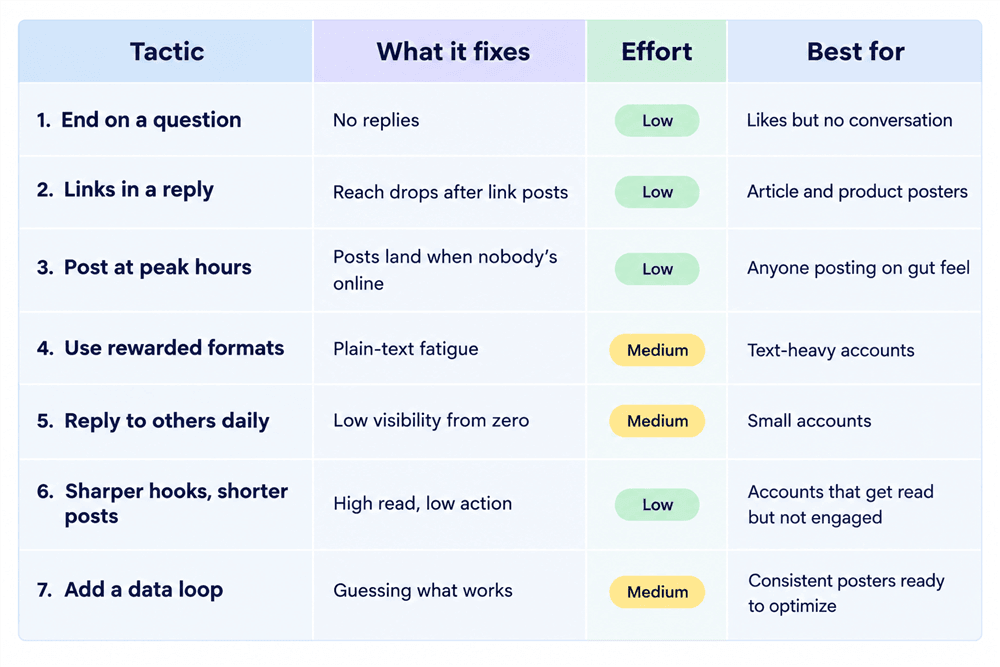
Method 1: End posts with a question, not a period
This is the highest-leverage change for most accounts. X's ranking code shows replies carry far more weight than passive likes — a post that sparks a conversation gets distributed wider than one that just collects nods.
The trick is asking in a way that's easy to answer. "Thoughts?" gets ignored; a specific, low-effort prompt gets replies.
- Ask for a number or a tool: "What's the one plugin you'd keep if you had to delete everything else?"
- Ask for a story: "What's the dumbest mistake you made in your first year?"
- Take a defensible position: "Hot take: posting more than twice a day hurts most accounts. Am I wrong?"
💡 Pro tip: Reply to your own post with a follow-up question about an hour in. It restarts the conversation and opens a second engagement window.
Best for: accounts with steady likes but almost no replies.
Method 2: Move external links out of the main post
X's systems have long favored posts that keep people on the platform, and independent analyses of the 2026 algorithm report a large reach reduction when a link sits in the main post body.
So don't put your link in the post. Put it in the first reply or as the last post of a thread, and write "link below." You keep the click and the main post keeps its reach.
⚠️ Warning: The same logic punishes "link in bio" bait. If the post has nothing to say without the link, it won't travel.
Best for: creators who post articles, products, or newsletters.
Method 3: Post When Your Audience Is Active
Timing can give a strong post a better chance to be seen and engaged with, but there is no universal best time for every X account. A 2026 analysis of 52 million+ social posts found that timing is an amplifier rather than the main driver of engagement, while X's recommendation system uses many signals beyond recency.
Use broad benchmarks as a starting point, then test different posting windows against your own X analytics. Look for consistent differences in impressions, engagement rate, replies, reposts, and clicks rather than judging a single post.
Pro tip: Test the same type of content across three different time windows and compare the results over several weeks. Keep the other variables as consistent as possible.
Best for: Anyone posting on a fixed schedule without knowing when their audience is most responsive.
Method 4: Match the format to what X distributes
Format is the most underrated lever. In practice X pushes what keeps people watching: native video (especially short clips), images, GIFs, and polls all tend to outperform plain text.
- Native video: upload directly, keep it short, add captions.
- Polls: the lowest-effort engagement there is — one tap.
- Threads and long-form: good for depth, but front-load the payoff so the first post stands alone.
Consistency in one niche also helps the algorithm route your posts to the right audience, so don't jump formats and topics at random.
Best for: text-heavy accounts ready to test one visual format per week.
Method 5: Spend 30 minutes a day in other people's replies
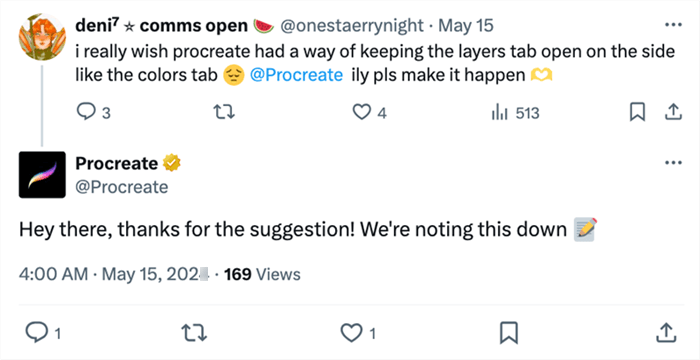
Engagement is reciprocal on X. Meaningful replies you leave on larger accounts in your niche drive profile clicks — and profile clicks are themselves a strong ranking signal — while putting your name in front of the audience you're trying to reach.
Do it deliberately: pick five accounts your ideal follower already follows, and add something specific to their conversation instead of "Great post!"
Best for: smaller accounts growing from zero.
Method 6: Tighten the hook and cut the length
Every post competes with a thumb mid-scroll. Your first line has to stop it.
Two rules: lead with the payoff (the result, the number, the tension), and cut anything that isn't earning attention. Short, dense posts usually earn more interaction, while slightly longer ones can earn more clicks — so match length to your goal.
💡 Pro tip: Write the post, then delete the first sentence. It's usually warm-up.
Best for: anyone whose posts get read but not acted on.
Method 7: Close the Loop With Your Own Data
X analytics shows what happened; AllyHub helps turn that data into content decisions.
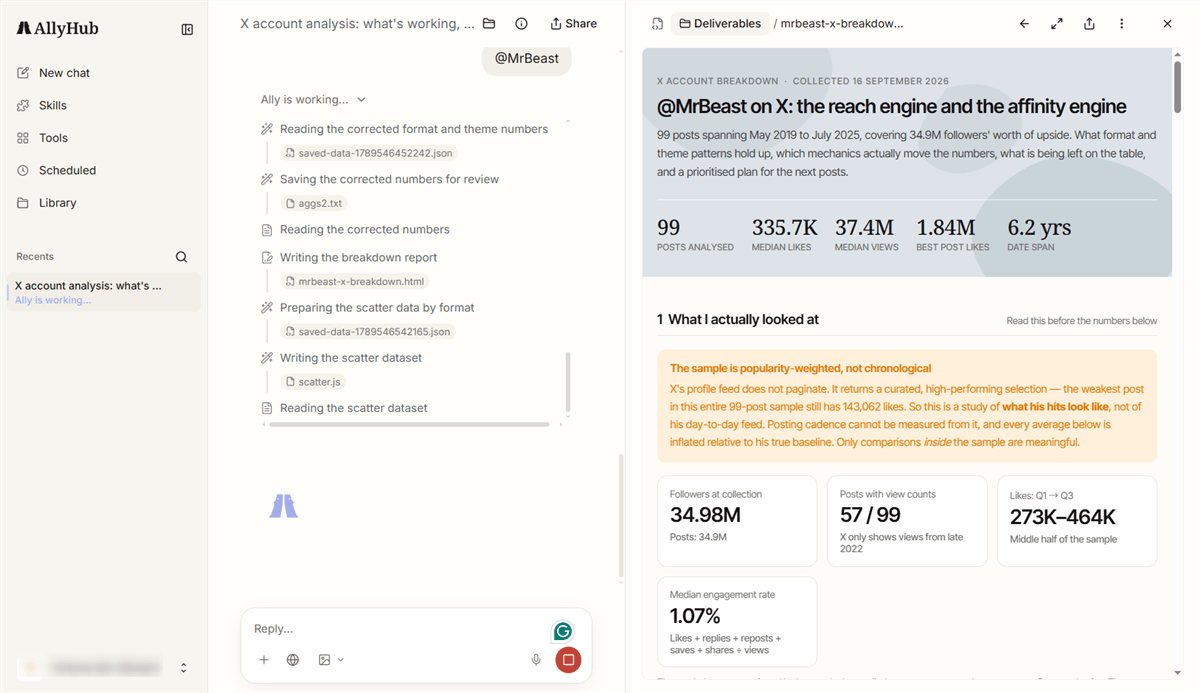
AllyHub is an AI-powered workspace for social content operations. Its key features for X include:
- Social: Analyzes your X account performance and generates AI performance briefings, winning-content patterns, content gaps, and next-topic ideas. It can also analyze audience responses at the post level.
- Radars: Creator Watch tracks X creators and their performance, viral content, positioning, and success patterns; News & Trends monitors keywords, news sources, and selected X accounts, with manual or scheduled scans.
- Profiles: Defines your positioning, audience, and brand voice so content ideas stay aligned with your account.
- Studio: Turns research and insights into on-brand content drafts, including long-form X posts.
AllyHub supports the analysis → research → content planning → creation loop, rather than automatically publishing posts to X.
Best for: Creators and content teams that want to turn their own X performance data into repeatable content decisions.
FAQ
Why is my Twitter engagement so low?
Low engagement can come from different problems: limited reach, weak audience fit, or posts that get seen but give people little reason to interact. Compare impressions with replies, reposts, clicks, and other interactions to identify where the drop-off happens.
Does X Premium help increase engagement?
It can give your replies greater visibility because X includes Premium status among the factors used to rank replies in conversations. But Premium does not guarantee more engagement on your own posts, so treat it as a visibility feature rather than an engagement strategy.
Should I use hashtags on X?
You can use relevant hashtags when they help people understand or find your post, but they are not a substitute for a strong topic or hook. X still supports hashtag search and discovery, so use them selectively rather than adding tags simply to increase reach.
Is it better to reply to other people's posts or post more of my own?
Both serve different purposes. Your own posts give you content to measure, while relevant replies put you into existing conversations and can help you connect with people interested in the same topic. Focus on contributing something useful rather than replying simply to get noticed.
Do engagement pods or buying engagement work?
Artificially coordinated engagement is not a reliable way to build an audience. X explicitly considers coordinated behavior intended to manipulate engagement against its rules, so focus on genuine interactions from people who are actually interested in your content.



