

Are you trying to extract 10,000 product pages into a clean dataset by tomorrow morning, or are you trying to get an AI agent to do browser work in a browser you're already logged into? If the answer is the first, you want Apify. If the answer is the second, you want AllyHub. These two tools are filed next to each other in every "AI scraping tools" listicle, but they were built for different jobs — and picking the wrong one will cost you a week of rework.
This article maps each tool to the job it's actually built for, so you can decide in ten minutes instead of ten hours.
Key Takeaways
- The Fundamental Difference: Apify is cloud-based infrastructure (servers, IP proxies, code) built for developers to scrape massive datasets. AllyHub is a local AI Chrome extension built for marketers and operators to automate authenticated, multi-step browser tasks.
- Pricing: AllyHub starts at $19.99/mo Pro; Apify starts at $29/mo Starter plus per-compute-unit usage that scales with scraping volume.
- The Anti-Bot Factor: Apify charges you for expensive residential proxies to bypass bot detection. AllyHub doesn't need proxies—because it uses your actual desktop browser and your real Wi-Fi IP address.
What Is AllyHub?
AllyHub is a browser-native AI agent that runs inside your Chrome session and executes tasks on real websites. Instead of calling APIs or building workflows, you describe what you want in natural language — and the agent navigates pages, interacts with UI, and completes multi-step work using your existing logged-in context.
It’s designed for operators and individuals who want to automate research, scraping, and content workflows without engineering setup.
Key Features
- Real Browser Execution — Performs clicks, form filling, scrolling, and extraction on live websites (not APIs)
- Authenticated Access — Uses your logged-in sessions (e.g. LinkedIn, Amazon, internal tools) to access gated data
- Zero Setup Workflow — No need to design pipelines, manage APIs, or deploy infrastructure
- ROTI (Return on Token Investment) — Past tasks become reusable Skills, reducing token usage and execution time over repeated runs
- Service Hub (Prebuilt Tasks) — 50+ ready-to-use Services for scraping, research, and content generation
- Natural Language Interface — Turn complex multi-step tasks into simple instructions
📌 Limitations: Designed for individual use (no team workspace), limited concurrency (up to 3 tasks), and not suitable for large-scale or production-grade scraping pipelines.
What Is Apify?
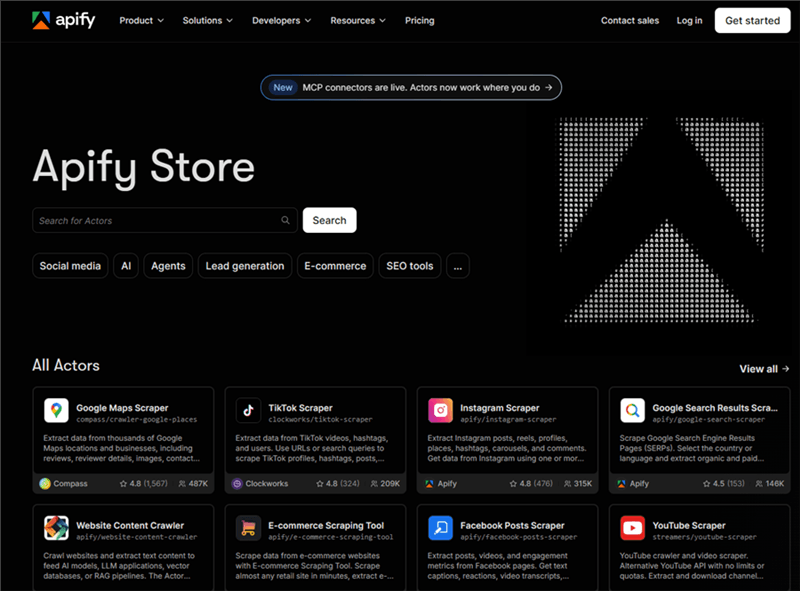
Apify is a cloud-based scraping and automation platform built for running data extraction jobs at scale.
Instead of interacting with a browser you control, Apify runs server-side programs (Actors) that crawl websites, process data, and return structured outputs via APIs, datasets, or integrations.
It’s designed for developers, data teams, and growth operators who need reliable, repeatable, and scalable data pipelines.
Key Features
- Actors Framework — Serverless scrapers and automation scripts
- Massive Library — 5,000+ pre-built scrapers (Amazon, Google Maps, Instagram)
- Built for Scale — Handles large datasets (thousands to millions of pages)
- Full Infrastructure — Proxies, CAPTCHA solving, scheduling, webhooks
- Developer SDKs — JS & Python for custom pipelines
📌 Limitations: Requires setup and technical knowledge, no access to your local browser session, not designed for real-time manual workflows.
AllyHub vs Apify: Feature-by-Feature Breakdown
Feature | AllyHub | Apify | Winner |
Product type | Browser agent (Chrome extension) | Cloud scraping platform (Actors) | Depends on job |
AllyHub vs Apify: Pricing Compared
Plan | AllyHub | Apify |
Free | Daily credits | $5 one-time credit |
Entry paid | $19.99/mo Pro, 2,000 credits | $29/mo Starter |
The pricing models reflect different bets. AllyHub uses a flat monthly credit model with daily top-ups. With ROTI, repeat workflows can get cheaper over time as Skills accumulate. Apify is compute-based: costs scale with runtime, memory, and concurrency. Reusing an Actor doesn’t reduce cost unless it’s further optimized.
This works well for large-scale scraping, but can feel heavy for ad-hoc operator tasks.
⚠️ Apify usage can grow quickly if not monitored — inefficient Actors may exhaust plans fast.
Who wins:
- AllyHub → solo operators & repeat workflows
- Apify → teams & scalable scraping
Apify offers startup and academic discounts; AllyHub currently does not.
AllyHub vs Apify: 4 Architectural Differences That Matter (Deep Dive)
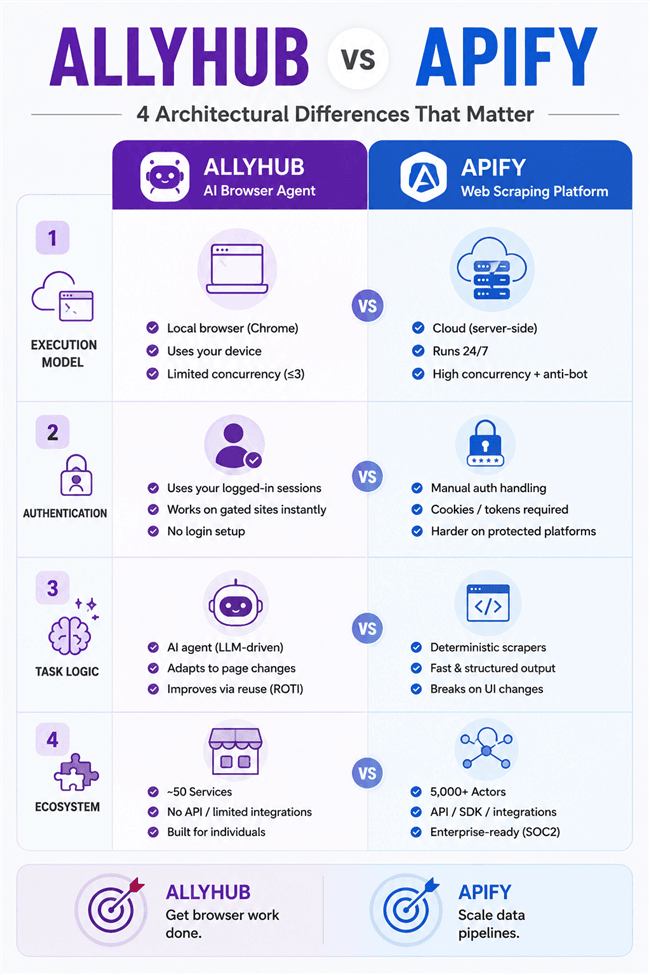
Execution Model & Anti-Bot Infrastructure
The fundamental divide between these tools lies in where and how code executes:
- Apify is cloud-native infrastructure. Its serverless cloud Actors run on Apify’s servers, enabling unattended 24/7 background execution. Built specifically for high-throughput scraping, Apify packs enterprise anti-bot defenses: automated residential and datacenter proxy rotation, CAPTCHA solving, automated retries, and request throttling. On paid tiers, concurrency scales with available RAM, allowing you to scrape 50,000+ pages overnight without keeping your local computer on. The trade-off is setup complexity: configuring input schemas, webhook payloads, and SDK pipelines requires developer fluency.
- AllyHub is a local browser runtime. Operating as a Chrome extension, it controls your active desktop browser directly and executes tasks using your local machine and real IP address. Because it acts as an authenticated human user on a residential connection, it bypasses basic bot detection without needing proxy pools. However, this model creates hard scale limits: AllyHub caps at 3 concurrent tasks, requires your laptop to remain awake and the browser active, and offers zero automated CAPTCHA solving or proxy routing.
Authentication & Session Handling
Scraping behind paywalls, private SaaS platforms, and social networks reveals stark differences in how each tool handles auth states:
- AllyHub inherits active browser sessions natively. Because it runs inside your personal browser, it operates with your live cookies, active SaaS subscriptions, and authenticated sessions—including LinkedIn, Amazon, Notion, or internal dashboards. Asking AllyHub to navigate to LinkedIn, identify target prospects, and draft personalized connection requests works instantly because no separate login step or credential handoff is required.
- Apify requires explicit server-side authentication. Because cloud Actors run in isolated headful or headless browser sandboxes on remote servers, every session requires manual auth management—such as injecting cookie state, passing session tokens, or handling multi-factor authentication (MFA). Furthermore, major platforms frequently flag and block cloud IP ranges even when proxies are deployed, making authenticated personal workflows tedious to build and maintain on Apify.
Deterministic Scrapers vs. Self-Evolving AI Agents
The underlying execution engines cater to entirely different task logic:
- Apify relies on deterministic programs. Most Actors follow fixed DOM extraction logic: they target specific HTML elements, parse structured attributes, and output clean JSON/CSV payloads. This approach is fast, predictable, and highly cost-efficient at scale. However, deterministic scrapers are fragile—if a target platform updates its frontend layout or class names, the Actor breaks until code is updated.
- AllyHub functions as an adaptive AI agent. It uses LLM reasoning to interpret page context, plan multi-step cross-site workflows, and dynamically adapt when UI layouts change. AllyHub’s core differentiator is its ROTI (Return on Token Investment) framework: as tasks complete, the agent automatically condenses repetitive execution pathways into reusable Skills and Service cards. Over time, recurring research, content drafting, or form-filling tasks require fewer prompt tokens and execute faster.
Ecosystem, Integrations & Enterprise Readiness
Extensibility and enterprise compliance determine how each platform fits into broader software stacks:
- Apify provides a production-grade developer platform. The Apify Store hosts over 5,000 pre-built Actors covering major web services. Developers can utilize native JS/Python SDKs, REST APIs, webhooks, an official MCP (Model Context Protocol) Server, and direct integrations with n8n, Make, Zapier, and LangChain. For enterprise security, Apify is SOC 2 certified with options for SSO, RBAC, dedicated SLAs, and custom support.
- AllyHub offers a curated operator workspace. Its Hub marketplace features ~50 curated Services geared toward daily business workflows (research, content creation, ad-hoc analysis). While AllyHub fits neatly into consumer and operator browser environments, developer-centric tooling—including a public REST API, SDK, and MCP support—remains on its product roadmap. As of mid-2026, AllyHub does not offer SOC 2, HIPAA, or GDPR compliance certifications.
The Real-World Scenario Test: Which one should you buy?
Instead of a generic feature list, let's look at how these tools handle real-world business scenarios:
Scenario A:
You need to scrape all 15,000 product prices from a competitor's Shopify store into a clean SQL database.
🏆 Winner: Apify.
Why: AllyHub limits you to 3 concurrent tasks and requires your browser to stay open. Apify's cloud infrastructure will spin up residential proxies, handle the rate limits, and dump the 15,000 rows into your database while you sleep.
Scenario B:
You need to log into your CRM, read the last 5 emails with a specific client, cross-reference their LinkedIn profile, and draft a highly personalized follow-up.
🏆 Winner: AllyHub.
Why: Apify would require a developer to build a complex, multi-API pipeline just to authenticate into your CRM and LinkedIn. AllyHub simply takes control of your current browser tabs and acts as your digital intern, executing the reasoning and drafting immediately.
Scenario C:
You run ad-hoc competitive research workflows 3 times a week and want to keep SaaS costs low.
🏆 Winner: AllyHub.
Why: Apify's compute-unit model ($29/mo + overages) can spiral out of control if a script gets stuck. AllyHub’s flat $19.99/mo (Pro) provides total cost predictability, and its ROTI system means those repeat research tasks get cheaper and faster over time.
FAQ: AllyHub vs Apify
Can a team use both AllyHub and Apify?
Absolutely. This is the "God-Mode" stack for growth teams. You use Apify in the background to bulk-scrape 2,000 target leads from a directory. Then, you pipe that clean dataset into AllyHub, which runs locally in your authenticated browser to visit each lead's social profile, do contextual AI research, and execute personalized outreach.
If I must scrape authenticated pages on Apify, how do I pass my login state?
Because Apify Actors run on remote cloud servers, you cannot log in interactively. You must manually extract your active browser session state (cookies, local storage, or session tokens) using tools like Puppeteer/Playwright storageState, and inject them as JSON parameters into the Actor's input schema. Note that high-security platforms may still detect cloud IP access and invalidate the session, requiring residential proxy rotation alongside session injection.
Which tool is more budget-predictable for a solo user with light daily tasks?
AllyHub is more cost-predictable. It operates on a fixed monthly credit pool with daily top-ups ($19.99/mo Pro), meaning your maximum spend is capped. Apify's compute-unit model ($49/mo Starter, plus usage) scales strictly by resource consumption (GB-RAM-hours). If a serverless Actor hits an infinite loop, fails to terminate, or gets stuck on a anti-bot challenge, it can exhaust your monthly plan quota in hours.
Does AllyHub's local extension model pose any session security risks?
AllyHub executes locally inside your Chrome extension sandbox, meaning your login credentials and cookies never pass through remote scraping servers.


