TikTok trends may help a video get higher visibility, more views, organic discovery, and build instant connection with targeted audiences. But TikTok trends peak and die in days, sometimes hours, and the creators who benefit most are the ones who saw them coming — or at least caught them on the way up.
The good news: TikTok gives away more trend data than any other platform. Between its official dashboards, built-in search tools, and a few habits you can train, you can build a reliable early-warning system for trending topics. This guide walks through the six methods I'd use, plus the part turning a trend into your own content.
Key Takeaways
- Timing matters: Some TikTok trends peak within days, while others last much longer. The advantage comes from spotting rising signals before they become saturated.
- Start with official data: TikTok Creative Center has free dashboards for Trending Hashtags, Songs, Creators, and Videos, filterable by country, industry, and time period.
- Demand-led beats trend-chasing: Creator Search Insights shows what your audience is actively searching for — content built on real search demand outlasts viral moments.
- Your FYP is a radar: A niche-trained For You page surfaces trends 48–72 hours before they hit the mainstream.
- Bottom line: Filter every trend through your niche, add your own angle, and either film it the same day or skip it.
How TikTok Trends Actually Work
TikTok trends can move fast. Some sounds, memes, and formats peak within days, while others stay relevant for weeks or longer. The earlier you spot a trend that fits your niche, the more room you have to create something original before it becomes saturated.
That's why "trend spotting" isn't about knowing what's popular right now. It's about knowing what's popular next. Every method below exists to move your detection point earlier on the curve — from "I saw it everywhere" to "I saw it first."
⚠️ Warning: Finding trends is the easy half. A trend that doesn't fit your niche will confuse the algorithm and your audience alike. Collection first, filtering second, filming third.
Method 1: Use Trends from Creative Center
The single most underused free resource on the platform is TikTok Creative Center. It is free to access, and you don't need an ad account just to browse its public trend resources.
Inside the Trends section you'll find four dashboards:
- Trending Hashtags — See hashtags gaining attention, and open their analytics to inspect trendlines, related videos, audience insights, and regional popularity.
- Trending Songs — Find sounds gaining traction, and explore where they're being used.
- Trending Creators — Discover creators currently attracting attention to your market.
- Trending Videos — Browse high-performing TikTok videos for content and format inspiration.
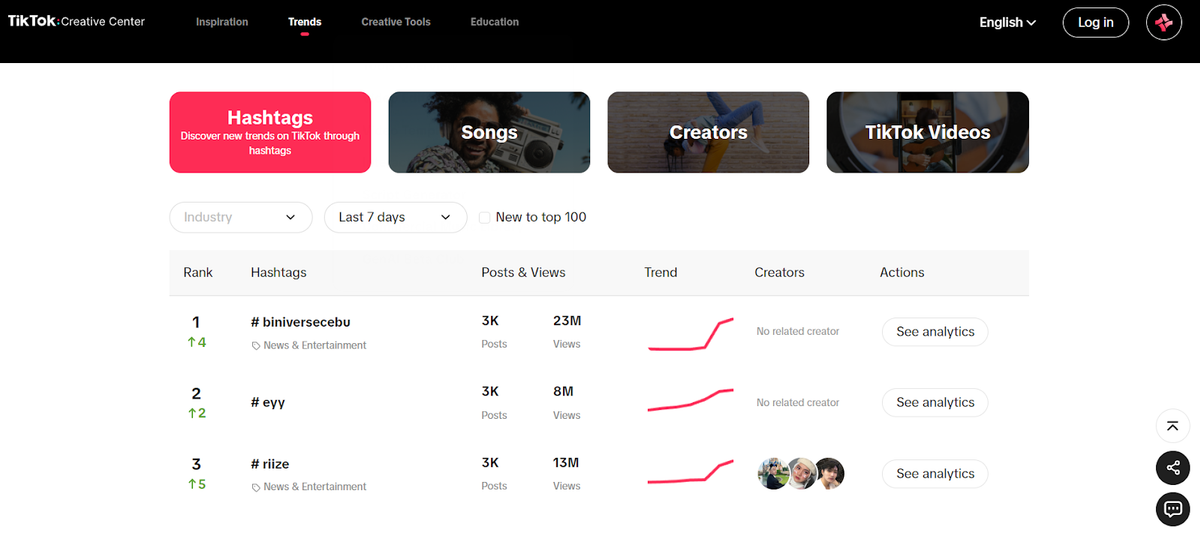
You can filter trend data by factors such as industry, region, and time period, depending on the trend view you're using.
Method 2: Ask TikTok What People Are Searching For
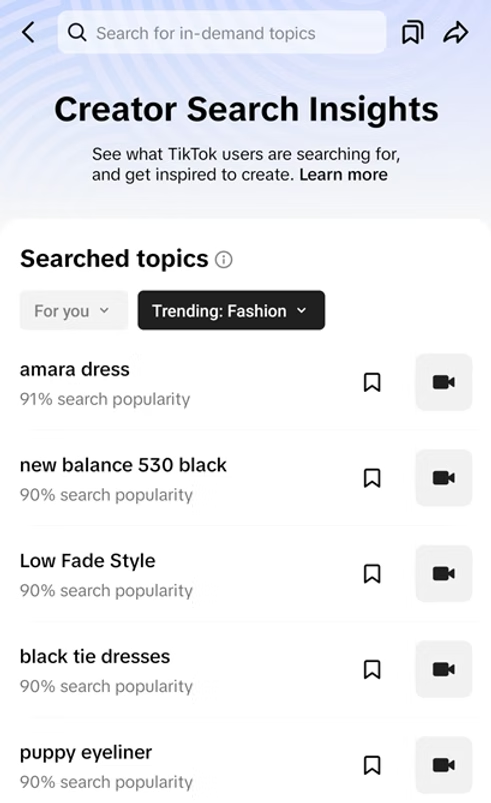
Hidden in your creator settings is one of the most honest trend tools on the platform: Creator Search Insights. Find it by searching "Creator Search Insights" in the app or through Creator Tools in your settings.
Unlike viral sounds, this tool shows what users in your space are actively searching for — popular queries, trending topics by industry, and how your posts perform in search results. It shifts you from trend-reactive to demand-led: instead of hoping a format goes viral, you answer questions people are already asking. Search-driven content also decays slower than sound-driven content, which makes it the better foundation for a content calendar.
Method 3: Train Your For You Page to Be a Trend Radar
Your For You page is a recommendation engine, which means it's also a detection tool — if you train it. It can act as an early signal when it's tightly aligned with your niche, but don't treat it as a standalone trend predictor.
The discipline is the hard part: scroll with intention, don't linger on off-niche videos, and save or favorite anything that repeats — the same sound twice, the same format twice, the same topic twice. Repetition across different creators is the strongest early signal TikTok will show you.
💡 Pro tip: Keep a "trend log" — a note in your phone where you drop anything you've seen twice in 24 hours. Trends hide in repetition, not in any single video.
Method 4: Use the Search Bar
Use TikTok's search to confirm whether a topic is gaining attention.
The search tab is the most direct window into demand. Open it and type your niche's core words — the autocomplete suggestions are ranked by popularity, and the suggestion chips at the top of results show related searches gaining traction. If a new phrase starts completing itself, people are actively looking for it.
Method 5: Track Sounds and Hashtags
Third-party tools are extra options, especially when you need trend tracking at scale.
Sounds drive a large share of TikTok trends, and they leave public footprints. Tap any sound you hear twice in a day to open its page — you'll see total videos using it, recent videos, and the growth curve. A sound with a few thousand uses but a steep recent curve is exactly what you want: momentum before saturation.
For speed at scale, third-party tools track rising sounds daily. Tokchart shows the fastest-rising sounds, and Pentos takes daily snapshots of songs, hashtags, and topics so you can tell current popularity from momentum. They're paid beyond trial tiers, so start with the in-app sound pages and upgrade only if sound-trending becomes your core strategy.
Method 6: Look for Signals Outside TikTok
Some TikTok trends start outside TikTok, so external signals can give you an earlier idea of what might become relevant on the platform. They may begin on a subreddit, a niche Twitter/X community, or an Instagram Reels experiment, then get ported over. The creators who find trending topics earliest are reading outside the app:
- Google Trends shows search spikes for topics and products weeks before they become content formats.
- Exploding Topics tracks terms growing fast across industries — a strong source of "about to trend" topics.
- Niche communities (subreddits, Discords, Facebook groups) surface obsessions months before the mainstream algorithm does.
The trick is mapping an outside signal onto a TikTok format: a rising search term becomes a hook, a trending product becomes a demo, a community argument becomes a POV video.
How to Use TikTok Trends for Your Own Content
Finding the trend is step one. Using it well is where most creators fail — either they copy the top video beat for beat and blend into the noise, or they ignore trends entirely and wonder why reach stalled.
The middle path is a three-question filter you run on every trend:
- Does it fit my niche? A cooking account jumping on a dance trend confuses the algorithm about who your videos are for. Skip it.
- What's my angle? The trend is the delivery vehicle, not the content. Your audience, your expertise, your format — the trend just opens the door.
- Can I publish while the trend is still relevant? Trends decay in days. If the idea can't be on your schedule within 24 hours, let it go and catch the next one.
Creators who apply this filter consistently end up with the best of both worlds: the reach of trending topics and an audience that still knows exactly who they're watching.
How to Automate TikTok Trends Research with AI
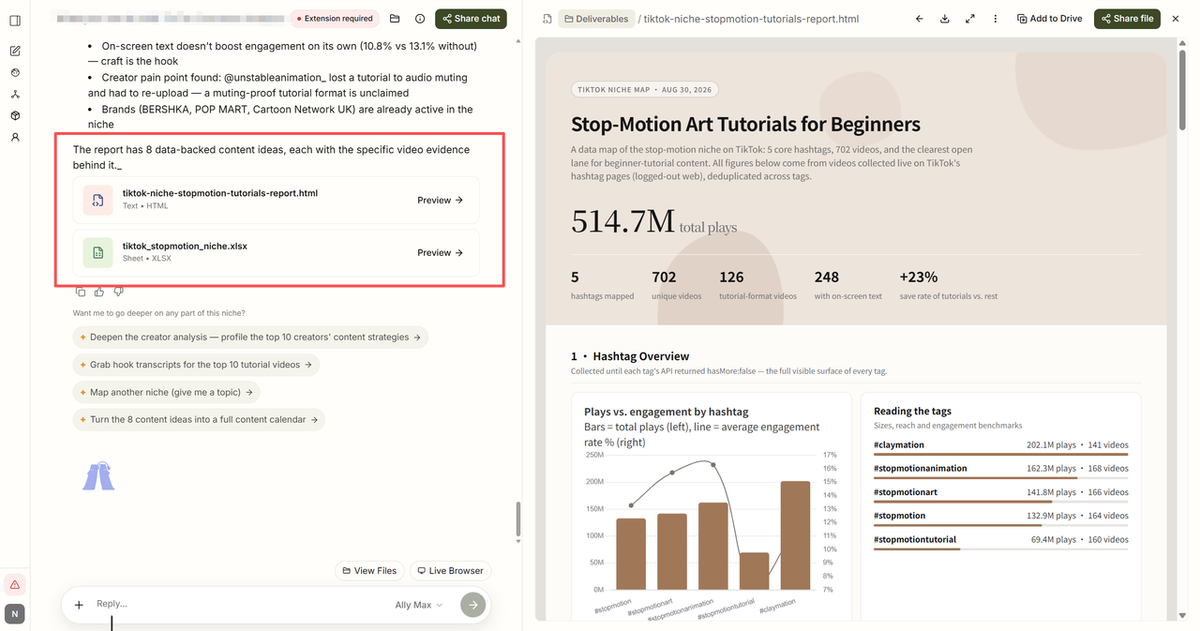
The manual collection work takes lots of time. That is exactly where a browser-native AI autopilot like AllyHub can help.
Instead of manually opening dozens of TikTok pages, search results, creator profiles, and community discussions, you can have AllyHub run the research workflow in the browser and compile the findings into a structured report.
For example, you can use it to research what creators in your niche are posting, collect recurring audience questions, compare competitor content, and organize emerging topics into a research brief. It doesn't replace your judgment about whether a trend fits your brand or audience — it removes the repetitive browser work needed to find and organize the signals.
FAQ: TikTok Trends
What are TikTok trends?
TikTok trends include sounds, hashtags, formats, memes, challenges, and topics that are gaining attention on the platform. Their lifespan varies: some peaks within days, while others remain relevant for weeks or longer.
What is TikTok Creative Center?
It's TikTok's free analytics hub for trend research, accessible without an ad account. Its Trends section tracks rising hashtags, songs, creators, and videos by country and industry, with momentum indicators and a commercial-use filter for sounds.
How early can I catch a TikTok trend?
There is no reliable number of hours you can expect to get ahead of a trend.
How do I use TikTok trends for my own content?
Run every trend through a three-question filter: does it fit your niche, what's your unique angle, and can you film it within 24 hours? Use the trend as the delivery vehicle, keep your audience and format as the content, and skip anything that fails the filter.
Can I automate TikTok trend research?
Yes. A browser AI autopilot like AllyHub can monitor niche discussions, track what top creators post, and compile rising topics and sounds into a structured report, so you spend your time judging trends instead of hunting for them.