

AllyHub vs Zapier: which one should you use? Zapier automates workflows by connecting APIs across thousands of apps, making it a strong choice for structured, reliable integrations. AllyHub takes a different approach — it uses AI to execute tasks directly in your browser, handling multi-step actions like navigation, form filling, and data extraction from natural language instructions.
The core difference is simple: Zapier connects tools, while AllyHub performs tasks. If your workflow depends on stable integrations between systems, Zapier fits better. If you need AI to handle real-world, messy browser workflows, AllyHub is designed for that. This guide breaks down where each tool works best so you can decide quickly.
Key Takeaways
- Quick answer: Zapier wins for teams connecting APIs across 9,000+ apps with server-side 24/7 execution. AllyHub wins for solo operators who need an AI agent that operates their real logged-in browser and compounds value via ROTI.
- Pricing: AllyHub starts at $19/mo Pro; Zapier starts at $29.99/mo Pro and scales steeply with task volume.
- Key difference: Zapier connects app APIs (deterministic plumbing between tools); AllyHub operates your browser (AI-driven interaction with any web page, including logged-in apps with no API).
- Scale: Zapier has 9,000+ integrations and the largest automation ecosystem. AllyHub has 50+ pre-built browser Services and a focused marketplace.
- Bottom line: if you're connecting tools (Gmail → Sheets → Slack), pick Zapier. If you're operating web apps that have no API or require your login session, pick AllyHub.
AllyHub vs Zapier: Quick Verdict
Zapier wins for teams that need to connect APIs across 9,000+ apps with server-side 24/7 execution and SOC2 compliance. AllyHub wins for solo operators who need an AI agent that operates their real logged-in browser and compounds value via ROTI. Zapier is plumbing between your apps; AllyHub is hands-on your keyboard. If you're connecting tools, pick Zapier. If you're operating web apps, pick AllyHub.
What Is AllyHub?
AllyHub is a browser-native AI agent platform delivered as a Chrome extension. Unlike traditional API-based integration tools like Zapier, AllyHub operates directly at the user interface level within your active browser. By leveraging your existing logins and cookies across platforms—from LinkedIn to custom SaaS dashboards—it autonomously executes multi-step web tasks like web scraping, automated form filling, research, and report generation without requiring complex API configurations.
Its standout feature is ROTI (Return on Token Investment): every completed task automatically builds reusable Skills and Service cards, continuously lowering token consumption for future workflows. Rather than starting from scratch, users can also tap into The Hub, a public marketplace offering 50+ pre-built, ready-to-deploy automation services.
What Is Zapier?
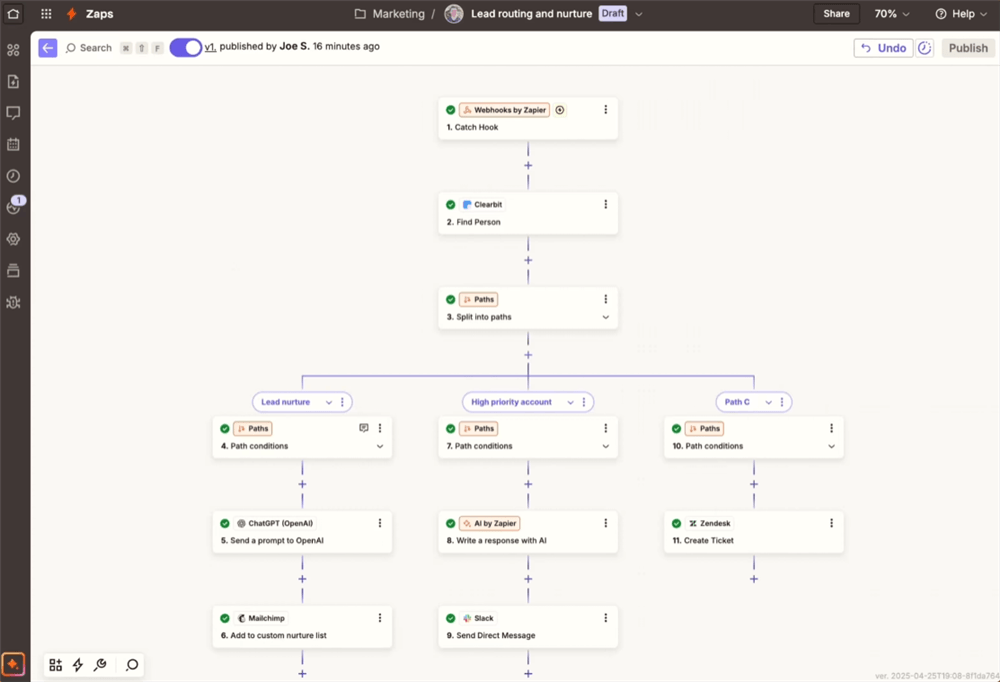
Zapier is the world's largest workflow automation platform, with 9,000+ app integrations and deterministic "Zaps" that connect APIs between tools. A typical Zap: when a new email arrives in Gmail → extract the attachment → save to Google Drive → notify the team in Slack. You build workflows visually with triggers and actions, and Zapier runs them server-side 24/7 — no laptop required. Zapier now also offers Zapier Agents (AI-powered autonomous task agents) and Zapier Chatbots (custom AI chatbots for websites), plus MCP integration for connecting to AI models. Its strength is breadth: if two apps have APIs, Zapier can probably connect them.
AllyHub vs Zapier: Feature-by-Feature Breakdown
Feature | AllyHub | Zapier | Winner |
Core paradigm | AI browser agent (natural language → browser execution) | API workflow automation (triggers → actions between apps) | Different jobs |
Integration model |
This comparison focuses on use-case differences rather than declaring a universal winner.
AllyHub vs Zapier: Key Differences & When to Use Each
The feature table tells you what each tool can do. This section tells you where each one meaningfully outperforms the other — and where it doesn't.
Integration Architecture: API Plumbing vs Browser Operation
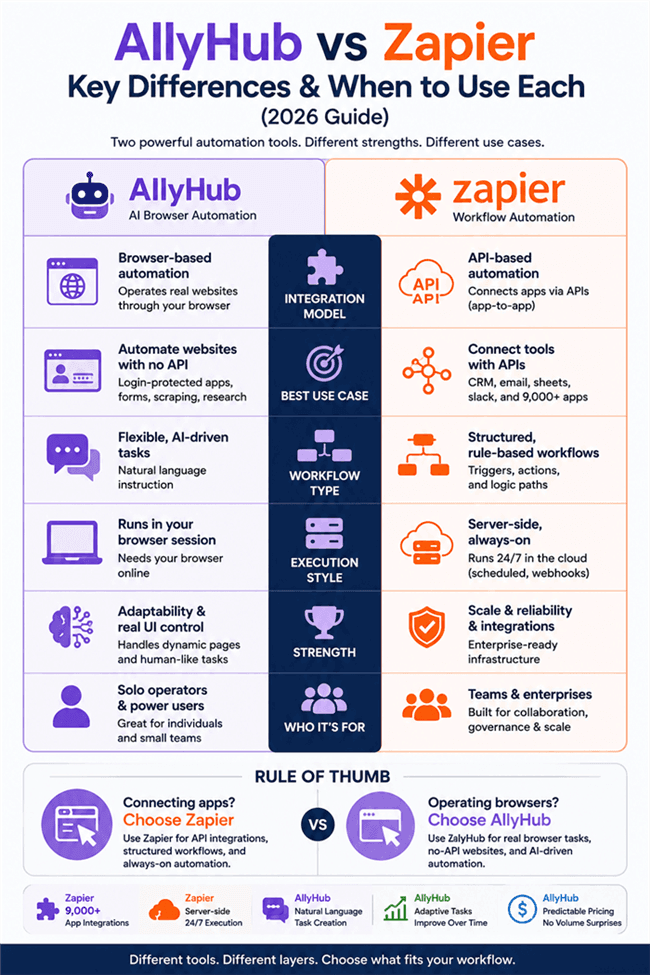
Zapier wins for connecting apps that have APIs. With 9,000+ native integrations, it can pipe data between Gmail, Slack, Salesforce, HubSpot, Notion, Airtable, Google Sheets, Stripe, and thousands more — deterministically, reliably, server-side. If your workflow is "when X happens in app A, do Y in app B," Zapier is unmatched.
AllyHub wins for operating web apps that have no API, require login-state access, or need human-like interaction (clicking, scrolling, filling forms, reading dynamic content). Your competitor's auth-gated pricing page, a web app with no public API, a form that requires visual interaction — AllyHub handles these where Zapier structurally cannot.
Who wins where: Zapier wins for API-driven app-to-app automation; AllyHub wins for browser-driven human-to-web automation.
Execution, Scale, and Background Operation
Zapier wins decisively. Zaps run server-side on Zapier's infrastructure 24/7. Your laptop can be closed. Concurrency scales with your plan (billed by task volume). Scheduled Zaps fire on cron. Webhooks respond in real time. This is production-grade automation infrastructure that scales to enterprise.
AllyHub requires your local browser to stay online. Close your laptop and tasks die. Concurrency is capped at 3 tasks on Pro. This is adequate for interactive solo workflows but unsuited for always-on production pipelines.
Who wins where: Zapier wins unambiguously for server-side, scheduled, and high-volume execution; AllyHub wins only for interactive browser sessions where the human is present.
AI Capabilities
AllyHub stands out in AI-driven browser automation. Tasks are defined in natural language, with agents handling navigation, form filling, data extraction, and output generation. The system can improve efficiency over time for repeat workflows, though performance and cost gains may vary by use case.
Zapier has added Zapier Agents (AI-powered autonomous agents that can browse and take actions) and Zapier Chatbots (custom AI chatbots). These are real AI features, but they're layered on top of its existing workflow system — not AI-native the way AllyHub is. Zapier Agents can't operate your real logged-in browser, and they don't have ROTI compounding.
Who wins where: AllyHub wins for adaptive, AI-native browser tasks; Zapier wins for AI-assisted workflow triggers where determinism still matters.
Enterprise Readiness and Team Scale
Zapier leads on enterprise readiness: SOC 2 + GDPR compliance, SAML SSO, and mature API ecosystem. Team and Enterprise plans support scalable deployment, though pricing and user limits vary. Strong fit for procurement-driven teams.
AllyHub has none of these today. No SOC2, no Team plan, no SSO, no API.
Who wins where: Zapier wins enterprise for any team or regulated buyer; AllyHub is acceptable for solo operators or internal-only use.
Self-Improvement and Efficiency Over Time
AllyHub stands out in adaptive workflows. Completed tasks can be reused as structured steps or “skills,” helping reduce effort for similar workflows over time. This can improve speed and efficiency for repeat tasks, though the extent of cost reduction depends on usage patterns and implementation.
Zapier workflows are deterministic. Zaps run the same way each time, ensuring reliability and predictability. They don’t inherently learn from past executions, and pricing typically scales with task volume rather than decreasing over time.
Where each fits: AllyHub is better suited for high-volume, repeat workflows where iteration and reuse can compound efficiency. Zapier is a strong fit for stable, predefined pipelines where consistency and reliability matter more than adaptability.
Who Wins Where (Quick Summary)
- Zapier wins for: connecting 9,000+ apps via API, server-side 24/7 execution, team collaboration with SSO, scheduled and trigger-based automations, enterprise compliance (SOC2/GDPR), high-volume production pipelines, developers who want API + SDK access
- AllyHub wins for: operating logged-in web apps (no API needed), adaptive AI browser tasks, natural language task creation, ROTI-compounding repeat workflows, solo operators on a budget, predictable flat pricing at scale
- Tie / depends: AI capabilities (Zapier Agents vs AllyHub native AI — different approaches), accessibility (both are more accessible than n8n, but in different ways)
AllyHub vs Zapier: Pricing Compared
Plan | AllyHub | Zapier | Best For |
Free | Daily credit top-up | Limited Free tier (100 tasks/mo) | Trying either tool |
Entry paid |
Value judgment: AllyHub typically has a lower entry price and can become more efficient for repeat browser workflows over time. Zapier’s pricing reflects its broader capabilities — including extensive API integrations, scalability, and enterprise features. As usage grows, Zapier costs tend to scale with volume, while AllyHub can be more cost-efficient for browser-heavy, repeat tasks.
AllyHub vs Zapier: Performance & User Experience
Concurrency & Background Execution
Zapier runs server-side with concurrency and scheduling capabilities based on plan level. Workflows execute continuously in the background, with support for triggers, cron scheduling, and real-time webhooks.
AllyHub is browser-based, so execution depends on an active session and is better suited for interactive or short-running tasks.
Winner: Zapier for always-on, production-grade workflows; AllyHub for interactive automation.
Integration Depth & Breadth
Zapier’s strength lies in its extensive API integration ecosystem, enabling reliable connections across a wide range of apps, along with developer extensibility.
AllyHub operates through the browser, allowing it to work with virtually any web app — including those without APIs — but with less structured integration depth.
Winner: Zapier for API breadth and reliability; AllyHub for no-API and browser-native use cases.
When to Choose AllyHub
Choose AllyHub if you:
- Need to automate real browser tasks (especially login-protected or no-API apps)
- Work with dynamic web pages that require flexible, AI-driven execution
- Prefer describing tasks in natural language instead of building workflows
- Run repeat browser tasks where efficiency improves over time
Not ideal if you:
- Rely heavily on API-based integrations across many tools
- Need always-on, server-side automation or high concurrency
- Require team features or enterprise-grade compliance
When to Choose Zapier
Choose Zapier if you:
- Need to connect multiple apps via APIs in a structured way
- Want reliable, always-on automation with triggers, schedules, and webhooks
- Are building workflows for teams with shared access and governance
- Value a large integration ecosystem and standardized processes
Not ideal if you:
- Need to operate websites directly (especially behind logins or without APIs)
- Require flexible automation for frequently changing web interfaces
- Prefer quick, natural-language task setup over structured workflow building
FAQ: AllyHub vs Zapier
Is AllyHub better than Zapier?
Not universally. Zapier is better for connecting apps via APIs with reliable, server-side execution. AllyHub is better for automating real browser workflows with AI. The right choice depends on whether you’re connecting systems or operating interfaces.
Can Zapier operate my logged-in browser?
No native support. Zapier primarily interacts through app APIs and does not directly control a user’s browser session or login state. For workflows that require browser-based interaction, tools like AllyHub are better suited.
Why can Zapier be more expensive than AllyHub?
Zapier pricing typically scales with task volume, so costs increase as automation usage grows. AllyHub often uses a more predictable pricing model, and repeat workflows may become more efficient over time. In practice, Zapier can be more cost-effective for structured API workflows, while AllyHub may offer better efficiency for high-frequency browser tasks.
Does Zapier have AI features?
Yes — Zapier Agents (AI-powered autonomous agents) and Zapier Chatbots (custom AI chatbots). But these are bolted onto a deterministic workflow engine, not AI-native like AllyHub. Zapier Agents can't operate your real logged-in browser and don't have ROTI compounding.
Can I use AllyHub and Zapier together?
Yes. A common setup: Zapier for app-to-app API pipelines (Gmail → Sheets → Slack) and AllyHub for browser research and content production (scrape competitor pricing, monitor auth-gated pages). They cover non-overlapping layers.


