

You don't need a camera, a studio, or even your own face to make engaging TikTok videos. With the right workflow, you can turn an idea into a polished faceless video using scripts, stock footage, screen recordings, AI visuals, voiceovers, and simple editing.
The challenge is knowing what to create, how to structure it, and how to put all the pieces together without filming yourself.
This guide walks you through the complete faceless TikTok production process — from choosing a video idea and writing the script to creating visuals, adding voiceovers, editing, and optimizing the final video for TikTok.
Key Takeaways
- Faceless TikTok is a real strategy, not a shortcut: The most successful faceless accounts win on content quality and niche clarity — not on automation alone.
- Your niche determines everything: Education, storytelling, product demos, and finance are the highest-performing faceless niches because they deliver clear value without requiring a personality-driven hook.
- The core workflow has five steps: Pick a niche → Write a script → Create visuals → Add voiceover → Edit and post. Each step has free and paid tool options.
- AI tools accelerate production, but don't replace strategy: Tools like ElevenLabs, CapCut, and Pexels handle the execution; your content angle and hook are still what determines whether a video performs.
- Start with one method, then systematize: Master the screen recording or stock footage approach first before layering in AI video generators or animation tools.
What Is a Faceless TikTok Video?
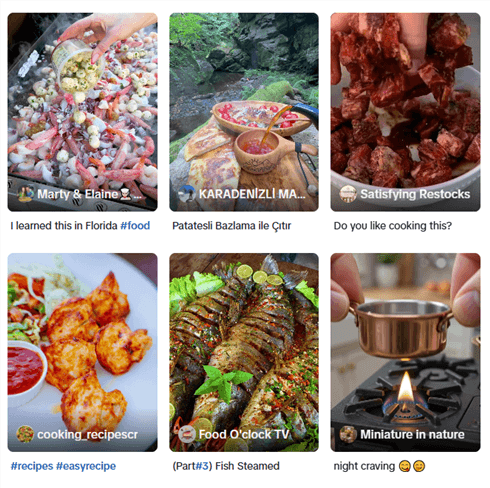
A faceless TikTok video is any short-form video that delivers value — education, entertainment, storytelling, product information — without the creator appearing on camera. Instead of a talking head, these videos use:
- Stock footage or B-roll with a voiceover narration
- Screen recordings of apps, websites, or tutorials
- Text overlays on aesthetic or relevant background visuals
- Hands-only shots for product demos, cooking, or crafting
- AI-generated visuals or animations paired with a script
- Gameplay footage with commentary
The format works because TikTok's algorithm rewards content performance — watch time, completion rate, shares, comments — not creator visibility. If your content holds attention, the algorithm distributes it. Your face is irrelevant.
📌 Note: TikTok's Creator Rewards Program (which replaced the Creator Fund in 2023) requires videos to be over 60 seconds and have a high originality score. Faceless content that relies heavily on reused footage or generic stock clips may score lower on originality — keep this in mind when building your monetization strategy.
How to Make Faceless TikTok Videos
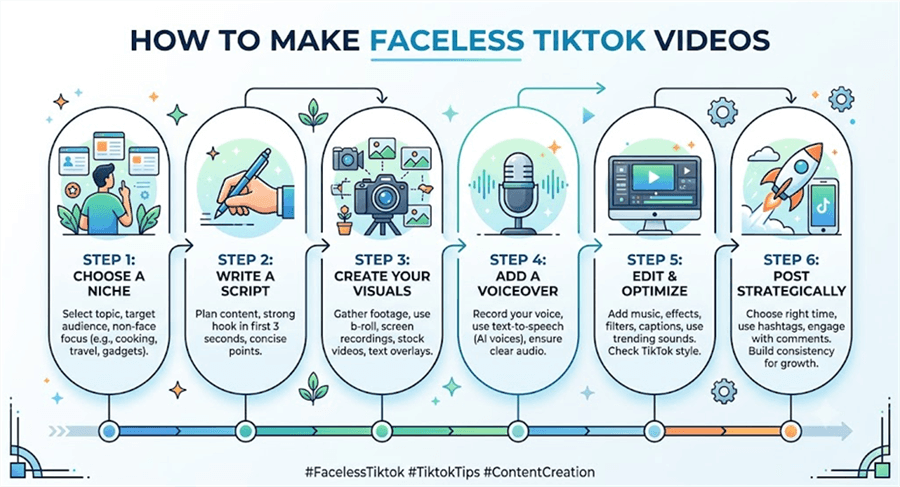
Step 1: Write a Script That Hooks in the First 3 Seconds
A strong hook determines whether viewers keep watching or scroll away. The first 1–3 seconds should immediately create curiosity or promise value.
How to write a faceless TikTok script:
First, start with a strong hook. Use a question, surprising fact, bold statement, or clear benefit.
- “Most people don't know this about [topic]...”
- “Here's how to [result] without showing your face...”
- “Stop doing [mistake] — try this instead.”
Second, keep it concise and conversational. Remove unnecessary details and make every sentence add value. Write for voiceover first, then add supporting text on screen.
Then, end with a clear CTA. Encourage viewers to follow, comment, or save the video to increase engagement.
Recommended scriptwriting tools:
You can ask ChatGPT to "write a TikTok script," but the output will likely sound robotic and boring. Instead of guessing, use a browser-native AI agent like AllyHub to automate the scripting process directly on TikTok.
- Open a competitor's viral TikTok video in your Chrome browser.
- Use AllyHub to instantly extract the video's transcript (the word-for-word spoken text).
- Command the AI: "Analyze this viral transcript. Keep the structural pacing and the exact 3-second hook framework, but rewrite the core content for my specific product."
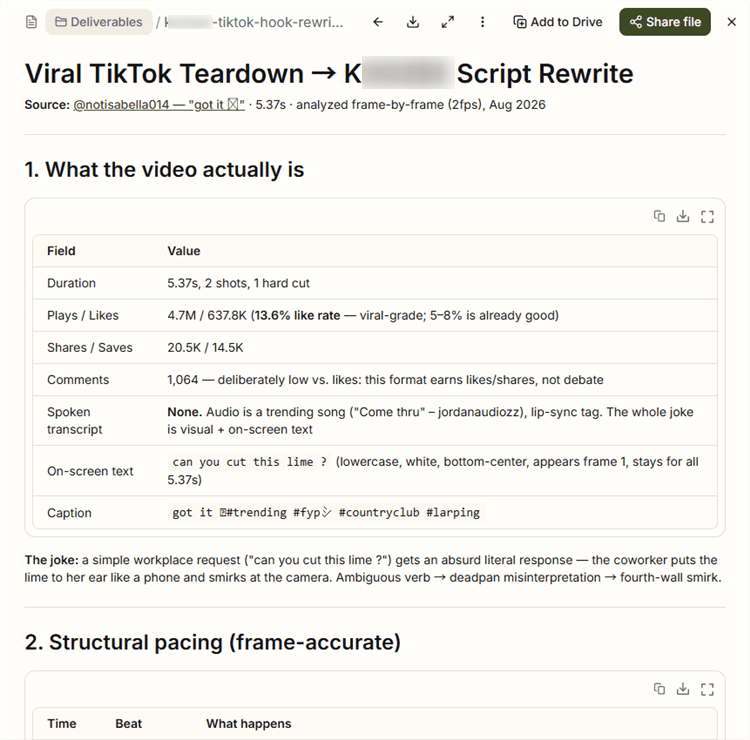
By extracting real data from the browser, you aren't writing from scratch; you are building on top of proven, high-retention psychology.
Step 2: Create Your Visuals
This is where most faceless creators get stuck. The good news: you have more options than you think, and the best approach depends on your niche.
Method A: Stock Footage + Voiceover (Best for storytelling, education, motivation)
Best for storytelling, education, finance, and motivational content.
Use relevant stock clips from sources like Pexels, Pixabay, or Mixkit, then combine them with your script, voiceover, and text overlays. Focus on matching visuals to each part of your story rather than using random footage.
Best for: True crime narrators, motivational content, educational explainers, finance creators.
Method B: Screen Recording (Best for tutorials, app walkthroughs, tech content)
Step-by-step guide to faceless TikTok videos using screen recording:
- Plan what you'll demonstrate — map out the exact clicks and screens before recording.
- Use OBS Studio (free, full control) or ScreenPal (browser-based, beginner-friendly) to record your screen.
- Record at 1080p minimum. Crop to a 9:16 vertical frame in post if needed.
- Add a voiceover narration in your editing tool, or record it simultaneously.
- Add text callouts to highlight key actions on screen.
- Speed up or cut dead time between actions.
Best for: Tech tutorials, productivity tips, app reviews, coding content, e-commerce seller walkthroughs.
Tips: Pure screen recordings are boring. To make them TikTok-friendly:
- Format for Mobile: Don't record a wide desktop screen and crop it later. Resize your browser window to a vertical rectangle before you start recording so the UI elements are readable on a phone.
- Zoom and Pan: In your editing software (like CapCut or Premiere), use keyframes to smoothly zoom in on the specific button you are clicking. Never let the screen sit static for more than 3 seconds.
Method C: Hands-Only Footage (Best for product demos, cooking, crafting)
- Set up your phone on a tripod pointing straight down at your workspace.
- Film your hands interacting with the product, ingredients, or materials.
- Keep clips short (2–4 seconds each) and cut between angles for visual variety.
- Add a voiceover or text overlay explaining what's happening.
Best for: Product reviewers, UGC creators, cooking channels, DIY and crafting content.
Method D: AI-Generated Visuals (Best for unique, original content)
AI visuals help creators produce custom scenes and animations without filming. Create visuals from your script using tools like Midjourney, DALL-E, or AI video generators, then combine them with voiceover, captions, and editing effects.
This works well for content that needs original visuals, but strong scripts and storytelling still matter more than the tools themselves.
Best for: Niche creators who want unique visuals, fantasy/sci-fi storytelling, abstract educational content.
⚠️ Warning: TikTok's originality scoring penalizes content that relies heavily on reused or generic stock footage. If you're targeting the Creator Rewards Program, prioritize original footage (hands-only, screen recordings) or AI-generated visuals over generic stock clips.
Step 3: Add a Voiceover
Your voiceover is the voice of your brand — even if it's not your actual voice. This is one of the most important production decisions for a faceless creator.
Option 1: Your Own Voice (Recommended if you're comfortable)
Recording your own voice — even if you never show your face — builds the most authentic connection with your audience. You don't need a professional microphone to start:
- Use your phone's voice memo app or a USB microphone (Blue Yeti, Rode NT-USB Mini).
- Record in a quiet room — a closet with clothes works as a makeshift sound booth.
- Import the audio into CapCut or your editing tool and sync to visuals.
Option 2: AI Voiceover Tools
Tool | Best For | Pricing |
ElevenLabs | Most natural-sounding AI voices; voice cloning | Free tier; paid from $5/mo |
Murf AI | Studio-quality voices, multiple languages | Free tier; paid from $19/mo |
How to add an AI voiceover:
- Paste your script into your chosen tool.
- Select a voice that matches your brand tone (energetic, calm, authoritative, friendly).
- Adjust pacing — most AI voices default to slightly too fast for TikTok.
- Export the audio file and import into your video editor.
- Sync the voiceover to your visual cuts.
💡 Pro tip: ElevenLabs' voice cloning feature lets you clone your own voice from a short audio sample. This means you can generate voiceovers at scale while maintaining a consistent, personal-sounding voice — without recording every video manually.
Step 4: Edit and Optimize for TikTok
Editing is where your raw materials become a TikTok video. The goal is to hold attention from the first frame to the last.
Core editing principles for faceless TikTok:
- Cut every 1–3 seconds. Fast cuts maintain visual momentum. Dead air kills retention.
- Add captions. Auto-generate captions in CapCut, then review for accuracy. Bold, high-contrast text performs best.
- Use background music. Add copyright-free music at 10–20% volume under your voiceover. Pixabay Music and TikTok's commercial sound library are good sources.
- Place text in the safe zone. Keep all text between 15% and 85% of the vertical frame — TikTok's UI covers the top and bottom edges.
- Add a strong first frame. The thumbnail (first frame) determines whether someone taps to watch. Use bold text or a visually striking image.
- Export at 1080×1920 (9:16), 30fps minimum.
Step 5: Post Strategically and Build Consistency
Creating the video is only half the job. How and when you post determines how much distribution you get.
Posting best practices for faceless TikTok creators:
- Post 1–3 times per day when starting out. Volume matters early — you're feeding the algorithm data about what resonates with your audience.
- Use 3–5 relevant hashtags. Mix broad (#learnontiktok, #fyp) with niche-specific tags. Avoid hashtag stuffing — it signals spam.
- Write a caption that adds context or asks a question. "Which method do you use?" drives comments. Comments are a strong engagement signal.
- Post at peak times for your audience. Generally: 6–9 am, 12–2 pm, and 7–11 pm in your target timezone. Use TikTok Analytics (available once you switch to a Creator or Business account) to find your specific audience's active hours.
- Respond to comments in the first hour. Early engagement signals boost distribution.
- Repurpose top performers. If a video hits, make a follow-up, a "part 2," or a deeper dive on the same topic.
📌 Note: TikTok's algorithm doesn't heavily weight follower count for new videos — every video gets an initial test distribution to a small audience. If it performs well (high completion rate, shares, comments), it gets pushed to a larger audience. This means a brand-new account can go viral on its first video if the content is strong.
How Smart Creators Scale Their Research and Content Operations
Creating faceless TikTok videos is only one part of building a scalable content operation. The bigger challenge is knowing which topics to create, why certain videos perform, and how to repeat the process consistently.
This is where AllyHub fits into the workflow. Instead of relying on manual scrolling or disconnected AI writing tools, AllyHub can turn TikTok data into actionable content insights — from competitor analysis and audience research to content creation.

For TikTok creators, agencies, and e-commerce sellers, AllyHub can help with:
- TikTok content research: Analyze TikTok videos, creators, captions, engagement patterns, and content formats to identify what works in a specific niche.
- Audience insight mining: Extract TikTok comments at scale and analyze audience reactions, recurring questions, product feedback, and sentiment patterns — turning comment sections into content ideas.
- Content angle discovery: Use comment themes and audience responses to uncover pain points, objections, and topics worth creating videos around.
- TikTok caption optimization: Generate captions with hooks, hashtags, and CTAs tailored to the video's niche and audience, helping creators produce content batches faster.
- Product content research: For e-commerce sellers and UGC creators, analyze product discussions and customer feedback to discover stronger video angles, selling points, and content opportunities.
The difference is that AllyHub does not stop at collecting TikTok data. It connects data → analysis → content decisions → production, helping creators build repeatable systems instead of manually researching every new video idea.
Common Mistakes Faceless TikTok Creators Make (And How to Avoid Them)
- Choosing a niche that's too broad
A broad category like "motivation" or "life tips" is hard to grow. Focus on a specific audience and topic so your content has a clearer direction.
- Creating content without a strong hook
The first 1–3 seconds decide whether viewers keep watching. Spend more time crafting your opening than polishing the middle of the video.
- Relying on generic visuals
Stock footage alone rarely creates engagement. Combine visuals with strong storytelling, voiceover, or original footage to make your videos stand out.
- Posting inconsistently
Consistency matters more than short bursts of activity. A sustainable posting schedule is better than uploading many videos and disappearing.
- Ignoring TikTok's quality and formatting rules
Avoid reused content, keep videos original, and make sure captions and text stay within TikTok's visible safe zone.
Frequently Asked Questions
Can I make faceless videos on TikTok and still grow a real audience?
Yes. Many successful TikTok accounts never show their face. The key is choosing a clear niche and creating valuable content consistently.
What is the best AI tool for faceless TikTok videos?
There is no single best tool. Most creators combine tools like ElevenLabs for voiceovers, CapCut for editing, and AI writing tools for scripts.
How do I create faceless TikTok videos without using stock footage?
Use screen recordings, hands-only videos, AI-generated visuals, or product footage. These formats often work better because they feel more original.
How long should faceless TikTok videos be?
Short videos (15–30 seconds) are great for reach, while longer videos (60+ seconds) can work for education and monetization.
How can I automate faceless TikTok videos?
You can automate parts of the workflow, such as research, scripting, and captions. However, human input is still important for choosing angles and improving originality.
Do I need a TikTok Business account to monetize faceless content?
No. Most creators start with a Creator account, which supports content growth and monetization features.
What's the fastest way to get started with faceless TikTok videos?
Choose a niche, create your first few scripts, and start publishing. Consistent testing and improvement matter more than having perfect tools.



