

Your last five videos stalled at 500 views, and your follower count hasn't moved in a month. You open TikTok Studio, stare at the charts, and still have no idea why your account is dying.
That is when you need to stop posting and run a TikTok Audit.
A TikTok audit is a ruthless, data-driven "health check" of your account. Regular TikTok audits help you identify the problem, provide the insights for your content strategy, profile funnel, and grow your account more effectively.
This guide walks through a 7-step audit built for creators, MCN operators, and e-commerce sellers.
Key Takeaways
- Audit, don't guess: Review your profile, content, audience, and competitors to find growth gaps.
- Start with TikTok Studio: Use native analytics first; add third-party tools for competitor and audience research.
- Focus on what matters: Compare watch behavior, engagement, follower conversion, and traffic sources—not just views and likes.
- Benchmark smart: Compare with your own history and similar accounts, not fixed “good” numbers.
- Use search insights: Creator Search Insights reveals popular searches and content gaps.
- Review regularly: Do a light monthly check and a full audit each quarter.
What Is a TikTok Audit?
A TikTok audit is a structured review of a TikTok account — its profile, content, audience, engagement, and competitors — that identifies what's working, what's not, and what to change next. A good audit ends with an action plan, not just a report.
For creators, an audit answers "why has my growth stalled?" For MCNs and agencies, it justifies signing (or dropping) talent. For e-commerce sellers, it reveals which product content actually drives search traffic and shop visits. The steps below follow the same skeleton Sprout Social's team uses: goals, profile, content, audience, competitors, action plan.
How to Do a TikTok Audit: 7 Steps
Step 1: Set Your Audit Goal and Time Window
- Pick one goal for this audit. Examples: restart stalled follower growth, raise engagement rate, convert more viewers into followers, or improve TikTok Shop conversion. One clear goal keeps the audit from drifting.
- Choose your window. Audit the last 30 days for diagnosis, and the last 90 days for strategy. Older data is less useful when the algorithm changes fast.
- Decide the scope. Your own account only, or your account plus 3–5 competitors? MCNs should run every creator through the same template so results are comparable.
💡 Pro tip: If you manage multiple accounts, keep one reusable audit template — same metrics, same window. Cross-account comparisons are where the real insights hide.
Step 2: Audit Your TikTok Profile and First Impression
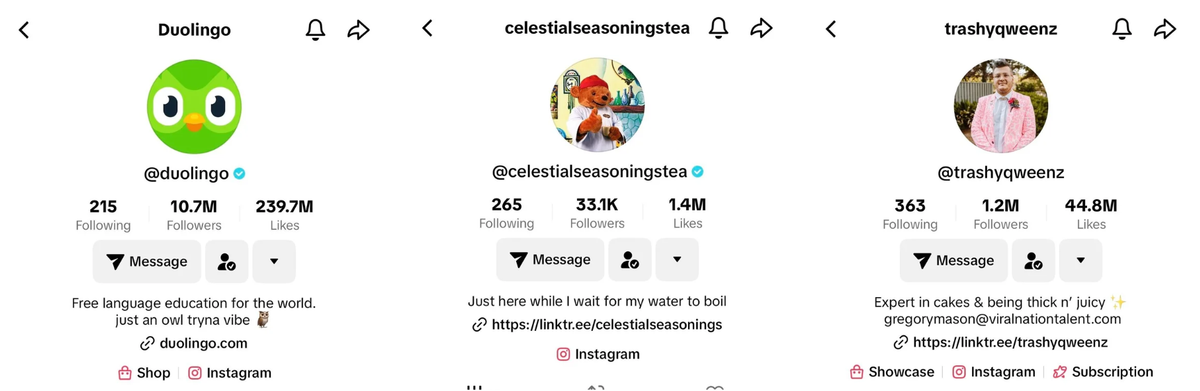
The profile should make your niche and value proposition obvious at a glance.
Check each of these:
- Run the niche test. Can a new visitor tell what you post from your bio, display name, and pinned videos?
- Make your profile searchable. Use clear, descriptive language that reflects your niche rather than a vague tagline.
- Write a bio that converts. Explain who you help, what you offer, and what visitors should do next.
- Check your link. Make sure the destination supports your main goal, such as a product page, storefront, or portfolio.
- Use pinned videos strategically. Pin videos that explain your niche, showcase your strongest content, or answer common questions.
- Check visual consistency. Profile imagery and thumbnails should make the account recognizable and fit the niche.
Step 3: Content Audit — Find What's Actually Working
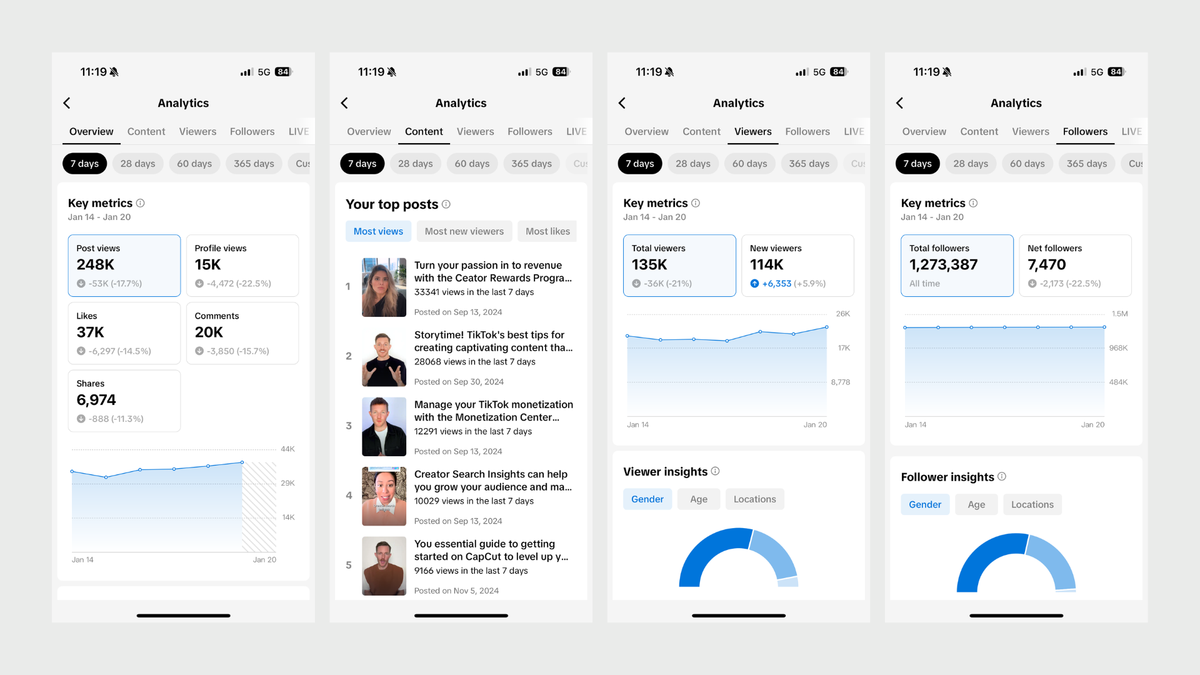
- Use TikTok Studio's Content analytics to review individual post performance, or keep a simple tracking sheet if you want to compare videos side by side over time.
- Sort by watch behavior and engagement, not views alone. Compare average watch time, completion rate, views, shares, and comments across your strongest and weakest posts.
- Evaluate the opening. Look at early watch behavior and average watch time to compare how your strongest videos hold attention against weaker ones. Then review the first few seconds of those videos for differences in topic, framing, pacing, and hook style.
- Map videos to content pillars. Tag each video with a pillar: education, product demo, story, trending topic, behind-the-scenes. If most of your videos sit in one pillar, check whether that pillar is producing the results you want—and whether other important content goals are being neglected.
- Spot the spaghetti. "Content spaghetti" is posting whatever feels easy, with no strategy behind it. If you can't tag a video to a pillar, it's spaghetti.
- Review cadence and timing. Note your actual posting frequency and your audience's active times from TikTok Studio's Viewers analytics. Gaps here are cheap to fix.
- Track view velocity. Compare views in the first 24 hours against total views. Videos that start slow but keep climbing signal search traffic or slow-burn topics.
💡 Pro tip: Check your search performance. If search is already contributing meaningful traffic, use Creator Search Insights to find related searches and content gaps, then create more content around topics with clear search demand.
Step 4: Audit Your Audience and Engagement Quality
- Check the demographics in the Followers tab: top territories, age, gender. If they don't match your ideal customer — or a brand's target — that's a strategy problem, not a content problem.
- Read follower growth as a trend, not a total. A flat 90-day line while views keep growing means a view-to-follower conversion problem.
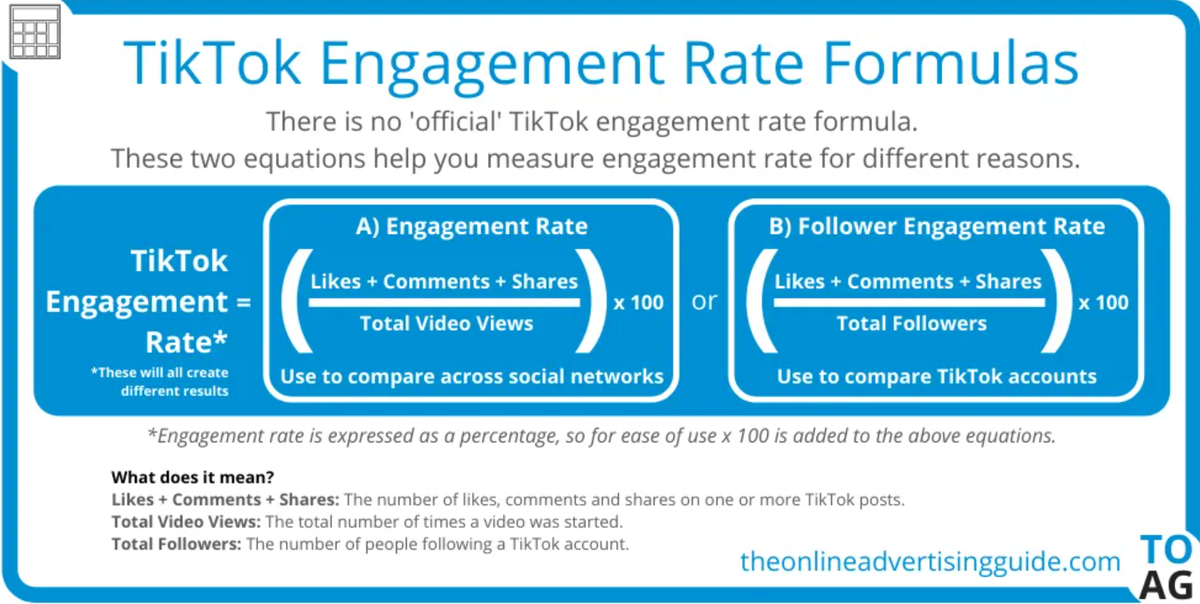
- Calculate engagement rate by views: (likes + comments + shares + saves) ÷ views × 100. Compare it against the benchmarks below.
- Measure view-to-follower conversion. Views that don't convert usually mean the content entertains but never gives a reason to follow.
- Audit comment quality. Read the last 50 comments on your top videos. Are they questions, appreciation, or silence? Recurring questions are pre-validated content ideas.
- Check audience authenticity when it matters. Look for unexplained follower spikes, unusually weak engagement, suspicious comments, or audience demographics that don't fit the account. Treat these as signals to investigate, not proof of fake followers. Tools such as HypeAuditor can provide additional audience-quality and authenticity checks.
How to Benchmark TikTok Engagement
There is no single engagement rate or reach target that works for every TikTok account. Performance varies by account size, niche, content format, posting frequency, and whether a video is distributed primarily through For You or Search.
As a broad reference, Socialinsider's 2026 TikTok benchmark report found an average engagement rate by views of 3.85% across more than 2 million posts in the first half of 2026.
Use benchmarks as context, not pass/fail rules. For an account audit, the more useful comparison is:
- Your own median: How does each video perform against your recent median?
- Best vs. worst: What separates your top 10% of posts from your bottom 10%?
- Peer accounts: How does your performance compare with accounts in the same niche and size range?
- Trend: Is engagement, reach, and follower growth improving or declining over time?
This makes the audit more useful than chasing a universal “good” engagement rate.
Step 5: Benchmark Against Competitors
- Pick 3–5 peers, not superstars. Same niche, roughly one size class bigger than you. Compare up, not across.
- Record their content mix and cadence over 30 days: formats, pillars, posts per week.
- Break down their top 5 videos. Hook style, topic, length, hashtags, sound. Look for a repeatable pattern you can adapt to your niche.
- Mine their comment sections for gaps. What are their audiences asking that nobody answers? Those are your content openings.
- Check their SEO surface. What keywords appear in their display names, bios, and captions? TikTok's Creator Search Insights shows keyword demand and saturation for your niche.
💡 Pro tip: Compare competitors using the same fields each time—posting cadence, content pillars, top posts, and recurring audience questions.
Step 6: Turn Findings Into an Action Plan
An audit without an action plan is a book report. Close with three plain-text lists:
Keep — what's already working
- Your pinned-video formats that consistently outperform your account median
- The one posting time that reliably gets early views
Stop — what's dragging
- Spaghetti posts with no pillar
- Hashtags with zero search relevance
Start — 3 experiments for the next 30 days
- Post twice a week on the under-served pillar
- Test 3 new hook styles
- Answer your top 5 recurring comment questions as videos
Three rules to keep the plan honest:
- Limit yourself to 3 changes. More than three and nothing gets done.
- Tie one metric to each change so you can tell in 30 days whether it worked.
- Schedule the next audit before you close the doc. Monthly light check, quarterly full audit.
Step 7: Automate the Repetitive TikTok Audits
AllyHub can research TikTok competitors, collect video and comment data, identify content gaps, and turn scattered findings into structured reports. Because it works in your browser, it can handle multi-step research tasks across TikTok and other public websites.
For a TikTok audit, useful workflows include:
- Competitor research: Open selected competitor profiles, collect public video details such as captions, hashtags, and views, and organize the findings into a spreadsheet for comparison.
- Comment mining: Collect comments from selected videos, group recurring questions and themes, and turn them into potential content gaps or video ideas.
- Trend research: Search competitor content and public discussions to spot recurring topics, audience questions, and emerging content angles.
- Reusable audits: Turn recurring competitor and comment research into reusable workflows, making monthly audits faster and more consistent.
Here's the example of niche research by AllyHub:
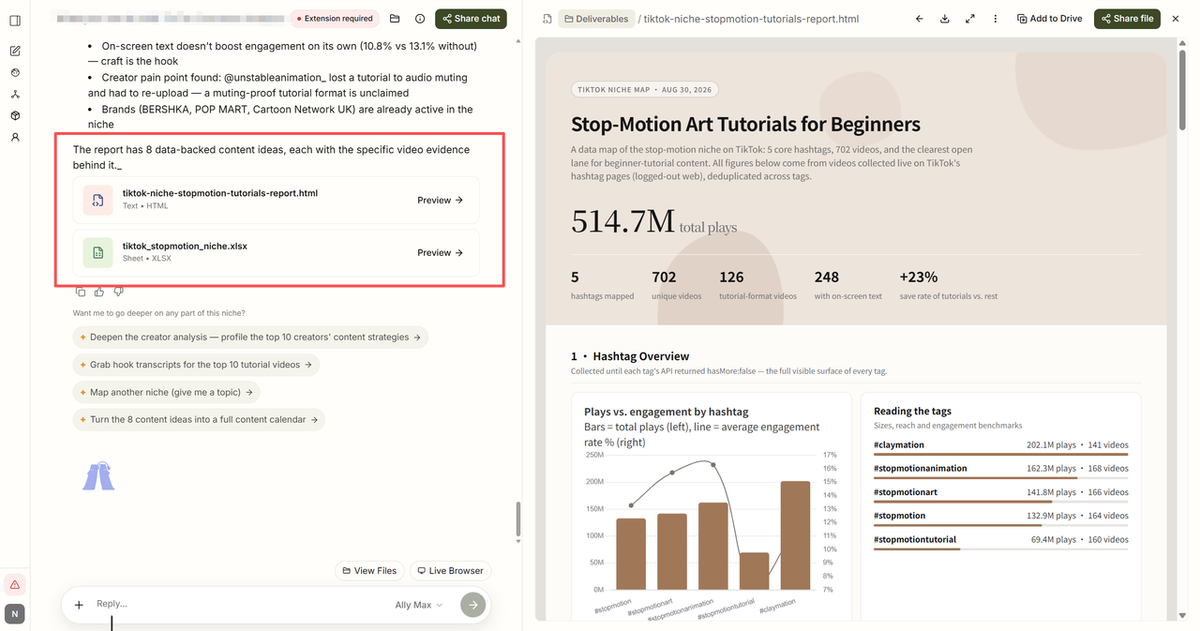
Use TikTok Studio for first-party account analytics and AllyHub for browser-based competitor, comment, and trend research.
TikTok Audit Tools: Free and Paid Options Compared
TikTok Studio's native analytics is the free foundation for your own account. Third-party tools fill the gaps: competitor data, cross-platform reporting, and audience authenticity checks.
Tool | Price | Best for | Main limitation |
TikTok Studio | Free | Your own account analytics | Limited competitor benchmarking |
Frequently Asked Questions About TikTok Audits
What metrics should I check in a TikTok audit?
Focus on average watch time, completion rate, engagement, follower growth, follower conversion, and traffic sources. Compare these metrics across your best and weakest videos rather than relying on views or likes alone.
Can I do a TikTok audit for free?
Yes. TikTok Studio provides core analytics for your own account at no cost. Free third-party tools can help with public-account and audience research, while paid platforms add deeper competitor benchmarking and reporting.
How often should I do a TikTok audit?
Do a light monthly review and a full audit every quarter. Run an additional audit after a major strategy change or a significant shift in performance.
What is the best TikTok audit tool?
The native TikTok Studio is the best free tool for auditing your own retention graphs and audience demographics. For auditing competitors and scraping their content strategies, a browser-native AI agent like AllyHub is the shortcut for automating the process.



