

TikTok hashtags still matter, but adding more tags won't automatically increase reach. If you are still stuffing 15 random hashtags into your TikTok captions, you are actively killing your reach. The key is choosing hashtags that accurately match your content, audience, and search intent.
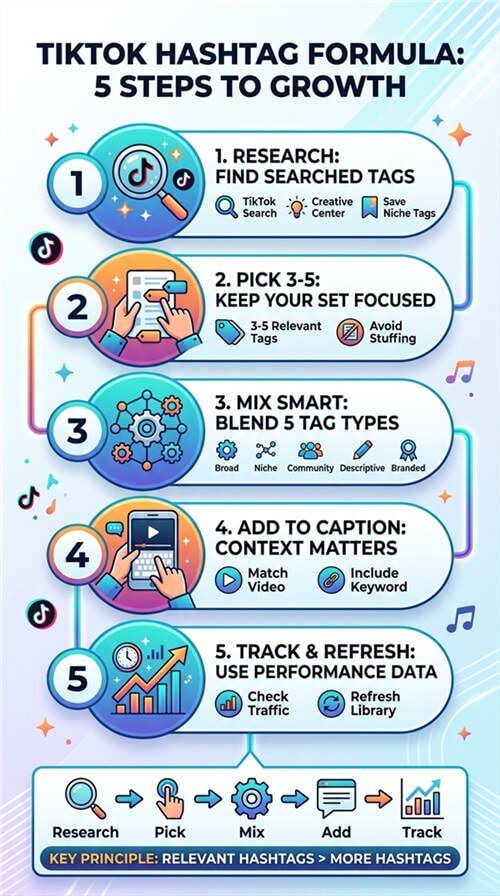
Hashtags help TikTok categorize content and support search discovery, but they work alongside captions, keywords, and other content signals. This guide covers a 5-step strategy for researching, choosing, using, and tracking TikTok hashtags for creators, e-commerce sellers, and MCNs.
Key Takeaways
- Use hashtags for relevance, not reach hacks: They support content categorization and search discovery.
- Start with 3–5 relevant hashtags: Prioritize a close match to your video's topic and audience.
- Mix hashtag types: Choose from broad, niche, community, descriptive, and branded tags based on your goal.
- Research before posting: Use TikTok Search, Creative Center, and competitor content to find relevant terms.
- Track and refresh: Compare hashtag performance and update your library as search behavior and trends change.
- Scale with a system: Creators can build a simple hashtag library; MCNs and sellers should maintain libraries by niche or product category.
How to Use Hashtags on TikTok: The 5-Step Process
Step 1: Research Before You Post (10 Minutes, Non-Negotiable)
The best TikTok hashtags for views are the ones your niche actually searches — and you can only know that by checking.
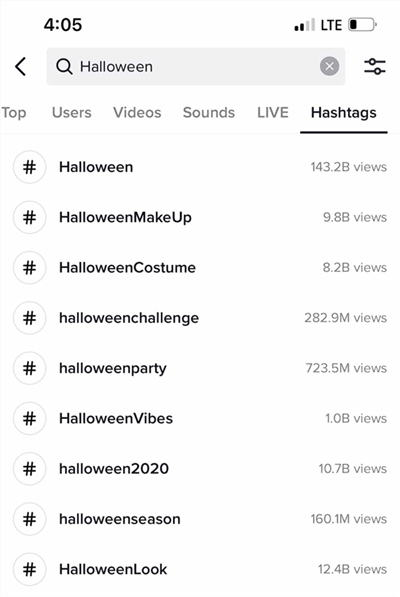
- Open TikTok search: Type a keyword related to your video (e.g., "clean beauty routine"). The autocomplete suggestions are real search demand, and each shows a view count.
- Check TikTok Creative Center: TikTok's free Trends tool shows rising hashtags by region and industry — the closest thing to official trend data.
- Mine 3–5 top videos in your niche: Open the best-performing posts from the last month and note which tags repeat.
- Save to a niche hashtag library: Keep a simple list (30–50 tags per niche) with a "last used" column, so you rotate instead of repeating.
💡 Pro tip: Ignore a hashtag's total views in isolation. #fyp has hundreds of billions of views — your video is a drop in an ocean. A tag with 10M–500M views that matches your exact niche is where smaller accounts actually surface.
Step 2: Pick 3–5 Hashtags
Use 3 to 5 relevant hashtags per TikTok post. This gives the algorithm enough data to categorize your video without looking spammy or confusing the system.
Two rules people commonly cite:
- The 5-hashtag rule: Cap yourself around five tags. More than that starts reading as spam and dilutes your categorization signal.
- The 3-hashtag rule: Every set should cover three buckets — what the video is about, who it's for, and your brand/community. (More on this in Step 3.)
Step 3: Build a Relevant Hashtag Mix
Don't force every post into the same hashtag formula. Instead, choose from five hashtag types based on what the video needs: broad, niche, community, descriptive, and branded. The goal is to balance discovery with relevance—not to maximize the number of tags.
You don't need all five in every post. For most creators, 1–2 niche or descriptive hashtags should form the core, with a broad, community, or branded tag added when it genuinely fits.
Hashtag type | Purpose | Example | Best for |
Broad | Tells the algorithm the general industry | #beautytips, #smallbusiness | Adding broader context to a niche topic |
A simple rule: Start with the hashtags that most accurately describe the video, then add broader or branded tags only when they add useful context. This is more effective than filling every available hashtag slot.
Step 4: Add Them the Right Way
How do you add hashtags to a TikTok post? In the caption — not buried in the comments, where search indexing is weaker.
- Tap + to create a video or upload one from your camera roll.
- Tap Next to reach the post screen.
- In the caption field, type # followed by your keyword. TikTok will suggest hashtags with view counts — pick from the list.
- Repeat for your 3–5 tags, then write your caption around the primary keyword.
- Tap Post. (TikTok now allows you to edit the caption and hashtags after publishing, but only once per day, and only within 7 days of posting. Double-check before you hit publish.)
⚠️ Warning: Avoid tags TikTok has restricted for spam or safety violations — if a tag returns "no results" when searched, it may be banned, and using it can suppress your video's distribution.
Step 5: Track and Iterate
Hashtags are a system, not a lottery ticket. Every 2–4 weeks:
- Open TikTok Analytics on a post and check traffic sources — if "Search" traffic is growing, your hashtag-and-caption strategy is working.
- Compare videos that used different tag sets: which ones pulled search views?
- Kill tags that never produce search traffic; double down on the ones that do.
- Refresh your library — trends rotate monthly (see the next section).
What Are Best TikTok Hashtag Mixes by Niche
There is no single set of TikTok hashtags that guarantees more views. Trending tags change quickly, while relevant niche and descriptive hashtags tend to remain useful for much longer. Instead of chasing monthly hashtag lists, build your mix around the topic, audience, and search intent of each video.
- Content creators: Start with 1–2 niche or community hashtags that describe your content, then add a descriptive topic tag. For example, a book review might use #booktok, #bookrecommendations, and a genre-specific tag rather than relying on #fyp.
- E-commerce sellers: Combine product-category and descriptive hashtags with a relevant shopping or seasonal tag when appropriate. For example, a skincare product might use #skincare, #skincareroutine, and #tiktokshop.
- MCNs / new media operators: Maintain separate hashtag libraries for each creator niche. Refresh them regularly based on search trends and content performance instead of giving every account the same hashtag set.
Scenario | Recommended approach | Why |
First-time creator | 1–2 niche + 1 descriptive + optional broad tag | Builds relevance before chasing broader reach |
E-commerce product video | Product category + descriptive + shopping/seasonal tag |
The takeaway: Don't choose hashtags because they have the highest view count. Choose the smallest set that clearly tells TikTok what the video is about, who it's for, and what people might search to find it.
How to Find Winning Hashtags
Method | Cost | Time per post | Best for |
TikTok search bar | Free | 5 min | Quick keyword checks and autocomplete demand |
TikTok Creative Center |
Manually researching hashtags in TikTok Creative Center works, but it can take 15 minutes or more per video. For daily posting, that quickly becomes hours of repetitive research each week.
A browser-native AI agent like AllyHub can automate the research. Instead of generating random hashtag lists, it can collect hashtags from top-ranking TikTok content for a target topic, then organize and analyze the results.
Step 1. Define your target topic.
Start with a specific keyword, product category, or content topic such as “summer dresses” or “skincare routine.”
Step 2. Find top-ranking TikTok content.
Use AllyHub to search the topic and collect relevant high-performing videos and their visible metadata.
Step 3. Extract the hashtags.
Have AllyHub pull the hashtags used across the selected videos and organize them into a structured list.

Step 4. Identify recurring hashtags.
Analyze which hashtags appear repeatedly across top-performing posts. These recurring tags are stronger candidates for testing than random high-volume hashtags.
Step 5. Turn the findings into a hashtag set.
Group the results by topic, intent, or content type, then build several relevant hashtag combinations to test across your posts.
Beyond hashtag collection, AllyHub can turn the same research into competitor patterns, content angles, and topic ideas, making hashtag research part of a repeatable research-to-content workflow.
Why Your TikTok Hashtags Aren't Working
Hashtags rarely fix weak reach on their own. If they're not helping discovery, check these common issues:
- Too many hashtags — A long list of generic tags adds little value. Start with a focused set of 3–5 relevant hashtags.
- Too broad — Tags like #fyp and #viral are highly competitive and say little about what your video is actually about.
- Irrelevant tags — A hashtag should accurately describe the content or audience. Don't add a trending tag simply because it's popular.
- Weak keywords — Hashtags work best alongside a clear, keyword-rich caption and content that matches the search intent.
- Stale hashtag sets — Reusing the same tags indefinitely can cause you to miss new search terms, trends, and niche conversations.
- Restricted hashtags — Check a hashtag before using it. If TikTok doesn't surface normal results for a tag, choose another relevant term.
The fix: Use fewer, more relevant hashtags, pair them with clear keywords, and refresh your hashtag library based on search and performance data.
FAQ: TikTok Hashtags
How do you use hashtags effectively on TikTok?
Use a small set of relevant hashtags that describe the video's topic, niche, and target audience. Combine specific tags with broader ones where relevant, and avoid adding unrelated trending hashtags just for reach.
How many hashtags should I use on TikTok?
There is no official limit that guarantees better reach. A focused set of relevant hashtags is generally more useful than filling the caption with tags. Test different combinations and keep the ones that consistently fit your content and audience.
What is the 5 hashtag rule on TikTok?
The “5 hashtag rule” is a creator best practice, not an official TikTok rule. It suggests keeping your hashtag set to around five relevant tags rather than relying on a long list of generic or viral hashtags.
How can I find hashtags worth using on TikTok?
Search your main topic on TikTok and check autocomplete suggestions, related searches, and relevant high-performing posts. TikTok Creative Center can also surface rising hashtags by region and industry. For faster research, tools such as AllyHub can collect hashtags from top-performing content and identify recurring tags across a niche.
Can hashtags help a TikTok go viral?
Hashtags can help categorize and surface relevant content, but they cannot make a video go viral on their own. Strong hooks, viewer retention, engagement, and content relevance matter more than simply adding popular hashtags.



